Spring Boot (十五): 优雅的使用 API 文档工具 Swagger2
- 2019 年 10 月 17 日
- 筆記

1. 引言
各位在开发的过程中肯定遇到过被接口文档折磨的经历,由于 RESTful 接口的轻量化以及低耦合性,我们在修改接口后文档更新不及时,导致接口的调用方(无论是前端还是后端)经常抱怨接口与文档不一致。程序员的特点是特别不喜欢写文档,但是又同时特别不喜欢别人不写文档。所以 API 文档工具这时就应运而生了,本篇文章我们将会介绍 API 文档工具 Swagger2 。
2. 快速上手
既然 Swagger2 是一个 API 文档工具,我们就在代码中看一下这个文档工具在 Spring Boot 中是如何使用的吧。
2.1 引入依赖
代码清单:spring-boot-swagger/pom.xml
***
<!-- swagger工具包 --> <dependency> <groupId>io.springfox</groupId> <artifactId>springfox-swagger2</artifactId> <version>${swagger.version}</version> </dependency> <!-- https://mvnrepository.com/artifact/io.springfox/springfox-swagger-ui --> <dependency> <groupId>io.springfox</groupId> <artifactId>springfox-swagger-ui</artifactId> <version>${swagger.version}</version> </dependency>这里选用的版本是 2.9.2 ,同时也是目前最新的一个版本。
2.2 配置类 SwaggerConfig
代码清单:spring-boot-swagger/src/main/java/com/springboot/springbootswagger/config/SwaggerConfig.java
***
@Configuration @EnableSwagger2 public class SwaggerConfig { @Value("${swagger.show}") private boolean swaggerShow; @Bean public Docket swaggerSpringMvcPlugin() { return new Docket(DocumentationType.SWAGGER_2) .enable(swaggerShow) .apiInfo(apiInfo()) .select() .apis(RequestHandlerSelectors.basePackage("com.springboot.springbootswagger")) .paths(PathSelectors.any()) .build(); } private ApiInfo apiInfo() { return new ApiInfoBuilder() .title("Swagger2 演示接口RESTful APIs") .version("1.0") .build(); } }由于 Swagger 是一个 API 文档工具,我们肯定不能在生产环境中开启,所以笔者这里在配置中增加了 swagger.show ,在不同环境的配置文件中配置不同的值,或者如果有配置中心,这个配置可以添加到配置中心中,笔者这里示例简单起见就添加在 application 配置文件中了。这样,我们就可以优雅的开启或者关闭 Swagger 的功能。
2.3 实体类
代码清单:spring-boot-swagger/src/main/java/com/springboot/springbootswagger/model/User.java
***
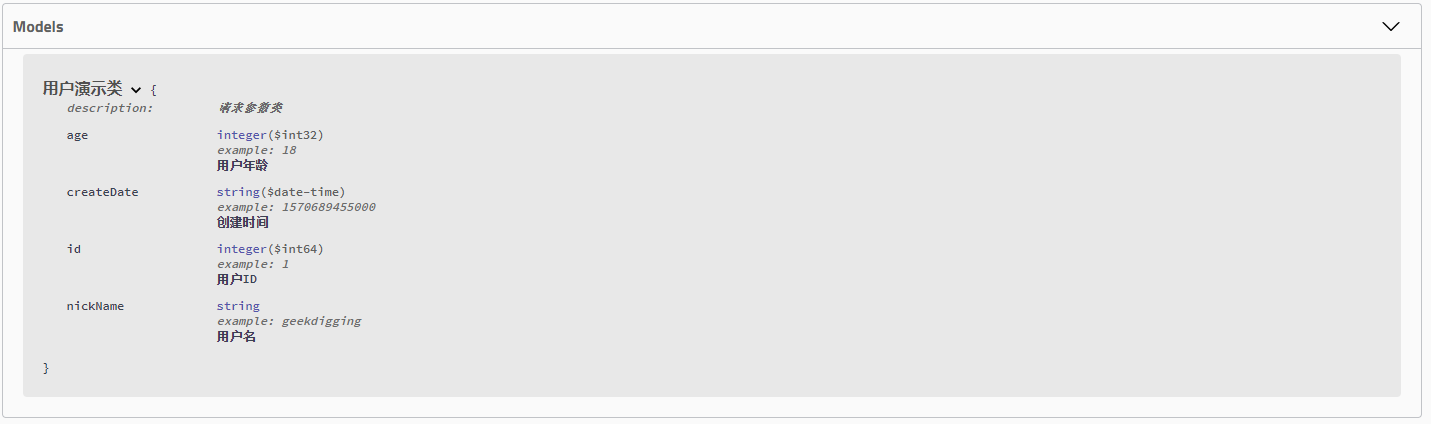
@Data @AllArgsConstructor @NoArgsConstructor @ApiModel(value = "用户演示类", description = "请求参数类") public class User { @ApiModelProperty(example = "1", notes = "用户ID") private Long id; @ApiModelProperty(example = "geekdigging", notes = "用户名") private String nickName; @ApiModelProperty(example = "1570689455000", notes = "创建时间") private Date createDate; @ApiModelProperty(example = "18", notes = "用户年龄") private Integer age; }Swagger 注解详细说明:
| API | 作用范围 | 使用位置 |
|---|---|---|
| @ApiModel | 描述返回对象的意义 | 用在返回对象类上 |
| @ApiModelProperty | 对象属性 | 用在出入参数对象的字段上 |
| @Api | 协议集描述 | 用于 controller 类上 |
| @ApiOperation | 协议描述 | 用在 controller 的方法上 |
| @ApiResponses | Response集 | 用在 controller 的方法上 |
| @ApiResponse | Response | 用在 @ApiResponses 里边 |
| @ApiImplicitParams | 非对象参数集 | 用在 controller 的方法上 |
| @ApiImplicitParam | 非对象参数描述 | 用在 @ApiImplicitParams 的方法里边 |
2.4 Controller
代码清单:spring-boot-swagger/src/main/java/com/springboot/springbootswagger/controller/UserController.java
***
@Api(value = "用户管理演示") @RestController public class UserController { @Autowired UserService userService; @GetMapping("/getUserById/{id}") @ApiOperation(value = "获取用户信息", notes = "根据用户 id 获取用户信息", tags = "查询用户信息类") public User getUserById(@PathVariable Long id) { return userService.getUserById(id); } @GetMapping("/getAllUsers") @ApiOperation(value = "获取全部用户信息", notes = "获取全部用户信息", tags = "查询用户信息类") public List<User> getAllUsers() { return userService.getAllUsers(); } @PostMapping("/saveUser") @ApiOperation(value = "新增/修改用户信息") public User saveUser(@RequestBody User user) { return userService.saveUser(user); } @DeleteMapping("/deleteById") @ApiOperation(value = "删除用户信息", notes = "根据用户 id 删除用户信息") public String deleteById(@PathVariable Long id) { userService.deleteById(id); return "success"; } }- @ApiOperation 中的 tag 标签可用于接口分组
2.5 展示结果如下
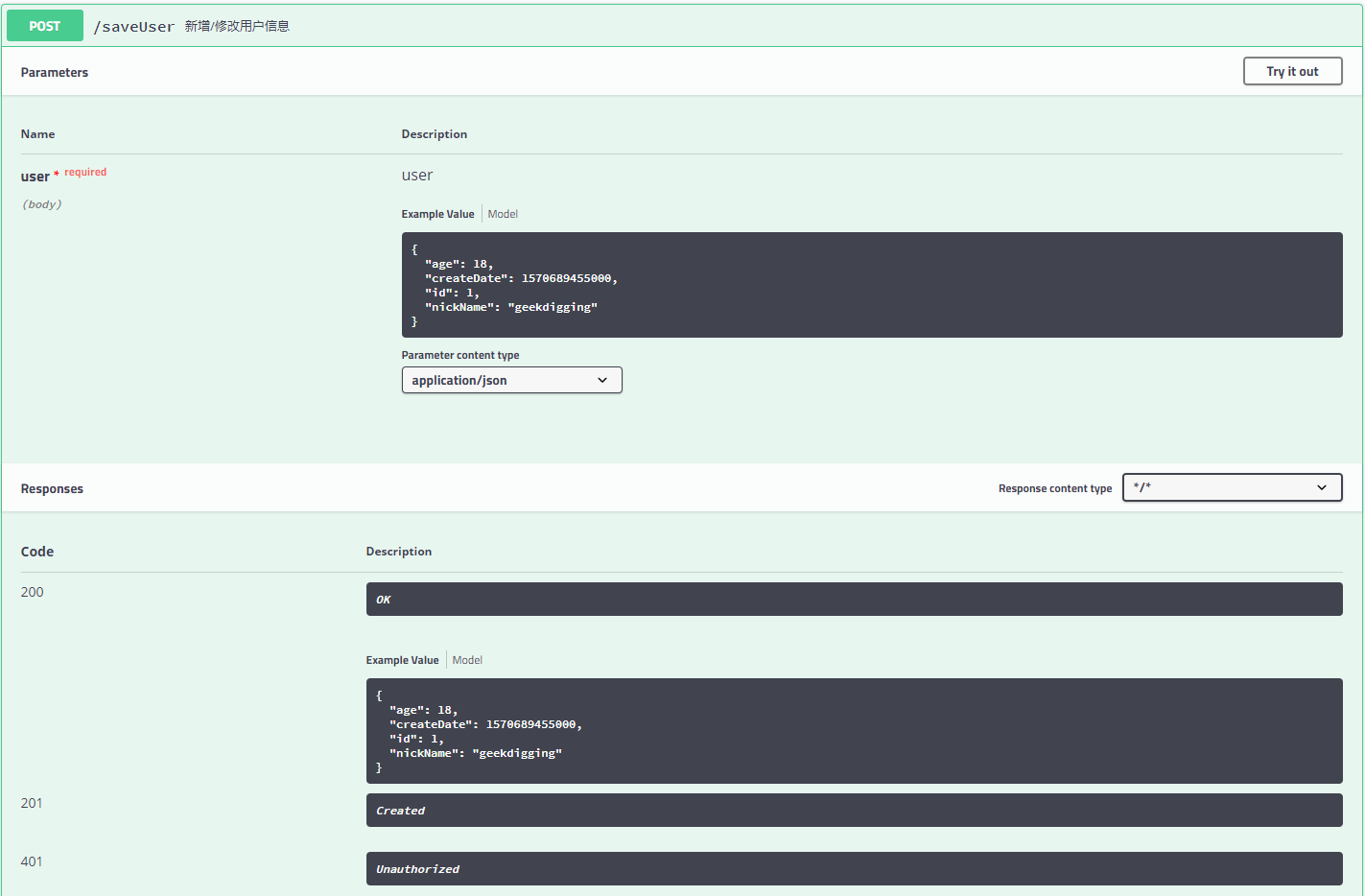
启动工程,打开浏览器访问: http://localhost:8080/swagger-ui.html ,可以看到如下页面:

这张图中可以看到我们的 tag 分组。
3. 示例代码
4. 参考
https://blog.csdn.net/xupeng874395012/article/details/68946676