fastjson自由:controller上指定active profile,讓你想序列化什麼欄位就序列化什麼欄位
- 2019 年 11 月 10 日
- 筆記
一、前言
最近有個需求,其實這個需求以前就有,比如定義了一個vo,包含了10個欄位,
在介面A里,要返回全部欄位;
但是在介面B里呢,需要復用這個 vo, 但是只需要返回其中8個欄位。
可能呢,有些同學會選擇重新定義一個新的vo,但這樣,會導致vo類數量特別多;你說,要是全部欄位都返回吧,則會給前端同學造成困擾。
針對需要排除部分欄位,希望能達到下面這樣的效果:
1、在controller上指定一個profile 
2、在profile要應用到的class類型中,在field上添加註解

3、請求介面,返回的結果,如下:
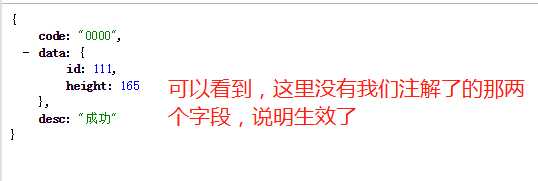
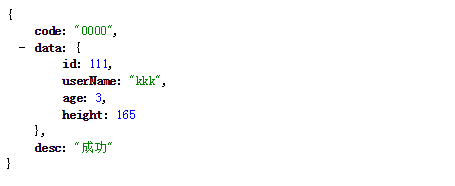
4、如果注釋掉註解那兩行,則效果如下:

針對僅需要包含部分欄位,希望能達到下面的效果:
1、在controller上指定profile
/** * 測試include類型的profile,這裡指定了: * 激活profile為 includeProfile * User中,對應的field將會被序列化,其他欄位都不會被序列化 */ @GetMapping("/test.do") @ActiveFastJsonProfileInController(profile = "includeProfile",clazz = User.class) public CommonMessage<User> test() { User user = new User(); user.setId(111L); user.setAge(8); user.setUserName("kkk"); user.setHeight(165); CommonMessage<User> message = new CommonMessage<>(); message.setCode("0000"); message.setDesc("成功"); message.setData(user); return message; }2、在ActiveFastJsonProfileInController註解的clazz指定的類中,對需要序列化的欄位進行註解:
@Data public class User { @FastJsonFieldProfile(profiles = {"includeProfile"},profileType = FastJsonFieldProfileType.INCLUDE) private Long id; private String userName; private Integer age; @FastJsonFieldProfile(profiles = {"includeProfile"},profileType = FastJsonFieldProfileType.INCLUDE) private Integer height; }3、請求結果如下:
{ code: "0000", data: { id: 111, height: 165 }, desc: "成功" }二、實現思路
思路如下:
- 自定義註解,加在controller方法上,指定要激活的profile、以及對應的class
- 啟動過程中,解析上述註解資訊,構造出以下map:

- 添加
controllerAdvice,實現org.springframework.web.servlet.mvc.method.annotation.ResponseBodyAdvice介面,對返回的responseBody進行處理 - 在
controllerAdvice中,獲取請求路徑,然後根據請求路徑,去第二步的map中,查詢激活的profile和class資訊 - 根據第四步獲取到的:激活的profile和class資訊,計算出對應的field集合,比如,根據profile拿到一個欄位集合:{name,age},而這兩個欄位都是 exclude 類型的,所以不能對著兩個欄位進行序列化
- 根據第五步的field集合,對
responseBody對象進行處理,不對排除集合中的欄位序列化
這麼講起來,還是比較抽象,具體可以看第一章的效果截圖。
三、實現細節
使用fastjson進行序列化
spring boot版本為2.1.10,網上有很多文章,都是說的1.x版本時候的方法,在2.1版本並不適用。因為默認使用是jackson,所以我們這裡將fastjson的HttpMessageConverter的順序提前了:
@Configuration public class WebMvcConfig extends WebMvcConfigurationSupport { @Override protected void extendMessageConverters(List<HttpMessageConverter<?>> converters) { super.extendMessageConverters(converters); FastJsonHttpMessageConverter converter = new FastJsonHttpMessageConverter(); Charset defaultCharset = Charset.forName("utf-8"); FastJsonConfig fastJsonConfig = new FastJsonConfig(); fastJsonConfig.setCharset(defaultCharset); converter.setFastJsonConfig(fastJsonConfig); converter.setDefaultCharset(defaultCharset); //將fastjson的消息轉換器提到第一位 converters.add(0, converter); } }讀取controller上方法的註解資訊,並構造map
這裡,要點是,獲取到RequestMapping註解上的url,以及對應方法上的自定義註解:
RequestMappingHandlerMapping handlerMapping = applicationContext.getBean(RequestMappingHandlerMapping.class); //獲取handlerMapping的map Map<RequestMappingInfo, HandlerMethod> handlerMethods = handlerMapping.getHandlerMethods(); for (HandlerMethod handlerMethod : handlerMethods.values()) { Class<?> beanType = handlerMethod.getBeanType();//獲取所在類 //獲取方法上註解 RequestMapping requestMapping = handlerMethod.getMethodAnnotation(RequestMapping.class); }動態註冊bean
上面構造了map後,本身可以直接保存到一個public static欄位,但感覺不是很優雅,於是,構造了一個bean(包含上述的map),註冊到spring中:
//bean的類定義 @Data public class VoProfileRegistry { private ConcurrentHashMap<String,ActiveFastJsonProfileInController> hashmap = new ConcurrentHashMap<String,ActiveFastJsonProfileInController>(); } //動態註冊到spring applicationContext.registerBean(VoProfileRegistry.class); VoProfileRegistry registry = myapplicationContext.getBean(VoProfileRegistry.class); registry.setHashmap(hashmap);在controllerAdvice中,對返回的responseBody進行處理時,根據請求url,從上述的map中,獲取profile等資訊:
org.springframework.web.servlet.mvc.method.annotation.ResponseBodyAdvice#beforeBodyWrite @Override public CommonMessage<Object> beforeBodyWrite(CommonMessage<Object> body, MethodParameter returnType, MediaType selectedContentType, Class<? extends HttpMessageConverter<?>> selectedConverterType, ServerHttpRequest request, ServerHttpResponse response) { String requestPath = request.getURI().getPath(); log.info("path:{}",requestPath); VoProfileRegistry voProfileRegistry = applicationContext.getBean(VoProfileRegistry.class); ConcurrentHashMap<String, ActiveFastJsonProfileInController> hashmap = voProfileRegistry.getHashmap(); //從map中獲取該url,激活的profile等資訊 ActiveFastJsonProfileInController activeFastJsonProfileInControllerAnnotation = hashmap.get(requestPath); if (activeFastJsonProfileInControllerAnnotation == null) { log.info("no matched json profile,skip"); return body; } ......//進行具體的對responseBody進行過濾 }四、總結與源碼
如果使用 fastjson的話,是支援propertyFilter的,具體可以了解下,也是對欄位進行include和exclude,但感覺不是特別方便,尤其是粒度要支援到介面級別。
另外,本來,我也有另一個方案:在controllerAdvice里,獲取到要排除的欄位集合後,設置到ThreadLocal變數中,然後修改fastjson的源碼,(fastjson對類進行序列化時,要獲取class的field集合,可以在那個地方,對field集合進行處理),但是吧,那樣麻煩不少,想了想就算了。
大家有什麼意見和建議都可以提,也歡迎加群討論。
源碼在碼雲上(github太慢了):
https://gitee.com/ckl111/json-profile
