Spring Cloud Eureka 分散式開發之服務註冊中心、負載均衡、聲明式服務調用實現
- 2019 年 10 月 3 日
- 筆記
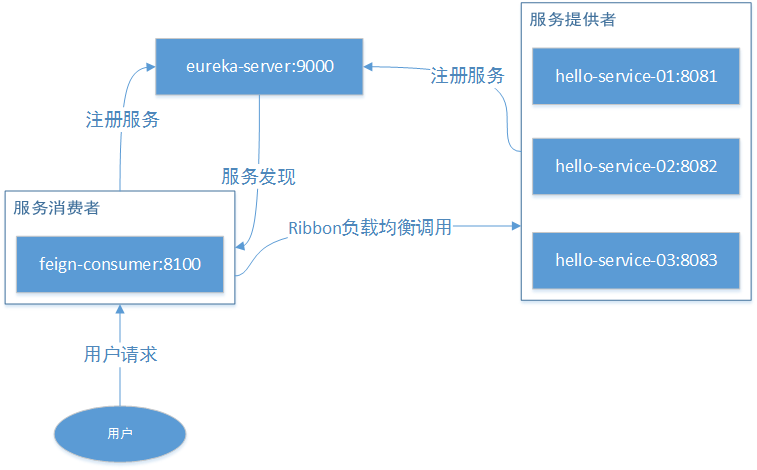
介紹
本示例主要介紹 Spring Cloud 系列中的 Eureka,使你能快速上手負載均衡、聲明式服務、服務註冊中心等
Eureka Server
Eureka 是 Netflix 的子模組,它是一個基於 REST 的服務,用於定位服務,以實現雲端中間層服務發現和故障轉移。
服務註冊和發現對於微服務架構而言,是非常重要的。有了服務發現和註冊,只需要使用服務的標識符就可以訪問到服務,而不需要修改服務調用的配置文件。該功能類似於 Dubbo 的註冊中心,比如 Zookeeper。
Eureka 採用了 CS 的設計架構。Eureka Server 作為服務註冊功能的服務端,它是服務註冊中心。而系統中其他微服務則使用 Eureka 的客戶端連接到 Eureka Server 並維持心跳連接
Eureka Server 提供服務的註冊服務。各個服務節點啟動後會在 Eureka Server 中註冊服務,Eureka Server 中的服務註冊表會存儲所有可用的服務節點資訊。
Eureka Client 是一個 Java 客戶端,用於簡化 Eureka Server 的交互,客戶端同時也具備一個內置的、使用輪詢負載演算法的負載均衡器。在應用啟動後,向 Eureka Server 發送心跳(默認周期 30 秒)。如果 Eureka Server 在多個心跳周期內沒有接收到某個節點的心跳,Eureka Server 會從服務註冊表中將該服務節點資訊移除。
簡單理解:各個微服務將自己的資訊註冊到server上,需要調用的時候從server中獲取到其他微服務資訊Ribbon
Spring Cloud Ribbon 是基於 Netflix Ribbon 實現的一套客戶端負載均衡工具,其主要功能是提供客戶端的軟體負載均衡演算法,將 Netflix 的中間層服務連接在一起。
Ribbon 提供多種負載均衡策略:如輪詢、隨機、響應時間加權等。
Feign
Feign是聲明式、模板化的HTTP客戶端,可以更加快捷優雅的調用HTTP API。在部分場景下和Ribbon類似,都是進行數據的請求處理,但是在請求參數使用實體類的時候顯然更加方便,同時還支援安全性、授權控制等。
Feign是集成了Ribbon的,也就是說如果引入了Feign,那麼Ribbon的功能也能使用,比如修改負載均衡策略等
程式碼實現
1.創建eureka-server服務註冊中心
pom.xml pom配置
<?xml version="1.0" encoding="UTF-8"?> <project xmlns="http://maven.apache.org/POM/4.0.0" xmlns:xsi="http://www.w3.org/2001/XMLSchema-instance" xsi:schemaLocation="http://maven.apache.org/POM/4.0.0 http://maven.apache.org/xsd/maven-4.0.0.xsd"> <modelVersion>4.0.0</modelVersion> <groupId>com.easy</groupId> <artifactId>eureka-server</artifactId> <version>0.0.1-SNAPSHOT</version> <packaging>jar</packaging> <name>eureka-server</name> <description>Demo project for Spring Boot</description> <parent> <artifactId>cloud-feign</artifactId> <groupId>com.easy</groupId> <version>1.0.0</version> </parent> <dependencies> <dependency> <groupId>org.springframework.cloud</groupId> <artifactId>spring-cloud-starter-netflix-eureka-server</artifactId> </dependency> <dependency> <groupId>org.springframework.boot</groupId> <artifactId>spring-boot-starter-test</artifactId> <scope>test</scope> </dependency> </dependencies> <build> <plugins> <plugin> <groupId>org.springframework.boot</groupId> <artifactId>spring-boot-maven-plugin</artifactId> </plugin> </plugins> </build> </project> application.yml 配置文件
server: port: 9000 spring: application: name: eureka-server eureka: instance: hostname: localhost # eureka 實例名稱 client: register-with-eureka: false # 不向註冊中心註冊自己 fetch-registry: false # 是否檢索服務 service-url: defaultZone: http://${eureka.instance.hostname}:${server.port}/eureka/ # 註冊中心訪問地址EurekaServerApplication.java 啟動類
package com.easy.eurekaServer; import org.springframework.boot.SpringApplication; import org.springframework.boot.autoconfigure.SpringBootApplication; import org.springframework.cloud.netflix.eureka.server.EnableEurekaServer; @EnableEurekaServer @SpringBootApplication public class EurekaServerApplication { public static void main(String[] args) { SpringApplication.run(EurekaServerApplication.class, args); } } 2.創建hello-service-api介面
Result.java 統一返回實體
package com.easy.helloServiceApi.vo; import lombok.Getter; import java.io.Serializable; @Getter public class Result implements Serializable { private static final long serialVersionUID = -8143412915723961070L; private int code; private String msg; private Object data; private Result() { } private Result(int code, String msg) { this.code = code; this.msg = msg; } private Result(int code, String msg, Object data) { this.code = code; this.msg = msg; this.data = data; } public static Result success() { return success(null); } public static Result success(Object data) { return new Result(200, "success", data); } public static Result fail() { return fail(500, "fail"); } public static Result fail(int code, String message) { return new Result(code, message); } } Order.java 訂單實體類
package com.easy.helloServiceApi.model; import lombok.AllArgsConstructor; import lombok.Data; import lombok.NoArgsConstructor; /** * 訂單類 */ @Data @NoArgsConstructor @AllArgsConstructor public class Order { private String orderId; private String goodsId; private int num; }GoodsServiceClient.java 聲明商品服務類
package com.easy.helloServiceApi.client; import com.easy.helloServiceApi.vo.Result; import org.springframework.cloud.openfeign.FeignClient; import org.springframework.web.bind.annotation.PathVariable; import org.springframework.web.bind.annotation.RequestMapping; @FeignClient(value = "hello-server") public interface GoodsServiceClient { @RequestMapping("/goods/goodsInfo/{goodsId}") Result goodsInfo(@PathVariable("goodsId") String goodsId); }Goods.java商品實體類
package com.easy.helloServiceApi.model; import lombok.AllArgsConstructor; import lombok.Data; import lombok.NoArgsConstructor; import lombok.ToString; /** * 商品類 */ @Data @NoArgsConstructor @AllArgsConstructor @ToString public class Goods { private String goodsId; private String name; private String descr; // 測試埠 private int port; } 3.創建hello-service-01服務提供者(這裡創建三個一樣的服務提供者做負載均衡用)
GoodsController.java商品服務入口
package com.easy.helloService.controller; import com.easy.helloService.service.GoodsService; import com.easy.helloServiceApi.model.Goods; import com.easy.helloServiceApi.vo.Result; import org.springframework.beans.factory.annotation.Autowired; import org.springframework.web.bind.annotation.PathVariable; import org.springframework.web.bind.annotation.RequestMapping; import org.springframework.web.bind.annotation.RestController; @RestController @RequestMapping("/goods") public class GoodsController { @Autowired private GoodsService goodsService; @RequestMapping("/goodsInfo/{goodsId}") public Result goodsInfo(@PathVariable String goodsId) { Goods goods = this.goodsService.findGoodsById(goodsId); return Result.success(goods); } } GoodsService.java介面
package com.easy.helloService.service; import com.easy.helloServiceApi.model.Goods; public interface GoodsService { Goods findGoodsById(String goodsId); } GoodsServiceImpl.java實現介面
package com.easy.helloService.service.impl; import com.easy.helloService.service.GoodsService; import com.easy.helloServiceApi.model.Goods; import org.springframework.stereotype.Service; import java.util.HashMap; import java.util.Map; @Service public class GoodsServiceImpl implements GoodsService { // 模擬資料庫 private static Map<String, Goods> data; static { data = new HashMap<>(); data.put("1", new Goods("1", "華為", "華為手機", 8081)); //表示調用8081埠的數據,實際上數據會放在資料庫或快取中 data.put("2", new Goods("2", "蘋果", "蘋果", 8081)); } @Override public Goods findGoodsById(String goodsId) { return data.get(goodsId); } } HelloServiceApplication.java啟動類
package com.easy.helloService; import org.springframework.boot.SpringApplication; import org.springframework.boot.autoconfigure.SpringBootApplication; import org.springframework.cloud.client.discovery.EnableDiscoveryClient; @EnableDiscoveryClient @SpringBootApplication public class HelloServiceApplication { public static void main(String[] args) { SpringApplication.run(HelloServiceApplication.class, args); } }application.yml配置文件,8081埠做01服務
server: port: 8081 spring: application: name: hello-server eureka: instance: instance-id: goods-api-8081 prefer-ip-address: true # 訪問路徑可以顯示 IP client: service-url: defaultZone: http://localhost:9000/eureka/ # 註冊中心訪問地址4.創建hello-service-02服務提供者(貼出和01服務不一樣的地方)
application.yml配置文件,8082做02服務埠
server: port: 8082 spring: application: name: hello-server eureka: instance: instance-id: goods-api-8082 prefer-ip-address: true # 訪問路徑可以顯示 IP client: service-url: defaultZone: http://localhost:9000/eureka/ # 註冊中心訪問地址GoodsServiceImpl.java 這裡故意設置不同的數據源,用來測試負載均衡有沒生效使用
package com.easy.helloService.service.impl; import com.easy.helloService.service.GoodsService; import com.easy.helloServiceApi.model.Goods; import org.springframework.stereotype.Service; import java.util.HashMap; import java.util.Map; @Service public class GoodsServiceImpl implements GoodsService { // 模擬資料庫 private static Map<String, Goods> data; static { data = new HashMap<>(); data.put("1", new Goods("1", "華為", "華為手機", 8082)); //表示8082埠的數據,實際上數據會放在資料庫或快取中 data.put("2", new Goods("2", "蘋果", "蘋果", 8082)); } @Override public Goods findGoodsById(String goodsId) { return data.get(goodsId); } } 5.創建hello-service-02服務提供者(貼出和01服務不一樣的地方)
application.yml配置文件,8082做02服務埠
server: port: 8083 spring: application: name: hello-server eureka: instance: instance-id: goods-api-8083 prefer-ip-address: true # 訪問路徑可以顯示 IP client: service-url: defaultZone: http://localhost:9000/eureka/ # 註冊中心訪問地址GoodsServiceImpl.java 這裡故意設置不同的數據源,用來測試負載均衡有沒生效使用
package com.easy.helloService.service.impl; import com.easy.helloService.service.GoodsService; import com.easy.helloServiceApi.model.Goods; import org.springframework.stereotype.Service; import java.util.HashMap; import java.util.Map; @Service public class GoodsServiceImpl implements GoodsService { // 模擬資料庫 private static Map<String, Goods> data; static { data = new HashMap<>(); data.put("1", new Goods("1", "華為", "華為手機", 8083)); //表示8083埠的數據,實際上數據會放在資料庫或快取中 data.put("2", new Goods("2", "蘋果", "蘋果", 8083)); } @Override public Goods findGoodsById(String goodsId) { return data.get(goodsId); } } 6.創建feign-consumer服務消費者,引入Ribbon實現服務調用負載均衡並實現聲明式服務調用
pom.xml配置
<?xml version="1.0" encoding="UTF-8"?> <project xmlns="http://maven.apache.org/POM/4.0.0" xmlns:xsi="http://www.w3.org/2001/XMLSchema-instance" xsi:schemaLocation="http://maven.apache.org/POM/4.0.0 http://maven.apache.org/xsd/maven-4.0.0.xsd"> <modelVersion>4.0.0</modelVersion> <groupId>com.easy</groupId> <artifactId>feign-consumer</artifactId> <version>0.0.1-SNAPSHOT</version> <packaging>war</packaging> <name>feign-consumer</name> <description>Demo project for Spring Boot</description> <parent> <artifactId>cloud-feign</artifactId> <groupId>com.easy</groupId> <version>1.0.0</version> </parent> <dependencies> <!-- springmvc --> <dependency> <groupId>org.springframework.boot</groupId> <artifactId>spring-boot-starter-web</artifactId> </dependency> <!-- eureka 客戶端 --> <dependency> <groupId>org.springframework.cloud</groupId> <artifactId>spring-cloud-starter-netflix-eureka-client</artifactId> </dependency> <!-- ribbon --> <dependency> <groupId>org.springframework.cloud</groupId> <artifactId>spring-cloud-starter-netflix-ribbon</artifactId> </dependency> <!-- feign --> <dependency> <groupId>org.springframework.cloud</groupId> <artifactId>spring-cloud-starter-openfeign</artifactId> </dependency> <dependency> <groupId>org.apache.commons</groupId> <artifactId>commons-lang3</artifactId> <version>3.9</version> </dependency> <dependency> <groupId>org.springframework.boot</groupId> <artifactId>spring-boot-starter-test</artifactId> <scope>test</scope> </dependency> <dependency> <groupId>com.easy</groupId> <artifactId>hello-service-api</artifactId> <version>0.0.1</version> </dependency> </dependencies> <build> <plugins> <plugin> <groupId>org.springframework.boot</groupId> <artifactId>spring-boot-maven-plugin</artifactId> </plugin> </plugins> </build> </project> 引入openfeign、ribbon、eureka-client等依賴,openfeign用來實現聲明式服務調用,ribbon用來實現負載均衡,eureka-client用來註冊、發現服務
RestConfiguration.java 配置
package com.easy.feignConsumer.config; import com.netflix.loadbalancer.IRule; import com.netflix.loadbalancer.RandomRule; import org.springframework.cloud.client.loadbalancer.LoadBalanced; import org.springframework.context.annotation.Bean; import org.springframework.context.annotation.Configuration; import org.springframework.web.client.RestTemplate; @Configuration public class RestConfiguration { @Bean @LoadBalanced public RestTemplate getRestTemplate() { return new RestTemplate(); } /** * 隨機選取負載均衡策略 * @return */ @Bean public IRule testRule() { return new RandomRule(); } }GoodsService 服務類介面
package com.easy.feignConsumer.service; import com.easy.helloServiceApi.model.Goods; import com.easy.helloServiceApi.vo.Result; public interface GoodsService { Result placeGoods(Goods goods); }GoodsServiceImpl.java 實現類
package com.easy.feignConsumer.service.impl; import com.easy.feignConsumer.service.GoodsService; import com.easy.helloServiceApi.client.GoodsServiceClient; import com.easy.helloServiceApi.model.Goods; import com.easy.helloServiceApi.vo.Result; import lombok.extern.slf4j.Slf4j; import org.apache.commons.lang3.builder.ToStringBuilder; import org.springframework.beans.factory.annotation.Autowired; import org.springframework.stereotype.Service; @Service @Slf4j public class GoodsServiceImpl implements GoodsService { @Autowired private GoodsServiceClient goodsServiceClient; @Override public Result placeGoods(Goods order) { Result result = this.goodsServiceClient.goodsInfo(order.getGoodsId()); if (result != null && result.getCode() == 200) { log.info("=====獲取本地商品===="); log.info("介面返回數據為==>{}", ToStringBuilder.reflectionToString(result.getData())); } return result; } } GoodsController.java 控制器
package com.easy.feignConsumer.controller; import com.easy.feignConsumer.service.GoodsService; import com.easy.helloServiceApi.model.Goods; import com.easy.helloServiceApi.vo.Result; import org.springframework.beans.factory.annotation.Autowired; import org.springframework.web.bind.annotation.RequestMapping; import org.springframework.web.bind.annotation.RestController; @RestController @RequestMapping("/goods") public class GoodsController { @Autowired private GoodsService orderService; @RequestMapping("/place") public Result placeGoods(Goods goods) { Result result = this.orderService.placeGoods(goods); return result; } }FeignConsumerApplication.java 消息者啟動類
package com.easy.feignConsumer; import org.springframework.boot.SpringApplication; import org.springframework.boot.autoconfigure.SpringBootApplication; import org.springframework.cloud.netflix.eureka.EnableEurekaClient; import org.springframework.cloud.openfeign.EnableFeignClients; @EnableFeignClients(basePackages = {"com.easy"}) @EnableEurekaClient @SpringBootApplication public class FeignConsumerApplication { public static void main(String[] args) { SpringApplication.run(FeignConsumerApplication.class, args); } }application.yml 配置文件
server: port: 8100 spring: application: name: feign-consumer eureka: instance: instance-id: order-api-8100 prefer-ip-address: true # 訪問路徑可以顯示 IP client: service-url: defaultZone: http://localhost:9000/eureka/ # 註冊中心訪問地址使用示例
運行創建的5個服務
1個服務註冊中心,3個服務提供者,1個服務消費者
進入服務註冊中心查看服務
地址欄輸入:http://localhost:9000/,我們看到5個服務註冊成功並且都是運行狀態了(UP狀態),效果如下:
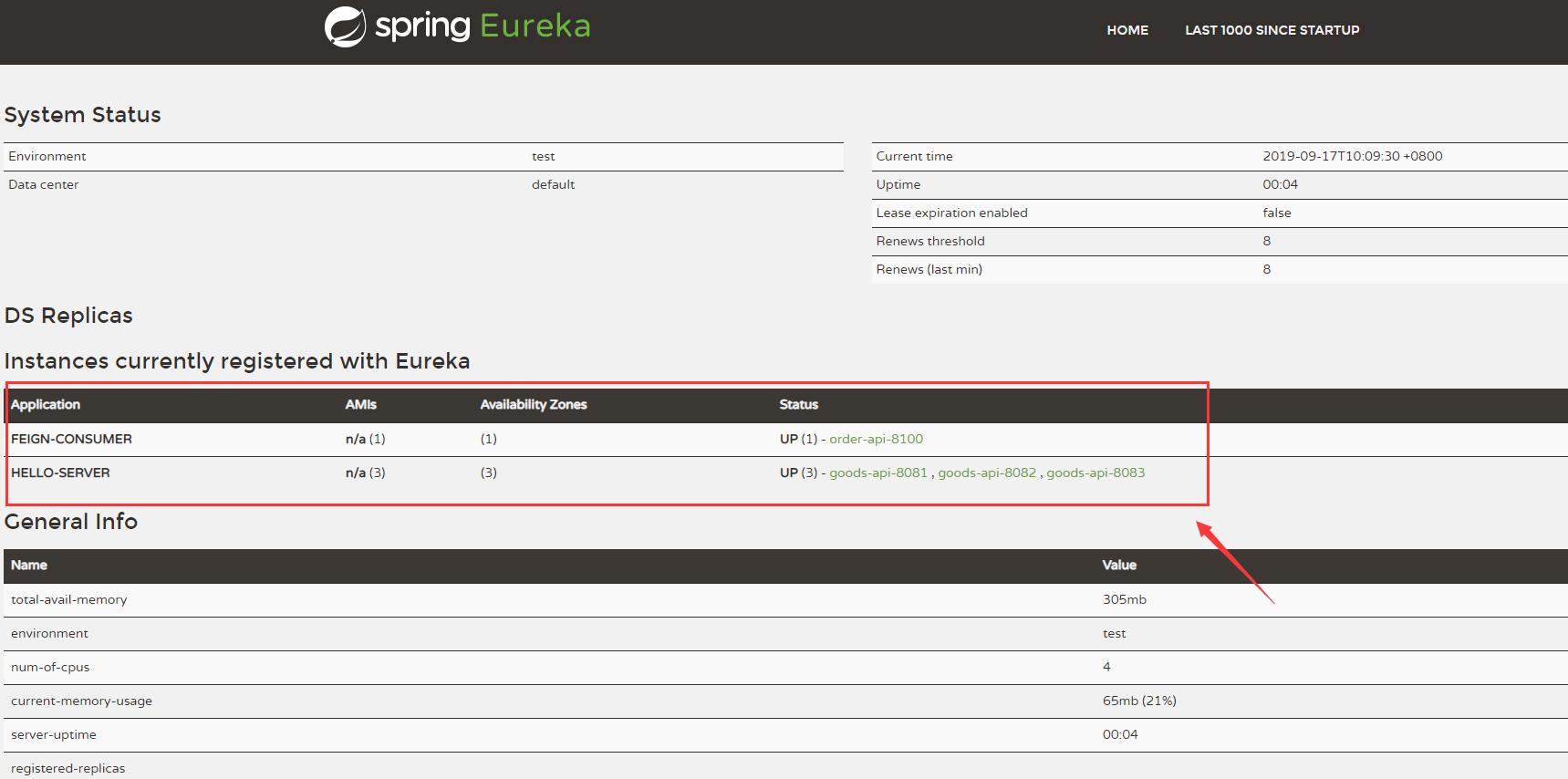
- Application列下有兩個服務(FEIGN-CONSUMER、HELLO-SERVER)
- Availability Zones列下表示可用服務分別的數量(這裡分別顯示1和3)
- Status 列顯示服務狀態,UP表示服務在運行狀態,後面分別跟著服務的內部地址:goods-api-8100(服務消費者),goods-api-8081(服務提供者01), goods-api-8082(服務提供者02), goods-api-8083(服務提供者03)
調用介面測試
地址欄輸入:http://localhost:8100/goods/place?goodsId=1,返回數據結果為:
{ code: 200, msg: "success", data: { goodsId: "1", name: "華為", descr: "華為手機", port: 8081 } }- 多刷新幾次頁面,我們發現port會在8081 8082 8083隨機變化,表示我們的隨機負載均衡器生效了
- 隨意關掉2個或1個服務提供者,刷新頁面介面功能無影響,能正常返回數據,實現了高可用
聲明式服務和非聲明式服務對比
非聲明式服務調用程式碼
@Test public void testFeignConsumer() { Goods goods = new Goods(); goods.setGoodsId("1"); Result result = this.restTemplate.getForObject("http://HELLO-SERVER/goods/goodsInfo/" + goods.getGoodsId(), Result.class); log.info("成功調用了服務,返回結果==>{}", ToStringBuilder.reflectionToString(result)); }消費端每個請求方法中都需要拼接請求服務的 URL 地址,存在硬編碼問題並且這樣並不符合面向對象編程的思想
聲明式服務調用
@FeignClient(value = "hello-server") public interface GoodsServiceClient { @RequestMapping("/goods/goodsInfo/{goodsId}") Result goodsInfo(@PathVariable("goodsId") String goodsId); } @Autowired private GoodsServiceClient goodsServiceClient; @Override public Result placeGoods(Goods order) { Result result = this.goodsServiceClient.goodsInfo(order.getGoodsId()); return result; }通過編寫簡單的介面和插入註解,就可以定義好HTTP請求的參數、格式、地址等資訊,實現遠程介面調用,這樣將使我們的程式碼更易擴展和利用,複合面向對象編程實現。