Mybatis公司開發常用!
Mybatis核心
- 本文重點:註解開發,mybatis多表操作,動態SQL(WHERE,SET,IF,SQL—ID減少復用)
- 程式碼地址--//gitee.com/zhangjzm/my-batis.git1
面向介面編程
- 真正的開發中,很多時候我們會選擇面向介面編程
- 根本原因 : 解耦,可拓展,提高復用,分層開發中,上層不用管具體的實現,大家都遵守共同的標準,使得開發變得容易,規範性更好
關於介面的理解
- 介面從更深層次的理解,應是定義(規範,約束)與實現(名實分離的原則)的分離。
- 介面的本身反映了系統設計人員對系統的抽象理解。
- 介面應有兩類:
- 第一類是對一個個體的抽象,它可對應為一個抽象體(abstract class);
- 第二類是對一個個體某一方面的抽象,即形成一個抽象面(interface);
- 一個體有可能有多個抽象面。抽象體與抽象面是有區別的
三個面向區別
- 面向對象是指,我們考慮問題時,以對象為單位,考慮它的屬性及方法 .
- 面向過程是指,我們考慮問題時,以一個具體的流程(事務過程)為單位,考慮它的實現 .
- 介面設計與非介面設計是針對復用技術而言的,與面向對象(過程)不是一個問題.更多的體現就是對系統整體的架構
Mybatis詳細執行流程
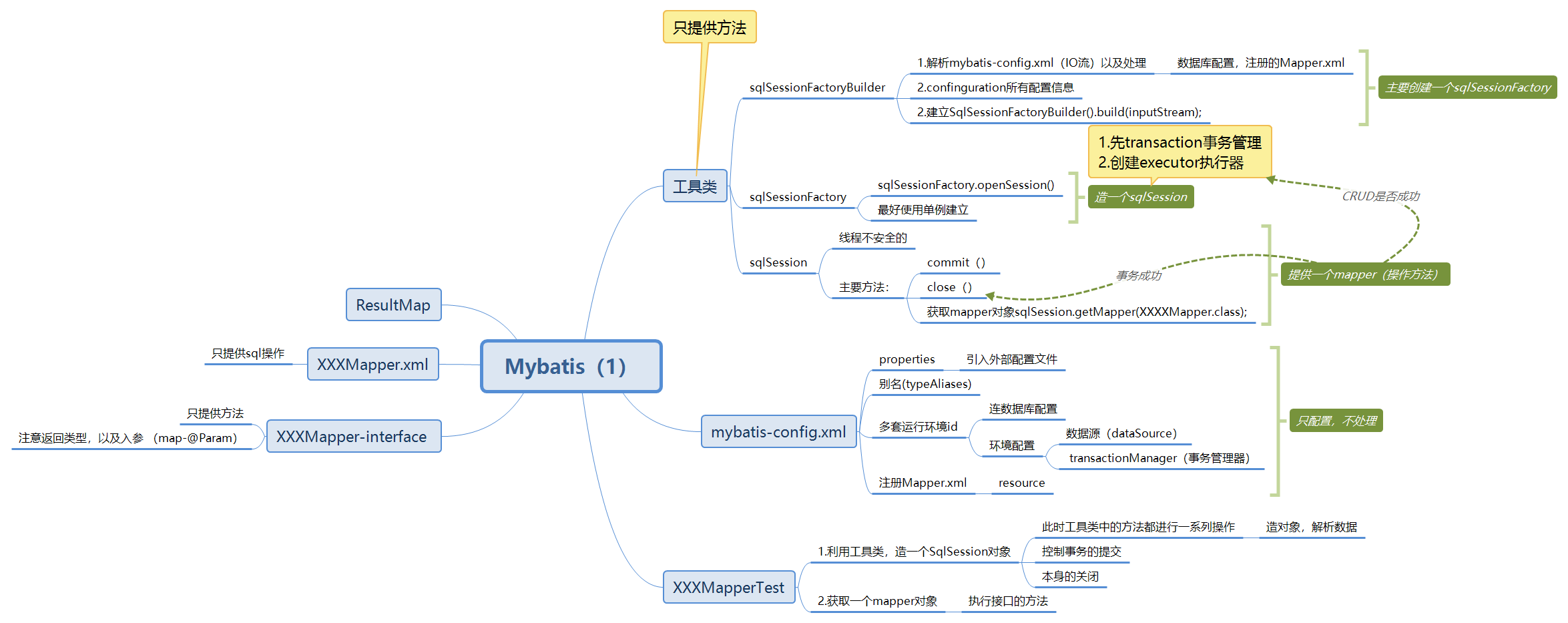
- 設置事務自動提交
- 雖說可以自動提交,但是有些時候出錯了,他也會提交了。。。
- 工具類中
   public static SqlSession getSqlSession() {

       return sqlSessionFactory.openSession(true);  // true 意味著開始事務自動提交,不寫的話需手動提交
    }
註解開發
-
所有註解底層都是通過反射機制來運行的
-
mybatis最初配置資訊是基於 XML ,映射語句(SQL)也是定義在 XML 中的。而到MyBatis 3提供了
新的基於註解的配置。不幸的是,Java 註解的的表達力和靈活性十分有限。最強大的 MyBatis 映
射並不能用註解來構建。多表的時候。。。 -
sql 類型主要分成 :
- @select ()
- @update ()
- @Insert ()
- @delete ()
-
【注意】利用註解開發就不需要resource mapper.xml映射文件了.但是需要配置class。。
註解CRUD
-
地址 Mybatis-05
-
1.使用註解開發需要改·
mybatis-config.xml<!--綁定介面--> `《mappers》` `《mapper class="com.zjz.dao.UserMapper"/》` `《/mappers》` -
2.Mapper程式碼
-
入參為User時,測試時直接方法(new User(XX,XX,XX));
@Select("select * from user") List<User> GetUsers(); // 方法存在多個參數,所有參數前面必須加@Param("X")註解 @Select("select * from user where id =#{id} AND name = #{name}") List<User> getUserByIdName(@Param("id")int id,@Param("name")String name); @Insert("insert into user(id,name,password) values(#{id},#{name},#{password})") int addUser(User user); // 測試時的送參:mapper.updateUser(new User(4,"zjz4","123456")); @Update("update user set name=#{name},password=#{password} where id=#{id}") int updateUser(User user); // 測試時的送參: mapper.updateUser(new User(4,"zjz4","123456")); @Delete("delete from user where id=#{id}") int deleteUser(@Param("id")int id); -
查看
@param源碼
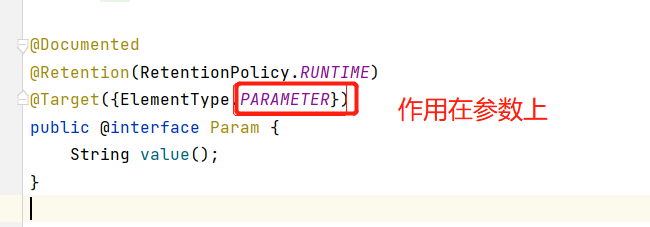
映射(mapper)---特別重要,不要忘記了
resource class 兩種映射方式
普通方法--一個個xml綁定。
<mapper resource="com/zjz/dao/UserMapper.xml"/>使用註解開發就需要專門綁定介面了
<mapper class="com.zjz.dao.UserMapper"/>
- 遇到的問題,resultType的pojo沒解析出來
  Cause: org.apache.ibatis.builder.BuilderException: Error resolving class.
  Cause: org.apache.ibatis.type.TypeException: Could not resolve type alias 'Student'.
  Cause: java.lang.ClassNotFoundException: Cannot find class: Student

    <!--起別名-->
      <typeAliases>
          <typeAlias type="com.zjz.pojo.BEAN" alias="BEAN"/>
      </typeAliases>

      或者resultType直接com.zjz.pojo.BEAN
多表連接查詢
- 地址 Mybatis-06,7
多對一,一對多--怎麼區分:
一種是看結果要什麼?(設計思想)---要一個老師手下有多個學生? 還是要多個學生,後面有個備註(教師:---)
關鍵:編碼的主體(因為一對多反過來就是多對一,所以主體要分清) --外鍵(聯繫)
- 核心涉及:
- 複雜的屬性,我們需要單獨處理 對象:association 集合:collection
- 對象用來多對一(每個人都對應這個師傅(對象)) 集合用來一對多 (一個人有多個徒弟(集合))
- 類型獲取:
- 對象中 javaType="" 指定的屬性類型---對象
- 集合中的泛型資訊。使用ofType獲取--對象
resultMap(重中之重,。)
-
主要作用:實現多表查詢
-
體系圖
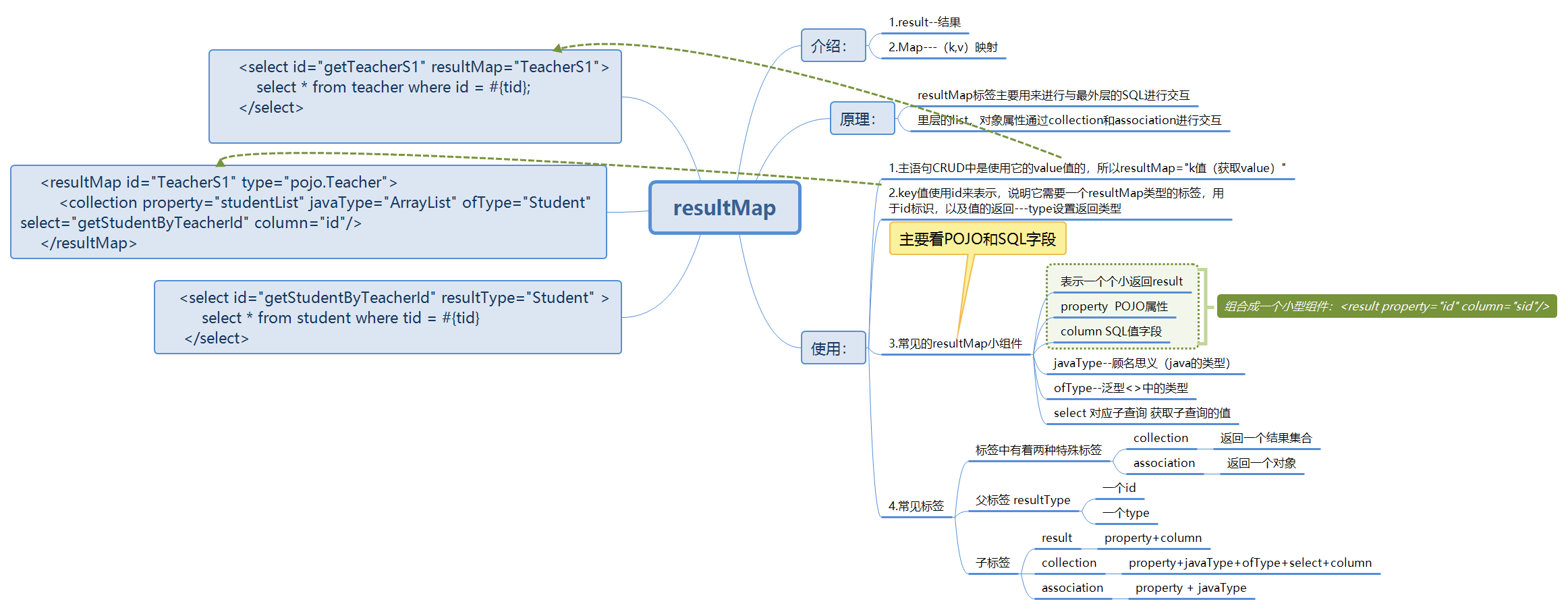
多表連接查詢——多對一
重點 association resultMap property column javaType
- association 對象
- javaType="" 指定的屬性!!類型(對象)
多個學生對應一個老師 主要是看主體,外鍵 使用學生時多個學生的外鍵相同,映射一個老師
思想:子查詢,聯表查詢
引入Teacher對象查詢--畢竟每個學生後面都映射著老師
- 區別:
《association property="teacher" javaType="Teacher"》 《result property="name" column="tname"/》 《/association》
《association property="teacher" column="tid" javaType="com.pojo.Teacher" select="getTeacher"/》
--類似子查詢
- pojo(此時便區分出,多個學生屬於一個老師)
    @Data
    @AllArgsConstructor
    @NoArgsConstructor
    public class Student {
        private int id;
        private String name;
        private Teacher teacher; // 引入老師對象(每個學生都有老師的id)
    }


    public class Teacher {
        private int id;
        private String name;
    }
- mybatis-config
《mappers》 《mapper class="com.dao.TeacherMapper"/》 《mapper class="com.dao.StudentMapper"/》 《/mappers》 - StudentMapper (查每個學生)
  // 查詢所有的學生資訊,以及對應的老師的資訊
    public List<Student> getStudentList();
- StudentMapper.xml
   <!--子查詢 -->
    《select id="getStudentList" resultMap="StudentTeacher"》
        select * from student
    《/select》
    《resultMap id="StudentTeacher" type="com.pojo.Student"》
        《result property="id" column="id"/》
        《result property="name" column="name"/》
    <!--
        複雜的屬性,我們需要單獨處理  對象:association  集合:collection
        javaType="" 指定的屬性!!類型(對象)
    -->
    《association property="teacher" column="tid" javaType="com.pojo.Teacher" select="getTeacher"/》

    《/resultMap》

    《select id="getTeacher" resultType="com.pojo.Teacher"》
         select * from teacher where id = #{id}
    《/select》
類似嵌套查詢 推薦使用::
- mapper.xml
    <!--按照結果嵌套查詢-->

    《select id="getStudentList2" resultMap="StudentTeacher2"》
        select s.id sid,s.name sname,t.name tname
        from student s ,teacher t
        where s.tid = t.id;
    《/select》

    <!--resultType Aliases 已經配置Student Teacher -->
   《resultMap id="StudentTeacher2" type="Student"》
        《result property="id" column="sid"/》
        《result property="name" column="sname"/》
        《association property="teacher" javaType="Teacher"》
            《result property="name" column="tname"/》
        《association》
    《/resultMap》
結果:多對一
-
發現每個學生後面寫的個老師,說明學生為主體。每個後面有一個老師
-
[Student(id=1, name=小明, teacher=Teacher(id=0, name=zjzTeacher)), Student(id=2, name=小紅, teacher=Teacher(id=0, name=zjzTeacher)), Student(id=3, name=小黃, teacher=Teacher(id=0, name=zjzTeacher)), Student(id=4, name=小藍, teacher=Teacher(id=0, name=zjzTeacher)), Student(id=5, name=小白, teacher=Teacher(id=0, name=zjzTeacher))] -
總體構造及使用:
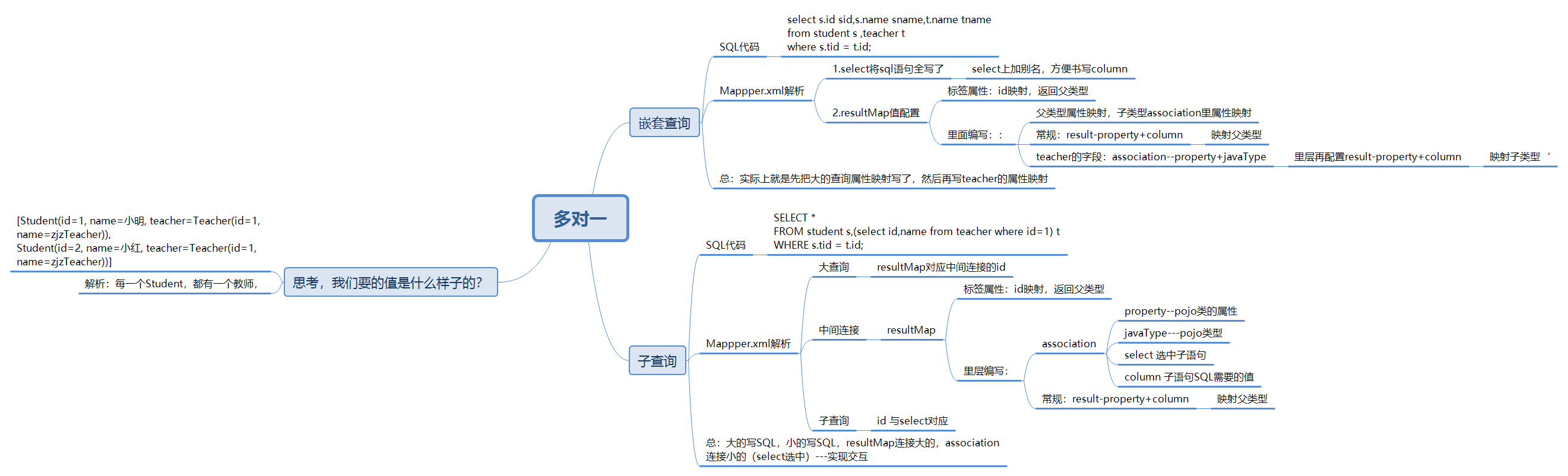
多表連接查詢——多對一的查詢方式
嵌套查詢(鏈表查詢)
-
pojo
// student的屬性 public class Student { private int id; private String name; private int tid; } public class Teacher { private int id; private String name; // 一個老師對應多個學生 public List<Student> studentList; } -
dao
-
Teacher getTeacherS(@Param("tid")int id); -
TeacherMapper.xml
      <!--按結果嵌套查詢-->
      《select id="getTeacherS" resultMap="TeacherS"》
          select t.name tname,t.id tid,s.id sid,s.name sname
          from student s ,teacher t
          where s.tid = t.id and t.id = #{tid}
      《/select》
       <!--typeAliases 已經配置好 Teacher Student-->

      《resultMap id="TeacherS" type="Teacher"》
          《result property="id" column="tid"/》
          《result property="name" column="tname"/》
          <!--
         複雜的屬性,我們需要單獨處理  對象:association  集合:collection
         javaType="" 指定的屬性!!類型
         集合中的泛型資訊。使用ofType獲取
          -->
          《collection property="studentList" ofType="Student"》
              《result property="id" column="sid"/》
              《result property="name" column="sname"/》
             《result property="tid" column="tid"/》
          《/collection》

     《/resultMap》
子查詢
- TeacherMapper
Teacher getTeacherS1(@Param("id")int id);
- TeacherMapper.xml
    <!-- 子查詢-->

      《select id="getTeacherS1" resultMap="TeacherS1"》
          select * from teacher where id = #{id};
      《/select>

      《resultMap id="TeacherS1" type="Teacher"》
          <!--Teacher底下的屬性,此時加id,普通查詢不出來了-->
          <result property="id" column="id"/》
          <collection property="studentList" javaType="ArrayList" ofType="Student" select="getStudentByTeacherId" column="id"/》
      《/resultMap》

      《select id="getStudentByTeacherId" resultType="Student" 》
          select * from student where tid = #{id}
      《/select》
- 結果:一個老師的集合下有5個學生
  Teacher(id=1, name=zjzTeacher, studentList=[
  Student(id=1, name=小明, tid=1),
  Student(id=2, name=小紅, tid=1),
  Student(id=3, name=小黃, tid=1),
  Student(id=4, name=小藍, tid=1),
  Student(id=5, name=小白, tid=1)])
- 核心體系圖
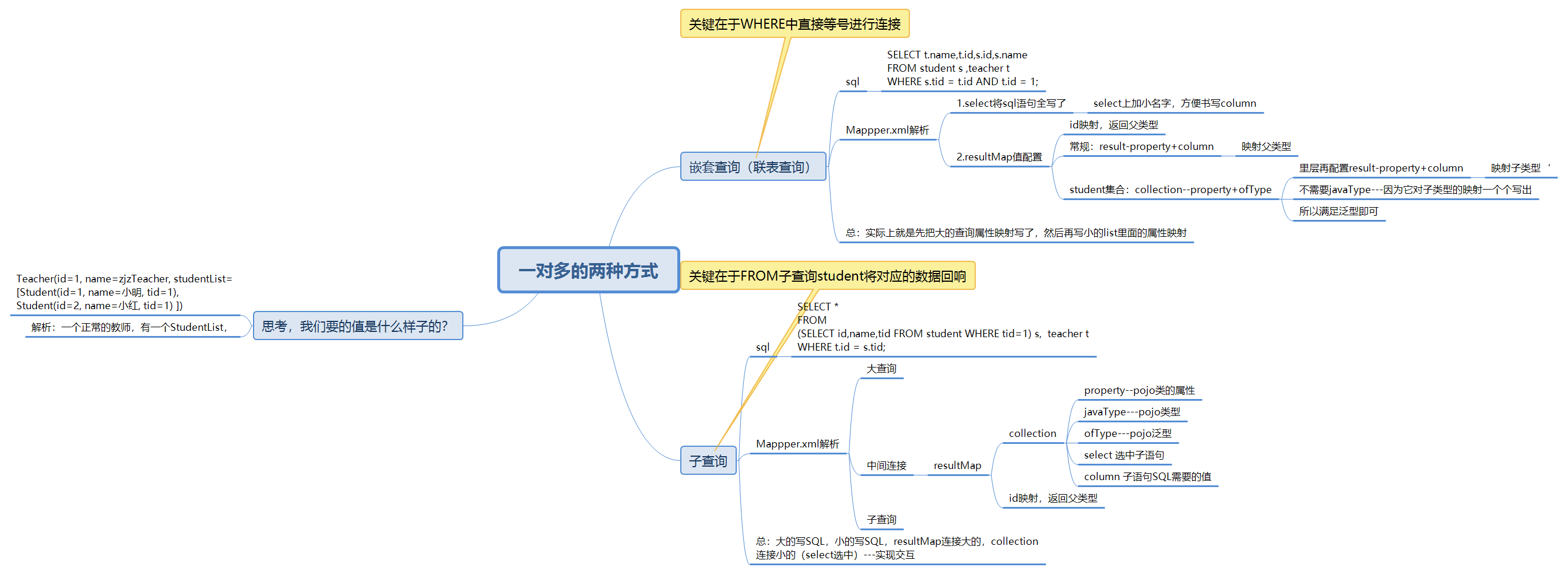
關於多表總結
- 1.三個圖 resultMap 多對一 一對多
- 2.保證sql的可讀性
- 3.屬性名(property),欄位(column)
- 4.日誌要用好,好找問題
- 5.複雜的多表要注意速率---慢SQL 1000s,快 1s SQL優化,引擎,InnoDB底層原理,索引,索引優化
動態SQL
定義:所謂動態SQL,本質還是SQL語句,只是我們可以在SQL層面,去執行一個邏輯程式碼
作用:非常方便的進行SQL語句拼接
關鍵:邏輯程式碼怎麼操作
- 動態SQL,根據不同的條件生成不同的SQL(以前JDBC時的SQL拼接)
介紹
- 動態 SQL 元素和 JSTL 或基於類似 XML 的文本處理器相似。
在 MyBatis 之前的版本中,有很多元素需要花時間了解。
MyBatis 3 大大精簡了元素種類,現在只需學習原來一半的元素便可。
MyBatis 採用功能強大的基於 OGNL 的表達式來淘汰其它大部分元素。
- if
- choose (when, otherwise)
- trim (where, set)
- foreach
where標籤
-
在SQL語句之下編寫
-
<where>中間寫IF啥的</where> -
作用:如果沒有前置元素,它會自動去掉語句中的and或or,然後作為前置元素,如果什麼屬性都不傳,自動清除where
  如果不加的話會是這樣的運行,肯定報錯,所以它的作用就是去掉and
  select * from blog where and author = #{author}
if操作(常用)
- 程式碼在:mybatis-08
操作
-
XXXMapper中
// 查詢部落格IF List<Blog> QueryBlogIF(Map map); -
XXXMapper.xml
《select id="QueryBlogIF" parameterType="map" resultType="Blog"》 select * from blog 《where》 《if test="title != null"》 and title = #{title} 《/if》 《if test="author != null"》 and author = #{author} 《/if》 《/where》 《/select》 -
Test中
     @Test
        public void Test3(){
            SqlSession sqlSession = MybatisUtils.getSqlSession();

            BlogMapper mapper = sqlSession.getMapper(BlogMapper.class);
            logger.info("QueryBlogIF開始");

            HashMap map = new HashMap();


            map.put("title","MYTitle1");

            List《Blog》 blogs = mapper.QueryBlogIF(map);


            for (Blog blog : blogs) {
                System.out.print(blog);

            }
            System.out.println();

            logger.info("QueryBlogIF結束");
            sqlSession.close();
        }
choose
choose 類似於switch 比起if 它是從上到下進行的,執行一個後停止後面的
適用於優先順序查詢,比如VIP來了,優先買了,後來再看有沒有
when---otherwise 兩個小標籤
當然少不了where標籤
-
Mapper介面
// 查詢部落格Choose List《Blog》 QueryBlogChoose(Map map); -
Mapper.xml
    《select id="QueryBlogChoose" parameterType="map" resultType="Blog"》
        select * from blog
        《where》
            《choose》
                《when test="title != null"》
                    title = #{title}
                《/when》
                《when test="author != null"》
                    and author = #{author}
                《/when》
                《otherwise》
                    and views 》 #{views}
                《/otherwise》
            《/choose》
        《/where》
    《/select》
SET
目的:update中用啊
作用:前置SET關鍵字 同時刪掉無關的逗號
- 註:SET中如果沒,逗號是會報錯的
使用
-
Mapper介面
// 更新部落格 int updateBlog(Map map); -
Mapper.xml
    《update id="updateBlog" parameterType="map"》
        update blog
        《set》
            《if test="title != null"》
                title = #{title},
            《/if》
            《if test="author != null"》
                author = #{author},
            《/if》
        《/set》
        where id = #{id}
    《/update》
trim
prefixOverrides 屬性會忽略通過管道符分隔的文本序列(注意此例中的空格是必要的)。
會移除所有 prefixOverrides 屬性中指定的內容,並且插入 prefix 屬性中指定的內容。prefixOverrides 除去前面的 suffixOverrides 除去後面的
-
trim 元素來訂製 where 元素的功能。比如,和 where 元素等價的自定義 trim 元素為
  《trim prefix="WHERE" prefixOverrides="AND |OR "》
    ...
  《/trim》
《trim prefix="SET" suffixOverrides=","》 ... 《/trim》
SQL片段
-
目的:實現程式碼的復用,減少重複性操作
-
存值的地方----
《sql id="ID"》程式碼《/sql》 -
怎麼使用? ----
《include refid="ID"》《/include》 -
使用SQL標籤抽取公共部分,
-
在需要使用的地方使用include標籤引用即可
-
注意事項,最好基於單表來定義SQL片段
-
SQL-ID不要有WEHER標籤
-
最好就if test-----
-
程式碼
  《sql id="if-title-author"》
        《if test="title != null"》
            and title = #{title}
        《/if》

        《if test="author != null"》
            and author = #{author}
        《/if》
    《/sql》


  《select id="QueryBlogIF" parameterType="map" resultType="Blog"》
        select * from blog
        《where》
            《include refid="if-title-author"》《/include》
        《/where》
    《/select》
foreach
目的:遍歷一些操作,如(id=1 or id=2 or id=3)
使用:
關鍵字:collection item open close separator
- collection 集合名字
- item 集合中的子元素的名字
- open 以什麼東西開始
- close 以什麼東西結束
- separate 每執行一個item中間加什麼操作--

-
Mapper.xml
《!-- SQL語句:select * from blog where 1=1 and (id=1 or id=2 or id=3) 我們現在傳遞一個萬能的map,這個map中可以傳遞=一個集合= open close 中要注意空格的使用,如果連起來,會被視為一個整體 --》 《select id="QueryBlogForeach" parameterType="map" resultType="Blog"》 select * from blog 《where》 《foreach collection="ids" item="id" open="and (" close=")" separator="or"》 id = #{id} 《/foreach》 《/where》 《/select》 -
測試:
@Test public void TestQueryBlogForeach(){ SqlSession sqlSession = MybatisUtils.getSqlSession(); BlogMapper mapper = sqlSession.getMapper(BlogMapper.class); logger.info("QueryBlogForeach開始"); HashMap map = new HashMap(); List《Integer》 ids = new ArrayList《》(); ids.add(1); ids.add(2); map.put("ids",ids); List《Blog》 blogs = mapper.QueryBlogForeach(map); System.out.println(blogs.toString()); logger.info("QueryBlogForeach結束"); sqlSession.close(); } -
總體構造及使用:


