堆溢出---glibc malloc
- 2020 年 4 月 26 日
- 筆記
成功從來沒有捷徑。如果你只關注CVE/NVD的動態以及google專家泄露的POC,那你只是一個腳本小子。能夠自己寫有效POC,那就證明你已經是一名安全專家了。今天我需要複習一下glibc中記憶體的相關知識,以鞏固我對堆溢出的理解和分析。帶著以下問題去閱讀本章:
- dlmalloc – General purpose allocator
- ptmalloc2 – glibc
- jemalloc – FreeBSD and Firefox
- tcmalloc – Google
- libumem – Solaris
我們以glibc為例探討堆的運行機制,主要是因為伺服器絕大部分都和glibc有關,研究glibc有廣泛意義。
系統調用:malloc本身需要調用brk或mmap完成記憶體分配操作
執行緒:ptmalloc2的前身是dlmalloc,它們最大的區別是ptmalloc2支援執行緒,它提升了記憶體分配的效率。在dlmalloc中,如果有2個執行緒同時調用 malloc,只有一個執行緒可以進入關鍵區,執行緒之間共享同一個freelist數據結構。在ptmaloc2中,每一個執行緒都擁有單獨的堆區段,也就意味著每個執行緒都有自己的freelist結構體。沒有執行緒之間的共享和爭用,性能自然提高不少。Per thread arena用來特指為每個執行緒維護獨立的堆區段和freelist結構體的方式。
 1 /* Per thread arena example. */
 2 #include <stdio.h>
 3 #include <stdlib.h>
 4 #include <pthread.h>
 5 #include <unistd.h>
 6 #include <sys/types.h>
 7
 8 void* threadFunc(void* arg) {
 9         printf("Before malloc in thread 1\n");
10         getchar();
11         char* addr = (char*) malloc(1000);
12         printf("After malloc and before free in thread 1\n");
13         getchar();
14         free(addr);
15         printf("After free in thread 1\n");
16         getchar();
17 }
18
19 int main() {
20         pthread_t t1;
21         void* s;
22         int ret;
23         char* addr;
24
25         printf("Welcome to per thread arena example::%d\n",getpid());
26         printf("Before malloc in main thread\n");
27         getchar();
28         addr = (char*) malloc(1000);
29         printf("After malloc and before free in main thread\n");
30         getchar();
31         free(addr);
32         printf("After free in main thread\n");
33         getchar();
34         ret = pthread_create(&t1, NULL, threadFunc, NULL);
35         if(ret)
36         {
37                 printf("Thread creation error\n");
38                 return -1;
39         }
40         ret = pthread_join(t1, &s);
41         if(ret)
42         {
43                 printf("Thread join error\n");
44                 return -1;
45         }
46         return 0;
47 }
分析:主執行緒在malloc調用之前,沒有任何堆區和棧區被分配
sploitfun@sploitfun-VirtualBox:~/ptmalloc.ppt/mthread$ ./mthread
Welcome to per thread arena example::6501
Before malloc in main thread
...
sploitfun@sploitfun-VirtualBox:~/ptmalloc.ppt/mthread$ cat /proc/6501/maps
08048000-08049000 r-xp 00000000 08:01 539625     /home/sploitfun/ptmalloc.ppt/mthread/mthread
08049000-0804a000 r--p 00000000 08:01 539625     /home/sploitfun/ptmalloc.ppt/mthread/mthread
0804a000-0804b000 rw-p 00001000 08:01 539625     /home/sploitfun/ptmalloc.ppt/mthread/mthread
b7e05000-b7e07000 rw-p 00000000 00:00 0
...
sploitfun@sploitfun-VirtualBox:~/ptmalloc.ppt/mthread$
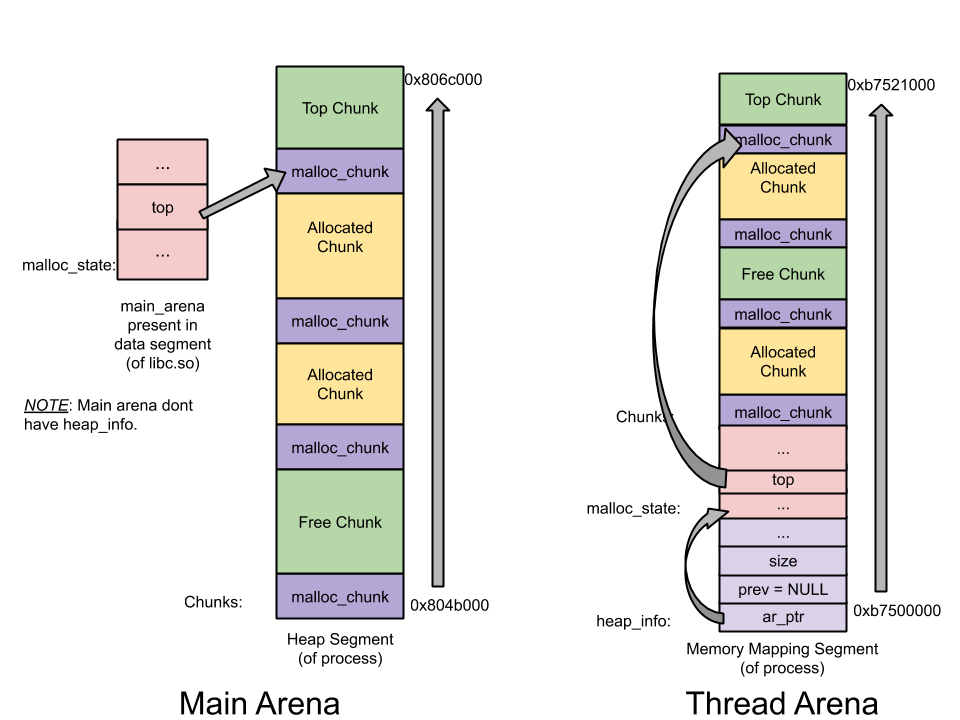
主執行緒在調用malloc之後,從下圖中我們可以看出堆區域被分配在0804b000-0806c000區域,這是通過調用brk調整記憶體中止點來建立堆。此外,儘管申請了1000位元組,但分配了132KB的堆記憶體。這個連續區域被稱為Arena。主執行緒建立的就稱為Main Arena。未來分配記憶體的請求會持續使用Arena區域直到用盡。如果用盡,可以調整記憶體中止點來擴大Top trunk。相似的,也可以相應的收縮以防止top chunk有太多的空間。(Top trunk是Arena最頂部的chunk)
sploitfun@sploitfun-VirtualBox:~/ptmalloc.ppt/mthread$ ./mthread
Welcome to per thread arena example::6501
Before malloc in main thread
After malloc and before free in main thread
...
sploitfun@sploitfun-VirtualBox:~/lsploits/hof/ptmalloc.ppt/mthread$ cat /proc/6501/maps
08048000-08049000 r-xp 00000000 08:01 539625     /home/sploitfun/ptmalloc.ppt/mthread/mthread
08049000-0804a000 r--p 00000000 08:01 539625     /home/sploitfun/ptmalloc.ppt/mthread/mthread
0804a000-0804b000 rw-p 00001000 08:01 539625     /home/sploitfun/ptmalloc.ppt/mthread/mthread
0804b000-0806c000 rw-p 00000000 00:00 0          [heap]
b7e05000-b7e07000 rw-p 00000000 00:00 0
...
sploitfun@sploitfun-VirtualBox:~/ptmalloc.ppt/mthread$
主執行緒 Free之後,記憶體並未歸還給OS,而是交由glibc malloc管理,放在Main Arena的bin中。(freelist數據結構體就是bin)之後所有的空間申請,都會在bin中尋求滿足。無法滿足時才再次向內核獲得空間。
sploitfun@sploitfun-VirtualBox:~/ptmalloc.ppt/mthread$ ./mthread
Welcome to per thread arena example::6501
Before malloc in main thread
After malloc and before free in main thread
After free in main thread
...
sploitfun@sploitfun-VirtualBox:~/lsploits/hof/ptmalloc.ppt/mthread$ cat /proc/6501/maps
08048000-08049000 r-xp 00000000 08:01 539625     /home/sploitfun/ptmalloc.ppt/mthread/mthread
08049000-0804a000 r--p 00000000 08:01 539625     /home/sploitfun/ptmalloc.ppt/mthread/mthread
0804a000-0804b000 rw-p 00001000 08:01 539625     /home/sploitfun/ptmalloc.ppt/mthread/mthread
0804b000-0806c000 rw-p 00000000 00:00 0          [heap]
b7e05000-b7e07000 rw-p 00000000 00:00 0
...
sploitfun@sploitfun-VirtualBox:~/ptmalloc.ppt/mthread$
在調用thread1中malloc之前,thread1的堆區域並未建立,但執行緒棧已建立。
sploitfun@sploitfun-VirtualBox:~/ptmalloc.ppt/mthread$ ./mthread
Welcome to per thread arena example::6501
Before malloc in main thread
After malloc and before free in main thread
After free in main thread
Before malloc in thread 1
...
sploitfun@sploitfun-VirtualBox:~/ptmalloc.ppt/mthread$ cat /proc/6501/maps
08048000-08049000 r-xp 00000000 08:01 539625     /home/sploitfun/ptmalloc.ppt/mthread/mthread
08049000-0804a000 r--p 00000000 08:01 539625     /home/sploitfun/ptmalloc.ppt/mthread/mthread
0804a000-0804b000 rw-p 00001000 08:01 539625     /home/sploitfun/ptmalloc.ppt/mthread/mthread
0804b000-0806c000 rw-p 00000000 00:00 0          [heap]
b7604000-b7605000 ---p 00000000 00:00 0
b7605000-b7e07000 rw-p 00000000 00:00 0          [stack:6594]
...
sploitfun@sploitfun-VirtualBox:~/ptmalloc.ppt/mthread$
在thread1中malloc調用之後,執行緒堆區段建立了。位於b7500000-b7521000,大小132KB。這顯示和主執行緒不同,執行緒malloc調用的是mmap系統調用,而非sbrk。儘管用戶請求1000位元組,1M的堆記憶體被映射到了進程地址空間。但只有132KB被設置為可讀寫許可權,並被設置為該執行緒的堆空間。這個連續的記憶體空間是Thread Arena。
當用戶記憶體請求大小超過128KB時,不論請求是從主執行緒還是子執行緒,記憶體分配都是由mmap系統調用來完成的。
sploitfun@sploitfun-VirtualBox:~/ptmalloc.ppt/mthread$ ./mthread
Welcome to per thread arena example::6501
Before malloc in main thread
After malloc and before free in main thread
After free in main thread
Before malloc in thread 1
After malloc and before free in thread 1
...
sploitfun@sploitfun-VirtualBox:~/ptmalloc.ppt/mthread$ cat /proc/6501/maps
08048000-08049000 r-xp 00000000 08:01 539625     /home/sploitfun/ptmalloc.ppt/mthread/mthread
08049000-0804a000 r--p 00000000 08:01 539625     /home/sploitfun/ptmalloc.ppt/mthread/mthread
0804a000-0804b000 rw-p 00001000 08:01 539625     /home/sploitfun/ptmalloc.ppt/mthread/mthread
0804b000-0806c000 rw-p 00000000 00:00 0          [heap]
b7500000-b7521000 rw-p 00000000 00:00 0
b7521000-b7600000 ---p 00000000 00:00 0
b7604000-b7605000 ---p 00000000 00:00 0
b7605000-b7e07000 rw-p 00000000 00:00 0          [stack:6594]
...
sploitfun@sploitfun-VirtualBox:~/ptmalloc.ppt/mthread$
Thread1在free之後,被分配的記憶體區並未交還給作業系統,而是歸還給glicbc分配器,實際上它交給了執行緒Arena bin.
sploitfun@sploitfun-VirtualBox:~/ptmalloc.ppt/mthread$ ./mthread
Welcome to per thread arena example::6501
Before malloc in main thread
After malloc and before free in main thread
After free in main thread
Before malloc in thread 1
After malloc and before free in thread 1
After free in thread 1
...
sploitfun@sploitfun-VirtualBox:~/ptmalloc.ppt/mthread$ cat /proc/6501/maps
08048000-08049000 r-xp 00000000 08:01 539625     /home/sploitfun/ptmalloc.ppt/mthread/mthread
08049000-0804a000 r--p 00000000 08:01 539625     /home/sploitfun/ptmalloc.ppt/mthread/mthread
0804a000-0804b000 rw-p 00001000 08:01 539625     /home/sploitfun/ptmalloc.ppt/mthread/mthread
0804b000-0806c000 rw-p 00000000 00:00 0          [heap]
b7500000-b7521000 rw-p 00000000 00:00 0
b7521000-b7600000 ---p 00000000 00:00 0
b7604000-b7605000 ---p 00000000 00:00 0
b7605000-b7e07000 rw-p 00000000 00:00 0          [stack:6594]
...
sploitfun@sploitfun-VirtualBox:~/ptmalloc.ppt/mthread$
Arena:
在上面的例子中,主執行緒對應的是Main Arena,子執行緒對應的是Thread Arena。那執行緒和Arena是否是一一對應的呢?不是。實際上執行緒數可以多於核數,因此,讓一個執行緒擁有一個Arena有些奢侈。應用程式Arena的數量是和核數相關的,具體如下:
For 32 bit systems:
     Number of arena = 2 * number of cores.
For 64 bit systems:
     Number of arena = 8 * number of cores.
Multiple Arena:
舉例說明:一個單核32位系統有4個執行緒(1主3子)。那4個執行緒只有2個Arena。Glibc記憶體分配器確保Multiple Arena在執行緒之間共享
- 主執行緒首次調用malloc時一定是創建了Main Arena
- 當子執行緒1和子執行緒2首次調用malloc時,會給它們都建立一個新的Arena。此時Arena和執行緒是一一對應的
- 當子執行緒3首次調用 malloc,此時會計算Arena的限制。已超出Arena數量限制,要重用Main Arena, Thread1 Arena或Thread2 Arena
- 重用:
- 遍歷存在的Arena,找到一個後試圖去lock它
- 成功lock,比如是Main Arena,給用戶返回Arena
- 沒有空閑的Arena,就排隊等待
- 當Thread3二次調用 malloc時,malloc將使用最近訪問的Arena(可能是main arena)。如果main arena是空閑的就使用它,如果忙時就Block等待。
多堆:
Heap_info: 堆頭。一個執行緒Arena擁有多個堆,每個堆有它自己的頭。之所以有多個堆,是因為開始的時候只有一個堆,但隨著堆區空間用盡,新堆會由mmap重新建立,而且地址空間是不連續的,新舊堆無法合併
malloc_state: Arena Header - 一個執行緒Arena有多個堆,但那些堆只有一個Arena頭。Arena頭包含了bins,top chunk和last remainder chunk等資訊
malloc_chunk: Chunk Header - 一個堆被分為很多chunks,多個用戶請求導致多個chunk。每個chunk有它自己的頭部資訊
注意:
- Main Arena沒有多個堆,因此沒有heap_info結構。當main arena空間耗盡,sbrk的堆區被延展
- 和執行緒Arena不同,Main Arena的Arena頭並非由sbrk調用而產生的堆區的一部分。它是全局變數,存在於libc.so的數據區


Chunk的類型:
- Allocated chunk
- Free chunk
- Top chunk
- Last Remainder chunk
Allocated Trunk:

prev_size: 前一個chunk為空閑區,則該區域包含前一區域的大小。如果非空閑,則該域包含前一區域的用戶數據
size: 被分配空間的大小 。後三比特域包含標誌位
- PREV_INUSE (P) – 前一個chunk是否被佔用
- IS_MMAPPED (M) – 是否是mmap分配
- NON_MAIN_ARENA (N) – 是否屬於thread arena
注意:
- 對於allocated chunk, 其他域如 fd, bk不被使用. 這裡只存儲用戶數據
- 用戶請求的記憶體空間包含了malloc_chunk資訊,因此實際使用的空間會小於用戶請求大小。
Free Trunk:

prev_size: 兩個空閑區不能毗鄰,當兩個chunk空閑豕毗鄰,則會合併為一個空閑區。因此通常前一個chunk是非空閑的,prev_size是前一個chunk的用戶數據
size: 空間大小
fd: Forward pointer – 同一bin中的下一個chunk(非物理空間)
bk: Backward pointer – 同一bin中的前一個chunk(非物理空間)
Bins: 根據大小不同,有如下bin
- Fast bin
- Unsorted bin
- Small bin
- Large bin
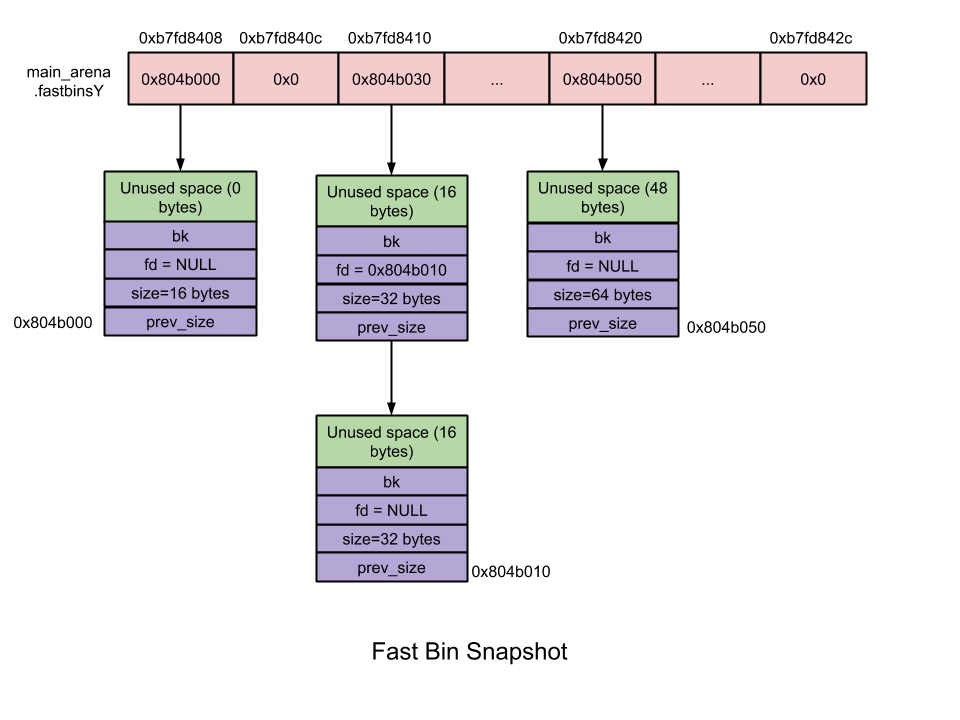
fastbinsY: 這個array是fastbin列表
bins: 共有126 個bins
- Bin 1 – Unsorted bin
- Bin 2 to Bin 63 – Small bin
- Bin 64 to Bin 126 – Large bin
Fast Bin: 大小在16~80位元組之間.
- 數量 – 10
- 每個fastbin有一個空閑chunk的單鏈表. 之所以用單鏈表是因為在鏈表中沒有刪除操作。添加和刪除都在表的頂部 – LIFO.
- Chunk大小 – 8位元組對齊
- 首個fastbin包含16位元組的binlist, 第2個fastbin包含24 bytes的binlist,以此類推
- 同一fastbin中的chunk大小是一致的
- 在malloc初始化時, 最大的fast bin 大小設置為64比特,而非80比特.
- 不合併 – 毗鄰chunk不合併. 不合併會導致碎片,但效率提高
- malloc(fast chunk) –
- 初始態 fast bin max size 和 fast bin indices 為空,因此儘管用戶請求fast chunk,是small bin code提供服務而非fast bin code。
- 之後當fastbin不為空,fast bin index通過計算激活相應的binlist
- 激活後的binlist中可以給用戶提供記憶體
- free(fast chunk) –
- 計算Fast bin index以激活相應binlist
- 釋放後的chunk被放入剛才激活的binlist 中
Unsorted Bin: 當small chunk 或 large chunk被釋放,不是將其歸還給相應的bin中,而是添加至unsorted bin。這對性能有所提升
- 數量 – 1
- 循環雙鏈表
- Chunk 大小 – 大小無限制
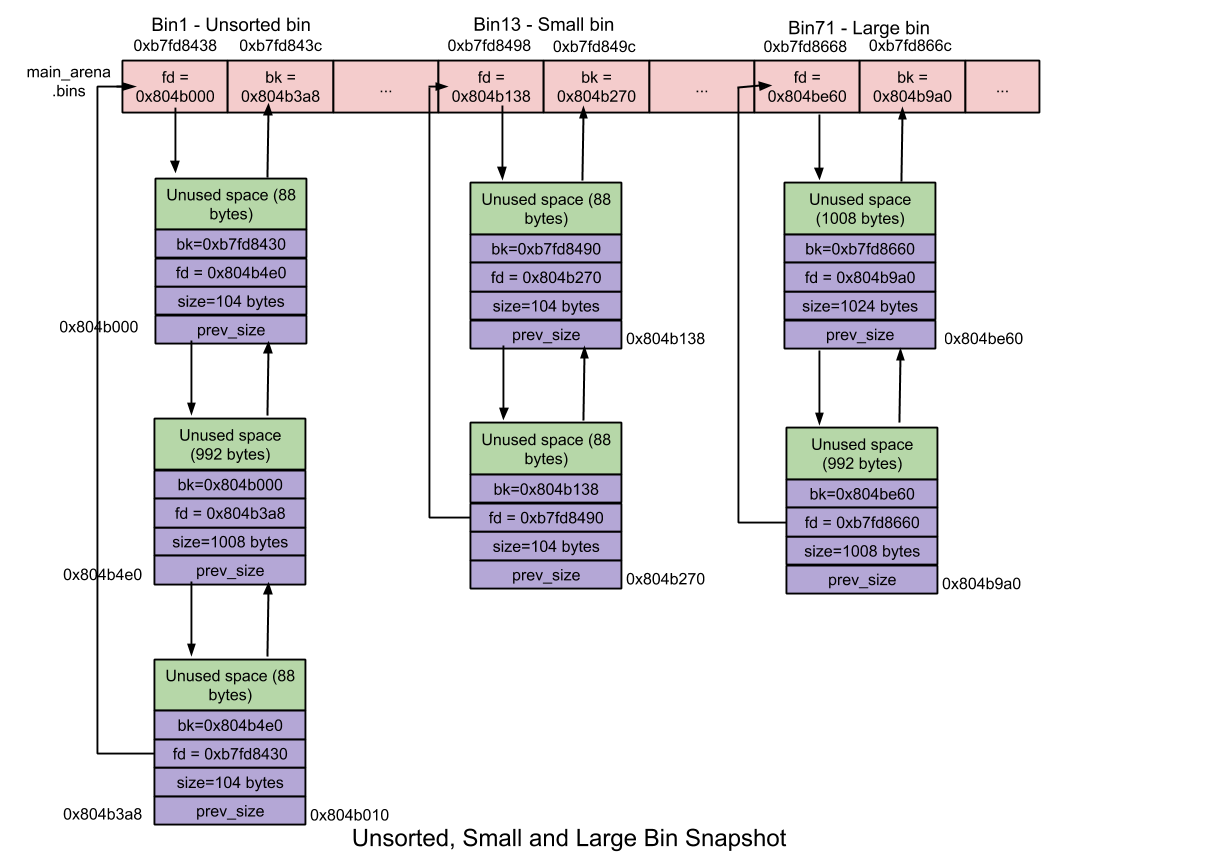
Small Bin:大小小於512位元組的塊稱為小塊。small bins在記憶體分配和釋放方面比large bins快(但比fast bins慢)。
- 數量– 62
- 每個small bin都包含一個循環的空閑塊的雙向鏈接列表(又稱垃圾箱列表)。使用雙鏈表是因為在小垃圾箱鏈接的中間可能會發生塊移除的操作。FIFO。
- 塊大小 – 8位元組對齊:
- 小bin包含大小為8個位元組的塊的binlist。first small bin包含大小為16個位元組的塊,second small bin包含大小為24個位元組的塊,依此類推……
- small bin 內的塊大小相同
- 合併– 兩個空閑的chunk不能彼此相鄰,將它們合併為一個空閑的塊。合併消除了外部碎片,但它放慢了速度!!
- malloc(small chunk)–
- 初始,所有small bin都將為NULL,儘管用戶請求一個small chunk, unsorted bin code 會為其服務,而不是smll bin code
- 同樣,第一次調用malloc的過程中,將初始化malloc_state中發現的small bin和large bin數據結構(bin),即,bin指向自身,表示它們為空。
- 稍後,當small bin不為空時,將刪除其對應的binlist 中的last chunk並將其返回給用戶。
- free (small chunk) –
- 釋放該塊時,請檢查其上一個或下一個塊是否空閑,如果有,則將它們從各自的鏈接列表中取消鏈接,然後將新合併的塊添加到未排序的bin鏈接列表的開頭
Large Bin:大小大於512的塊稱為大塊。存放大塊的垃圾箱稱為大垃圾箱。大存儲區在記憶體分配和釋放方面比小存儲區慢。
垃圾箱數量– 63
每個大垃圾箱都包含一個循環的空閑塊的雙向鏈接列表(又稱垃圾箱)。使用雙鏈表是因為在大倉中,可以在任何位置(前,中或後)添加和刪除塊。
在這63個垃圾箱中:
32個bin包含大小為64個位元組的塊的binlist。即)第一個大容器(Bin 65)包含大小為512位元組至568位元組的塊的binlist,第二個大容器(Bin 66)包含大小為576位元組至632位元組的塊的binlist,依此類推…
16個bin包含大小為512位元組的塊的binlist。
8個bin包含大小為4096位元組的塊的binlist。
4個bin包含大小為32768位元組的塊的binlist。
2個bin包含大小為262144個位元組的塊的binlist。
1箱包含一塊剩餘的大小。
與小垃圾箱不同,大垃圾箱中的塊大小不相同。因此,它們以降序存儲。最大的塊存儲在前端,而最小的塊存儲在其binlist的後端。
合併–兩個空閑的塊不能彼此相鄰,將它們合併為一個空閑的塊。
malloc(大塊)–
最初,所有大容器都將為NULL,因此即使用戶請求了大塊而不是大容器程式碼,下一個最大的容器程式碼也會嘗試為其服務。
同樣在第一次調用malloc的過程中,將初始化malloc_state中發現的小bin和大bin數據結構(bin),即,bin指向自身,表示它們為空。
稍後,當大容器為非空時,如果最大的塊大小(在其Binlist中)大於用戶請求的大小,則將Binlist從後端移動到前端,以找到大小接近/等於用戶請求的大小的合適塊。一旦找到,該塊將分為兩個塊
用戶塊(具有用戶請求的大小)–返回給用戶。
剩餘塊(剩餘大小)–添加到未排序的垃圾箱。
如果最大的塊大小(在其binlist中)小於用戶請求的大小,請嘗試使用下一個最大的(非空)容器來滿足用戶請求。下一個最大的bin程式碼掃描binmap,以查找不為空的下一個最大的bin,如果找到任何這樣的bin,則從該binlist中檢索合適的塊並將其拆分並返回給用戶。如果找不到,請嘗試使用頂部塊滿足用戶請求。
free(大塊)–其過程類似於free(小塊)
TOP Chunk: Arena頂部的chunk稱為top chunk. 它不屬於任何bin。它在當用戶需求無法滿足時使用。如果top chunk size 比用戶請求大小大,那top chunk被分為兩個
- 用戶塊
- 剩下的塊
剩下的塊成為新的top chunk。如果top chunk 大小小於用戶請求大小,則top chunk調用sbrk(Main arena)或mmap(thread arena)系統調用進行延展
Last Remainder Chunk: 即最近一次切割後剩下的那個chunk. Last remainder chunk 可幫助提升性能。連續的small chunk請求可能會導致分配的位置相近。
在很多arena的chunk中,哪個能夠成為last reminder chunk?
當一個用戶請求small chunk,small bin和unsorted bin都無法滿足,就會掃描binmaps進而找尋next largest bin. 正如較早提及的,找到the next largest bin,它將會分為2個chunk,user chunk返回給用戶,remainder chunk 添加至unsorted bin. 除此之外,它成為最新的last remainder chunk.
