Mybatis源碼詳解系列(三)--從Mapper介面開始看Mybatis的執行邏輯
簡介
Mybatis 是一個持久層框架,它對 JDBC 進行了高級封裝,使我們的程式碼中不會出現任何的 JDBC 程式碼,另外,它還通過 xml 或註解的方式將 sql 從 DAO/Repository 層中解耦出來,除了這些基本功能外,它還提供了動態 sql、延遲載入、快取等功能。 相比 Hibernate,Mybatis 更面向資料庫,可以靈活地對 sql 語句進行優化。
本文繼續分析 Mybatis 的源碼,第1點內容上一篇部落格已經講過,本文將針對 2 和 3 點繼續分析:
- 載入配置、初始化
SqlSessionFactory; - 獲取
SqlSession和Mapper; - 執行
Mapper方法。
除了源碼分析,本系列還包含 Mybatis 的詳細使用方法、高級特性、生成器等,相關內容可以我的專欄 Mybatis 。
注意,考慮可讀性,文中部分源碼經過刪減。
隱藏在Mapper背後的東西
從使用者的角度來看,項目中使用 Mybatis 時,我們只需要定義Mapper介面和編寫 xml,除此之外,不需要去使用 Mybatis 的其他東西。當我們調用了 Mapper 介面的方法,Mybatis 悄無聲息地為我們完成參數設置、語句執行、結果映射等等工作,這真的是相當優秀的設計。
既然是分析源碼,就必須搞清楚隱藏 Mapper 介面背後都是什麼東西。這裡我畫了一張 UML 圖,通過這張圖,應該可以對 Mybatis 的架構及 Mapper 方法的執行過程形成比較宏觀的了解。
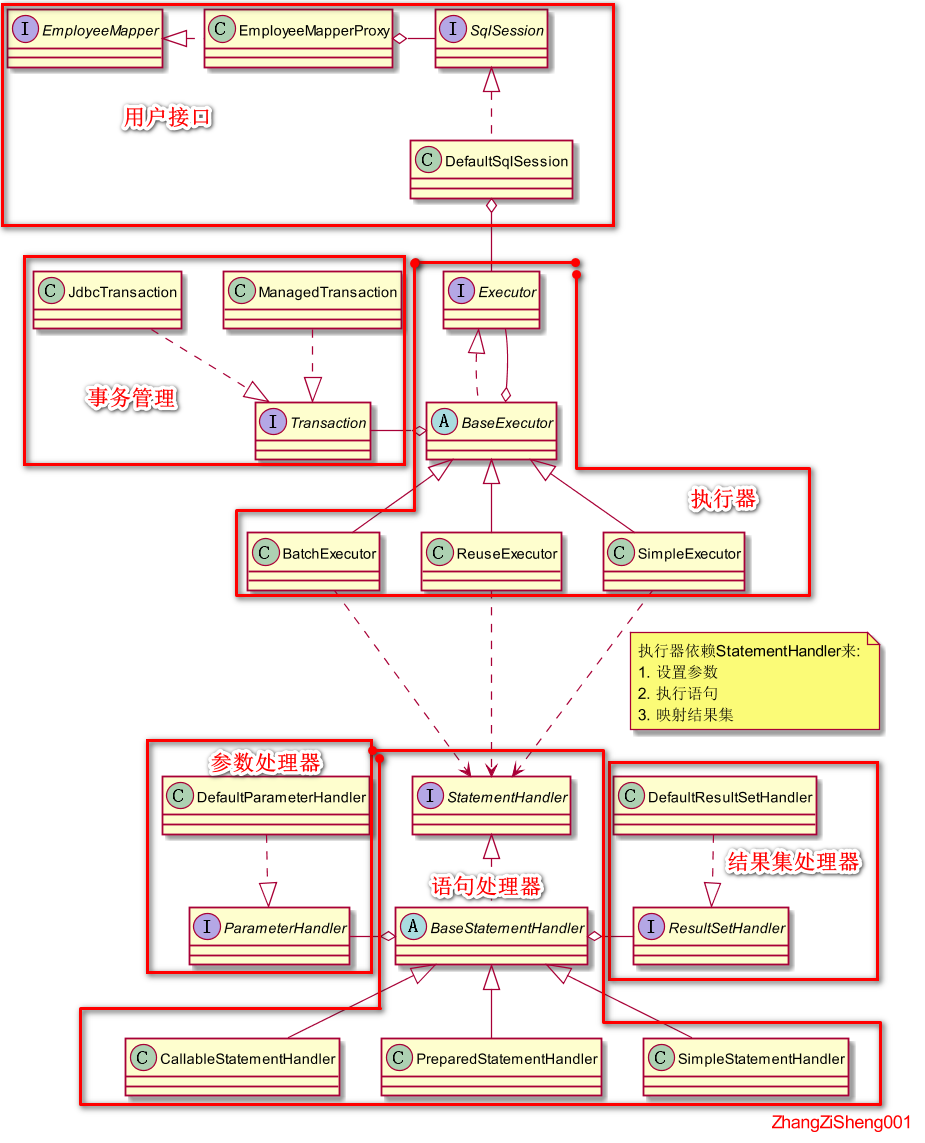
針對上圖,我再簡單梳理下:
Mapper和SqlSession可以認為是用戶的入口(項目中也可以不用Mapper介面,直接使用SqlSession),Mybatis 為我們生產的Mapper實現類最終都會去調用SqlSession的方法;Executor作為整個執行流程的調度者,它依賴StatementHandler來完成參數設置、語句執行和結果映射,使用Transaction來管理事務。StatementHandler調用ParameterHandler為語句設置參數,調用ResultSetHandler將結果集映射為所需對象。
那麼,我們開始看源碼吧。
Mapper代理類的獲取
一般情況下,我們會先拿到SqlSession對象,然後再利用SqlSession獲取Mapper對象,這部分的源碼也是按這個順序開展。
// 獲取 SqlSession
SqlSession sqlSession = sqlSessionFactory.openSession();
// 獲取 Mapper
EmployeeMapper baseMapper = sqlSession.getMapper(EmployeeMapper.class);
先拿到SqlSession對象
SqlSession的獲取過程
上一篇部落格講了DefaultSqlSessionFactory的初始化,現在我們將利用DefaultSqlSessionFactory來創建SqlSession,這個過程也會創建出對應的Executor和Transaction,如下圖所示。
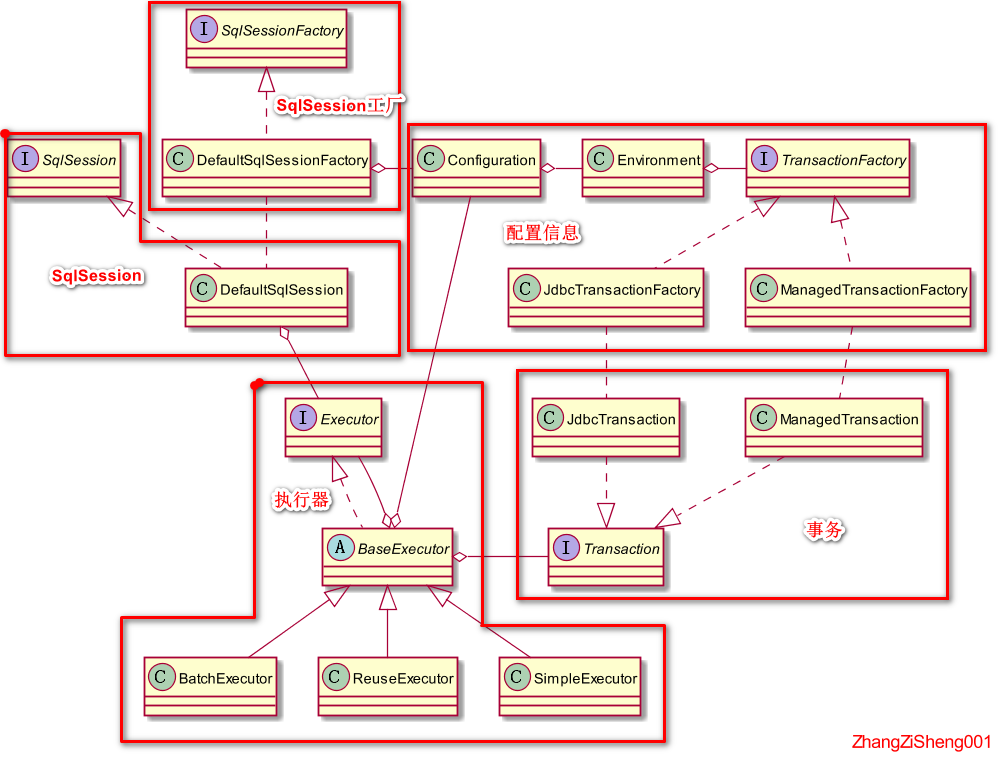
圖中的SqlSession創建時需要先創建Executor,而Executor又要依賴Transaction的創建,Transaction則需要依賴已經初始化好的TransactionFactory和DataSource。
進入到DefaultSqlSessionFactory.openSession()方法。默認情況下,SqlSession是執行緒不安全的,主要和Transaction對象有關,如果考慮復用SqlSession對象的話,需要重寫Transaction的實現。
@Override
public SqlSession openSession() {
    // 默認會使用SimpltExecutors,以及autoCommit=false,事務隔離級別為空
    // 當然我們也可以在入參指定
    // 補充:SIMPLE 就是普通的執行器;REUSE 執行器會重用預處理語句(PreparedStatement);BATCH 執行器不僅重用語句還會執行批量更新。
    return openSessionFromDataSource(configuration.getDefaultExecutorType(), null, false);
}

private SqlSession openSessionFromDataSource(ExecutorType execType, TransactionIsolationLevel level, boolean autoCommit) {
    Transaction tx = null;
    try {
        // 獲取Environment中的TransactionFactory和DataSource,用來創建事務對象
        final Environment environment = configuration.getEnvironment();
        final TransactionFactory transactionFactory = getTransactionFactoryFromEnvironment(environment);
        tx = transactionFactory.newTransaction(environment.getDataSource(), level, autoCommit);
        // 創建執行器,這裡也會給執行器安裝插件
        final Executor executor = configuration.newExecutor(tx, execType);
        // 創建DefaultSqlSession
        return new DefaultSqlSession(configuration, executor, autoCommit);
    } catch (Exception e) {
        closeTransaction(tx); // may have fetched a connection so lets call close()
        throw ExceptionFactory.wrapException("Error opening session.  Cause: " + e, e);
    } finally {
        ErrorContext.instance().reset();
    }
}
如何給執行器安裝插件
上面的程式碼比較簡單,這裡重點說下安裝插件的過程。我們進入到Configuration.newExecutor(Transaction, ExecutorType),可以看到創建完執行器後,還需要給執行器安裝插件,接下來就是要分析下如何給執行器安裝插件。
protected final InterceptorChain interceptorChain = new InterceptorChain();
public Executor newExecutor(Transaction transaction, ExecutorType executorType) {
    executorType = executorType == null ? defaultExecutorType : executorType;
    executorType = executorType == null ? ExecutorType.SIMPLE : executorType;
    Executor executor;
	// 根據executorType選擇創建不同的執行器
    if (ExecutorType.BATCH == executorType) {
        executor = new BatchExecutor(this, transaction);
    } else if (ExecutorType.REUSE == executorType) {
        executor = new ReuseExecutor(this, transaction);
    } else {
        executor = new SimpleExecutor(this, transaction);
    }
    if (cacheEnabled) {
        executor = new CachingExecutor(executor);
    }
    // 安裝插件
    executor = (Executor) interceptorChain.pluginAll(executor);
    return executor;
}
進入到InterceptorChain.pluginAll(Object)方法,這是一個相當通用的方法,不是只能給Executor安裝插件,後面我們看到的StatementHandler、ResultSetHandler、ParameterHandler等都會被安裝插件。
private final List<Interceptor> interceptors = new ArrayList<>();
public Object pluginAll(Object target) {
    // 遍歷安裝所有執行器
    for (Interceptor interceptor : interceptors) {
        target = interceptor.plugin(target);
    }
    return target;
}
// 進入到Interceptor.plugin(Object)方法,這個是介面里的方法,使用 default 聲明
default Object plugin(Object target) {
    return Plugin.wrap(target, this);
}
在定義插件時,一般我們都會採用註解來指定需要攔截的介面及其方法,如下。安裝插件的方法之所以能夠通用,主要還是@Signature註解的功勞,註解中,我們已經明確了攔截哪個介面的哪個方法。注意,這裡我也可以定義其他介面,例如StatementHandler。
@Intercepts(
        {
                @Signature(type = Executor.class, method = "query", args = {MappedStatement.class, Object.class, RowBounds.class, ResultHandler.class}),
                @Signature(type = Executor.class, method = "query", args = {MappedStatement.class, Object.class, RowBounds.class, ResultHandler.class, CacheKey.class, BoundSql.class}),
        }
)
public class PageInterceptor implements Interceptor {
    @Override
    public Object intercept(Invocation invocation) throws Throwable {
        // do something
    }
}
上面這個插件將對Executor介面的以下兩個方法進行攔截:
<E> List<E> query(MappedStatement ms, Object parameter, RowBounds rowBounds, ResultHandler resultHandler, CacheKey cacheKey, BoundSql boundSql) throws SQLException;
<E> List<E> query(MappedStatement ms, Object parameter, RowBounds rowBounds, ResultHandler resultHandler) throws SQLException;
那麼,Mybatis 是如何實現的呢?我們進入到Plugin這個類,它是一個InvocationHandler,也就是說 Mybatis 使用的是 JDK 的動態代理來實現插件功能,後面程式碼中, JDK 的動態代理也會經常出現。
public class Plugin implements InvocationHandler {
	// 需要被安裝插件的類
    private final Object target;
    // 需要安裝的插件
    private final Interceptor interceptor;
    // 存放插件攔截的介面接對應的方法
    private final Map<Class<?>, Set<Method>> signatureMap;

    private Plugin(Object target, Interceptor interceptor, Map<Class<?>, Set<Method>> signatureMap) {
        this.target = target;
        this.interceptor = interceptor;
        this.signatureMap = signatureMap;
    }

    public static Object wrap(Object target, Interceptor interceptor) {
		// 根據插件的註解獲取插件攔截哪些介面哪些方法
        Map<Class<?>, Set<Method>> signatureMap = getSignatureMap(interceptor);
        // 獲取目標類中需要被攔截的所有介面
        Class<?> type = target.getClass();
        Class<?>[] interfaces = getAllInterfaces(type, signatureMap);
        if (interfaces.length > 0) {
            // 創建代理類
            return Proxy.newProxyInstance(
                type.getClassLoader(),
                interfaces,
                new Plugin(target, interceptor, signatureMap));
        }
        return target;
    }

    @Override
    public Object invoke(Object proxy, Method method, Object[] args) throws Throwable {
        try {
            // 以「當前方法的聲明類」為key,查找需要被插件攔截的方法
            Set<Method> methods = signatureMap.get(method.getDeclaringClass());
            // 如果包含當前方法,那麼會執行插件里的intercept方法
            if (methods != null && methods.contains(method)) {
                return interceptor.intercept(new Invocation(target, method, args));
            }
            // 如果並不包含當前方法,則直接執行該方法
            return method.invoke(target, args);
        } catch (Exception e) {
            throw ExceptionUtil.unwrapThrowable(e);
        }
    }
以上就是獲取SqlSession和安裝插件的內容。默認情況下,SqlSession是執行緒不安全的,不斷地創建SqlSession也不是很明智的做法,按道理,Mybatis 應該提供執行緒安全的一套SqlSession實現才對。
再獲取Mapper代理類
Mapper 代理類的獲取過程比較簡單,這裡我們就不一步步看源碼了,直接看圖就行。我畫了 UML 圖,通過這個圖基本可以梳理以下幾個類的關係,繼而明白獲取 Mapper 代理類的方法調用過程,另外,我們也能知道,Mapper 代理類也是使用 JDK 的動態代理生成。
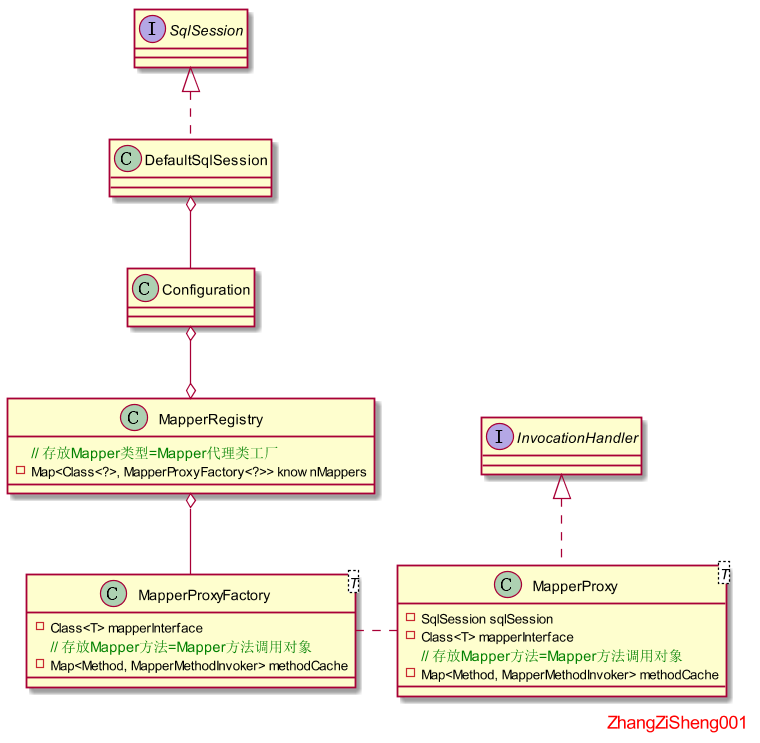
Mapper 作為一個用戶介面,最終還是得調用SqlSession來進行增刪改查,所以,代理類也必須持有對SqlSession的引用。通常情況下,這樣的 Mapper代理類是執行緒不安全的,因為它持有的SqlSession實現類DefaultSqlSession也是執行緒不安全的,但是,如果實現類是SqlSessionManager就另當別論了。
Mapper方法的執行
執行Mapper代理方法
因為Mapper代理類是通過 JDK 的動態代理生成,當調用Mapper代理類的方法時,對應的InvocationHandler對象(即MapperProxy)將被調用,所以,這裡就不展示Mapper代理類的程式碼了,直接從MapperProxy這個類開始分析。
同樣地,還是先看看整個 UML 圖,通過圖示大致可以梳理出方法的調用過程。MethodSignature這個類可以重點看下,它的屬性非常關鍵。
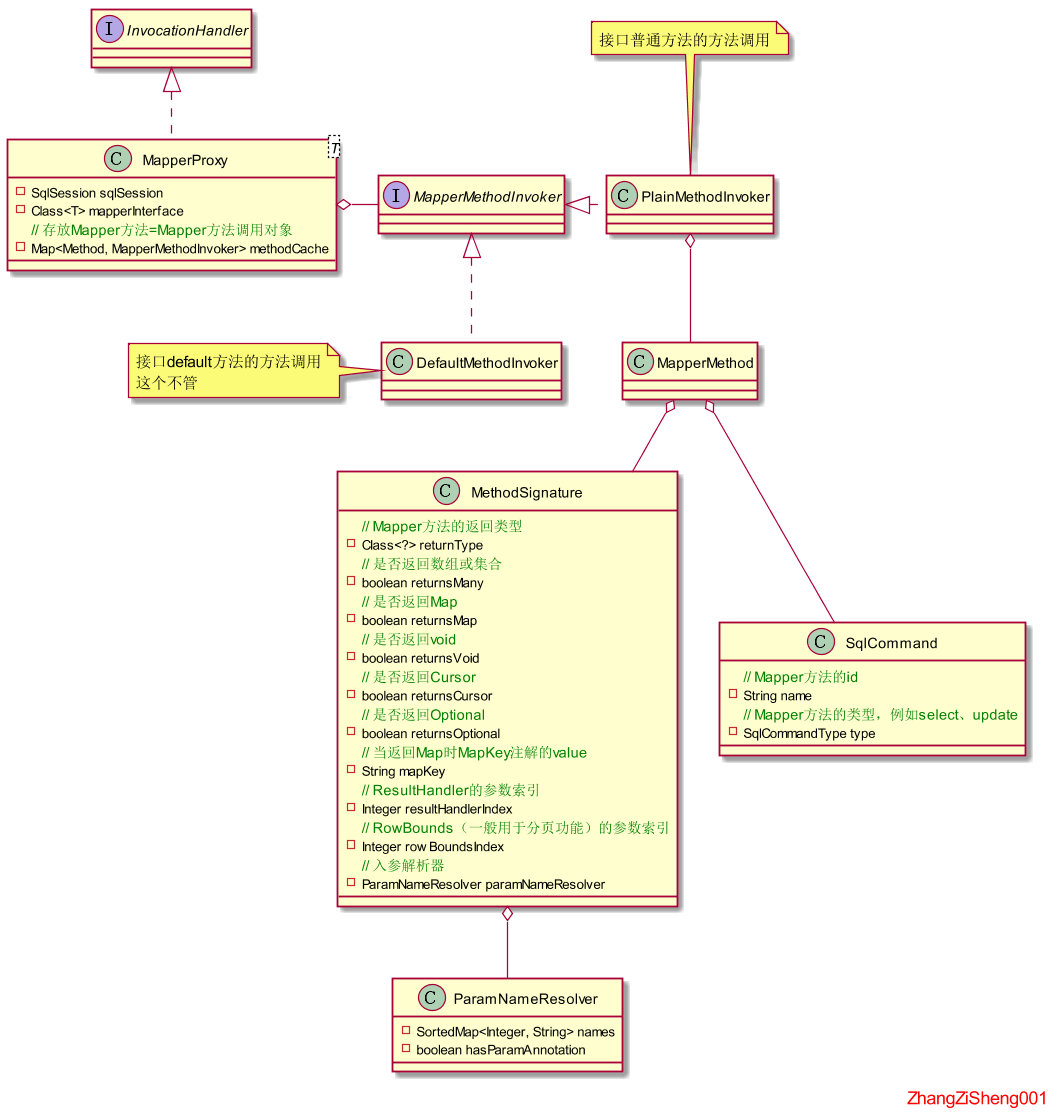
下面開始看源碼,進入到MapperProxy.invoke(Object, Method, Object[])。這裡的MapperMethodInvoker對象會被快取起來,因為這個類是無狀態的,不需要反覆的創建。當快取中沒有對應的MapperMethodInvoker時,方法對應的MapperMethodInvoker實現類將被創建並放入快取,同時MapperMethod、MethodSignature、sqlCommand等對象都會被創建好。
@Override
public Object invoke(Object proxy, Method method, Object[] args) throws Throwable {
    try {
        // 如果是Object類聲明的方法,直接調用
        if (Object.class.equals(method.getDeclaringClass())) {
            return method.invoke(this, args);
        } else {
            // 先從快取拿到MapperMethodInvoker對象,再調用它的方法
            // 因為最終會調用SqlSession的方法,所以這裡得傳入SqlSession對象
            return cachedInvoker(method).invoke(proxy, method, args, sqlSession);
        }
    } catch (Throwable t) {
        throw ExceptionUtil.unwrapThrowable(t);
    }
}
private MapperMethodInvoker cachedInvoker(Method method) throws Throwable {
    try {
        // 快取有就拿,沒有需創建並放入快取
        return methodCache.computeIfAbsent(method, m -> {
            // 如果是介面中定義的default方法,創建MapperMethodInvoker實現類DefaultMethodInvoker
            // 這種情況我們不關注
            if (m.isDefault()) {
                try {
                    if (privateLookupInMethod == null) {
                        return new DefaultMethodInvoker(getMethodHandleJava8(method));
                    } else {
                        return new DefaultMethodInvoker(getMethodHandleJava9(method));
                    }
                } catch (IllegalAccessException | InstantiationException | InvocationTargetException
                         | NoSuchMethodException e) {
                    throw new RuntimeException(e);
                }
            } else {
                // 如果不是介面中定義的default方法,創建MapperMethodInvoker實現類PlainMethodInvoker,在此之前也會創建MapperMethod
                return new PlainMethodInvoker(new MapperMethod(mapperInterface, method, sqlSession.getConfiguration()));
            }
        });
    } catch (RuntimeException re) {
        Throwable cause = re.getCause();
        throw cause == null ? re : cause;
    }
}
由於我們不考慮DefaultMethodInvoker的情況,所以,這裡直接進入到MapperProxy.PlainMethodInvoker.invoke(Object, Method, Object[], SqlSession)。
private final MapperMethod mapperMethod;
@Override
public Object invoke(Object proxy, Method method, Object[] args, SqlSession sqlSession) throws Throwable {
    // 直接調用MapperMethod的方法,method和proxy的入參丟棄
    return mapperMethod.execute(sqlSession, args);
}
進入到MapperMethod.execute(SqlSession, Object[])方法。前面提到過 Mapper 代理類必須依賴SqlSession對象來進行增刪改查,在這個方法就可以看到,方法中會通過方法的類型來決定調用SqlSession的哪個方法。
在進行參數轉換時有三種情況:
-
如果參數為空,則 param 為 null;
-
如果參數只有一個且不包含
Param註解,則 param 就是該入參對象; -
如果參數大於一個或包含了
Param註解,則 param 是一個Map<String, Object>,key 為註解Param的值,value 為對應入參對象。
另外,針對 insert|update|delete 方法,Mybatis 支援使用 void、Integer/int、Long/long、Boolean/boolean 的返回類型,而針對 select 方法,支援使用 Collection、Array、void、Map、Cursor、Optional 返回類型,並且支援入參 RowBounds 來進行分頁,以及入參 ResultHandler 來處理返回結果。
public Object execute(SqlSession sqlSession, Object[] args) {
    Object result;
    // 判斷屬於哪種類型,來決定調用SqlSession的哪個方法
    switch (command.getType()) {
		// 如果為insert類型方法
        case INSERT: {
            // 參數轉換
            Object param = method.convertArgsToSqlCommandParam(args);
            // rowCountResult將根據返回類型來處理result,例如,當返回類型為boolean時影響的rowCount是否大於0,當返回類型為int時,直接返回rowCount
            result = rowCountResult(sqlSession.insert(command.getName(), param));
            break;
        }
		// 如果為update類型方法
        case UPDATE: {
            Object param = method.convertArgsToSqlCommandParam(args);
            result = rowCountResult(sqlSession.update(command.getName(), param));
            break;
        }
        // 如果為delete類型方法
        case DELETE: {
            Object param = method.convertArgsToSqlCommandParam(args);
            result = rowCountResult(sqlSession.delete(command.getName(), param));
            break;
        }
        // 如果為select類型方法
        case SELECT:
            // 返回void,且入參有ResultHandler
            if (method.returnsVoid() && method.hasResultHandler()) {
                executeWithResultHandler(sqlSession, args);
                result = null;
            // 返回類型為數組或List
            } else if (method.returnsMany()) {
                result = executeForMany(sqlSession, args);
            // 返回類型為Map
            } else if (method.returnsMap()) {
                result = executeForMap(sqlSession, args);
            // 返回類型為Cursor
            } else if (method.returnsCursor()) {
                result = executeForCursor(sqlSession, args);
            // 這種一般是返回單個實體對象或者Optional對象
            } else {
                Object param = method.convertArgsToSqlCommandParam(args);
                result = sqlSession.selectOne(command.getName(), param);
                if (method.returnsOptional()
                    && (result == null || !method.getReturnType().equals(result.getClass()))) {
                    result = Optional.ofNullable(result);
                }
            }
            break;
        // 如果為FLUSH類型方法,這種情況不關注
        case FLUSH:
            result = sqlSession.flushStatements();
            break;
        default:
            throw new BindingException("Unknown execution method for: " + command.getName());
    }
    // 當方法返回類型為基本類型,但是result卻為空,這種情況會拋出異常
    if (result == null && method.getReturnType().isPrimitive() && !method.returnsVoid()) {
        throw new BindingException("Mapper method '" + command.getName()
                                   + " attempted to return null from a method with a primitive return type (" + method.getReturnType() + ").");
    }
    return result;
}
增刪改的我們不繼續看了,至於查的,只看method.returnsMany()的情況。進入到MapperMethod.executeForMany(SqlSession, Object[])。通過這個方法可以知道,當返回多個對象時,Mapper 中我們可以使用List接收,也可以使用數組或者Collection的其他子類來接收,但是處於性能考慮,如果不是必須,建議還是使用List比較好。
將RowBounds作為 Mapper 方法的入參,可以支援自動分頁功能,但是,這種方式存在一個很大缺點,就是 Mybatis 會將所有結果查放入本地記憶體再進行分頁,而不是查的時候嵌入分頁參數。所以,這個分頁入參,建議還是不要使用了。
private <E> Object executeForMany(SqlSession sqlSession, Object[] args) {
    List<E> result;
    // 轉換參數
    Object param = method.convertArgsToSqlCommandParam(args);
    // 如果入參包含RowBounds對象,這個一般用於分頁使用
    if (method.hasRowBounds()) {
        RowBounds rowBounds = method.extractRowBounds(args);
        result = sqlSession.selectList(command.getName(), param, rowBounds);
    } else {
    // 不用分頁的情況
        result = sqlSession.selectList(command.getName(), param);
    }
    // 如果SqlSession方法的返回類型和Mapper方法的返回類型不一致
    // 例如,mapper返回類型為數組、Collection的其他子類
    if (!method.getReturnType().isAssignableFrom(result.getClass())) {
        // 如果mapper方法要求返回數組
        if (method.getReturnType().isArray()) {
            return convertToArray(result);
        } else {
        // 如果要求返回Set等Collection子類,這個方法感興趣的可以研究下,非常值得借鑒學習
            return convertToDeclaredCollection(sqlSession.getConfiguration(), result);
        }
    }
    return result;
}
從Mapper進入到SqlSession
接下來就需要進入SqlSession的方法了,這裡選用實現類DefaultSqlSession進行分析。SqlSession作為用戶入口,程式碼不會太多,主要工作還是通過執行器來完成。
在調用執行器方法之前,這裡會對參數對象再次包裝,一般針對入參只有一個參數且不包含Param註解的情況:
- 如果是
Collection子類,將轉換為放入"collection"=object鍵值對的 map,如果它是List的子類,還會再放入"list"=object的鍵值對 - 如果是數組,將轉換為放入
"array"=object鍵值對的 map
@Override
public <E> List<E> selectList(String statement, Object parameter) {
    // 這裡還是給它傳入了一個分頁對象,這個對象默認分頁參數為0,Integer.MAX_VALUE
    return this.selectList(statement, parameter, RowBounds.DEFAULT);
}

@Override
public <E> List<E> selectList(String statement, Object parameter, RowBounds rowBounds) {
    try {
        // 利用方法id從配置對象中拿到MappedStatement對象
        MappedStatement ms = configuration.getMappedStatement(statement);
        // 接著執行器開始調度,傳入resultHandler為空
        return executor.query(ms, wrapCollection(parameter), rowBounds, Executor.NO_RESULT_HANDLER);
    } catch (Exception e) {
        throw ExceptionFactory.wrapException("Error querying database.  Cause: " + e, e);
    } finally {
        ErrorContext.instance().reset();
    }
}
執行器開始調度
接下來就進入執行器的部分了。注意,由於本文不會涉及到 Mybatis 結果快取的內容,所以,下面的程式碼都會刪除快取相關的部分。
那麼,還是回到最開始的圖,接下來將選擇SimpleExecutor進行分析。
進入到BaseExecutor.query(MappedStatement, Object, RowBounds, ResultHandler)。這個方法中會根據入參將動態語句轉換為靜態語句,並生成對應的ParameterMapping。
例如,
<if test="con.gender != null">and e.gender = {con.gender}</if>
將被轉換為 and e.gender = ?,並且生成
ParameterMapping{property='con.gender', mode=IN, javaType=class java.lang.Object, jdbcType=null, numericScale=null, resultMapId='null', jdbcTypeName='null', expression='null'}
的ParameterMapping。
生成的ParameterMapping將根據?的索引放入集合中待使用。
這部分內容我就不展開了,感興趣地可以自行研究。
@Override
public <E> List<E> query(MappedStatement ms, Object parameter, RowBounds rowBounds, ResultHandler resultHandler) throws SQLException {
    // 將sql語句片段中的動態部分轉換為靜態,並生成對應的ParameterMapping
    BoundSql boundSql = ms.getBoundSql(parameter);
    // 生成快取的key
    CacheKey key = createCacheKey(ms, parameter, rowBounds, boundSql);
    return query(ms, parameter, rowBounds, resultHandler, key, boundSql);
}
接下來一大堆關於結果快取的程式碼,前面說過,本文不講,所以我們直接跳過進入到SimpleExecutor.doQuery(MappedStatement, Object, RowBounds, ResultHandler, BoundSql)。可以看到,接下來的任務都是由StatementHandler來完成,包括了參數設置、語句執行和結果集映射等。
@Override
public <E> List<E> doQuery(MappedStatement ms, Object parameter, RowBounds rowBounds, ResultHandler resultHandler, BoundSql boundSql) throws SQLException {
    Statement stmt = null;
    try {
        Configuration configuration = ms.getConfiguration();
        // 獲取StatementHandler對象,在上面的UML中可以看到,它非常重要
        // 創建StatementHandler對象時,會根據StatementType自行判斷選擇SimpleStatementHandler、PreparedStatementHandler還是CallableStatementHandler實現類
        // 另外,還會給它安裝執行器的所有插件
        StatementHandler handler = configuration.newStatementHandler(wrapper, ms, parameter, rowBounds, resultHandler, boundSql);
        // 獲取Statement對象,並設置參數
        stmt = prepareStatement(handler, ms.getStatementLog());
        // 執行語句,並映射結果集
        return handler.query(stmt, resultHandler);
    } finally {
        closeStatement(stmt);
    }
}
本文將對以下兩行程式碼分別展開分析。其中,關於參數設置的內容不會細講,更多地精力會放在結果集映射上面。
// 獲取Statement對象,並設置參數
stmt = prepareStatement(handler, ms.getStatementLog());
// 執行語句,並映射結果集
return handler.query(stmt, resultHandler);
語句處理器開始處理語句
在創建StatementHandler時,會通過MappedStatement.getStatementType()自動選擇使用哪種語句處理器,有以下情況:
- 如果是 STATEMENT,則選擇
SimpleStatementHandler; - 如果是 PREPARED,則選擇
PreparedStatementHandler; - 如果是 CALLABLE,則選擇
CallableStatementHandler; - 其他情況拋出異常。
本文將選用PreparedStatementHandler進行分析。
獲取語句對象和設置參數
進入到SimpleExecutor.prepareStatement(StatementHandler, Log)。這個方法將會獲取當前語句的PreparedStatement對象,並給它設置參數。
protected Transaction transaction;
private Statement prepareStatement(StatementHandler handler, Log statementLog) throws SQLException {
    Statement stmt;
    // 獲取連接對象,通過Transaction獲取
    Connection connection = getConnection(statementLog);
    // 獲取Statement對象,由於分析的是PreparedStatementHandler,所以會返回實現類PreparedStatement
    stmt = handler.prepare(connection, transaction.getTimeout());
    // 設置參數
    handler.parameterize(stmt);
    return stmt;
}
進入到PreparedStatementHandler.parameterize(Statement)。正如 UML 圖中說到的,這裡實際上是調用ParameterHandler來設置參數。
protected final ParameterHandler parameterHandler;
@Override
public void parameterize(Statement statement) throws SQLException {
    parameterHandler.setParameters((PreparedStatement) statement);
}
進入到DefaultParameterHandler.setParameters(PreparedStatement)。前面講過,在將動態語句轉出靜態語句時,生成了語句每個?對應的ParameterMapping,並且這些ParameterMapping會按照語句中對應的索引被放入集合中。在以下方法中,就是遍歷這個集合,將參數設置到PreparedStatement中去。
private final TypeHandlerRegistry typeHandlerRegistry;
private final MappedStatement mappedStatement;
private final Object parameterObject;
private final BoundSql boundSql;
private final Configuration configuration;

@Override
public void setParameters(PreparedStatement ps) {
    // 獲得當前語句對應的ParameterMapping
    List<ParameterMapping> parameterMappings = boundSql.getParameterMappings();
    if (parameterMappings != null) {
        // 遍歷ParameterMapping
        for (int i = 0; i < parameterMappings.size(); i++) {
            ParameterMapping parameterMapping = parameterMappings.get(i);
            // 一般情況mode都是IN,至於OUT的情況,用於結果映射到入參,比較少用
            if (parameterMapping.getMode() != ParameterMode.OUT) {
                Object value;// 用於設置到ps中的?的參數
                // 這個propertyName對應mapper中#{value}的名字
                String propertyName = parameterMapping.getProperty();
                // 判斷additionalParameters是否有這個propertyName,這種情況暫時不清楚
                if (boundSql.hasAdditionalParameter(propertyName)) { // issue #448 ask first for additional params
                    value = boundSql.getAdditionalParameter(propertyName);
                // 如果入參為空
                } else if (parameterObject == null) {
                    value = null;
                // 如果有當前入參的類型處理器
                } else if (typeHandlerRegistry.hasTypeHandler(parameterObject.getClass())) {
                    value = parameterObject;
                // 如果沒有當前入參的類型處理器,這種一般是傳入實體對象或傳入Map的情況
                } else {
                    // 這個原理和前面說過的MetaClass差不多
                    MetaObject metaObject = configuration.newMetaObject(parameterObject);
                    value = metaObject.getValue(propertyName);
                }
                TypeHandler typeHandler = parameterMapping.getTypeHandler();
                JdbcType jdbcType = parameterMapping.getJdbcType();
                // 如果未指定jdbcType,且入參為空,沒有在setting中配置jdbcTypeForNull的話,默認為OTHER
                if (value == null && jdbcType == null) {
                    jdbcType = configuration.getJdbcTypeForNull();
                }
                try {
                    // 利用類型處理器給ps設置參數
                    typeHandler.setParameter(ps, i + 1, value, jdbcType);
                } catch (TypeException | SQLException e) {
                    throw new TypeException("Could not set parameters for mapping: " + parameterMapping + ". Cause: " + e, e);
                }
            }
        }
    }
}
使用ParameterHandler設置參數的內容就不再多講,接下來分析語句執行和結果集映射的程式碼。
語句執行和結果集映射
進入到PreparedStatementHandler.query(Statement, ResultHandler)方法。語句執行就是普通的 JDBC,沒必要多講,重點看看如何使用ResultSetHandler完成結果集的映射。
protected final ResultSetHandler resultSetHandler;
@Override
public <E> List<E> query(Statement statement, ResultHandler resultHandler) throws SQLException {
    PreparedStatement ps = (PreparedStatement) statement;
    // 直接執行
    ps.execute();
    // 映射結果集
    return resultSetHandler.handleResultSets(ps);
}
為了滿足多種需求,Mybatis 在處理結果集映射的邏輯非常複雜,這裡先簡單說下。
一般我們的 resultMap 是這樣配置的:
<resultMap id="blogResult" type="Blog">
	<association property="author" column="author_id" javaType="Author" select="selectAuthor"/>
</resultMap>
<select id="selectBlog" resultMap="blogResult">
	SELECT * FROM BLOG WHERE ID = #{id}
</select>
然而,Mybatis 竟然也支援多 resultSet 映射的情況,這裡拿到的第二個結果集將使用resultSet="authors"的resultMap 進行映射,並將得到的Author設置進Blog的屬性。
<resultMap id="blogResult" type="Blog">
    <id property="id" column="id" />
    <result property="title" column="title"/>
    <association property="author" javaType="Author" resultSet="authors" column="author_id" foreignColumn="id">
        <id property="id" column="id"/>
        <result property="username" column="username"/>
        <result property="password" column="password"/>
        <result property="email" column="email"/>
        <result property="bio" column="bio"/>
    </association>
</resultMap>
<select id="selectBlog" resultSets="blogs,authors" resultMap="blogResult" statementType="CALLABLE">
	{call getBlogsAndAuthors(#{id,jdbcType=INTEGER,mode=IN})}
</select>
還有一種更加奇葩的,多 resultSet、多 resultMap,如下。這種我暫時也不清楚怎麼用。
<select id="selectBlogs" resultSets="blogs01,blogs02" resultMap="blogResult01,blogResult02">
	{call getTwoBlogs(#{id,jdbcType=INTEGER,mode=IN})}
</select>
接下來只考慮第一種情況。另外兩種感興趣的自己研究吧。
進入到DefaultResultSetHandler.handleResultSets(Statement)方法。
@Override
public List<Object> handleResultSets(Statement stmt) throws SQLException {
	// 用於存放最終對象的集合
    final List<Object> multipleResults = new ArrayList<>();
	// resultSet索引
    int resultSetCount = 0;
    // 獲取第一個結果集
    ResultSetWrapper rsw = getFirstResultSet(stmt);

    // 獲取當前語句對應的所有ResultMap
    List<ResultMap> resultMaps = mappedStatement.getResultMaps();
    // resultMap總數
    int resultMapCount = resultMaps.size();
    // 校驗結果集非空時resultMapCount是否為空
    validateResultMapsCount(rsw, resultMapCount);
    // 接下來結果集和resultMap會根據索引一對一地映射
    while (rsw != null && resultMapCount > resultSetCount) {
        // 獲取與當前結果集映射的resultMap
        ResultMap resultMap = resultMaps.get(resultSetCount);
        // 映射結果集,並將生成的對象放入multipleResults
        handleResultSet(rsw, resultMap, multipleResults, null);
        // 獲取下一個結果集
        rsw = getNextResultSet(stmt);
        // TODO
        cleanUpAfterHandlingResultSet();
        // resultSet索引+1
        resultSetCount++;
    }

    // 如果當前resultSet的索引小於resultSets中配置的resultSet數量,將繼續映射
    // 這就是前面說的第二種情況了,這個不講
    String[] resultSets = mappedStatement.getResultSets();
    if (resultSets != null) {
        while (rsw != null && resultSetCount < resultSets.length) {
            // 獲取指定resultSet對應的ResultMap
            ResultMapping parentMapping = nextResultMaps.get(resultSets[resultSetCount]);
            if (parentMapping != null) {
                // 獲取嵌套ResultMap進行映射
                String nestedResultMapId = parentMapping.getNestedResultMapId();
                ResultMap resultMap = configuration.getResultMap(nestedResultMapId);
                handleResultSet(rsw, resultMap, null, parentMapping);
            }
            // 獲取下一個結果集
            rsw = getNextResultSet(stmt);
            // TODO
            cleanUpAfterHandlingResultSet();
            // resultSet索引+1
            resultSetCount++;
        }
    }
	// 如果multipleResults只有一個,返回multipleResults.get(0),否則整個multipleResults一起返回
    return collapseSingleResultList(multipleResults);
}
進入DefaultResultSetHandler.handleResultSet(ResultSetWrapper, ResultMap, List<Object>, ResultMapping)。這裡的入參 parentMapping 一般為空,除非在語句中設置了多個 resultSet;
屬性 resultHandler 一般為空,除非在 Mapper 方法的入參中傳入,這個對象可以由用戶自己實現,通過它我們可以對結果進行操作。在實際項目中,我們往往是拿到實體對象後才到 Web 層完成 VO 對象的轉換,通過ResultHandler ,我們在 DAO 層就能完成 VO 對象的轉換,相比傳統方式,這裡可以減少一次集合遍歷,而且,因為可以直接傳入ResultHandler ,而不是具體實現,所以轉換過程不會滲透到 DAO層。注意,採用這種方式時,Mapper 的返回類型必須為 void。
private void handleResultSet(ResultSetWrapper rsw, ResultMap resultMap, List<Object> multipleResults, ResultMapping parentMapping) throws SQLException {
    try {
        // 如果不是設置了多個resultSets,parentMapping一般為空
        // 所以,這種情況不關注
        if (parentMapping != null) {
            // 映射結果集
            handleRowValues(rsw, resultMap, null, RowBounds.DEFAULT, parentMapping);
        } else {
            // resultHandler一般為空
            if (resultHandler == null) {
                // 創建defaultResultHandler
                DefaultResultHandler defaultResultHandler = new DefaultResultHandler(objectFactory);
                // 映射結果集
                handleRowValues(rsw, resultMap, defaultResultHandler, rowBounds, null);
                // 將對象放入集合
                multipleResults.add(defaultResultHandler.getResultList());
            } else {
                // 映射結果集,如果傳入了自定義的ResultHandler,則由用戶自己處理映射好的對象
                handleRowValues(rsw, resultMap, resultHandler, rowBounds, null);
            }
        }
    } finally {
        // issue #228 (close resultsets)
        closeResultSet(rsw.getResultSet());
    }
}
進入到DefaultResultSetHandler.handleRowValues(ResultSetWrapper, ResultMap, ResultHandler<?>, RowBounds, ResultMapping)。這裡會根據是否包含嵌套結果映射來判斷調用哪個方法,如果是嵌套結果映射,需要判斷是否允許分頁,以及是否允許使用自定義ResultHandler。
public void handleRowValues(ResultSetWrapper rsw, ResultMap resultMap, ResultHandler<?> resultHandler, RowBounds rowBounds, ResultMapping parentMapping) throws SQLException {
    // 如果resultMap存在嵌套結果映射
    if (resultMap.hasNestedResultMaps()) {
        // 如果設置了safeRowBoundsEnabled=true,需校驗在嵌套語句中使用分頁時拋出異常
        ensureNoRowBounds();
        // 如果設置了safeResultHandlerEnabled=false,需校驗在嵌套語句中使用自定義結果處理器時拋出異常
        checkResultHandler();
        // 映射結果集
        handleRowValuesForNestedResultMap(rsw, resultMap, resultHandler, rowBounds, parentMapping);
    // 如果resultMap不存在嵌套結果映射
    } else {
        // 映射結果集
        handleRowValuesForSimpleResultMap(rsw, resultMap, resultHandler, rowBounds, parentMapping);
    }
}
這裡我就不搞那麼複雜了,就只看非嵌套結果的情況。進入DefaultResultSetHandler.handleRowValuesForSimpleResultMap(ResultSetWrapper, ResultMap, ResultHandler<?>, RowBounds, ResultMapping)。在這個方法中可以看到,使用RowBounds進行分頁時,Mybatis 會查出所有數據到記憶體中,然後再分頁,所以,不建議使用。
private void handleRowValuesForSimpleResultMap(ResultSetWrapper rsw, ResultMap resultMap, ResultHandler<?> resultHandler, RowBounds rowBounds, ResultMapping parentMapping)
    throws SQLException {
    // 創建DefaultResultContext對象,這個用來做標誌判斷使用,還可以作為ResultHandler處理結果的入參
    DefaultResultContext<Object> resultContext = new DefaultResultContext<>();
    // 獲取當前結果集
    ResultSet resultSet = rsw.getResultSet();
    // 剔除分頁offset以下數據
    skipRows(resultSet, rowBounds);
    while (shouldProcessMoreRows(resultContext, rowBounds) && !resultSet.isClosed() && resultSet.next()) {
        // 如果存在discriminator,則根據結果集選擇匹配的resultMap,否則直接返回當前resultMap
        ResultMap discriminatedResultMap = resolveDiscriminatedResultMap(resultSet, resultMap, null);
        // 創建實體對象,並完成結果映射
        Object rowValue = getRowValue(rsw, discriminatedResultMap, null);
        // 一般會回調ResultHandler的handleResult方法,讓用戶可以對映射好的結果進行處理
        // 如果配置了resultSets的話,且當前在映射子結果集,那麼會將子結果集映射到的對象設置到父對象的屬性中
        storeObject(resultHandler, resultContext, rowValue, parentMapping, resultSet);
    }
}
進入DefaultResultSetHandler.getRowValue(ResultSetWrapper, ResultMap, String)方法。這個方法將創建對象,並完成結果集的映射。點到為止,有空再做補充了。
private Object getRowValue(ResultSetWrapper rsw, ResultMap resultMap, String columnPrefix) throws SQLException {
    final ResultLoaderMap lazyLoader = new ResultLoaderMap();
    // 創建實體對象,這裡會完成構造方法中參數的映射,以及完成懶載入的代理
    Object rowValue = createResultObject(rsw, resultMap, lazyLoader, columnPrefix);
    if (rowValue != null && !hasTypeHandlerForResultObject(rsw, resultMap.getType())) {
        // MetaObject可以方便完成實體對象的獲取和設置屬性
        final MetaObject metaObject = configuration.newMetaObject(rowValue);
        // foundValues用於標識當前對象是否還有未映射完的屬性
        boolean foundValues = this.useConstructorMappings;
        // 映射列名和屬性名一致的屬性,如果設置了駝峰規則,那麼這部分也會映射
        if (shouldApplyAutomaticMappings(resultMap, false)) {
            foundValues = applyAutomaticMappings(rsw, resultMap, metaObject, columnPrefix) || foundValues;
        }
        // 映射property的RsultMapping
        foundValues = applyPropertyMappings(rsw, resultMap, metaObject, lazyLoader, columnPrefix) || foundValues;
        foundValues = lazyLoader.size() > 0 || foundValues;
        // 返回映射好的對象
        rowValue = foundValues || configuration.isReturnInstanceForEmptyRow() ? rowValue : null;
    }
    return rowValue;
}
以上,基本講完 Mapper 的獲取及方法執行相關源碼的分析。
通過分析 Mybatis 的源碼,希望讀者能夠更了解 Mybatis,從而在實際工作和學習中更好地使用,以及避免「被坑」。針對結果快取、參數設置以及其他細節問題,本文沒有繼續展開,後續有空再補充吧。
參考資料
相關源碼請移步:mybatis-demo
本文為原創文章,轉載請附上原文出處鏈接://www.cnblogs.com/ZhangZiSheng001/p/12761376.html

