第2-1-4章 SpringBoot整合FastDFS文件存儲服務
- 2022 年 11 月 8 日
- 筆記
- JAVA, springboot, FastDFS, 中台戰略與組件化開發, 文件服務, 文件存儲服務
目錄
5 SpringBoot整合
5.1 操作步驟
- 配置FastDFS執行環境
- 文件上傳配置
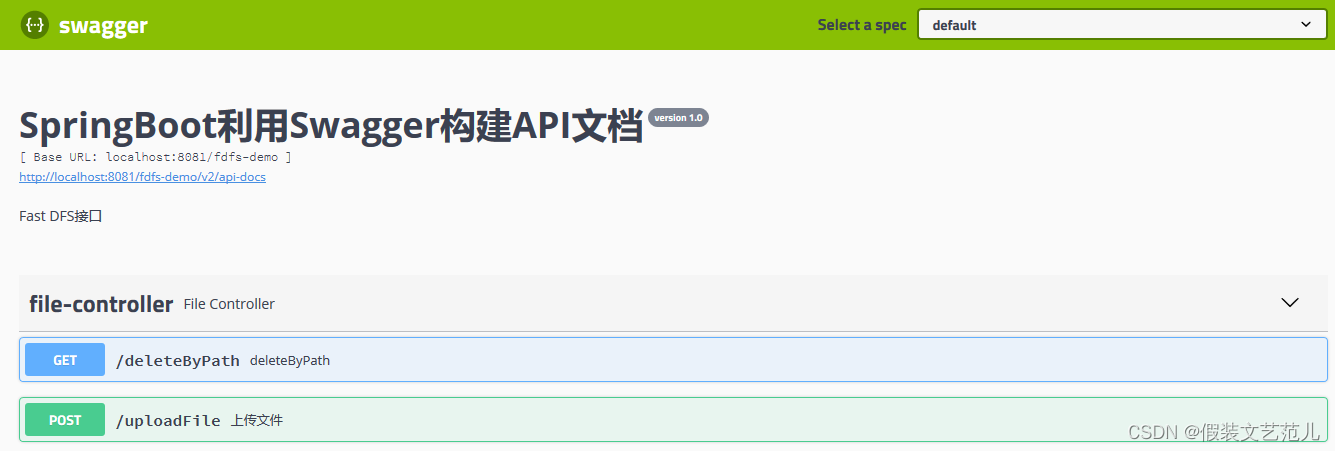
- 整合Swagger2測試介面
5.2 項目依賴
<!-- FastDFS依賴 -->
<dependency>
    <groupId>com.github.tobato</groupId>
    <artifactId>fastdfs-client</artifactId>
    <version>1.26.5</version>
</dependency>

<!-- Swagger2 核心依賴 -->
<dependency>
    <groupId>io.springfox</groupId>
    <artifactId>springfox-swagger2</artifact>
    <version>2.9.2</version>
</dependency>
<dependency>
    <groupId>io.springfox</groupId>
    <artifactId>springfox-swagger-ui</artifactId>
    <version>2.9.2</version>
</dependency>
5.3 客戶端開發
5.3.1 FastDFS配置
fdfs:
  # 鏈接超時
  connect-timeout: 60
  # 讀取時間
  so-timeout: 60
  # 生成縮略圖參數
  thumb-image:
    width: 150
    height: 150
  tracker-list: 192.168.86.101:22122
5.3.2 FastDFS配置類
@Configuration
@Import(FdfsClientConfig.class)
// 避免Jmx重複註冊bean
@EnableMBeanExport(registration = RegistrationPolicy.IGNORE_EXISTING)
public class DFSConfig {

}
5.3.3 文件工具類
import com.github.tobato.fastdfs.domain.fdfs.StorePath;
import com.github.tobato.fastdfs.service.FastFileStorageClient;
import org.slf4j.Logger;
import org.slf4j.LoggerFactory;
import org.springframework.stereotype.Component;
import org.springframework.util.StringUtils;
import org.springframework.web.multipart.MultipartFile;
import javax.annotation.Resource;


@Component
public class FileDfsUtil {
    private static final Logger LOGGER = LoggerFactory.getLogger(FileDfsUtil.class);
    @Resource
    private FastFileStorageClient storageClient ;
    /**
     * 上傳文件
     */
    public String upload(MultipartFile multipartFile) throws Exception{
        String originalFilename = multipartFile.getOriginalFilename().
                substring(multipartFile.getOriginalFilename().
                        lastIndexOf(".") + 1);
        StorePath storePath = this.storageClient.uploadImageAndCrtThumbImage(
                multipartFile.getInputStream(),
                multipartFile.getSize(),originalFilename , null);
        return storePath.getFullPath() ;
    }

    /**
     * 刪除文件
     */
    public void deleteFile(String fileUrl) {
        if (StringUtils.isEmpty(fileUrl)) {
            LOGGER.info("fileUrl == >>文件路徑為空...");
            return;
        }
        try {
            StorePath storePath = StorePath.parseFromUrl(fileUrl);
            storageClient.deleteFile(storePath.getGroup(), storePath.getPath());
        } catch (Exception e) {
            LOGGER.info(e.getMessage());
        }
    }
}
5.3.4 文件上傳配置
spring:
  application:
    name: fdfs-demo
  jackson:
    time-zone: GMT+8
    date-format: yyyy-MM-dd HH:mm:ss
  servlet:
    multipart:
      max-file-size: 100MB
      max-request-size: 100MB
      enabled: true
5.3.5 配置Swagger2
配置類:
import org.springframework.context.annotation.Bean;
import org.springframework.context.annotation.Configuration;
import springfox.documentation.builders.ApiInfoBuilder;
import springfox.documentation.builders.PathSelectors;
import springfox.documentation.builders.RequestHandlerSelectors;
import springfox.documentation.service.ApiInfo;
import springfox.documentation.spi.DocumentationType;
import springfox.documentation.spring.web.plugins.Docket;

/**
 * Swagger 配置文件
 */
@Configuration
public class SwaggerConfig {
    @Bean
    public Docket createRestApi() {
        return new Docket(DocumentationType.SWAGGER_2)
                .apiInfo(apiInfo())
                .select()
                .apis(RequestHandlerSelectors.basePackage("com.itheima.fdfs.demo"))
                .paths(PathSelectors.any())
                .build();
    }

    private ApiInfo apiInfo() {
        return new ApiInfoBuilder()
                .title("SpringBoot利用Swagger構建API文檔")
                .description("Fast DFS介面")
                .version("version 1.0")
                .build();
    }
}
啟動類:
import org.springframework.boot.SpringApplication;
import org.springframework.boot.autoconfigure.SpringBootApplication;
import springfox.documentation.swagger2.annotations.EnableSwagger2;

@EnableSwagger2
@SpringBootApplication
public class FdfsDemoApplication {
	public static void main(String[] args) {
		SpringApplication.run(FdfsDemoApplication.class, args);
	}
}
5.3.6 API介面
import com.itheima.fdfs.demo.common.FileDfsUtil;
import io.swagger.annotations.ApiOperation;
import org.springframework.http.ResponseEntity;
import org.springframework.util.StringUtils;
import org.springframework.web.bind.annotation.RequestMapping;
import org.springframework.web.bind.annotation.RequestMethod;
import org.springframework.web.bind.annotation.RequestParam;
import org.springframework.web.bind.annotation.RestController;
import org.springframework.web.multipart.MultipartFile;

import javax.annotation.Resource;

@RestController
public class FileController {
    @Resource
    private FileDfsUtil fileDfsUtil ;
    /**
     * //localhost:8081/swagger-ui.html
     */
    @ApiOperation(value="上傳文件", notes="測試FastDFS文件上傳")
    @RequestMapping(value = "/uploadFile",headers="content-type=multipart/form-data", method = RequestMethod.POST)
    public ResponseEntity<String> uploadFile (@RequestParam("file") MultipartFile file){
        String result ;
        try{
            String path = fileDfsUtil.upload(file) ;
            if (!StringUtils.isEmpty(path)){
                result = path ;
            } else {
                result = "上傳失敗" ;
            }
        } catch (Exception e){
            e.printStackTrace() ;
            result = "服務異常" ;
        }
        return ResponseEntity.ok(result);
    }

    /**
     * 文件刪除
     */
    @RequestMapping(value = "/deleteByPath", method = RequestMethod.GET)
    public ResponseEntity<String> deleteByPath (){
        String filePathName = "group1/M00/00/00/rBIAAmNmi82AJxLsAABdrZgsqUU214.jpg" ;
        fileDfsUtil.deleteFile(filePathName);
        return ResponseEntity.ok("SUCCESS") ;
    }
}
5.4 介面演示
-
測試介面
- 上傳介面
- 刪除介面