一句口訣教你辨別索引失效七大場景
摘要:本文將通過一句口訣,教你如何辨別索引失效。
本文分享自華為雲社區《虛竹哥教你一句口訣辨別索引失效七大場景》,作者:小虛竹 。
一、口訣
教你一句功法口訣:模 型 數 或 運 最 快
二、初始化數據
創建存儲引擎為InnoDB的學生表
drop table if exists student;
CREATE TABLE `student` (
`id` int NOT NULL AUTO_INCREMENT COMMENT '自增ID',
`order_num` bigint NOT NULL COMMENT '序號',
`student_name` varchar(20) NOT NULL COMMENT '姓名',
`age` int COMMENT '年齡',
`create_time` TIMESTAMP COMMENT '創建時間',
`gender` int COMMENT '性別 0:男; 1:女; 2:其他',
 PRIMARY KEY (`id`)
 )ENGINE=InnoDB CHARACTER SET utf8 COLLATE utf8_general_ci;
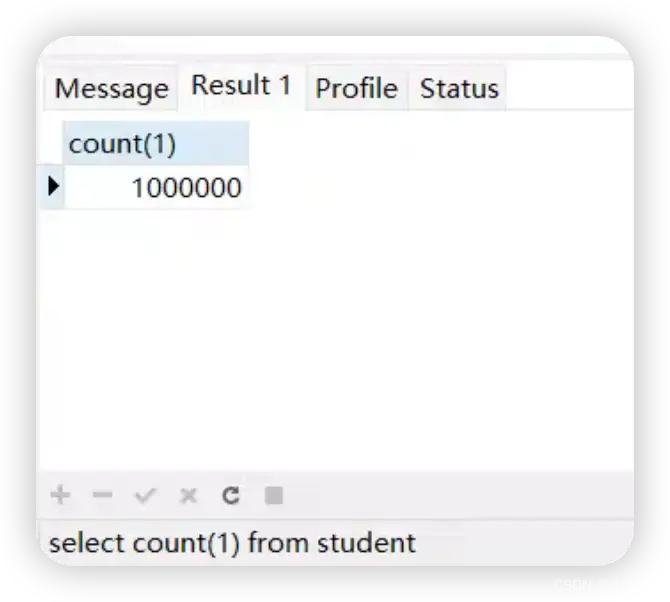
插入100萬條數據,這裡使用了存儲過程,進行批量提交數據,先關閉自動提交,插入一定條數再進行提交。
--創建存儲過程
drop procedure if exists add_student;
CREATE PROCEDURE `add_student`(in n int,in batchNum int)
BEGIN
 DECLARE i INT DEFAULT 1;
 DECLARE age1 INT DEFAULT 1;
 DECLARE gender1 INT DEFAULT 1;
WHILE (i < n+1 ) DO
set age1=floor(18+( rand() * 5));
set gender1 = floor(rand() * 3);
set autocommit = 0;
INSERT into student (order_num,student_name,age,create_time,gender) VALUES (i,concat('student_name',i),age1,now(),gender1);
set i=i+1;
if i mod batchNum = 0 then
 commit;
 end if;
END WHILE;
 commit;
END
-- 調用
CALL add_student(1000000,100000)
三、口訣詳解
模
like 模糊全匹配(like 『%內容%』),會導致全表掃描;like模糊左匹配(like 『%內容』),會導致全表掃描。
實戰驗證
查看student表的索引
show index from student;

對student_name 欄位添加索引
CREATE INDEX idx_student_name ON student(student_name(20));
再查看student表的索引
show index from student;

測試:
like 右匹配是可以命中索引的
explain select count(1)
from student
where student_name like 'student_name1%'

解析出來的type級別是range
當查詢條件使用索引檢索某個範圍的數據,典型的場景為使用=、<>、>、>=、<、<=、IS [NOT] NULL、<=>、BETWEEN AND或者IN操作符時,類型為range
like 左匹配:
explain select count(1)
from student
where student_name like '%student_name1'

解析出來的type級別是index
查詢條件中的欄位包含索引中的欄位(含有非索引欄位,就會是ALL了),此時只需要掃描索引樹。也是全表掃描的。
like 完全匹配:
explain select count(1)
from student
where student_name like '%student_name1%'
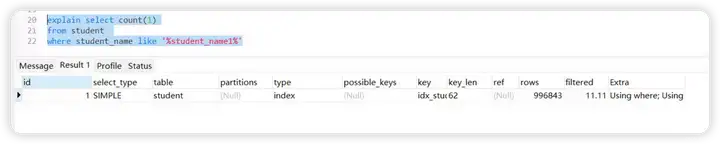
解析出來的type級別是index
查詢條件中的欄位包含索引中的欄位(含有非索引欄位,就會是ALL了),此時只需要掃描索引樹。也是全表掃描的。
測試結論
模 字決索引失效成立。
型
代表數據類型。例如對字元串name欄位加的索引,where條件寫name=1,索引會失效。
實戰驗證
查看student表的索引
show index from student;
對student_name 欄位添加索引
CREATE INDEX idx_student_name ON student(student_name(20));
再查看student表的索引
show index from student;
測試:
explain select count(1)
from student
where student_name=1

解析出來的type級別是index
查詢條件中的欄位包含索引中的欄位(含有非索引欄位,就會是ALL了),此時只需要掃描索引樹。也是全表掃描的。
測試結論
型 字決索引失效成立。
數
是函數的意思。對索引的欄位使用內部函數,索引也會失效。這種情況下應該建立基於函數的索引。
SELECT * FROM user WHERE DATE(create_time) = 『2020-09-03』;
這裡使用DATE函數
實戰驗證
查看student表的索引
show index from student;
對create_time 欄位添加索引
CREATE INDEX idx_create_time ON student(create_time);
再查看student表的索引
show index from student;

測試:
explain SELECT count(1) FROM student WHERE DATE(create_time) = '2020-09-03';

解析出來的type級別是index
查詢條件中的欄位包含索引中的欄位(含有非索引欄位,就會是ALL了),此時只需要掃描索引樹。也是全表掃描的。
直接查create_time 欄位是可以的:
explain SELECT count(1) FROM student WHERE create_time = '2020-09-03';

解析出來的type級別是ref
當查詢語句中的連接條件或者查詢條件使用的索引不是主鍵和非空唯一索引,或者只是一個索引的一部分,則type的取值為ref
測試結論
數 字決索引失效成立。
或
在 where 子句中使用 or 來連接條件,如果一個欄位有索引,一個欄位沒有索引,將導致引擎放棄使用索引而進行全表掃描;
實戰驗證
查看student表的索引
show index from student;
對order_num 欄位添加索引
CREATE INDEX idx_order_num ON student(order_num);
再查看student表的索引
show index from student;

測試:
explain select count(1)
from student
where order_num = 20 or student_name='student_name10'

測試結論
或 字決索引失效成立。
運
對索引的列進行運算,索引失效,例如:WHERE age+1=8;
實戰驗證
查看student表的索引
show index from student;
對age 欄位添加索引
CREATE INDEX idx_age ON student(age);
再查看student表的索引
show index from student;

測試:
explain select count(1)
from student
where age+1 = 20

解析出來的type級別是index
查詢條件中的欄位包含索引中的欄位(含有非索引欄位,就會是ALL了),此時只需要掃描索引樹。也是全表掃描的。
測試結論
運 字決索引失效成立。
最
組合索引,查詢時的條件列不是聯合索引中的第一個列,索引失效(索引的最左原則)。
實戰驗證
查看student表的索引
show index from student;
對student_name,age,gender 欄位添加組合索引
CREATE INDEX idx_student_name_age_gender ON student(student_name,age,gender);
再查看student表的索引
show index from student;

測試:
查詢條件中包含索引的第一列,索引生效:
explain select count(1)
from student
where student_name ='student_name9527'
and gender =1

解析出來的type級別是ref
當查詢語句中的連接條件或者查詢條件使用的索引不是主鍵和非空唯一索引,或者只是一個索引的一部分,則type的取值為ref
索引生效,查詢條件中包含索引的第一列,其他排列組合,大家可自行體驗下。
查詢條件中不包含索引的第一列,索引不生效:
explain select count(1)
from student
where age=20
and gender =1

測試結論
最 字決索引失效成立。
快
查詢數量是超過表的一部分,mysql30%,oracle 20%(這個數據可能不準確,不是官方說明,僅供參考),導致索引失效;
實戰驗證
show index from student;
對create_time 欄位添加索引
CREATE INDEX idx_create_time ON student(create_time);
再查看student表的索引
show index from student;
測試:
查出來的數據量少,可命中索引:
explain select *
from student
where create_time >='2022-10-03 22:48:12'
and create_time <='2022-10-03 22:48:13'

解析出來的type級別是range
當查詢條件使用索引檢索某個範圍的數據,典型的場景為使用=、<>、>、>=、<、<=、IS [NOT] NULL、<=>、BETWEEN AND或者IN操作符時,類型為range。
查詢出來的數據量多,會直接走全表:
explain select *
from student
where create_time >='2022-10-03 22:48:12'

測試結論
快 字決索引失效成立。
