Springboot集成阿里雲簡訊
- 2022 年 10 月 8 日
- 筆記
- JAVA, springboot, 簡訊服務
目錄
1 前言
線上系統開發中,簡訊功能是經常要用到的,比如註冊、修改手機號、修改密碼時簡訊驗證碼等。我們這裡是一個基於Springboot的微服務(SpringCloud Alibaba)項目,選擇阿里雲的簡訊介面。
2 準備工作
2.1 了解流程
登錄阿里雲簡訊控制台,了解簡訊相關知識。我們這裡需要簡訊發送功能,進一步了解相關API。
2.2 配置資訊
- 憑證:登錄阿里雲簡訊控制台,通過快速學習,我們知道,我們需要創建accessKey,accessKeySecret,即用戶的訪問憑證,具體如何創建,這裡不贅述,自行查閱文檔。
- 域名endpoint:即我們通過那個地址訪問阿里雲的簡訊介面。
2.3 簡訊簽名和模板
簽名和模板是阿里雲簡訊功能所必須的,下面講解下簽名和模板的添加。
2.3.1 簽名
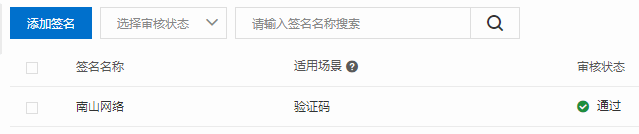
- 添加簽名:一個賬戶只能添加一個驗證碼類型的簽名,我已經添加了一個,你們根據需要自行選擇,圖示:
2.3.2 模板
-
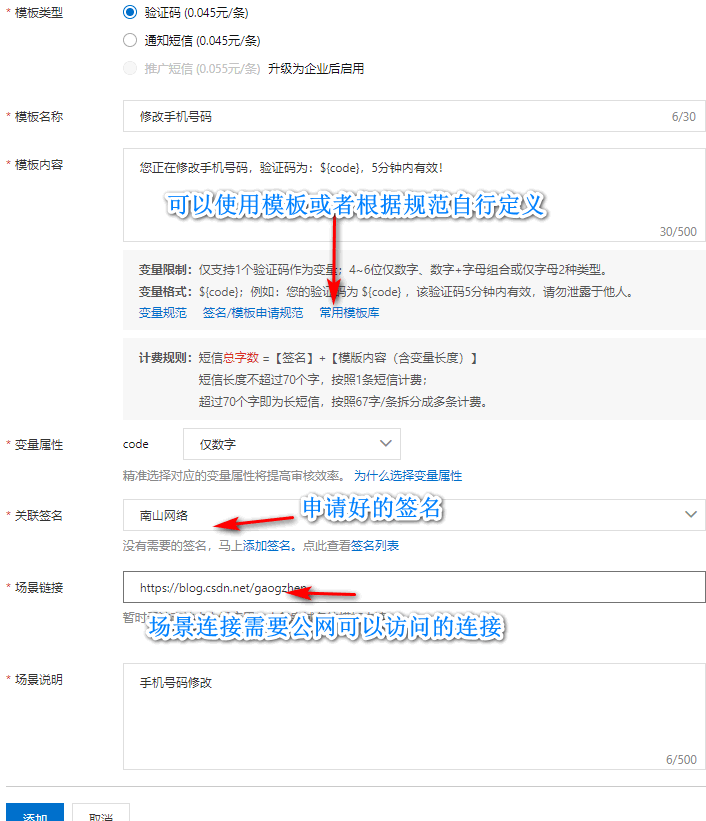
添加模板:
-
審核不通過原因:
- 場景連接:這裡場景連接一定要填寫公網可訪問連接,比如你上線的App、網站網址,或者你的部落格等待的。
- 模板內容:如需自定義,仔細閱讀變數規範、模板申請規範;或者直接說使用模板庫中預定義模組,適當修改文字,可滿足大部分應用場景。
-
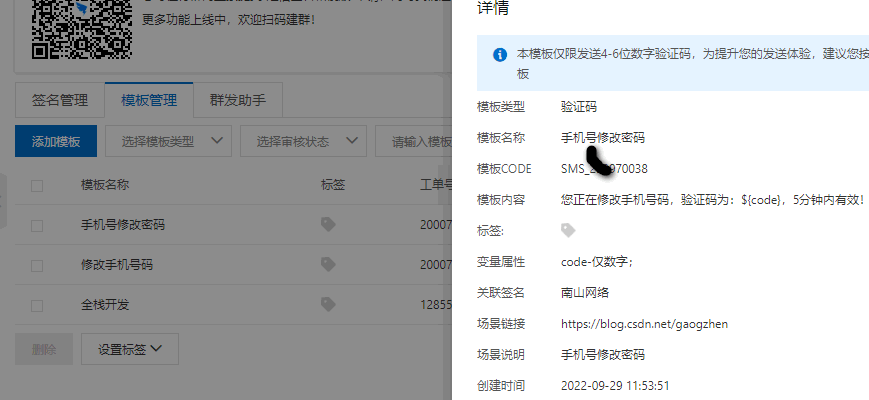
效果圖示:
2.3.3 存入資料庫
- 與簡訊功能相關的簽名、模板,這些資訊保存在資料庫的配置表中。
- 簽名:效果就是簡訊開頭的【】中的資訊,開發需要用到簽名名稱signName。
- 模板:效果就是簡訊的內容,開發中需要用到模板名稱templateCode,其他資訊保存在資料庫中。
3 SDK
雖然是做了前面的準備工作,但是具體怎麼應用還是很模糊,查閱相關技術文檔,很多都是舊版本的內容。這裡我們還是通過阿里雲的OpenAPI來學習最新的應用技術,這裡我們以簡訊發送為例,圖示: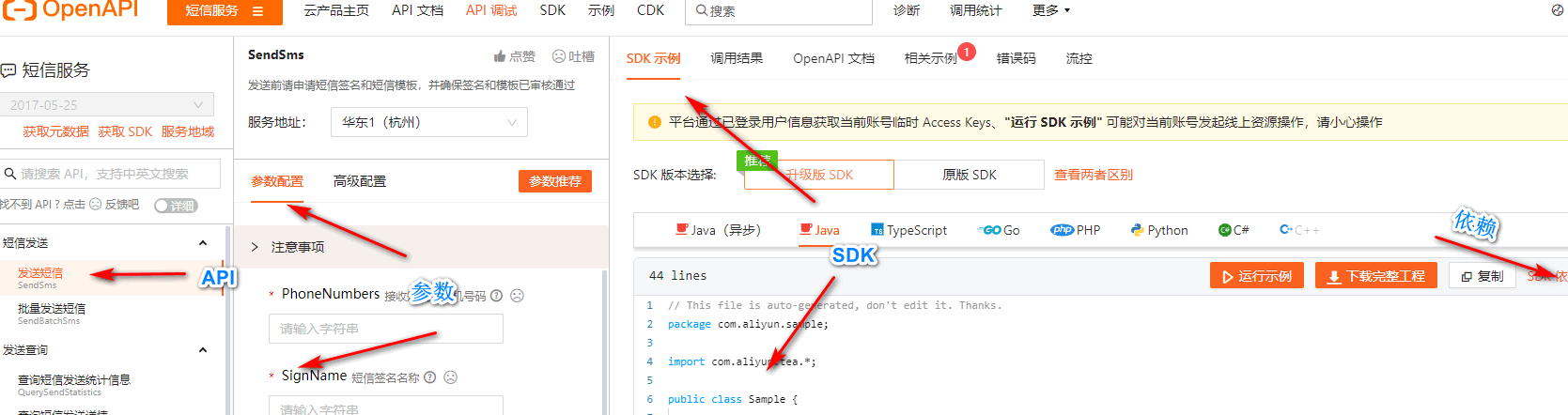
api參數,示例,依賴一目了然,而且是最新版本的內容,下面我們開始集成到項目中。
4 集成Springboot
4.1 集成
-
pom.xml:複製上面依賴資訊
<dependency> <groupId>com.aliyun</groupId> <artifactId>dysmsapi20170525</artifactId> <version>2.0.21</version> </dependency> -
分析:
- 簡訊功能我們項目中多個模組需要用到,我們把簡訊發送功能封裝到AliSms類中,AliSms配置為IOC容器中的bean,位置放置在公共模組中。
- 需要用到的配置資訊,比如accessKey,secretKey,endpoint,我們在nacos中配置,圖示:
-
參考官網給出的SDK封裝我們自己的AliSms類,源碼:
import com.aliyun.dysmsapi20170525.Client; import com.aliyun.dysmsapi20170525.models.SendSmsRequest; import com.aliyun.dysmsapi20170525.models.SendSmsResponse; import com.aliyun.teautil.models.RuntimeOptions; import cn.hutool.core.bean.BeanUtil; import java.util.Map; /** * @author Administrator * @version 1.0 * @description ali sms * @date 2022-09-30 11:19 * 阿里雲簡訊類 */ public class AliSms { private final Client client; private final SendSmsRequest request; public AliSms(Client client, SendSmsRequest request) { this.client = client; this.request = request; } public Map<String, Object> sendSms(String templateCode, String templateParam, String phoneNumbers) throws Exception { request.setTemplateCode(templateCode); request.setTemplateParam(templateParam); request.setPhoneNumbers(phoneNumbers); RuntimeOptions runtime = new RuntimeOptions(); SendSmsResponse response = null; try { response = client.sendSmsWithOptions(request, runtime); } catch (Exception e) { e.printStackTrace(); throw new Exception("簡訊發送失敗"); } return BeanUtil.beanToMap(response); } } import com.aliyun.dysmsapi20170525.Client; import com.aliyun.teaopenapi.models.Config; import com.aliyun.dysmsapi20170525.models.SendSmsRequest; import org.springframework.beans.factory.annotation.Value; import org.springframework.context.annotation.Bean; import org.springframework.context.annotation.Configuration; /** * @author Administrator * @version 1.0 * @description sms簡訊發送 * @date 2022-10-04 12:50 */ @Configuration public class SmsAutoConfiguration { /** * 阿里雲簡訊服務賬戶accessKey */ @Value("${spring.cloud.alicloud.access-key}") private String accessKey; /** * 阿里雲簡訊服務賬戶accessKey */ @Value("${spring.cloud.alicloud.secret-key}") private String secretKey; /** * 阿里雲簡訊服務endpoint */ @Value("${spring.cloud.alicloud.sms.endpoint}") private String endpoint; /** * 阿里雲簡訊服務簽名 */ @Value("${spring.cloud.alicloud.sms.signName}") private String signName; @Bean public AliSms aliSms() { return new AliSms(createClient(), sendSmsRequest()); } private SendSmsRequest sendSmsRequest() { SendSmsRequest request = new SendSmsRequest(); request.setSignName(signName); return request; } private Client createClient(){ Config config = new Config() // 您的 AccessKey ID .setAccessKeyId(accessKey) // 您的 AccessKey Secret .setAccessKeySecret(secretKey); // 訪問的域名 config.endpoint = endpoint; Client client = null; try { client = new Client(config); } catch (Exception e) { e.printStackTrace(); throw new RuntimeException("創建阿里客戶端失敗!"); } return client; } } -
pom.xml添加依賴,全部相關依賴:
        <dependency>
            <groupId>com.aliyun</groupId>
            <artifactId>dysmsapi20170525</artifactId>
            <version>2.0.21</version>
        </dependency>
        <dependency>
            <groupId>com.aliyun</groupId>
            <artifactId>tea-util</artifactId>
            <version>0.2.14</version>
        </dependency>
4.2 測試
- 測試程式碼:前端程式碼及後端介面根據業務需求自己設計,這裡只展示業務實現層的簡訊發送方法的簡單測試實現:
@Autowired
    private AliSms aliSms;

    @Override
    public void sendSms(Sms sms) {
        try {
            log.info("發送簡訊{}", JSON.toJSONString(sms, true));
            String templateParam = "{\"code\":\"" + "123456" + "\"}";
            Map<String, Object> info = aliSms.sendSms(sms.getTemplateCode(), templateParam, sms.getMobile());
            log.info("發送結果:{}", JSON.toJSONString(info, true));
        } catch (Exception e) {
            e.printStackTrace();
            throw new RuntimeException("發送簡訊失敗");
        }
    }
-
測試結果:
-
控制台:
{ "basePath":"//192.168.10.1:8090", "description":"發送簡訊", "ip":"192.168.10.1", "method":"com.gaogzhen.controller.SmsController.sendSms", "parameter":{ "sms":{ "countryCode":"+86", "mobile":"自己填寫的手機號", "templateCode":"自己的模板CODE" } }, "result":{ "code":200 }, "spendTime":0, "uri":"/sms/sendTo", "url":"//192.168.10.1:8090/sms/sendTo", "username":"1014066909280374785" } -
手機截圖:
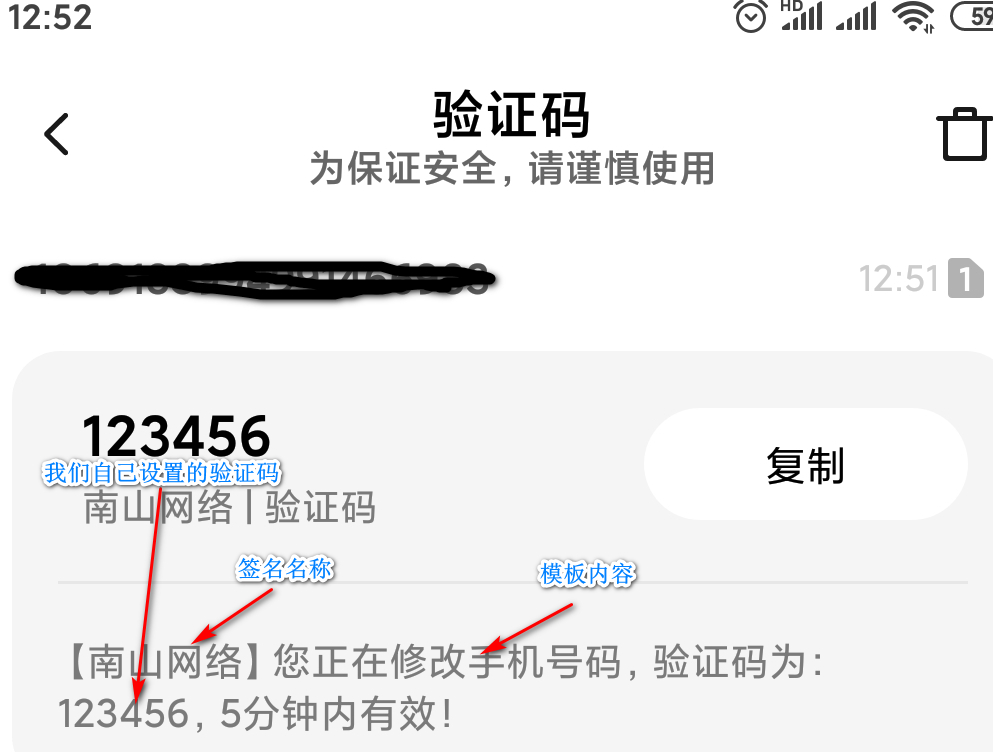
-
5 後記
歡迎交流學習,下面為聯繫方式和倉庫源程式碼地址
❓QQ:806797785
⭐源程式碼倉庫地址://gitee.com/gaogzhen/coin-exchange