C#/VB.NET 讀取條碼類型及條碼在圖片中的坐標位置
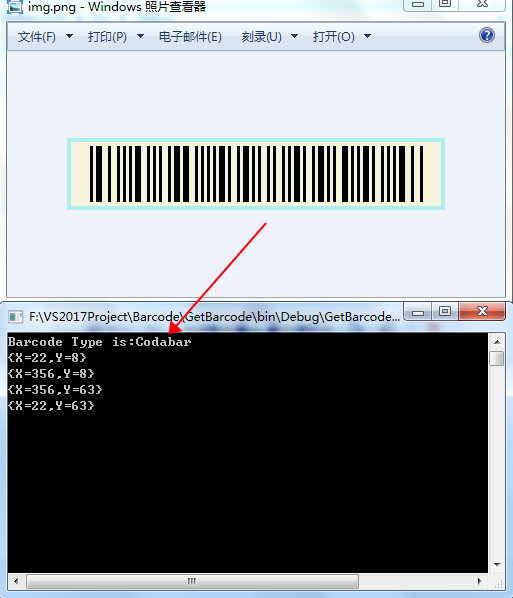
我們在創建條形碼時,如果以圖片的方式將創建好的條碼保存到指定文件夾路徑,可以在程式中直接載入圖片使用;已生成的條碼圖片,需要通過讀取圖片中的條碼資訊,如條碼類型、條碼繪製區域在圖片中的四個頂點坐標位置等,可參考本文中的方法。
注:讀取時,也支援讀取二維碼類型。
引入dll
調用API:Spire.Barcode for .NET
兩種方法:
★ 1. 在VS中通過「管理NuGet包」,搜索「Spire.Barcode」安裝;
或者通過PM控制台安裝:
PM> NuGet\Install-Package Spire.Barcode -Version 6.8.0
★ 2. 官網下載包,安裝到本地路徑,然後將安裝路徑下的Spire.Barcode.dll手動引入到VS程式。
讀取條碼類型及頂點坐標
C#
using Spire.Barcode;
using Spire.Barcode.Settings;
using System.Drawing;

namespace GetBarcode
{
    class Program
    {
        static void Main(string[] args)
        {
            //載入條碼圖片
            BarcodeInfo[] barcodeInfos = BarcodeScanner.ScanInfo("img.png");
            for (int i = 0; i < barcodeInfos.Length; i++)
            {
                //獲取條碼類型
                BarCodeReadType barCodeReadType = barcodeInfos[i].BarCodeReadType;
                System.Console.WriteLine("Barcode Type is:" + barCodeReadType.ToString());

                //獲取條形碼圖片中的四個頂點坐標位置
                Point[] vertexes = barcodeInfos[i].Vertexes;
                //輸出結果
                for(int j = 0; j < vertexes.Length; j++)
                {
                    System.Console.WriteLine(vertexes[j]);
                }
                System.Console.ReadKey();
            }
        }
    }
}
VB.NET
Imports Spire.Barcode
Imports Spire.Barcode.Settings
Imports System.Drawing

Namespace GetBarcode
    Class Program
        Private Shared Sub Main(args As String())
            '載入條碼圖片
            Dim barcodeInfos As BarcodeInfo() = BarcodeScanner.ScanInfo("img.png")
            For i As Integer = 0 To barcodeInfos.Length - 1
                '獲取條碼類型
                Dim barCodeReadType As BarCodeReadType = barcodeInfos(i).BarCodeReadType
                System.Console.WriteLine("Barcode Type is:" + barCodeReadType.ToString())

                '獲取條形碼圖片中的四個頂點坐標位置
                Dim vertexes As Point() = barcodeInfos(i).Vertexes
                '輸出結果
                For j As Integer = 0 To vertexes.Length - 1
                    System.Console.WriteLine(vertexes(j))
                Next
                System.Console.ReadKey()
            Next
        End Sub
    End Class
End Namespace
讀取結果:
—END—
