【面試題】js實現將excel表格copy到頁面
js實現將excel表格copy到頁面
其實最核心的技術,還是copy的是我們粘貼板上的數據
就像平常怎麼粘貼複製其他的數據一樣,只是我們在excel粘貼的是一個表格數據
這時我們首先也時獲取我們粘貼板上的數據,如何對粘貼板上的數據進行處理,處理成
我們想要的表格形式。
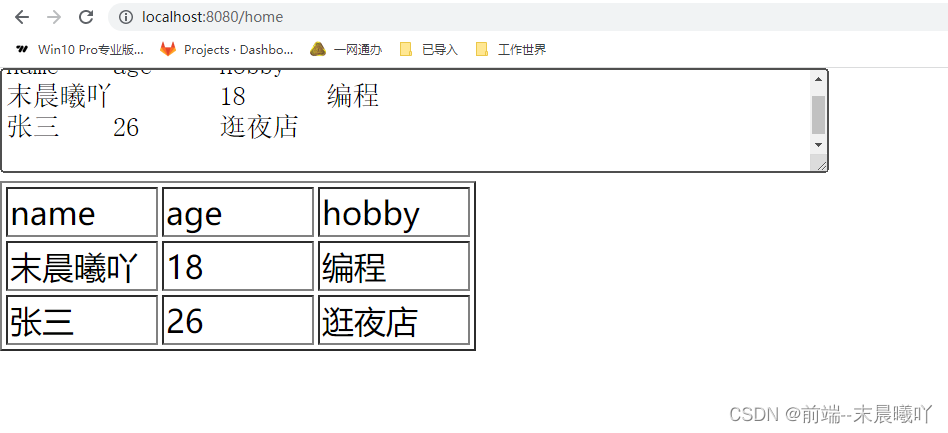
完整案例:
<template>
  <div id="app">
    <textarea
      rows="3"
      cols="60"
      id="txtContent"
      @keydown="onkeydown"
      @mousedown="mousedown"
    ></textarea>
    <table id="table" border="1"></table>
  </div>
</template>

<script>
export default {
  name: "App",
  data() {
    return {
      keyCodeCtrl: 0,
      keyCodeV: 0,
    };
  },
  mounted() {},
  components: {},
  methods: {
    //監聽滑鼠右鍵粘貼事件
    mousedown(e) {
      if (e.button == 2) {
        this.clippedRange();
      }
    },
    //監聽鍵盤事件ctrl+V
    onkeydown(e) {
      let seft = this;
      if (e.which == "17") {
        seft.keyCodeCtrl = 1;
      }
      if (e.which == "86") {
        seft.keyCodeV = 1;
      }
      if (seft.keyCodeCtrl == 1 && seft.keyCodeV == 1) {
        this.clippedRange();
      }
    },
    //獲取粘貼值
    clippedRange() {
      let seft = this;
      document.addEventListener("paste", (event) => {
        let clipdata = event.clipboardData || window.clipboardData;
        const html = event.clipboardData.getData("text/html");
        const $doc = new DOMParser().parseFromString(html, "text/html");
        // 載入所有的行
        const $trs = Array.from($doc.querySelectorAll("table tr"));
        let table = document.getElementById("table");
        $trs.forEach((item) => {
          table.append(item);
        });
        $trs.forEach((item, index) => {
          let item2 = item.getElementsByTagName("td");
          let list = [];
          for (let i = 0; i <= item2.length - 1; i++) {
            list.push(item2[i].innerHTML);
          }
          console.log("數據", list);
        });
      });
    },
  },
};
</script>

<style scoped>
</style>
效果圖: