提桶跑路前一天——整理組件
閑聊:
小穎今年四月底從西安跑到深圳來找工作,本來想著好好賺錢還房貸,結果快轉正了被通知要麼無薪待崗,要麼辦理離職,嗯~ o(* ̄▽ ̄*)o.............................. 想罵人咋辦 ?
小穎之前沒怎麼寫過小程式,到這邊後接手了離職小姐姐的工作,看程式碼、看api、自己試著建項目,後面摸索著根據需求開發前端靜態頁面,一邊寫還要一邊和產品溝通,說的是按PC端開發移動端,但產品給的原型和PC端差異很大,有的是Pc端沒有按他當時給的需求寫,有的是產品遺漏了······,反正寫的時候是真費勁,後來組裡又招了個前端,不過我的隊友有自己的想法,寫的時候只看當前頁面不封裝不整理,也不調用別人寫的············,UI出來了也是不按UI的來寫個大概的樣式,然後他負責的模組前端進度就是一排排的
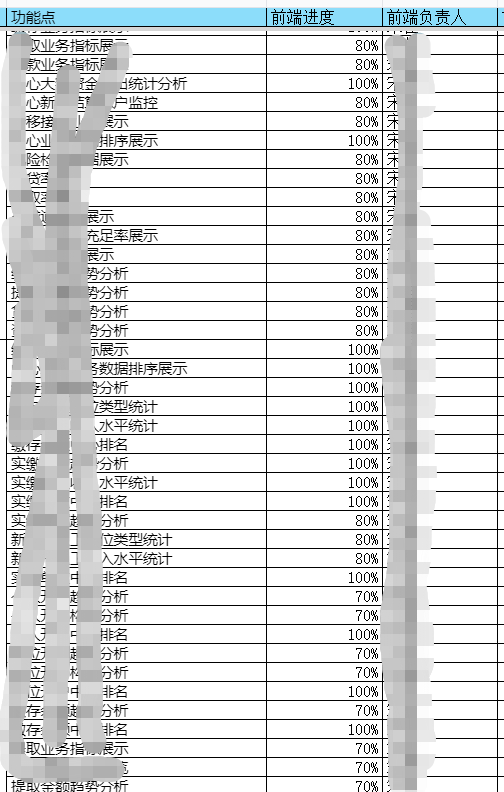
給他說把一個模組改完了再弄下一個也不聽········反正就是很有自己的想法,然後後面調介面時,他就開始吐槽他好忙,我也不知道怎麼接話,我三個模組的介面都聯調完了,他一個模組都沒完,雖然領導要求我們1、2、4、6加班,但他的進度依舊真怕後面我把活幹完了,他沒幹完領導讓我給他擦屁股,這下要被勸退了就不用擔心啦 所以這麼想想就覺得其實還挺開心的,起碼不用再和我的隊友一起寫程式碼了,畢竟現在跑哦那個比後面發現坑太多跑不急的好,那麼希望我倆後面不要再面試同一家了,希望我們接下來找的工作都比現在的工資高、待遇好,加油💪
偷偷向下看: 其實想想我這還好不算慘,我們另一個組和我一起入職的男生,剛被上一家釋放,來這邊快轉正了又遇到釋放·············這更慘,所以想想也就不那麼難過啦,所以不要覺得自己過的不如意,過得不如意時看看比自己慘的就突然釋懷了,覺得自己也沒那麼慘了,也就沒那麼焦慮啦。
無薪待崗 or 離職 ,我當然選擇離職啦,趕緊提桶跑路,那就在跑前把自己寫的部分組件整理下,雖然不是什麼複雜組件,但記錄一下,方便以後找程式碼,不然靠腦子的話,怕是有點難為我自己,哈哈。那就上程式碼
1.創建小程式項目
具體怎麼弄,請大家移步到:HBuilderx 創建 、運行uniapp項目
2.初始化菜單
第一步:點擊 page文件夾右鍵——>新建頁面

根據自己的需求是否 註冊、創建同名目錄
第二步:在pages.json中配置小程式頁面菜單和頂部導航欄標題
{
    "pages": [ //pages數組中第一項表示應用啟動頁,參考://uniapp.dcloud.io/collocation/pages
        {
            "path": "pages/index/index",
            "style": {
                "navigationBarTitleText": "小組件",
                "navigationBarBackgroundColor": "#ffffff"
            }
        }, {
            "path": "pages/echarts-report/echarts-report",
            "style": {
                "navigationBarTitleText": "報表組件",
                "enablePullDownRefresh": false
            }

        }, {
            "path": "pages/show-com/show-com",
            "style": {
                "navigationBarTitleText": "",
                "enablePullDownRefresh": false
            }

        }
    ],
    "tabBar": {
        // "height": "67px",
        "color": "#8F919F",
        "selectedColor": "#2F65DF",
        "borderStyle": "black",
        "backgroundColor": "#ffffff",
        "list": [{
                "pagePath": "pages/index/index",
                // "iconPath": "./static/tabbar/tab_workbench_nromal.png",
                // "selectedIconPath": "./static/tabbar/tab_workbench_select.png",
                "text": "其他"
            },
            {
                "pagePath": "pages/echarts-report/echarts-report",
                // "iconPath": "./static/tabbar/tab_my_normal.png",
                // "selectedIconPath": "./static/tabbar/tab_my_select.png",
                "text": "報表"
            }
        ]
    },
    "globalStyle": {
        "navigationBarTextStyle": "black",
        "navigationBarTitleText": "uni-app",
        "navigationBarBackgroundColor": "#F8F8F8",
        "backgroundColor": "#F8F8F8"
    }
}
其中 tabBar 中配置的底部導航資訊,pages 中配置頁面路由資訊
第三步:開發頁面
因為小穎的這個小程式里就只有兩個菜單,倆菜單模組中點擊進去後就開始渲染相應的組件,所以小穎就把他們拆分成兩個菜單頁和一個載入組件頁,菜單頁樣式和交互方式一樣所以,小穎把才對呢單獨提了個組件,兩個頁面是各自底部導航點進入的頁面,把渲染組件的頁面用的同一頁組件,具體怎麼實現的呢,程式碼一個一個往上貼哈哈
目錄:
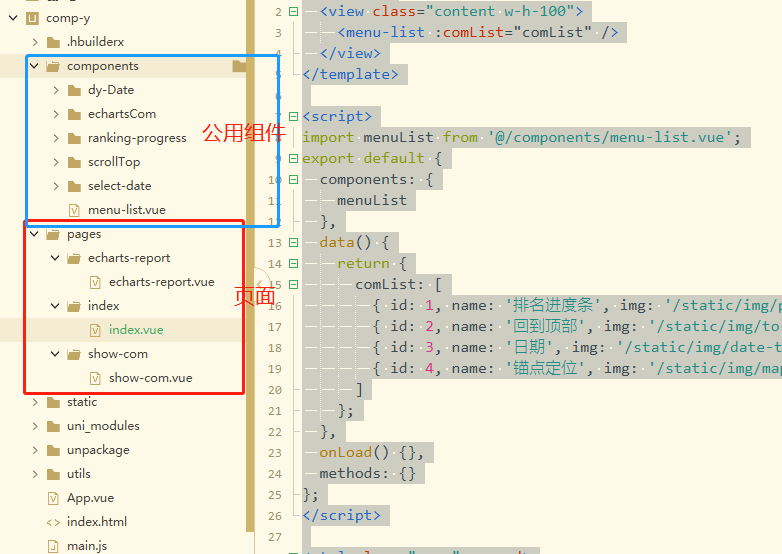
小組件頁面:index.vue
<template>
    <view class="content w-h-100">
        <menu-list :comList="comList" />
    </view>
</template>

<script>
import menuList from '@/components/menu-list.vue';
export default {
    components: {
        menuList
    },
    data() {
        return {
            comList: [
                { id: 1, name: '排名進度條', img: '/static/img/progress-icon.svg', url: '/pages/show-com/show-com?type=progress' },
                { id: 2, name: '回到頂部', img: '/static/img/to-top.svg', url: '/pages/show-com/show-com?type=toTop' },
                { id: 3, name: '日期', img: '/static/img/date-time.svg', url: '/pages/show-com/show-com?type=Time' },
                { id: 4, name: '錨點定位', img: '/static/img/map-fill.svg', url: '/pages/show-com/show-com?type=aimingPosition' }
            ]
        };
    },
    onLoad() {},
    methods: {}
};
</script>

<style lang="scss" scoped>
.content {
    background-color: $uni-bg-color-grey;
}
</style>
報表組件頁面:echarts-report.vue
<template>
    <!-- 報表組件 -->
    <view class="content w-h-100"><menu-list :comList="comList" /></view>
</template>

<script>
import menuList from '@/components/menu-list.vue';
export default {
    components: {
        menuList
    },
    data() {
        return {
            comList: [
                { id: 1, name: '餅狀圖', img: '/static/img/pie-icon.svg', url: '/pages/show-com/show-com?type=pieEchart' },
                { id: 2, name: '柱狀圖', img: '/static/img/bar-icon.svg', url: '/pages/show-com/show-com?type=barEchart' },
                { id: 3, name: '混合圖', img: '/static/img/bar-line-icon.svg', url: '/pages/show-com/show-com?type=barLineEChart' }
                // { id: 4, name: '堆疊', img: '/static/img/map-fill.svg' }
            ]
        };
    },
    methods: {}
};
</script>

<style></style>
菜單組件:
<template>
    <view class="menu-list-box flex-row">
        <view class="list-item" :key="dt.id" v-for="dt in comList" @click="changePage(dt.url)">
            <view class="center-jus"><image class="img" :src="dt.img"></image></view>
            <view class="menu-name">{{ dt.name }}</view>
        </view>
    </view>
</template>

<script>
export default {
    props: {
        comList: {
            type: Array,
            required: true
        }
    },
    data() {
        return {};
    },
    methods: {
        changePage(url) {
            uni.navigateTo({url});
        }
    }
};
</script>

<style lang="scss" scoped>
.menu-list-box {
        padding-top: 30rpx;
        margin-left: 32rpx;
        .list-item {
            border-radius: 12rpx;
            height: 170rpx;
            flex: 2;
            background-color: $uni-bg-color;
            margin: 16rpx 32rpx 16rpx 0;

            image {
                width: 90rpx;
                height: 90rpx;
                margin: 20rpx 0 10rpx 0;
            }
        }
        .menu-name {
            font-size: 28rpx;
            width: 100%;
            text-align: center;
        }
    }
</style>
載入組件的:show-com.vue
<template>
    <!-- 展示組件 -->
    <view class="charts-content w-h-100">
        <!-- 進度條 -->
        <view v-if="showCom == 'progress'">
            <ranking-prog :unitType="2" :rankList="rankingData" unitTxt="個" />
            <ranking-prog :unitType="1" :rankList="rankingData" unitTxt="億" />
        </view>
        <!-- 回到頂部 -->
        <view v-if="showCom == 'toTop'">
            <scroll-view class="scroller-box" scroll-y="true" scroll-with-animation="true" :scroll-top="scrollTopNum" @scroll="scrollFun">
                <view class="scroller-content"></view>
                <!-- 回到頂部 -->
                <scroll-top :showToTop="showToTops" @goTopFun="goTopFun" />
            </scroll-view>
        </view>
        <!-- 瞄點定位 -->
        <view v-if="showCom == 'aimingPosition'" class="aiming-position-box">
            <uni-data-select v-model="toView" :localdata="anchorPoints" @change="changeFun" />
            <scroll-view class="scroller-box" scroll-y="true" scroll-with-animation="true" :scroll-into-view="toView">
                <view id="anchor1" class="has-back">內容模組1</view>
                <view id="anchor2" class="has-back">內容模組2</view>
                <view id="anchor3" class="has-back">內容模組3</view>
            </scroll-view>
        </view>
        <!-- 日期 -->
        <view v-if="showCom == 'Time'" class="show-time-com">
            <!-- 不支援設置默認時間 -->
            <view class="flex-row">
                <view class="row-item">
                    <view class="flex-row">
                        <view class="row-item"><text class="time-type-txt">日期類型:</text></view>
                        <view class="row-item"><uni-data-select v-model="timePram.timeType" :localdata="timeTypeList" @change="changeType" /></view>
                    </view>
                </view>
                <view class="row-item"><select-dt :timeType="timePram.timeType" :endTime="true" @getStartT="getStartTime" @getEndT="getEndTime" /></view>
            </view>
            <text v-if="timePram.timeType">所選日期:{{ timePram.startTime }}-{{ timePram.endTime }}</text>
        </view>
        <!-- 餅狀圖 -->
        <pie-echart v-if="showCom == 'pieEchart'" :pieCanvasId="'chartsPie'" :pieChartData="ChartData" ref="chartsPie" />
        <!-- 柱狀圖 -->
        <bar-echart v-if="showCom == 'barEchart'" :barCanvasId="'columnCanvas'" :barChartData="ChartData" :ontouch="true" />
        <!-- 折現+柱狀混合圖 -->
        <barLineEChart v-if="showCom == 'barLineEChart'" :chartData="ChartData" />
    </view>
</template>

<script>
import rankingProg from '@/components/ranking-progress/ranking-progress.vue';
import scrollTop from '@/components/scrollTop/scrollTop.vue';
import selectDt from '@/components/select-date/select-date.vue';
import pieEchart from '@/components/echartsCom/pie-y.vue';
import barEchart from '@/components/echartsCom/bar-charts.vue';
import barLineEChart from '@/components/echartsCom/bar-line-charts.vue';
import { pieChart } from '@/utils/echarts.config.js';
import moment from '@/static/js/moment.min.js';
export default {
    name: 'show-com',
    components: {
        rankingProg,
        scrollTop,
        selectDt,
        pieEchart,
        barEchart,
        barLineEChart
    },
    data() {
        return {
            showCom: 'pieEchart',
            ChartData: {},
            rankingData: [],
            oldScrollNum: 0,
            scrollTopNum: 0,
            showToTops: false,
            toView: '',
            anchorPoints: [{ value: 'anchor1', text: '內容模組1' }, { value: 'anchor2', text: '內容模組2' }, { value: 'anchor3', text: '內容模組3' }],
            timePram: {
                timeType: 'day',
                startTime: '',
                endTime: '',
                startTimeTxt: '',
                endTimeTxt: ''
            },
            timeTypeList: [{ value: 'day', text: '日' }, { value: 'month', text: '月' }, { value: 'quarter', text: '季度' }, { value: 'year', text: '年' }]
        };
    },
    onLoad(option) {
        let type = option.type,
            _title = '';
        this.showCom = type;
        switch (type) {
            case 'progress':
                _title = '組件-排名進度條';
                this.initProgress();
                break;
            case 'toTop':
                _title = '組件-回到頂部';
                this.initBarChar();
                break;
            case 'Time':
                _title = '組件-日期';
                this.initTimeCom();
                break;
            case 'aimingPosition':
                _title = '組件-錨點定位';
                break;
            case 'pieEchart':
                _title = '組件-餅圖';
                this.initPieChar();
                break;
            case 'barEchart':
                _title = '組件-柱狀圖';
                this.initBarChar();
                break;
            case 'barLineEChart':
                _title = '組件-折線+柱狀圖';
                this.initBarLineEChart();
                break;
        }
        uni.setNavigationBarTitle({
            title: _title
        });
    },
    methods: {
        initProgress() {
            this.rankingData = [
                {
                    name: 'XXXXXXXXXXXXXXXX銀行分理處1',
                    percentage: 82,
                    num: 385
                },
                {
                    name: 'XXXXXXX中國銀行分理處2',
                    percentage: 80,
                    num: 345
                },
                {
                    name: '中國工商銀行雄縣支行3',
                    percentage: 70,
                    num: 233
                },
                {
                    name: '容城縣津海大街光大銀行分理處4',
                    percentage: 55,
                    num: 214
                },
                {
                    name: '農業銀行雄縣支行5',
                    percentage: 40,
                    num: 128
                },
                {
                    name: '農業銀行雄縣支行6',
                    percentage: 40,
                    num: 128
                },
                {
                    name: '容城閑羅薩大街中國銀行分理處7',
                    percentage: 80,
                    num: 345
                },
                {
                    name: '中國工商銀行雄縣支行8',
                    percentage: 70,
                    num: 233
                },
                {
                    name: '容城縣津海大街光大銀行分理處9',
                    percentage: 55,
                    num: 214
                },
                {
                    name: '農業銀行雄縣支行10',
                    percentage: 40,
                    num: 128
                },
                {
                    name: '2農業銀行雄縣支行11',
                    percentage: 40,
                    num: 128
                }
            ];
        },
        scrollFun(e) {
            this.oldScrollNum = e.detail.scrollTop;
            if (this.oldScrollNum > 500 || this.oldScrollNum == 500) {
                this.showToTops = true;
            } else {
                this.showToTops = false;
            }
        },
        // 回滾到頂部
        goTopFun(v) {
            // 解決view層不同步的問題
            this.scrollTopNum = this.oldScrollNum;
            this.$nextTick(() => {
                this.scrollTopNum = 0;
            });
        },
        initTimeCom() {
            this.timePram.startTime = moment(new Date().getTime()).format('YYYY-MM-DD');
            this.timePram.endTime = this.timePram.startTime;
        },
        getStartTime(time) {
            this.timePram.startTime = time._time;
            this.timePram.startTimeTxt = time.timeY;
            console.log('開始時間', time);
        },
        getEndTime(time) {
            this.timePram.endTime = time._time;
            this.timePram.endTimeTxt = time.timeY;
            console.log('結束時間', time);
        },
        changeType(value) {
            this.timePram.timeType = value;
        },
        changeFun(id) {
            if (!id) {
                return;
            }
            let anchorId = id;
            setTimeout(() => {
                this.$nextTick(() => {
                    this.toView = anchorId;
                });
            }, 1000);
        },
        initPieChar() {
            setTimeout(() => {
                this.ChartData = JSON.parse(JSON.stringify(pieChart.series));
                this.ChartData.series[0].data = [{ name: '繳存', value: 200 }, { name: '提取', value: 200 }, { name: '貸款', value: 201 }];
                this.$refs.chartsPie.pieEopts.title.text = '本月檢核問題類型佔比';
            }, 500);
        },
        initBarChar() {
            //模擬從伺服器獲取數據時的延時
            setTimeout(() => {
                //模擬伺服器返回數據,如果數據格式和標準格式不同,需自行按下面的格式拼接
                let res = {
                    categories: ['202108', '202109', '202110', '202111', '202112', '202201', '202202', '202203', '202204', '202205', '202206', '202207'],
                    series: [
                        {
                            name: '問題數量',
                            data: [990, 850, 790, 700, 700, 450, 700, 650, 590, 580, 550, 570]
                        }
                    ]
                };
                this.ChartData = JSON.parse(JSON.stringify(res));
            }, 500);
        },
        initBarLineEChart() {
            setTimeout(() => {
                let res = {
                    categories: ['2016', '2017', '2018', '2019', '2020', '2021'],
                    series: [
                        { name: '發放金額', type: 'column', data: [70, 90, 88, 88, 65, 78] },
                        { name: '同期發放金額', type: 'column', data: [50, 58, 56, 58, 43, 55] },
                        { name: '同比增長率', index: 1, type: 'line', data: [-2, -6, 4, 3, 4, 0], addPoint: true },
                        { name: '環比增長率', index: 1, type: 'line', data: [-5, -9, 5, -5, -14, 0], addPoint: true }
                    ]
                };
                this.ChartData = JSON.parse(JSON.stringify(res));
            }, 500);
        }
    }
};
</script>

<style lang="scss" scoped>
.charts-content {
    /deep/.ranking-progress-box {
        padding: 20rpx 32rpx;
    }
    .row-item {
        flex: 1;
        .time-type-txt {
            height: 70rpx;
            line-height: 70rpx;
        }
    }
    .show-time-com {
        padding-top: 50rpx;
        padding: 50rpx 32rpx 0 32rpx;
    }
    .scroller-box {
        height: 1600rpx;
        .scroller-content {
            height: 1500px;
            background-color: aliceblue;
        }
    }
    .aiming-position-box {
        .scroller-box {
            height: 1500rpx;
        }
    }
    .has-back {
        height: 800rpx;
        width: 100%;
        background-color: antiquewhite;
    }
    #anchor2 {
        background-color: paleturquoise;
    }
    #anchor3 {
        background-color: greenyellow;
    }
}
</style>
瞄點定位那個小穎沒有提成組件,其實就是 下拉框 和 scroll-view的結合 ,需要注意: scroll-view 要給高 並且裡面的小模組的高加起來要大於 scroll-view 的 高,這樣才能滾起來
回到頂部那個也是需要注意 scroll-view 設定高,不然不會觸發它的 @scroll 事件
其他組件麻煩大家移步:comp-y
菜單效果圖: