mybatis 10: 動態sql --- part2
< foreach >標籤
作用
- 用來進行循環遍歷,完成循環條件的查詢,批量刪除,批量增加,批量更新
用法
- 循環查詢 + 批量刪除 + 批量增加 + 批量更新
UsersMapper.java
package com.example.mapper;

import com.example.pojo.User;

import java.util.List;

/**
 * 數據訪問層的介面,定義對資料庫完成的CRUD的操作
 */
public interface UsersMapper {


    //循環查詢
    List<User> getByIds(Integer []id_array);

    //批量刪除
    int deleteByIds(Integer []id_array);

    //批量插入
    int insertBatch(List<User> users);

    //批量更新
    int updateBatch(List<User> users);
}
UsersMapper.xml
<?xml version="1.0" encoding="UTF-8" ?>
<!DOCTYPE mapper PUBLIC "-//mybatis.org//DTD Mapper 3.0//EN" "//mybatis.org/dtd/mybatis-3-mapper.dtd">

<mapper namespace="com.example.mapper.UsersMapper">

    <!--
        //循環查詢
        List<User> getByIds(Integer []id_array);
    -->
    <select id="getByIds" resultType="user">
        select
            <include refid="allColumns"/>
        from
            users
        where
            id
        in
            <foreach collection="array" item="id" open="(" close=")" separator=",">
                #{id}
            </foreach>
    </select>


    <!--
        //批量刪除
        int deleteByIds(Integer []id_array);
    -->
    <delete id="deleteByIds">
        delete from
                   users
        where
            id
        in
        <foreach collection="array" item="id" separator="," open="(" close=")">
            #{id}
        </foreach>
    </delete>


    <!--
        //批量插入
        int insertBatch(List<User> users);
    -->
    <insert id="insertBatch">
        insert into
            users(username, birthday, sex, address)
        values
            <foreach collection="list" item="user" separator=",">
                (#{user.userName}, #{user.birthday}, #{user.sex}, #{user.address})
            </foreach>
    </insert>


    <!--
        //批量更新
        int updateBatch(List<User> users);
        private Integer id;
        private String userName;
        private Date birthday;
        private String sex;
        private String address;
    -->
    <update id="updateBatch">
        <foreach collection="list" item="user" separator=";">
            update
                users
            <set>
                <if test="user.userName != null and user.userName != ''">
                    username=#{user.userName},
                </if>

                <if test="user.birthday != null">
                    birthday=#{user.birthday},
                </if>

                <if test="user.sex != null and user.sex != ''">
                    sex=#{user.sex},
                </if>

                <if test="user.address != null and user.address != ''">
                    address=#{user.address},
                </if>
            </set>
            where
                id=#{user.id}
        </foreach>
    </update>
</mapper>
映射文件分析
-
當入參是數組時,parameterType可以不寫,
- 其實只有當入參類型是實體類時,才必須指明其類型,其他類型的數據皆可不寫
-
< foreach >標籤的屬性說明
- collection:指明待遍歷的數據容器的類型,可選的有三個:array,list,map
- item:給遍歷出的每個元素指定一個名稱,便於在標籤內使用
- open 和 close:原先sql語句,in後面待遍歷的數據放在括弧中,這裡通過標籤屬性的形式來實現
- 可以將sql語句和標籤的書寫分隔開,使得程式碼更加直觀
- 注意:這是循環外層的括弧,用來容納所有的元素,循環內部的元素自身的括弧不能用這對標籤,要手動加上
- 是否要使用 open 和 close標籤的說明:
<!-- 批量刪除時使用 --> <foreach collection="array" item="id" separator="," open="(" close=")"> #{id} </foreach> <!-- 批量插入時未使用 --> <foreach collection="list" item="user" separator=","> <!-- 為元素手動添加括弧 --> (#{user.userName}, #{user.birthday}, #{user.sex}, #{user.address}) </foreach> <!-- 不同選擇的依據: 看被遍歷的元素是否要放在同一個括弧內,需要則使用open 和 close標籤,否則不用 元素自身需要括弧,則手動添加 -->- separator:遍歷出的元素之間用什麼符號分隔,mybatis框架會確保間隔符號的正確使用
- 正確使用是指:在指定需要的間隔符後,間隔符號的個數以及出現在元素之間的位置,由mybatis自動正確放置(如果有多個元素的話)
-
進行批量更新操作時
- 本質:由底層解析出的sql語句可知,本質執行的是多條獨立的update語句
- 這也決定了< update >標籤內應該是一個 < foreach >標籤,分隔符應該是";",用來間隔多條相互獨立的update語句
- 注意:這與執行一條update語句,影響多行記錄是不同的,必須在jdbc.properties文件中的url的值後新增配置:allowMultiQueries=true
jdbc.driverClassName=com.mysql.cj.jdbc.Driver jdbc.url=jdbc:mysql://ip:3306/ssm?useUnicode=true&characterEncoding=utf8&allowMultiQueries=true jdbc.username=XXXX jdbc.password=YYYY- 不修改jdbc.properties時報錯
- 本質:由底層解析出的sql語句可知,本質執行的是多條獨立的update語句
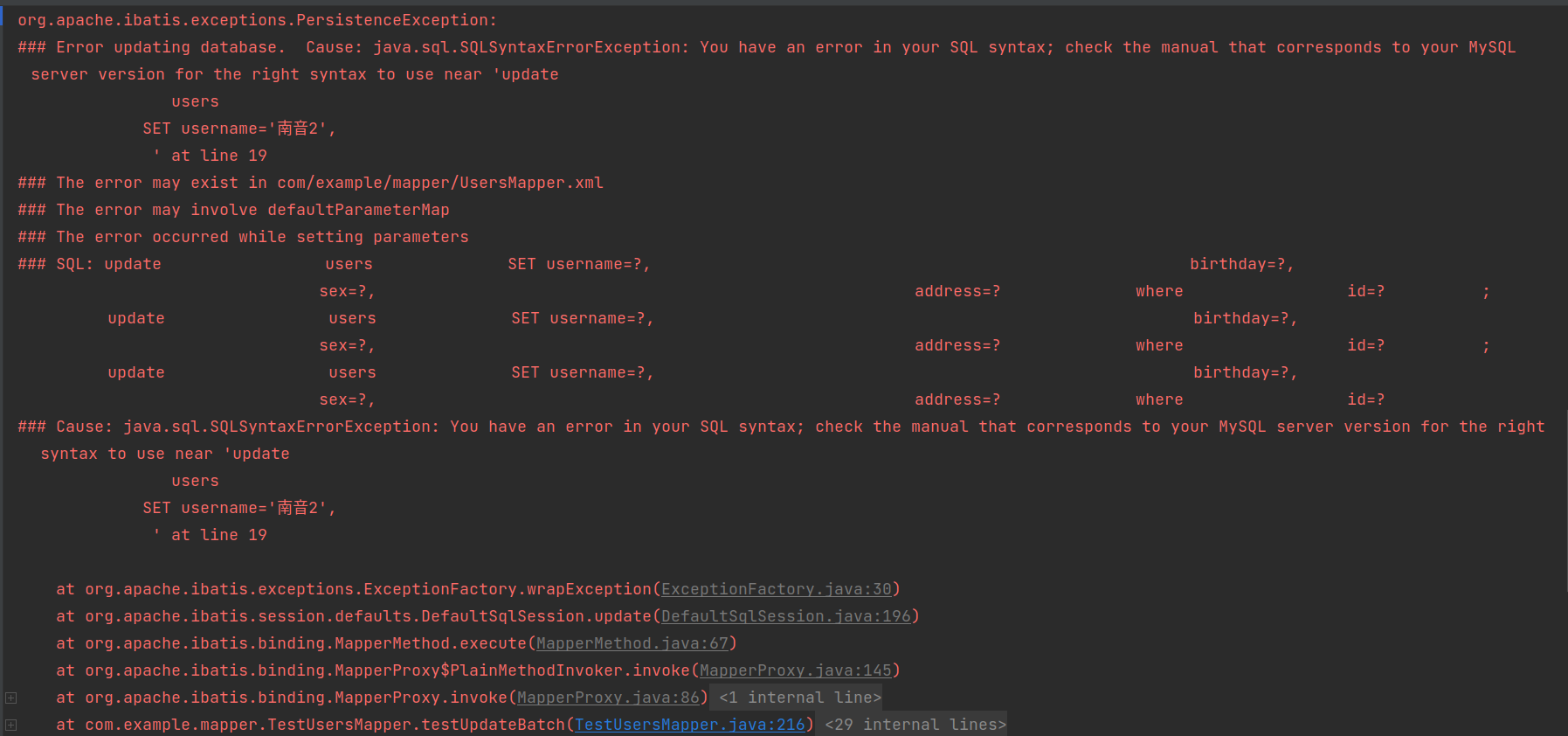
- 各sql標籤在底層分別被解析為
//批量查詢

==>  Preparing: select id, username, birthday, sex, address from users where id in ( ? , ? , ? )
//批量刪除

==>  Preparing: delete from users where id in ( ? , ? )
//批量插入

==>  Preparing: insert into users(username, birthday, sex, address) values (?, ?, ?, ?) , (?, ?, ?, ?) , (?, ?, ?, ?)
//批量更新

==>  Preparing:
update users SET username=?, birthday=?, sex=?, address=? where id=? ;
update users SET username=?, birthday=?, sex=?, address=? where id=? ;
update users SET username=?, birthday=?, sex=?, address=? where id=?
測試程式碼
package com.example.mapper;

import com.example.pojo.User;
import org.apache.ibatis.io.Resources;
import org.apache.ibatis.session.SqlSession;
import org.apache.ibatis.session.SqlSessionFactory;
import org.apache.ibatis.session.SqlSessionFactoryBuilder;
import org.junit.After;
import org.junit.Before;
import org.junit.Test;

import java.io.IOException;
import java.io.InputStream;
import java.lang.reflect.Array;

import java.util.List;


public class TestUsersMapper {

    //時間刷
    SimpleDateFormat date = new SimpleDateFormat("yyyy-MM-dd");

    //SqlSession對象
    SqlSession sqlSession;

    //mybatis動態代理對象
    UsersMapper usersMapper;

    //獲取SqlSession
    @Before
    public void getSqlSession() throws IOException {
        //讀取核心配置文件
        InputStream in = Resources.getResourceAsStream("SqlMapConfig.xml");
        //創建SqlSessionFactory對象
        SqlSessionFactory factory = new SqlSessionFactoryBuilder().build(in);
        //獲取SqlSession
        sqlSession = factory.openSession();
        //獲取mybatis動態代理對象
        usersMapper = sqlSession.getMapper(UsersMapper.class);
    }

    //歸還SqlSession
    @After
    public void closeSession(){
        sqlSession.close();
    }

    //循環查詢測試
    @Test
    public void testGetByIds(){
        Integer []id_array = {1, 3, 5};
        List<User> users = usersMapper.getByIds(id_array);
        users.forEach(System.out::println);
    }

    //批量刪除測試
    @Test
    public void testDeleteByIds(){
        Integer []id_array = {3, 29};
        int num = usersMapper.deleteByIds(id_array);
        if(num == 2){
            System.out.println("批量刪除成功!");
            sqlSession.commit();
        }else{
            System.out.println("批量刪除失敗!");
        }
    }

    //批量插入測試
    @Test
    public void testInsertBatch() throws ParseException {
        User u1 = new User("西決", date.parse("2001-01-01"), "男", "北京");
        User u2 = new User("南音", date.parse("2002-02-02"), "女", "北京");
        User u3 = new User("北北", date.parse("2003-03-03"), "男", "北京");

        List<User> users = new ArrayList<>();
        users.add(u1);
        users.add(u2);
        users.add(u3);

        int num = usersMapper.insertBatch(users);
        if(num == 3){
            System.out.println("批量插入成功!");
            sqlSession.commit();
        }else{
            System.out.println("批量插入失敗!");
        }
    }

    //批量更新測試
    @Test
    public void testUpdateBatch() throws ParseException {
        User u1 = new User(31,"西決2", date.parse("2001-01-01"), "男", "北京");
        User u2 = new User(32,"南音2", date.parse("2002-02-02"), "女", "北京");
        User u3 = new User(33,"北北2", date.parse("2003-03-03"), "男", "北京");

        List<User> users = new ArrayList<>();
        users.add(u1);
        users.add(u2);
        users.add(u3);

        int num = usersMapper.updateBatch(users);
        if(num == 1){
            System.out.println("批量更新成功!");
            sqlSession.commit();
        }else{
            System.out.println("批量更新失敗!");
        }
    }
}
測試程式碼分析(著重分析一下批量更新)
- 在執行批量更新操作時,為什麼數據表的記錄明明修改了3條,輸出結果中更新結果的返回值卻是1呢?
- 更新後的數據表,修改了3條記錄
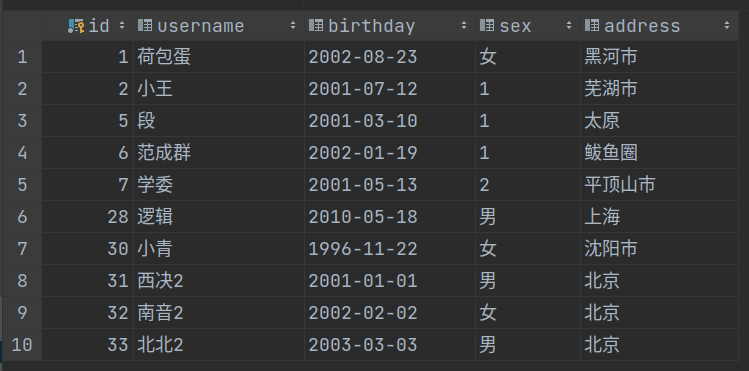
- 批量更新後的返回結果
<==    Updates: 1
批量更新成功!
-
原因:
- 首先要區別< update >標籤和update語句:在 < update >標籤中有一個< foreach >標籤,他循環了3條相互獨立的update語句
- 注意:每條update語句恰巧都只是修改了一條記錄,所以< update >標籤返回3次1後結束,因為循環3次後循環標籤結束了
- 對於如下測試程式碼,num其實被賦值3次,num的值是最後一次賦值的結果,本次測試恰好是:1
- 其實筆者不太確定num是否被賦值了3,但是根據底層輸出的結果可知,起作用的一定是最後一條update語句影響的記錄條數
- 不是循環的3條update語句影響條數的和,因為輸出結果:是1,而不是3
int num = usersMapper.updateBatch(users);
輸出結果
//批量查詢結果

Checking to see if class com.example.mapper.TestUsersMapper matches criteria [is assignable to Object]
Checking to see if class com.example.mapper.UsersMapper matches criteria [is assignable to Object]
Opening JDBC Connection
Created connection 16148478.
Setting autocommit to false on JDBC Connection [com.mysql.cj.jdbc.ConnectionImpl@f667fe]
==>  Preparing: select id, username, birthday, sex, address from users where id in ( ? , ? , ? )
==> Parameters: 1(Integer), 3(Integer), 5(Integer)
<==    Columns: id, username, birthday, sex, address
<==        Row: 1, 荷包蛋, 2002-08-23, 女, 黑河市
<==        Row: 3, 小張, 1999-02-22, 1, 長沙
<==        Row: 5, 段, 2001-03-10, 1, 太原
<==      Total: 3
Users{id=1, userName='荷包蛋', birthday=Fri Aug 23 00:00:00 CST 2002, sex='女', address='黑河市'}
Users{id=3, userName='小張', birthday=Mon Feb 22 00:00:00 CST 1999, sex='1', address='長沙'}
Users{id=5, userName='段', birthday=Sat Mar 10 00:00:00 CST 2001, sex='1', address='太原'}
Resetting autocommit to true on JDBC Connection [com.mysql.cj.jdbc.ConnectionImpl@f667fe]
Closing JDBC Connection [com.mysql.cj.jdbc.ConnectionImpl@f667fe]
Returned connection 16148478 to pool.

Process finished with exit code 0
//批量刪除結果

Checking to see if class com.example.mapper.TestUsersMapper matches criteria [is assignable to Object]
Checking to see if class com.example.mapper.UsersMapper matches criteria [is assignable to Object]
Opening JDBC Connection
Created connection 544966217.
Setting autocommit to false on JDBC Connection [com.mysql.cj.jdbc.ConnectionImpl@207b8649]
==>  Preparing: delete from users where id in ( ? , ? )
==> Parameters: 3(Integer), 29(Integer)
<==    Updates: 2
批量刪除成功!
Committing JDBC Connection [com.mysql.cj.jdbc.ConnectionImpl@207b8649]
Resetting autocommit to true on JDBC Connection [com.mysql.cj.jdbc.ConnectionImpl@207b8649]
Closing JDBC Connection [com.mysql.cj.jdbc.ConnectionImpl@207b8649]
Returned connection 544966217 to pool.

Process finished with exit code 0
//批量增加結果

Checking to see if class com.example.mapper.TestUsersMapper matches criteria [is assignable to Object]
Checking to see if class com.example.mapper.UsersMapper matches criteria [is assignable to Object]
Opening JDBC Connection
Created connection 749604930.
Setting autocommit to false on JDBC Connection [com.mysql.cj.jdbc.ConnectionImpl@2cae1042]
==>  Preparing: insert into users(username, birthday, sex, address) values (?, ?, ?, ?) , (?, ?, ?, ?) , (?, ?, ?, ?)
==> Parameters: 西決(String), 2001-01-01 00:00:00.0(Timestamp), 男(String), 北京(String), 南音(String), 2002-02-02 00:00:00.0(Timestamp), 女(String), 北京(String), 北北(String), 2003-03-03 00:00:00.0(Timestamp), 男(String), 北京(String)
<==    Updates: 3
批量插入成功!
Committing JDBC Connection [com.mysql.cj.jdbc.ConnectionImpl@2cae1042]
Resetting autocommit to true on JDBC Connection [com.mysql.cj.jdbc.ConnectionImpl@2cae1042]
Closing JDBC Connection [com.mysql.cj.jdbc.ConnectionImpl@2cae1042]
Returned connection 749604930 to pool.

Process finished with exit code 0
//批量更新結果

Checking to see if class com.example.mapper.TestUsersMapper matches criteria [is assignable to Object]
Checking to see if class com.example.mapper.UsersMapper matches criteria [is assignable to Object]
Opening JDBC Connection
Created connection 1718322084.
Setting autocommit to false on JDBC Connection [com.mysql.cj.jdbc.ConnectionImpl@666b83a4]
==>  Preparing: update users SET username=?, birthday=?, sex=?, address=? where id=? ; update users SET username=?, birthday=?, sex=?, address=? where id=? ; update users SET username=?, birthday=?, sex=?, address=? where id=?
==> Parameters: 西決2(String), 2001-01-01 00:00:00.0(Timestamp), 男(String), 北京(String), 31(Integer), 南音2(String), 2002-02-02 00:00:00.0(Timestamp), 女(String), 北京(String), 32(Integer), 北北2(String), 2003-03-03 00:00:00.0(Timestamp), 男(String), 北京(String), 33(Integer)
<==    Updates: 1
批量更新成功!
Committing JDBC Connection [com.mysql.cj.jdbc.ConnectionImpl@666b83a4]
Resetting autocommit to true on JDBC Connection [com.mysql.cj.jdbc.ConnectionImpl@666b83a4]
Closing JDBC Connection [com.mysql.cj.jdbc.ConnectionImpl@666b83a4]
Returned connection 1718322084 to pool.

Process finished with exit code 0

