【Azure 存儲服務】Java Azure Storage SDK V12使用Endpoint連接Blob Service遇見 The Azure Storage endpoint url is malformed
- 2022 年 5 月 26 日
- 筆記
- Azure Storage, Java Storage, Azure Developer, 【Azure 存儲服務】, The Azure Storage endpoint url is malformed, Java v12 SDK
問題描述
使用Azure Storage Account的共享訪問簽名(Share Access Signature) 生成的終結點,連接時遇見 The Azure Storage endpoint url is malformed (Azure 存儲終結點 URL 格式不正確)
Storage Account SDK in pom.xml:
    <dependency>
      <groupId>com.azure</groupId>
      <artifactId>azure-storage-blob</artifactId>
      <version>12.6.0</version>
    </dependency>
App.Java 文件中,創建 BlobServiceClient 對象程式碼:
String endpoint ="BlobEndpoint=//://************...";
BlobServiceClient blobServiceClientbyendpoint = new BlobServiceClientBuilder().endpoint(endpoint).buildClient();
獲取Endpoint的方法為(Azure Portal --> Storage Account --> Share access signature)
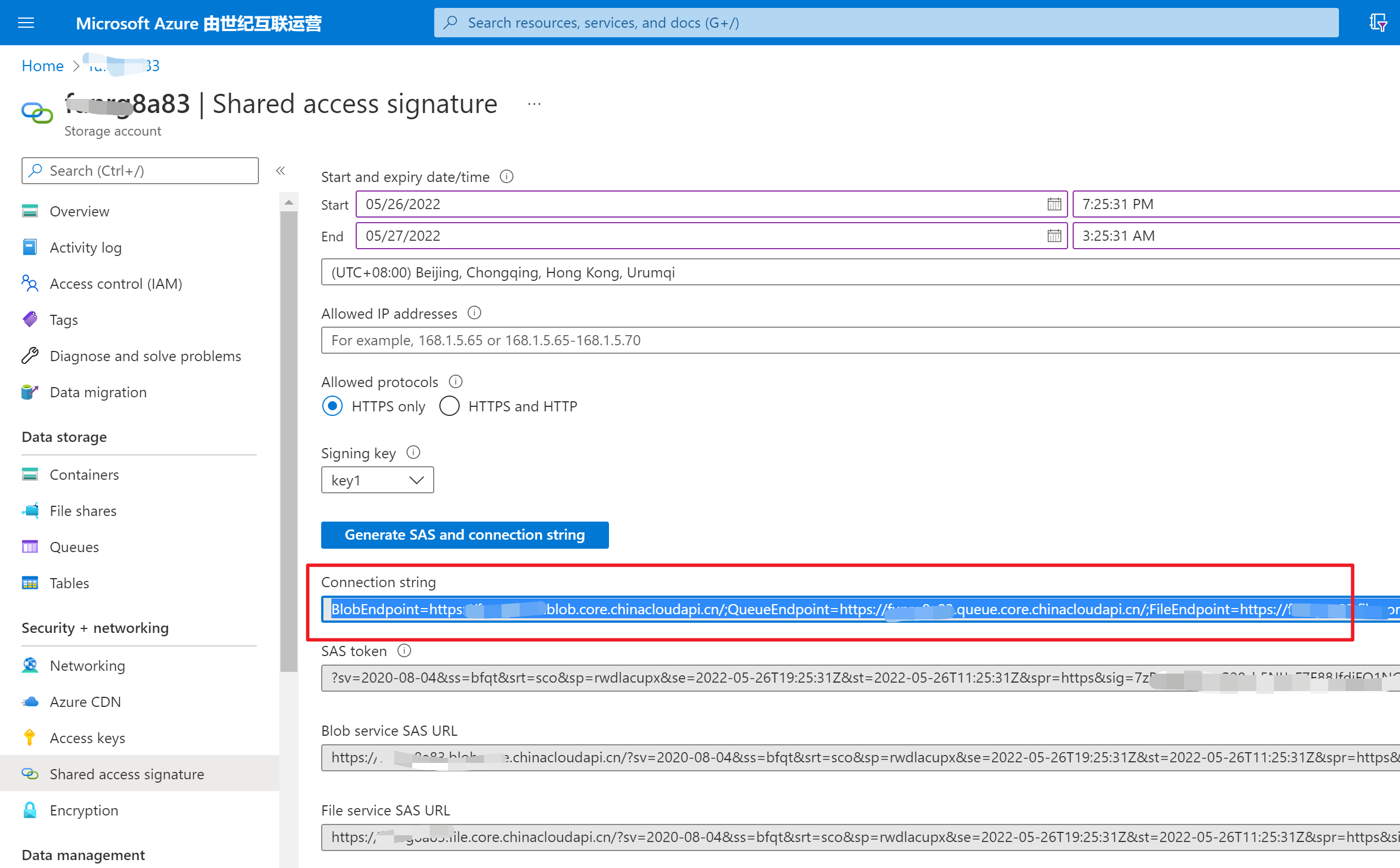
當執行Java 程式碼時,main函數拋出異常:java.lang.IllegalArgumentException: The Azure Storage endpoint url is malformed
PS C:\LBWorkSpace\MyCode\1-Storage Account - Operation Blob by Connection String - Java>
 & 'C:\Program Files\Microsoft\jdk-11.0.12.7-hotspot\bin\java.exe'
 '-agentlib:jdwp=transport=dt_socket,server=n,suspend=y,address=localhost:59757'
'@C:\Users\AppData\Local\Temp\cp_6ux3xmehddi1mc4fanfjupd3x.argfile'
 'com.blobs.quickstart.App'

Azure Blob storage v12 - Java quickstart sample

2022-05-26 10:24:29 ERROR BlobServiceClientBuilder - The Azure Storage endpoint url is malformed.
Exception in thread "main" java.lang.IllegalArgumentException: The Azure Storage endpoint url is malformed.
        at com.azure.storage.blob.BlobServiceClientBuilder.endpoint(BlobServiceClientBuilder.java:132)
        at com.blobs.quickstart.App.main(App.java:30)
問題分析
消息 [The Azure Storage endpoint url is malformed (Azure 存儲終結點 URL 格式不正確)] 說明程式碼中使用的格式不對,回到生成endopoint的頁面查看,原來使用的是連接字元串 Connection String. 與直接使用Access Key中的Connection String是相同的程式碼方式,而 Endpoint 是指當個連接到Blob Service的URL。
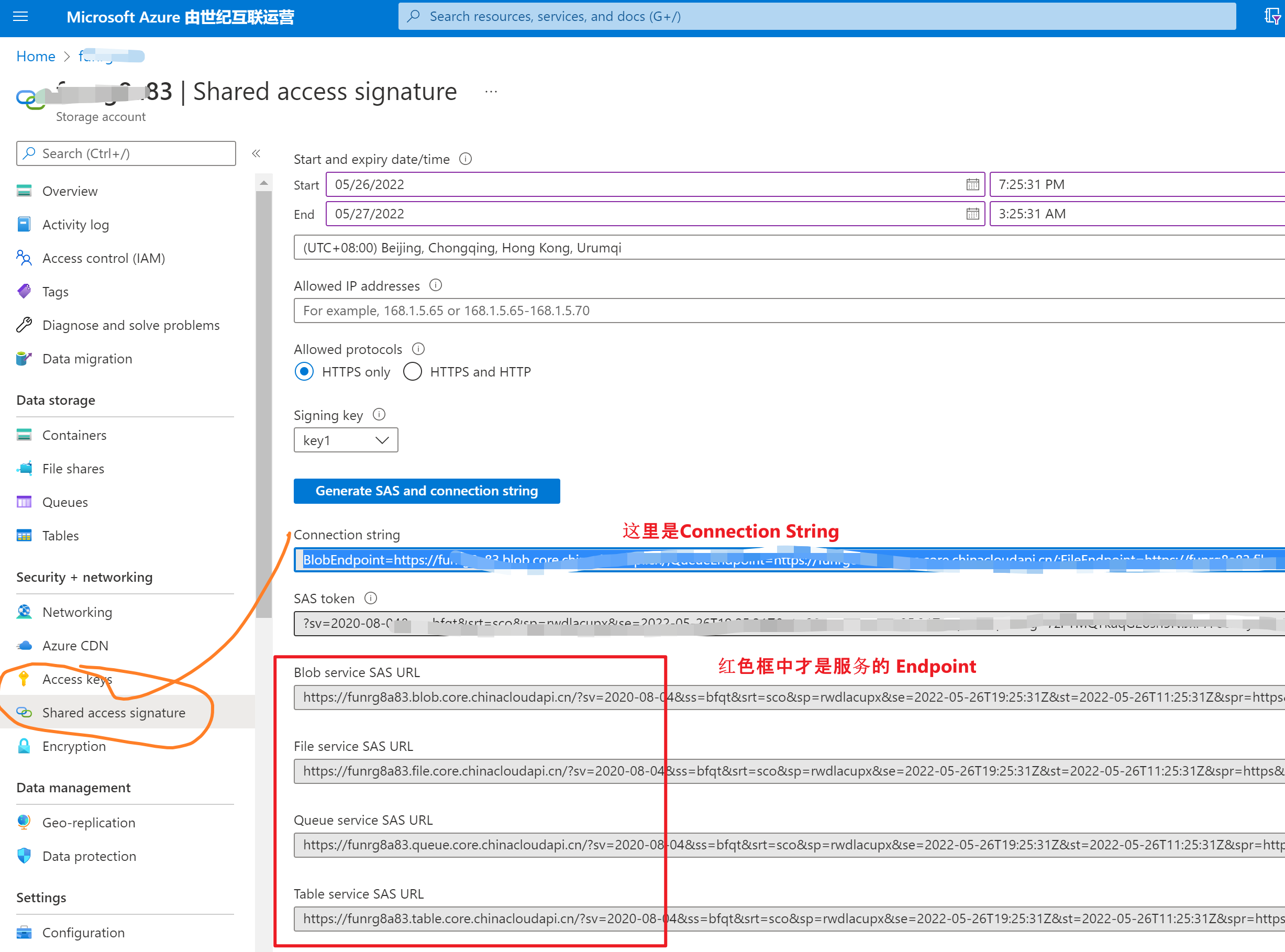
回到程式碼中,發現新版本把連接方式進行了區分:
- 使用Connection String時,用 new BlobServiceClientBuilder().connectionString(connectStr).buildClient();
- 使用Endpoint時,用 new BlobServiceClientBuilder().endpoint(endpoint).buildClient();
所以,解決 endpoint url malformed 關鍵就是使用正確的 SAS URL 或者是 Connection String
//使用連接字元串時
String connectStr ="BlobEndpoint=//:************.blob.core.chinacloudapi.cn/;...SharedAccessSignature=sv=2020-08-0...&sig=**************";
BlobServiceClient blobServiceClient = new BlobServiceClientBuilder().connectionString(connectStr).buildClient();

//使用SAS終結點
String endpoint ="//************.blob.core.chinacloudapi.cn/?sv=2020-08-04...&sig=*********************";
BlobServiceClient blobServiceClientbyendpoint = new BlobServiceClientBuilder().endpoint(endpoint).buildClient();
完整的示例程式碼:
package com.blobs.quickstart;

/**
 * Azure blob storage v12 SDK quickstart
 */
import com.azure.storage.blob.*;
import com.azure.storage.blob.models.*;
import java.io.*;

public class App
{
    public static void main( String[] args ) throws IOException
    {

        System.out.println("Azure Blob storage v12 - Java quickstart sample\n");

        // Retrieve the connection string for use with the application. The storage
        // connection string is stored in an environment variable on the machine
        // running the application called AZURE_STORAGE_CONNECTION_STRING. If the environment variable
        // is created after the application is launched in a console or with
        // Visual Studio, the shell or application needs to be closed and reloaded
        // to take the environment variable into account.

        //String connectStr ="DefaultEndpointsProtocol=https;AccountName=******;AccountKey=***********************;EndpointSuffix=core.chinacloudapi.cn";// System.getenv("AZURE_STORAGE_CONNECTION_STRING");
        String connectStr ="BlobEndpoint=https://******* */.blob.core.chinacloudapi.cn/;QueueEndpoint=https://*******.queue.core.chinacloudapi.cn/;FileEndpoint=https://*******.file.core.chinacloudapi.cn/;TableEndpoint=https://*******.table.core.chinacloudapi.cn/;SharedAccessSignature=sv=2020...&sig=*************************";
        BlobServiceClient blobServiceClient = new BlobServiceClientBuilder().connectionString(connectStr).buildClient();


        //Create a unique name for the container
        String containerName = "lina-" + java.util.UUID.randomUUID();

        // Create the container and return a container client object
        BlobContainerClient containerClient = blobServiceClient.createBlobContainer(containerName);

        BlobContainerClient containerClient1 = blobServiceClient.getBlobContainerClient("container-name");

        if(!containerClient1.exists())
        {
            System.out.println("create containerName");
            blobServiceClient.createBlobContainer("container-name");
        }


        System.out.println("create containerName .....");
        // // Create a local file in the ./data/ directory for uploading and downloading
        // String localPath = "./data/";
        // String fileName = "quickstart" + java.util.UUID.randomUUID() + ".txt";
        // File localFile = new File(localPath + fileName);

        // // Write text to the file
        // FileWriter writer = new FileWriter(localPath + fileName, true);
        // writer.write("Hello, World!");
        // writer.close();

        // // Get a reference to a blob
        // BlobClient blobClient = containerClient.getBlobClient(fileName);

        // System.out.println("\nUploading to Blob storage as blob:\n\t" + blobClient.getBlobUrl());

        // // Upload the blob
        // blobClient.uploadFromFile(localPath + fileName);

        // System.out.println("\nListing blobs...");

        // // List the blob(s) in the container.
        // for (BlobItem blobItem : containerClient.listBlobs()) {
        //     System.out.println("\t" + blobItem.getName());
        // }

        // // Download the blob to a local file
        // // Append the string "DOWNLOAD" before the .txt extension so that you can see both files.
        // String downloadFileName = fileName.replace(".txt", "DOWNLOAD.txt");
        // File downloadedFile = new File(localPath + downloadFileName);

        // System.out.println("\nDownloading blob to\n\t " + localPath + downloadFileName);

        // blobClient.downloadToFile(localPath + downloadFileName);

        // // Clean up
        // System.out.println("\nPress the Enter key to begin clean up");
        // System.console().readLine();

        // System.out.println("Deleting blob container...");
        // containerClient.delete();

        // System.out.println("Deleting the local source and downloaded files...");
        // localFile.delete();
        // downloadedFile.delete();

        System.out.println("Done");
    }
}
參考資料
快速入門:使用 Java v12 SDK 管理 blob: //docs.azure.cn/zh-cn/storage/blobs/storage-quickstart-blobs-java?tabs=powershell%2Cenvironment-variable-windows

