『德不孤』Pytest框架 — 9、Pytest測試報告
- 2022 年 3 月 10 日
- 筆記
- 測試基礎技能 - Pytest測試框架
1、pytest-html插件
Pytest可以通過命令行方式,生成xml/html格式的測試報告,並存儲於用戶指定路徑。
需要用到pytest-html插件。
安裝方式:執行命令pip install pytest-html。
(1)插件使用方式:
命令格式:--html=用戶路徑/report.html
運行方式:
main()函數方式:
pytest.main(['--html=./report/report_01.html'])(不好使,可能配置了pytest.ini文件)- 命令行方式:
在report目錄中生成report.html測試報告。
pytest ./pytest_demo/test_pytest_01.py --html=./report/report.html - 使用
pytest.ini文件方式:
在addopts屬性後追加--html參數配置,在report目錄中生成report.html測試報告。
addopts = -s --html=../report/report.html
(2)執行結果:
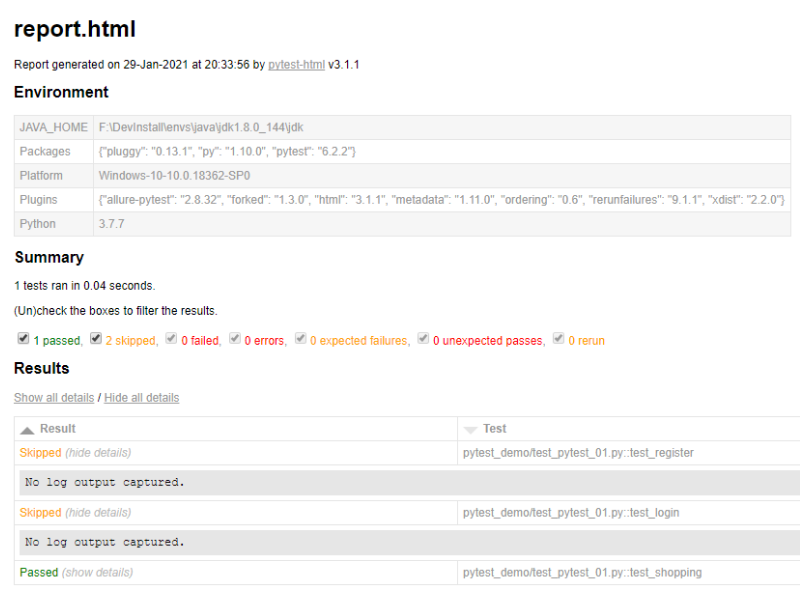
在指定目錄中會生成assets文件夾(css文件)和report.html文件。
如下圖所示:
提示:若要生成
xml文件,可將--html=./report.html改成--junitxml= report/report.xml
2、Allure測試報告
(1)Allure框架說明
Allure生成的測試報告與上面pytest-html插件生成的測試報告對比,簡直完美!
Allure是一個Report框架,是一種靈活的輕量級,支援多語言的測試報告工具,它不僅能夠以簡潔的WEB報告形式顯示已測試的內容,並帶有失敗用例截圖、測試步驟和測試說明資訊,也可以集成到Jenkins上展示高大上的報告介面。
而且允許參與開發過程的每個人從測試的日常執行中提取最大限度的有用資訊。
Allure框架支援的語言包括:
JavaPythonJavaScriptRubyGroovyPHP.NetScala
Allure幫助文檔:
(2)Allure框架的使用
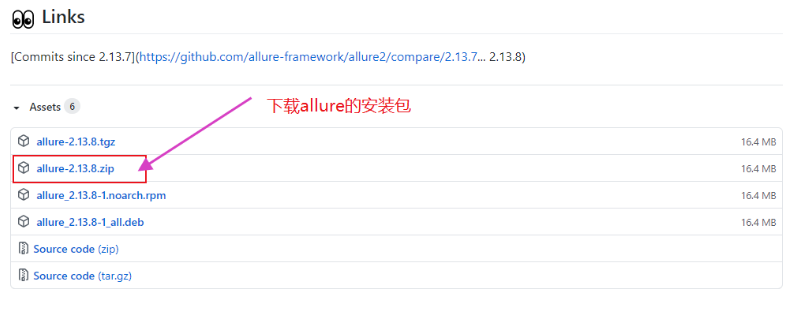
步驟1:下載Allure框架,並配置到環境變數中。
Allure框架下載地址://github.com/allure-framework/allure2/releases
點擊下圖位置,進行下載。
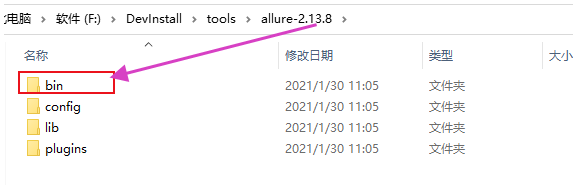
然後解壓Allure框架文件,放到自己指定的目錄中。
把Allure框架的bin目錄配置到Path環境變數中。
步驟2:驗證Allure框架是否安裝成功。
使用命令:allure --version
需要在CMD命令行和PyCharm的Terminal中,都需要驗證一下。
因為CMD可以驗證通過,但是PyCharm中驗證失敗,如下:
J:\PyCharmWorkSpace\Pytest_d>allure --version
'allure' 不是內部或外部命令,也不是可運行的程式
或批處理文件。
解決方式:需要重啟PyCharm。
步驟3:下載allure-pytest庫(插件)。
執行安裝命令:pip install allure-pytest
步驟4:設置生成的Json格式臨時報告的存放位置。
配置pytest.ini文件,在pytest.ini全局配置文件中的addopts屬性中添加:
--alluredir ../report/temp_jsonreport
例如:addopts = -vs --alluredir ../report/temp_jsonreport
然後我們執行測試用例就可以了,當然--alluredir參數也可以不配置在pytest.ini文件,比如在執行測試的命令行或者mian()函數中填寫都可以。(主要是生成Json格式的測試報告,是多個Json文件)
提示:
- 命令行參數:
pytest --alluredir report,是在執行命令目錄生成report文件夾,文件夾下包含xml文件。- 將
pytest.ini文件中的生成報告的命令替換成--alluredir report,在命令行中運行pytest即可生成報告格式為Json格式,保存在項目文件的report文件夾中。
步驟5:生成Allure測試報告。
原理是:使用第一步下載的Allure框架把Json格式的測試報告,轉換成精美的HTML測試報告。
將上面/report/temp_jsonreport文件夾中的Json格式的測試報告轉化為HTML格式的測試報告。
執行命令:allure generate ./report/temp_jsonreport -o ./report/html --clean
注意:以執行命令的目錄為相對路徑。
說明:
allure generate: 固定命令。./report/temp_jsonreport:生成的Json格式的臨時報告的路徑。-o:輸出output。./report/html:生成的Allure報告的路徑。--clean:清空./report/html路徑中原來的Allure測試報告。
提示:main()函數中執行如上命令。
if __name__ == '__main__':
    pytest.main()
    os.system("allure generate ./report/temp_jsonreport -o ./report/html --clean")

# 或者直接用main函數調用,哪種方式都可以。
# (直接執行測試文件, 而不用pytest的方式執行,就可以執行)
pytest.main(["testCase_demo1.py","-sv","--alluredir","../report/temp_jsonreport"])
os.system("allure generate ./report/temp_jsonreport -o ./report/html --clean")
說明:找不到路徑的話,可以在Python Console窗口調試。
最後,生成的Allure測試報告如下圖:
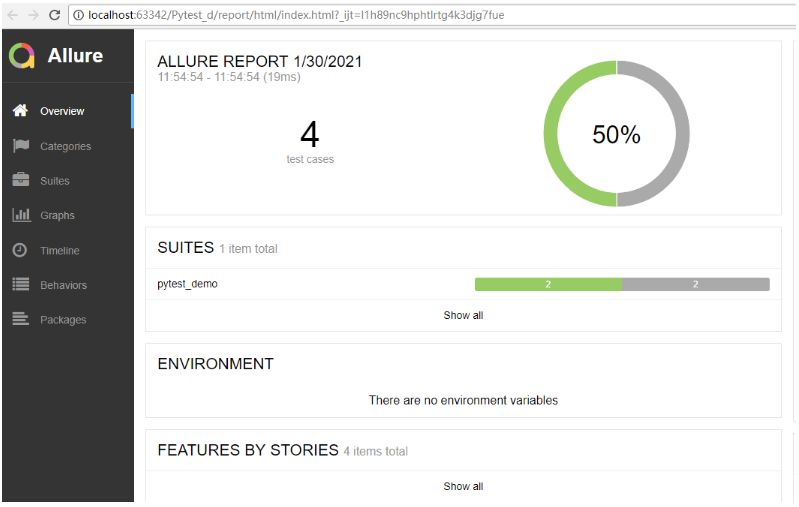
提示:
Allure測試報告支援自定義修改。