PC端申請表
公司項目需求中要做用html做一個PDF申請表的樣式出來。有點意思,貼上來大家看看。
先上效果圖:
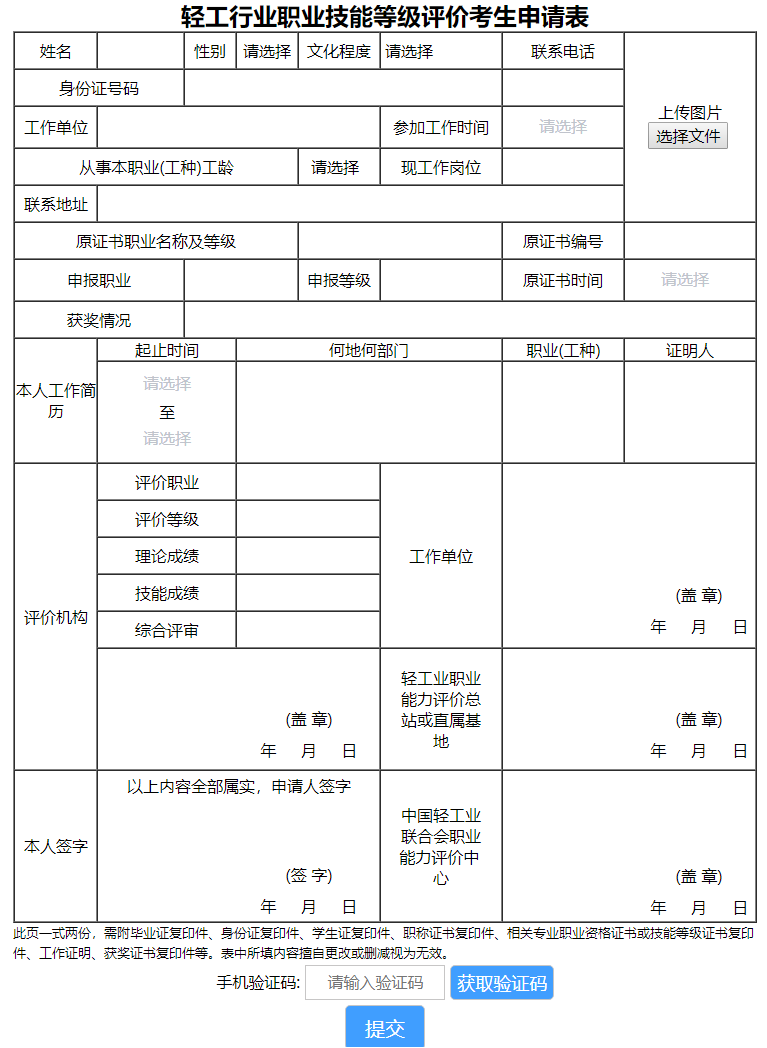
附上源程式碼:
HTML:

<div id="form">
        <h2>輕工行業職業技能等級評價考生申請表</h2>
        <table cellspacing="0" border="1px" class="table">
            <tr>
                <td style="width: 50px;" colspan="2">姓名</td>
                <td style="width: 70px;" colspan="2"><input class="a1" style="width: 85px;" type="text" value="" /></td>
                <td style="width: 50px;" colspan="2">性別</td>
                <td style="width: 60px;" colspan="2">
                    <div>
                        <select class="a2">
                            <option value="">請選擇</option>
                            <option value="010">男</option>
                            <option value="021">女</option>
                        </select>
                    </div>
                </td>
                <td style="width: 80px;" colspan="2">文化程度</td>
                <td style="width: 120px;" colspan="2">
                    <div>
                        <select class="a3">
                            <option value="">請選擇</option>
                            <option value="本科">本科</option>
                            <option value="研究生">研究生</option>
                            <option value="專科">專科</option>
                            <option value="高中及高中以下">高中及高中以下</option>
                        </select>
                    </div>
                </td>
                <td style="width: 120px;" colspan="2">聯繫電話</td>
                <td colspan="3" rowspan="5" style="width: 130px">
                    <!-- ifshow用於點擊後隱藏 -->
                    <div class="ifshow">上傳圖片</div>
                    <input style="width: 80px;height: 30px;" type="file" id="picFile" onchange="readFile(this)" />
                    <img id="img" src="" alt="" style="width: 130px;" />
                </td>
            </tr>

            <tr>
                <td colspan="4">身份證號碼</td>
                <td colspan="8">
                    <input id="idcard" class="a4" onblur="check1()" type="text" value="" style="width: 300px;" />
                </td>
                <td colspan="2">
                    <input id="phone" class="a5" onblur="check2()" type="text" value="" style="width: 120px;" />
                </td>
            </tr>

            <tr>
                <td colspan="2">工作單位</td>
                <td colspan="8">
                    <input class="a6" type="text" value="" style="width: 260px;" />
                </td>
                <td colspan="2">參加工作時間</td>
                <td colspan="2">
                    <!-- 參加工作時間選擇器 -->
                    <el-date-picker class="a7" v-model="value1" type="month" placeholder="請選擇"
                        style="width: 120px;font-size: 16px;" format="yyyy年MM月">
                    </el-date-picker>
                </td>
            </tr>

            <tr>
                <td colspan="8">從事本職業(工種)工齡</td>
                <td colspan="2">
                    <div>
                        <select class="a8">
                            <option value="">請選擇</option>
                            <option value="1年">1年</option>
                            <option value="1-3年">1-3年</option>
                            <option value="3-5年">3-5年</option>
                            <option value="5年以上">5年以上</option>
                        </select>
                    </div>
                </td>
                <td colspan="2">現工作崗位</td>
                <td colspan="2">
                    <input class="a9" type="text" value="" style="width: 120px;" />
                </td>
            </tr>

            <tr>
                <td colspan="2">聯繫地址</td>
                <td colspan="12">
                    <input class="a10" type="text" value="" style="width: 500px;" />
                </td>
            </tr>

            <tr>
                <td colspan="8">原證書職業名稱及等級</td>
                <td colspan="4">
                    <input class="a11" type="text" value="" style="width: 200px;" />
                </td>
                <td colspan="2">原證書編號</td>
                <td colspan="3">
                    <input class="a12" type="text" value="" style="width: 130px;" />
                </td>
            </tr>

            <tr>
                <td colspan="4">申報職業</td>
                <td colspan="4">
                    <input class="a13" type="text" value="" style="width: 110px;" />
                </td>
                <td colspan="2">申報等級</td>
                <td colspan="2">
                    <input class="a14" type="text" value="" style="width: 120px;" />
                </td>
                <td colspan="2">原證書時間</td>
                <td colspan="3">
                    <!-- 原證書時間選擇器 -->
                    <el-date-picker class="a15" v-model="value2" type="month" placeholder="請選擇"
                        style="width: 130px;font-size: 16px;" format="yyyy年MM月">
                    </el-date-picker>
                </td>
            </tr>

            <tr>
                <td colspan="4">獲獎情況</td>
                <td colspan="13">
                    <input class="a16" type="text" value="" style="width: 570px;" />
                </td>
            </tr>

            <tr>
                <td rowspan="2" colspan="2">本人工作簡歷</td>
                <td colspan="4">起止時間</td>
                <td colspan="6">何地何部門</td>
                <td colspan="2">職業(工種)</td>
                <td colspan="3">證明人</td>
            </tr>

            <tr>
                <td colspan="4">
                    <!-- 工作簡歷時間選擇器 -->
                    <div>
                        <el-date-picker class="a17" v-model="value3" type="month" placeholder="請選擇"
                            style="width: 120px;font-size: 16px;" format="yyyy年MM月">
                        </el-date-picker>
                    </div>
                    <div style="margin: -3px 0;">至</div>
                    <div>
                        <el-date-picker class="a18" v-model="value4" type="month" placeholder="請選擇"
                            style="width: 120px;font-size: 16px;" format="yyyy年MM月">
                        </el-date-picker>
                    </div>
                </td>
                <td colspan="6">
                    <input class="a19" type="text" value="" style="width: 260px;height: 100px;" />
                </td>
                <td colspan="2"><input class="a20" type="text" value="" style="width: 120px;height: 100px;" /></td>
                <td colspan="3"><input class="a21" type="text" value="" style="width: 130px;height: 100px;" /></td>
            </tr>

            <tr>
                <td rowspan="6" colspan="2">評價機構</td>
                <td colspan="4">評價職業</td>
                <td colspan="4">
                    <input type="text" value="" style="width: 140px;" />
                </td>
                <td rowspan="5" colspan="2">工作單位</td>
                <td rowspan="5" colspan="5">
                    <div style="margin-left:140px">
                        <div style="margin-top:110px; margin-bottom: 10px;">(蓋 章)</div>
                        <div>
                            <span style="margin-right: 20px">年</span>
                            <span style="margin-right: 20px">月</span>
                            <span>日</span>
                        </div>
                    </div>
                </td>
            </tr>

            <tr>
                <td colspan="4">評價等級</td>
                <td colspan="4"><input type="text" value="" style="width: 140px;" /></td>
            </tr>

            <tr>
                <td colspan="4">理論成績</td>
                <td colspan="4"><input type="text" value="" style="width: 140px;" /></td>
            </tr>
            <tr>
                <td colspan="4">技能成績</td>
                <td colspan="4"><input type="text" value="" style="width: 140px;" /></td>
            </tr>
            <tr>
                <td colspan="4">綜合評審</td>
                <td colspan="4"><input type="text" value="" style="width: 140px;" /></td>
            </tr>

            <tr>
                <td colspan="8" style="height: 120px;">
                    <div style="margin-left:140px">
                        <div style="margin-top:50px; margin-bottom: 10px;">(蓋 章)</div>
                        <div>
                            <span style="margin-right: 20px">年</span>
                            <span style="margin-right: 20px">月</span>
                            <span>日</span>
                        </div>
                    </div>
                </td>
                <td colspan="2">
                    輕工業職業<br />
                    能力評價總<br />
                    站或直屬基<br />
                    地
                </td>
                <td colspan="5">
                    <div style="margin-left:140px">
                        <div style="margin-top:50px; margin-bottom: 10px;">(蓋 章)</div>
                        <div>
                            <span style="margin-right: 20px">年</span>
                            <span style="margin-right: 20px">月</span>
                            <span>日</span>
                        </div>
                    </div>
                </td>
            </tr>

            <tr>
                <td colspan="2" style="height: 150px">本人簽字</td>
                <td colspan="8">
                    以上內容全部屬實,申請人簽字
                    <div style="margin-left:140px">
                        <div style="margin-top:68px; margin-bottom: 10px;">(簽 字)</div>
                        <div>
                            <span style="margin-right: 20px">年</span>
                            <span style="margin-right: 20px">月</span>
                            <span>日</span>
                        </div>
                    </div>
                </td>
                <td colspan="2">
                    中國輕工業<br />
                    聯合會職業<br />
                    能力評價中
                    <br />心
                </td>
                <td colspan="5">
                    <div style="margin-left:140px">
                        <div style="margin-top:90px; margin-bottom: 10px;">(蓋 章)</div>
                        <div>
                            <span style="margin-right: 20px">年</span>
                            <span style="margin-right: 20px">月</span>
                            <span>日</span>
                        </div>
                    </div>
                </td>
            </tr>
        </table>
        <div style="font-size: 13px; line-height: 20px;text-align: left;">
            此頁一式兩份,需附畢業證複印件、身份證複印件、學生證複印件、職稱證書複印件、相關專業職業資格證書或技能等級證書複印件、工作證明、獲獎證書複印件等。表中所填內容擅自更改或刪減視為無效。
        </div>
        <div>
            <span>手機驗證碼:</span>
            <input class="verification-code" placeholder="請輸入驗證碼" type="text" value=""
                style="width: 140px;border: 1px solid rgb(199, 198, 198); " />
            <button onclick="getCode()" class="getCode" type="button" style="height: 35px;position: relative;
            top: 2px;">獲取驗證碼
            </button>
        </div>
        <div style="margin-top: 5px;">
            <button type="button" onclick="submit()" style="font-size :20px;width: 80px;height: 45px;">提交</button>
        </div>
    </div>
</div>
JS:

//圖片上傳
function readFile(obj) {
    var file = obj.files[0];
    //判斷類型是不是圖片
    if (!/image\/\w+/.test(file.type)) {
        alert("請確保文件為影像類型");
        return false;
    } else {
        var reader = new FileReader();
        reader.readAsDataURL(file);
        reader.onload = function (e) {
            dealImage(this.result, {
                quality: 0.5
            }, function (base) {
                //調用
                var blob = dataURLtoBlob(base);
                var newFile = new File([blob], file.name, {
                    type: file.type
                });
                console.log(newFile)
                let r = new FileReader(); //本地預覽
                r.onload = function () {
                    $('#img').attr("src", r.result);
                    //將上傳圖片字體隱藏起來
                    $('.ifshow').hide();
                }
                r.readAsDataURL(newFile); //Base64
                // upload(newFile);
            });
        }
    }
}
//將base64轉換為blob
function dataURLtoBlob(dataurl) {
    var arr = dataurl.split(','),
        mime = arr[0].match(/:(.*?);/)[1],
        bstr = atob(arr[1]),
        n = bstr.length,
        u8arr = new Uint8Array(n);
    while (n--) {
        u8arr[n] = bstr.charCodeAt(n);
    }
    return new Blob([u8arr], {
        type: mime
    });
}

function upload(file) {
    var that = this;
    // 創建form對象
    let param = new FormData();
    // 通過append向form對象添加數據
    param.append('img', file);
    // 文件大小
    param.append('size', file.size);
    for (var n in that.params) {
        param.append(n, that.params[n]);
    }
    // 創建ajax
    var xhr = new XMLHttpRequest();
    xhr.onload = function () {
        console.log(xhr.responseText)
    }
    xhr.open("POST", "yourapi", true);
    // 發送表單數據
    xhr.send(param);
}
/**
 * 圖片壓縮,默認同比例壓縮
 * @param {Object} path
 * pc端傳入的路徑可以為相對路徑,但是在移動端上必須傳入的路徑是照相圖片儲存的絕對路徑
 * @param {Object} obj
 * obj 對象 有 width, height, quality(0-1)
 * @param {Object} callback
 * 回調函數有一個參數,base64的字元串數據
 */
function dealImage(path, obj, callback) {
    var img = new Image();
    img.src = path;
    img.onload = function () {
        var that = this;
        // 默認按比例壓縮
        var w = that.width,
            h = that.height,
            scale = w / h;
        w = obj.width || w;
        h = obj.height || (w / scale);
        var quality = obj.quality || 0.7; // 默認圖片品質為0.7
        //生成canvas
        var canvas = document.createElement('canvas');
        var ctx = canvas.getContext('2d');
        // 創建屬性節點
        var anw = document.createAttribute("width");
        anw.nodeValue = w;
        var anh = document.createAttribute("height");
        anh.nodeValue = h;
        canvas.setAttributeNode(anw);
        canvas.setAttributeNode(anh);
        ctx.drawImage(that, 0, 0, w, h);
        // 影像品質
        if (obj.quality && obj.quality <= 1 && obj.quality > 0) {
            quality = obj.quality;
        }
        // quality值越小,所繪製出的影像越模糊
        var base64 = canvas.toDataURL('image/jpeg', quality);
        // 回調函數返回base64的值
        callback(base64);
    }
}

//身份證號碼驗證
function check1() {
    //獲取身份證號碼值
    let idcard = $('#idcard').val();
    //先用正則判斷是否為正確的格式
    let partn = /^[1-9]\d{5}(18|19|20)\d{2}((0[1-9])|(10|11|12))(([0-2][1-9])|10|20|30|31)\d{3}[0-9Xx]$/;
    if (partn.test(idcard) == false) {
        $('.a4').val('');
        alert('請檢查身份證號碼格式是否正確');
        return false;
    } else {
        let number = [...idcard]; //es6語法,利用...將變數的值轉成數組。
        let ration = new Array("7", "9", "10", "5", "8", "4", "2", "1", "6", "3", "7", "9", "10", "5", "8", "4", "2"); //係數
        let ration22 = new Array("1", "0", "X", "9", "8", "7", "6", "5", "4", "3", "2");
        let sum = 0;
        console.log(ration);
        for (let i = 0; i < number.length - 1; i++) {
            sum = number[i] * ration[i] + sum;
            console.log(i);
        }
        let mod = sum % 11;
        if (ration22[mod] == number[17]) {

        } else {
            $('.a4').val('');
            alert('最後一位校驗錯誤');
        }
    }
}

//手機號驗證
function check2() {
    //獲取手機號值
    let phone = $('#phone').val();
    //先用正則判斷是否正確
    let b = /^1(3|4|5|6|7|8|9)\d{9}$/;
    if (b.test(phone)) {
        return true;
    } else {
        $('a5').val('');
        alert('請檢查手機號是否正確');
        return false;
    }
}

//獲取驗證碼
function getCode() {
    //獲取手機號值
    var phone = $('#phone').val();
    //先用正則判斷是否正確
    var b = /^1(3|4|5|6|7|8|9)\d{9}$/;
    if (!b.test(phone)) {
        $('a5').val('');
        alert('手機號輸入有誤!請重新輸入');
        return;
    } else {
        //本地介面還沒有弄好,直接codetime(60)
        codetime(60)
        // $.ajax({
        // type: 'POST',
        // headers: {},
        // url: "介面",
        // data: {
        //     'phone': phone
        // },
        //     success: function (data) {
        //         if (data == 456) {
        //             alert.msg("驗證碼在三分鐘之內都有效,無需重新獲取");
        //         } else {
        //             codetime(60);
        //         }
        //     }
        // })
    }
}
//codetime函數注釋
function codetime(time) {
    var _this = $(".getCode");
    if (time == 0) {
        _this.attr("disabled", false);
        _this.html("發送驗證碼");
        _this.css('background-color', '#409eff');
        _this.css('color', 'white');
    } else {
        _this.attr("disabled", true);
        _this.html("重新發送(" + time + ")");
        _this.css('background-color', '#fafafa');
        _this.css('color', '#999');
        time--;
        setTimeout(function () {
            codetime(time);
        }, 1000)
    }
}

//提交前的驗證
function submit() {
    a1 = $('.a1').val()
    a2 = $('.a2').val()
    a3 = $('.a3').val()
    a4 = $('.a4').val()
    a5 = $('.a5').val()
    a6 = $('.a6').val()
    a7 = $('.a7').val()
    a8 = $('.a8').val()
    a9 = $('.a9').val()
    a10 = $('.a10').val()
    a11 = $('.a11').val()
    a12 = $('.a12').val()
    a13 = $('.a13').val()
    a14 = $('.a14').val()
    a15 = $('.a15').val()
    a16 = $('.a16').val()
    a17 = $('.a17').val()
    a18 = $('.a18').val()
    a19 = $('.a19').val()
    a20 = $('.a20').val()
    a21 = $('.a21').val()
    verificationCode = $('.verification-code').val()
    if (a1 == "" || a1 == null) {
        alert('請填寫姓名');
    } else if (a2 == "" || a2 == null) {
        alert('請填寫性別');
    } else if (a3 == "" || a3 == null) {
        alert('請填寫文化程度');
    } else if (a4 == "" || a4 == null) {
        alert('請填寫身份證號碼');
    } else if (a5 == "" || a5 == null) {
        alert('請填寫聯繫電話');
    } else if (a6 == "" || a6 == null) {
        alert('請填寫工作單位');
    } else if (a7 == "" || a7 == null) {
        alert('請填寫參加工作時間');
    } else if (a8 == "" || a8 == null) {
        alert('請填寫工齡');
    } else if (a9 == "" || a9 == null) {
        alert('請填寫現工作崗位');
    } else if (a10 == "" || a10 == null) {
        alert('請填寫聯繫地址');
    } else if (a11 == "" || a11 == null) {
        alert('請填寫原證書職業名稱及等級');
    } else if (a12 == "" || a12 == null) {
        alert('請填寫原證書編號');
    } else if (a13 == "" || a13 == null) {
        alert('請填寫申報職業');
    } else if (a14 == "" || a14 == null) {
        alert('請填寫申報等級');
    } else if (a15 == "" || a15 == null) {
        alert('請填寫原證書時間');
    } else if (a16 == "" || a16 == null) {
        alert('請填寫獲獎情況');
    } else if (a17 == "" || a17 == null) {
        alert('請填寫工作簡歷開始時間');
    } else if (a18 == "" || a18 == null) {
        alert('請填寫工作簡歷結束時間');
    } else if (a19 == "" || a19 == null) {
        alert('請填寫何地何部門');
    } else if (a20 == "" || a20 == null) {
        alert('請填寫職業(工種)');
    } else if (a21 == "" || a21 == null) {
        alert('請填寫證明人');
    } else if (verificationCode == '' || verificationCode == null) {
        alert('請填寫驗證碼')
    } else {
        alert('提交成功')
    }
}
時間選擇器中引入了element-ui
CSS:
//時間選擇器的樣式只能用 scoped實現
<style scoped>
    .el-input__inner {
        border: none;
        color: black;
        width: 120px;
    }

    .el-input--prefix .el-input__inner {
        padding: 0;
    }

    .el-input__icon {
        display: none;
    }
</style>

其他:
html,
body,
div,
ul,
li,
h1,
h2,
h3,
h4,
h5,
h6,
p,
dl,
dt,
dd,
ol,
form,
input,
textarea,
th,
td,
select {
	margin: 0;
	padding: 0;
}
body {
	text-align: center;
}
#form {
	margin: 0 auto;
	width: 744px;
}
.table {
	margin: 0 auto;
}
input {
	height: 35px;
	font-size: 16px;
	text-align: center;
	box-sizing: border-box;
	/* 去掉input的邊框和點擊時的邊框 */
	border: none;
	outline: medium;
}
select {
	/*清除select默認樣式*/
	appearance: none;
	-moz-appearance: none;
	-webkit-appearance: none;
	-ms-appearance: none;
	/* 去掉select的邊框和點擊時的藍色邊框 */
	border: none;
	outline: none;

	font-size: 16px;
	text-align: center;
}
button{
	font-size: 18px;
	color: white;
	background-color:#409eff;
	border: 1px solid rgb(199, 198, 198);
	border-radius: 5px;
}

