從需求去理解 Linux dbus與基於dbus協議的無agent軟體管理
What is IPC
IPC [Inter-Process Communication] 進程間通訊,指至少兩個進程或執行緒間傳送數據或訊號的一些技術或方法。在Linux/Unix中,提供了許多IPC。Unix七大IPC:
- Pipe:無名管道,最基本的IPC,單向通訊,僅在父/子進程之間,也就是將一個程式的輸出直接交給另一個程式的輸入。常見使用為
ps -ef|grep xxx - FIFO [
(First in, First out)] 或 有名管道(named pipe):與Pipe不同,FIFO可以讓兩個不相關的進程可以使用FIFO。單向。 - Socket 和 Unix Domain Socket:socket和Unix套接字,雙向。適用於網路通訊,但也可以在本地使用。適用於不同的協議。
- 消息隊列
Message Queue: SysV 消息隊列、POSIX 消息隊列。 - Signal: 訊號,是發送到正在運行的進程通知以觸發其事件的特定行為,是IPC的一種有限形式。
- Semaphore:訊號量,通常用於IPC或同一進程內的執行緒間通訊。他們之間使用隊列進行消息傳遞、控制或內容的傳遞。(常見SysV 訊號量、POSIX 訊號量)
- Shared memory:(常見SysV 共享記憶體、POSIX 共享記憶體)。共享記憶體,是在進程(程式)之間傳遞數據的有效方式,目的是在其之間提供通訊。
每種IPC都有不通的特點,每種方式對資源的使用及性能都是不通的
- 管道 I/O是最快的,但為單向通訊,需要工作在 父/子 進程關係之間。
- UNIX 套接字可以在本地連接不同的進程,並且具有更高的頻寬,並且沒有固有的消息邊界。
- TCP/IP套接字可以連接任何進程。並且可以通過網路連接,但是對資源會有更多的開銷,同樣的沒有固定的消息邊界。
Reference
What is D-Bus
提到,D-Bus就不能不提一下freedesktop,而 D-Bus 僅僅作為freedesktop.org的一部分。
D-Bus 桌面匯流排 (Desktop Bus),的簡寫,也是Linux- IPC機制,不同於Unix 7大基礎IPC的是,D-Bus是在這些IPC類型之上實現的中間件IPC,D-Bus使用了基礎IPC中一種過多種,其設計的目的是在Linux桌面環境,提供服務的標準化。但目前並沒有合入主線內核中。
作為中間件IPC,D-Bus的性能較低與其他IPC模式,因為在通訊過程中會進行很多上下文切換,如果通過Dbus來發送消息,會先將其發送到內核,然後將其送回D-Bus。AF_BUS 修補程式是新的套接字類型,用來減少D-Bus上下文的切換。
更多可參考://en.wikipedia.org/wiki/D-Bus
D-Bus組成
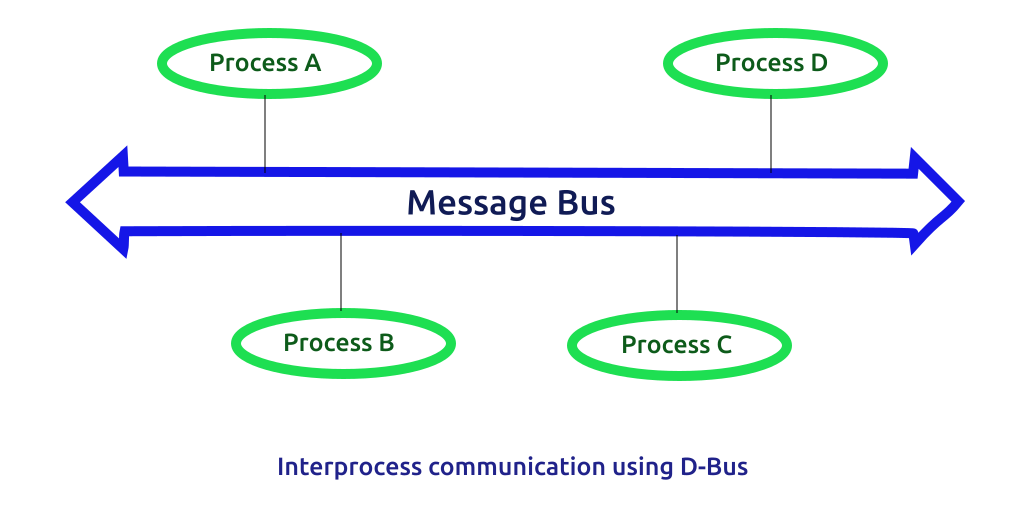
D-Bus是 一個IPC的實現方式,在架構上分位三層。
- Layer 1 libdbus:freedesktop機構提供的一個免費開源的一個由C語言編寫的
low-level API。是提供dbus功能的庫。是高級API綁定的低級API。 - Layer 2 dbus daemon:dbus實現的IPC守護進行,隨Linux啟動,通過不通進程對其的連接,實現了多進程間消息的路由(包含內核、網路、桌面等)
- Layer 3 Wapper libraries (high-level API): 對
low-level APIlibdbus的封裝 ,例如libdbus-qtlibdbus-pythongithub.com/godbus/dbus,這些不同程式語言實現的Wapper是不同開發者應該使用的lib,其簡化了D-Bus的開發難度。
Reference
dbus 基本概念
匯流排
在 D-Bus 中,bus是一個核心概念。它是應用程式可以進行方法調用、發送訊號和偵聽訊號的通道。有兩種預定義的bus:會話匯流排和系統匯流排。
-
會話匯流排(Session Bus):普通進程創建,可同時存在多條。會話匯流排屬於某個進程私有,它用於進程間傳遞消息。
-
系統匯流排(System Bus):在引導時就會啟動,它由作業系統和後台進程使用,安全性非常好,以使得任意的應用程式不能欺騙系統事件。當然,如果一個應用程式需要接受來自系統匯流排的消息,他也可以直接連接到系統匯流排中,但是他能發送的消息是受限的。系統匯流排最常見的用途是在系統範圍事件發生時發送系統範圍的通知。添加新的存儲設備、網路連接更改事件和關閉相關事件都是系統匯流排何時更適合通訊匯流排的示例。
通常情況下只存在一個System Bus,但可以存在多個Session Bus(每個桌面會話一個)。
匯流排以dbus-daemon的形式存在與系統中,該進程專門將消息從一個進程傳遞到另一個進程。該守護進程還將向匯流排上的所有應用程式轉發通知。
bus name
匯流排名稱 Bus Name,不能單單以字面意思 匯流排名稱 來理解,官方對其解釋為:Connections have one or more bus names associated with them. A connection has exactly one bus name that is a unique connection name.,可以出bus name其實是用來連接名稱。主要是用來標識一個應用和消息匯流排的連接。匯流排名稱主要分為兩類:唯一名稱與公共名稱。
- 唯一連接名稱
unique connection names:以冒號(':')字元開頭的 bus name是唯一的連接名稱。例如:1.0。每個連接都有一個唯一名。在一個 消息匯流排的生命期內,不會有兩個連接有相同的唯一名。 - 公共連接名稱
well-known bus names:公共名稱是以反向DNS域名(小寫)例如:org.fedoraproject.FirewallD1。- 如果DNS 域名包含連字元/減號,則應將其替換為下劃線,如果包含數字,則應通過添加下劃線進行轉義。例如: 7-zip.org的bus name應該定義為
org._7_zip.Archiver。
- 如果DNS 域名包含連字元/減號,則應將其替換為下劃線,如果包含數字,則應通過添加下劃線進行轉義。例如: 7-zip.org的bus name應該定義為
Reference
對象路徑
對象路徑(Object Paths) 是用於引用對象實例的名稱(類似於 C++ 或 Java 對象)。從概念上來說,D-Bus在消息交換中每個參與者都有任意個對象實例,如文件系統一樣,Dbus中的參與者中的對象實例也會形成一個層次樹。如,在CentOS7中 firewalld開發的D-Bus API 使用了/org/fedoraproject/FirewallD1的層次結構。
在定義一個對象路徑時,需要注意以下:
- 路徑可以是任意長度
- 路徑必須以 ASCII '/'(整數 47)字元開頭,並且必須由以斜杠字元分隔的元素組成。
- 每個元素只能包含 ASCII 字元
[AZ][az][0-9]_ - 不允許出現 空字元串
- 多個
/字元不能依次出現。 除非路徑是根路徑(單個/字元),否則不允許尾隨/字元。
介面名稱
interface,在每個 Object Path都包含多個介面,一般情況下介面名稱應以反向 DNS 域名開頭(小寫),(同 Java 中的介面名稱)。在命名規則上,與bus name相同。
例如:CentOS7中 firewalld開發的D-Bus API 定義的管理zone的介面 org.fedoraproject.FirewallD1.config.zone。如果DNS名稱中包含-,則應將其替換為下劃線 _。如果DNS 域名包含緊跟在 . 之後的數字,則介面名稱應在數字之前添加一個下劃線。例如,如果 7-zip.org 插件定義了一個介面,應該被命名為org._7_zip.Plugin.
成員方法名稱
成員方法名稱,Member names ,對於定義了介面後,需要實現其介面的放法,如需要獲得firewalld的zone時,就可以調用 org.fedoraproject.FirewallD1.getDefaultZone 。在D-Bus中Member names通常由「駝峰式」(camel-case)命名 。
dbus
在Linux中,如CentOS dbus包括 dbus daemon及一些cli commad。這些包
dbuslib
D-Bus的消息
最基本的D-Bus協議是一對一的通訊協議。與直接使用socket不同,D-Bus是面向消息的協議。 D-Bus的所有功能都是通過在連接上流動的消息完成的。
而在D-Bus中有四種類型的消息
- METHOD_CALL 方法調用
- METHOD_RETURN 方法返回
- ERROR 錯誤
- SIGNAL 訊號:與方法調用不同,訊號發射沒有響應。訊號發射只是一個類型為
SIGNAL的消息。它必須具有三個標頭欄位:PATH給出發出訊號的對象,加上INTERFACE並MEMBER給出訊號的完全限定名稱。
消息返回的類型
| Conventional name | 十進位值 | 說明 |
|---|---|---|
INVALID |
0 | 這是個無效類型 |
METHOD_CALL |
1 | 方法調用,該方法會有提示 |
METHOD_RETURN |
2 | 方法返回的數據 |
ERROR |
3 | 錯誤返回,第一個是其錯誤的資訊 |
SIGNAL |
4 | 訊號的發射 |
CentOS的dbus服務管理
在CentOS7中,作為systemd的一部分D-BUS會從Systemd獲取套接字文件描述符,並使用D-Bus交換當前進程生成的socket資訊。而PID 1 不使用 PolicyKit 來控制對特權操作的訪問,而是完全依賴於 low-level API D-Bus 。(這樣做是為了避免 PolicyKit 和 systemd/PID 1 之間的循環依賴。)而有些特權進程(例如關機/重啟/掛起/登陸)可以通過logind進行管理的。
由此,可以知道在CentOS中,dbus相關的服務大概有 dbus,與 logind。
dbus包含:
-
dbus-daemon:dbus架構中 layer 2的 dbus-damon
-
dbus-send: dbus提供的命令行工具,可以用dbus-send來發送消息。
-
dbus-monitor: dbus提供的命令行工具,用於監視匯流排上流動的消息。
-
dbus-launch: shell腳本啟動消息匯流排的命令行工具
dbus配置文件說明
dbus-daemon守護進程,有兩個配置文件,一個為 session bus,另外一個為 system bus。
標準的system bus文件 /usr/local/share/dbus-1/system.conf session bus配置 /usr/local/share/dbus-1/session.conf中配置。在一般情況下,不會操作這兩個文件,因其會引入 /etc/dbus-1 中的system.conf 或 session.conf。
配置文件包含的標籤:
更多的注釋可以參考:dbus-daemon
# 根元素
<busconfig>

  <!-- 根據指定的 -system或 -session 來選擇的配置文件 -->
  <type>system</type>

  <!-- dbus-daemon運行的用戶 -->
  <user>dbus</user>

  <!-- Fork into daemon mode -->
  <fork/>

  <!-- We use system service launching using a helper -->
  <standard_system_servicedirs/>

  <!-- This is a setuid helper that is used to launch system services -->
  <servicehelper>//usr/libexec/dbus-1/dbus-daemon-launch-helper</servicehelper>

  <!-- Write a pid file -->
  <pidfile>/run/dbus/messagebus.pid</pidfile>

  <!-- Enable logging to syslog -->
  <syslog/>

  <!-- 指定授權機制。如果不存在,所有的機制都被允許。 -->
  <auth>EXTERNAL</auth>

  <!-- 匯流排監聽的地址,支援unix socket,tcp,system等
		-->
  <listen>unix:path=/run/dbus/system_bus_socket</listen>
  <listen>unix:path=/tmp/foo</listen>
  <listen>tcp:host=localhost,port=1234</listen>


  <policy context="default">
    <!-- All users can connect to system bus -->
    <allow user="*"/>

    <!-- Holes must be punched in service configuration files for
         name ownership and sending method calls -->
    <deny own="*"/>
    <deny send_type="method_call"/>

    <!-- Signals and reply messages (method returns, errors) are allowed
         by efault -->
    <allow send_type="signal"/>
    <allow send_requested_reply="true" send_type="method_return"/>
    <allow send_requested_reply="true" send_type="error"/>

    <!-- All messages may be received by default -->
    <allow receive_type="method_call"/>
    <allow receive_type="method_return"/>
    <allow receive_type="error"/>
    <allow receive_type="signal"/>

    <!-- Allow anyone to talk to the message bus -->
    <allow send_destination="org.freedesktop.DBus"
           send_interface="org.freedesktop.DBus" />
    <allow send_destination="org.fedoraproject.FirewallD1"
	send_interface="org.fedorapproject.FirewallD1" />
    <allow send_destination="org.freedesktop.DBus"
           send_interface="org.freedesktop.DBus.Introspectable"/>
    <!-- But disallow some specific bus services -->
    <deny send_destination="org.freedesktop.DBus"
          send_interface="org.freedesktop.DBus"
          send_member="UpdateActivationEnvironment"/>
    <deny send_destination="org.freedesktop.DBus"
          send_interface="org.freedesktop.DBus.Debug.Stats"/>
    <deny send_destination="org.freedesktop.DBus"
          send_interface="org.freedesktop.systemd1.Activator"/>
  </policy>

  <!-- Only systemd, which runs as root, may report activation failures. -->
  <policy user="root">
    <allow send_destination="org.freedesktop.DBus"
           send_interface="org.freedesktop.systemd1.Activator"/>
  </policy>

  <!-- root may monitor the system bus. -->
  <policy user="root">
    <allow send_destination="org.freedesktop.DBus"
           send_interface="org.freedesktop.DBus.Monitoring"/>
  </policy>

  <!-- If the Stats interface was enabled at compile-time, root may use it.
       Copy this into system.local.conf or system.d/*.conf if you want to
       enable other privileged users to view statistics and debug info -->
  <policy user="root">
    <allow send_destination="org.freedesktop.DBus"
           send_interface="org.freedesktop.DBus.Debug.Stats"/>
  </policy>

  <!-- Include legacy configuration location -->
  <include ignore_missing="yes">/etc/dbus-1/system.conf</include>

  <!-- 包含的子配置文件. -->
  <includedir>system.d</includedir>

  <includedir>/etc/dbus-1/system.d</includedir>

  <!-- This is included last so local configuration can override what's
       in this standard file -->
  <include ignore_missing="yes">/etc/dbus-1/system-local.conf</include>

  <include if_selinux_enabled="yes" selinux_root_relative="yes">contexts/dbus_contexts</include>

</busconfig>
通過命令行發送dbus消息
dbus支援通過命令發送一個dbus消息,如獲取可用的dbus 服務。
dbus-send --session \
--dest=org.freedesktop.DBus \
--type=method_call \
--print-reply \
/org/freedesktop/DBus \
org.freedesktop.DBus.ListNames

method return time=1631452206.288425 sender=org.freedesktop.DBus -> destination=:1.29 serial=3 reply_serial=2
   array [
      string "org.freedesktop.DBus"
      string "org.freedesktop.login1"
      string "org.freedesktop.systemd1"
      string "org.fedoraproject.FirewallD1"
      string "org.freedesktop.PolicyKit1"
      string ":1.17"
      string ":1.0"
      string ":1.29"
      string ":1.18"
      string ":1.1"
   ]
返回org.freedesktop.DBus service
dbus-send --session \
--dest=org.freedesktop.DBus \
--type=method_call \
--print-reply \
/org/freedesktop/DBus \
org.freedesktop.DBus.Introspectable.Introspect

