MyBatis 插件使用-自定義簡單的分頁插件
- 2019 年 10 月 3 日
- 筆記
目錄
@
作為一個優秀的框架, 其除了要解決大部分的流程之外, 還需要提供給使用者能夠自定義的能力。 MyBatis 有快取, 有插件介面等。我們可以通過自定義插件的方式來對 MyBatis 進行使用上的擴展。
以一個簡單的 mysql 分頁插件為例, 插件的使用包含以下步驟:
1 分頁參數的傳遞
分頁參數就是 offset 和 limit。 可以使用 RowBounds 來進行傳遞, 但是這樣需要對原有的方法進行修改。 因此, 本例子通過 ThreadLocal 進行無痛覺的傳遞。
/** * @author homejim */ public class PageUtil { private static final ThreadLocal<Page> LOCAL_PAGE = new ThreadLocal<Page>(); public static void setPagingParam(int offset, int limit) { Page page = new Page(offset, limit); LOCAL_PAGE.set(page); } public static void removePagingParam() { LOCAL_PAGE.remove(); } public static Page getPaingParam() { return LOCAL_PAGE.get(); } }在實際的使用過程中, 用戶只需要再調用之前使用 PageUtil#setPagingParam 方法來進行分頁參數的傳遞即可。 後續無需進行處理。
2 實現 Interceptor 介面
2.1 Interceptor 介面說明
先看看攔截器的介面。
/** * 攔截器介面 * * @author Clinton Begin */ public interface Interceptor { /** * 執行攔截邏輯的方法 * * @param invocation 調用資訊 * @return 調用結果 * @throws Throwable 異常 */ Object intercept(Invocation invocation) throws Throwable; /** * 代理類 * * @param target * @return */ Object plugin(Object target); /** * 根據配置來初始化 Interceptor 方法 * @param properties */ void setProperties(Properties properties); }因此, 在實際的使用中。我們要覆蓋這幾個方法。
2.1 註解說明
在 mybatis 中, 可以攔截的方法包括
- Executor (update, query, flushStatements, commit, rollback, getTransaction, close, isClosed)
- ParameterHandler (getParameterObject, setParameters)
- ResultSetHandler (handleResultSets, handleOutputParameters)
- StatementHandler (prepare, parameterize, batch, update, query)
但是介面只有一個 Interceptor, 因此, 需要使用註解 @Intercepts和 @Signature 來指定攔截的方法。
@Documented @Retention(RetentionPolicy.RUNTIME) @Target({ElementType.TYPE}) public @interface Intercepts { Signature[] value(); }Intercepts 註解中是 Signature 註解的數組。
/** * 方法簽名資訊 * * @author Clinton Begin */ @Documented @Retention(RetentionPolicy.RUNTIME) @Target({}) public @interface Signature { /** * 需要攔截的類型 * * @return */ Class<?> type(); /** * 需要攔截的方法 * @return */ String method(); /** * 被攔截方法的參數列表 * * @return */ Class<?>[] args(); }2.3 實現分頁介面 PageInterceptor
/** * 分頁插件 * * @author homejim */ @Intercepts({ @Signature( type = Executor.class, method = "query", args = {MappedStatement.class, Object.class, RowBounds.class, ResultHandler.class} ) }) @Slf4j public class PageInterceptor implements Interceptor { private static int MAPPEDSTATEMENT_INDEX = 0; private static int PARAMETER_INDEX = 1; private static int ROWBOUNDS_INDEX = 2; @Override public Object intercept(Invocation invocation) throws Throwable { // 從 Invocation 中獲取參數 final Object[] queryArgs = invocation.getArgs(); final MappedStatement ms = (MappedStatement) queryArgs[MAPPEDSTATEMENT_INDEX]; final Object parameter = queryArgs[PARAMETER_INDEX]; // 獲取分頁參數 Page paingParam = PageUtil.getPaingParam(); if (paingParam != null) { // 構造新的 sql, select xxx from xxx where yyy limit offset,limit final BoundSql boundSql = ms.getBoundSql(parameter); String pagingSql = getPagingSql(boundSql.getSql(), paingParam.getOffset(), paingParam.getLimit()); // 設置新的 MappedStatement BoundSql newBoundSql = new BoundSql(ms.getConfiguration(), pagingSql, boundSql.getParameterMappings(), boundSql.getParameterObject()); MappedStatement mappedStatement = newMappedStatement(ms, newBoundSql); queryArgs[MAPPEDSTATEMENT_INDEX] = mappedStatement; // 重置 RowBound queryArgs[ROWBOUNDS_INDEX] = new RowBounds(RowBounds.NO_ROW_OFFSET, RowBounds.NO_ROW_LIMIT); } Object result = invocation.proceed(); PageUtil.removePagingParam(); return result; } @Override public Object plugin(Object o) { return Plugin.wrap(o, this); } @Override public void setProperties(Properties properties) { } /** * 創建 MappedStatement * @param ms * @param newBoundSql * @return */ private MappedStatement newMappedStatement(MappedStatement ms, BoundSql newBoundSql) { MappedStatement.Builder builder = new MappedStatement.Builder(ms.getConfiguration(), ms.getId(), new BoundSqlSqlSource(newBoundSql), ms.getSqlCommandType()); builder.keyColumn(delimitedArrayToString(ms.getKeyColumns())); builder.keyGenerator(ms.getKeyGenerator()); builder.keyProperty(delimitedArrayToString(ms.getKeyProperties())); builder.lang(ms.getLang()); builder.resource(ms.getResource()); builder.parameterMap(ms.getParameterMap()); builder.resultMaps(ms.getResultMaps()); builder.resultOrdered(ms.isResultOrdered()); builder.resultSets(delimitedArrayToString(ms.getResultSets())); builder.resultSetType(ms.getResultSetType()); builder.timeout(ms.getTimeout()); builder.statementType(ms.getStatementType()); builder.useCache(ms.isUseCache()); builder.cache(ms.getCache()); builder.databaseId(ms.getDatabaseId()); builder.fetchSize(ms.getFetchSize()); builder.flushCacheRequired(ms.isFlushCacheRequired()); return builder.build(); } public String getPagingSql(String sql, int offset, int limit) { StringBuilder result = new StringBuilder(sql.length() + 100); result.append(sql).append(" limit "); if (offset > 0) { result.append(offset).append(",").append(limit); }else{ result.append(limit); } return result.toString(); } public String delimitedArrayToString(String[] array) { if (array == null || array.length == 0) { return ""; } Joiner joiner = Joiner.on(","); return joiner.join(array); } } 根據前面註解的講解, 我們要攔截的是 Executor 類中以下方法
<E> List<E> query(MappedStatement ms, Object parameter, RowBounds rowBounds, ResultHandler resultHandler) throws SQLException;攔截後
- 獲取分頁參數
- 根據參數改寫 sql
- 生成新的
MappedStatement對象給代理方法 - 執行完成後移除分頁參數
3. 更改配置
在以上的步驟之後, mybatis 還是不知道我們都有哪些介面, 以及哪些介面需要用。 因此, 需要再配置中進行說明。
在 mybatis-config.xml 文件中, 加入以下的配置
<plugins> <plugin interceptor="com.homejim.mybatis.plugin.PageInterceptor"> </plugin> </plugins>4 測試
@Test public void testSelectList() { SqlSession sqlSession = null; try { sqlSession = sqlSessionFactory.openSession(); PageUtil.setPagingParam(1, 2); List<Student> students = sqlSession.selectList("selectAll"); for (int i = 0; i < students.size(); i++) { System.out.println(students.get(i)); } List<Student> students2 = sqlSession.selectList("selectAll"); for (int i = 0; i < students2.size(); i++) { System.out.println(students2.get(i)); } } catch (Exception e) { e.printStackTrace(); } finally { if (sqlSession != null) { sqlSession.close(); } } }其中, 第一個查詢使用了分頁, 第二個沒有使用。 執行結果如下
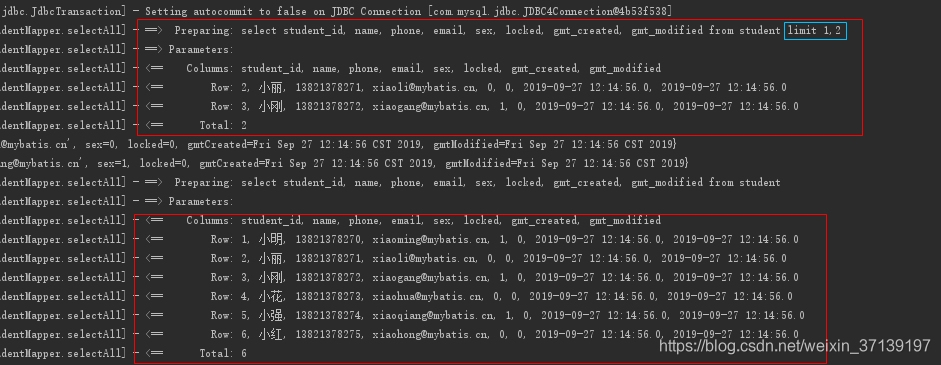
第一個查詢使用了分頁, 因此有 limit , 第二個查詢沒有, 因此查詢出了所有的結果。
更多使用, 訪問我的GitHub項目