Salesforce LWC學習(七) Navigation & Toast
- 2019 年 10 月 3 日
- 筆記
上一篇我們介紹了針對LWC中常用的LDS的適配的wire service以及@salesforce模組提供的相關的service,其實LWC中還提供其他的好用的service,比如針對導航相關的lightning/navigation以及展示toast提示資訊相關的lightning/platformShowToastEvent。此篇主要針對這兩個service進行簡單的介紹。
一. lightning/navigation
我們有好多場景會用到跳轉操作,比如創建記錄以後跳轉到此記錄詳情頁,點擊連接跳轉到下載頁面或者直接下載文件,跳轉到某個列表等等。LWC中封裝了lightning/navigation service去實現相關的跳轉操作。當然,此service除了封裝了跳轉相關的功能,還封裝了獲取當前PageReference的功能。詳情如下所示。
1. CurrentPageReference:此方法用於獲取當前頁面的引用,使用以下的聲明便可以獲取到當前的頁面的引用了。如果我們想編輯其鍵值對的parameter,我們需要更新當前page reference的Page state。至於如何更新,下面會有介紹。
1 import { CurrentPageReference } from 'lightning/navigation'; 2 @wire(CurrentPageReference) 3 pageRef;
返回的pageRef為PageReference變數。PageReference為js封裝的對象,有三個變數。
1) type:當前PageReference的類型。lwc封裝了以下的類型:
- Lightning Component
- Knowledge Article
- Login Page
- Named Page
- Navigation Item Page
- Object Page
- Record Page
- Record Relationship Page
- Web Page
這些PageReference詳情可以參看:https://developer.salesforce.com/docs/component-library/documentation/lwc/lwc.reference_page_reference_type
我們常用的有Lightning Component / Object Page / Record Page / Record Relationship Page / Web Page。
2)attribute:聲明不同類型的PageReference創建PageReference需要配置不同的attribute,細節的attribute的配置同看上面鏈接。
3)state:用來存儲鍵值對類型的parameter。我們在URL中可能傳遞參數,使用CurrentPageReference獲取到的PageReference中,state存儲的便是其參數部分。
下面來一個demo更好的了解用法以及返回內容。
1 import { LightningElement, wire } from 'lwc'; 2 import {CurrentPageReference} from 'lightning/navigation'; 3 export default class GetCurrentPageReferenceDemo extends LightningElement { 4 @wire(CurrentPageReference) 5 pageRef; 6 7 get currentPageInfo() { 8 if(this.pageRef !== undefined) { 9 return JSON.stringify(this.pageRef); 10 } 11 return ''; 12 } 13 }
getCurrentPageReferenceDemo.html:
1 <template> 2 {currentPageInfo} 3 </template>
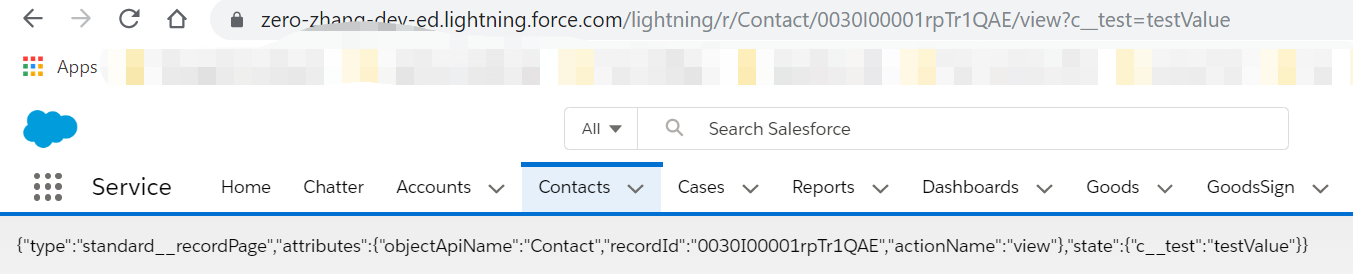
顯示結果:我們將此component放在contacts的詳情頁裡面,並且針對詳情頁的URL手動設置了parameter,返回的結果如下圖所示。
2. NavigationMixin:使用此adapter實現跳轉功能。此adapter封裝了兩個API實現跳轉。
[NavigationMixin.Navigate](pageReference, [replace])- 在應用中一個component調用此API跳轉到另外一個頁面;[NavigationMixin.GenerateUrl](pageReference)- component調用此API獲取需要跳轉的URL的Promise。
這兩個API,先調用GenerateUrl獲取到Promise,然後使用Navigate的API即可實現跳轉。我們使用此service前需要先在頭引入,和其他的區別為我們還需要在javascript的class中去繼承NavigationMixin。
import { NavigationMixin } from 'lightning/navigation'; export default class MyCustomElement extends NavigationMixin(LightningElement) {} 上面的兩個API我們也可以看見pageReference參數,此參數和上面的CurrentPageReference返回值類型相同,均為javascript中封裝的CurrentPageReference對象。我們可以使用plain object去拼接此對象的變數。說的比較繞,下面通過一個官方的demo便可以更好的了解。
navigationLineExample.js:在connectedCallback生命周期處聲明了PageReference的Promise,用於handleClick時去觸發。
1 import { LightningElement, track } from 'lwc'; 2 import { NavigationMixin } from 'lightning/navigation'; 3 4 export default class NavigationLinkExample extends NavigationMixin(LightningElement) { 5 @track url; 6 7 connectedCallback() { 8 // Store the PageReference in a variable to use in handleClick. 9 // This is a plain Javascript object that conforms to the 10 // PageReference type by including "type" and "attributes" properties. 11 // The "state" property is optional. 12 this.accountHomePageRef = { 13 type: "standard__objectPage", 14 attributes: { 15 "objectApiName": "Account", 16 "actionName": "home" 17 } 18 }; 19 this[NavigationMixin.GenerateUrl](this.accountHomePageRef) 20 .then(url => this.url = url); 21 } 22 23 handleClick(evt) { 24 // Stop the event's default behavior. 25 // Stop the event from bubbling up in the DOM. 26 evt.preventDefault(); 27 evt.stopPropagation(); 28 // Navigate to the Account Home page. 29 this[NavigationMixin.Navigate](this.accountHomePageRef); 30 } 31 }
navigationLineExample.html:點擊按鈕觸發handleClick方法
1 <template> 2 <div> 3 <a href={url} onclick={handleClick}>Account Home</a> 4 </div> 5 </template>
將demo配置在account的record page中,通過上面的demo我們便可以實現跳轉到Account的home頁面的功能,也可以看到聲明 PageReference中的type以及attributes的神奇之處。原理了解以後只需要通過改變PageReference Type以及其對應的attribute我們便可以實現更多的功能,感興趣的小夥伴可以自行嘗試。
我們在跳轉或者自刷新時,有時需要傳遞參數,在LWC中上面也提到過使用state變數傳遞參數,我們在更新此變數前先了解一下相關的限制和要求。
- pagereference對象已凍結,因此不能直接更改它。如果我們想要跳轉到一個同樣的頁面並且這個頁面包含了已經更新了的state,我們需要copy一下當前的這個PageReference然後使用Object.assign({}, pageReference)方式去更新state,如果跳轉到不同的頁面,我們只需要創建plain PageReference的時候傳進去即可,就不會有此點所說的限制。
- state變數在構建鍵值對時,鍵必須使用namespace加上兩個下劃線__作為前綴,如果不是managed package,則namespace為c,比如我們想要傳遞testParam的值為testValue。則構建鍵值對應該為state.c__testParam = testValue;
- state變數中的鍵值對的value必須全部為string類型因為state變數的鍵值對均可以序列化到URL query parameter。
- 如果想要刪除state的某個鍵值對,只需要設置value為undefined即可。
通過上述1,2,3,4點我們可以看出來,1屬於限制,2,3,4屬於規範。我們針對跳轉到其他頁面直接設置state即可,如果針對跳轉到當前頁面,只是參數變化,便需要考慮上面的第一點。通過官方提供的demo可以更好的了解針對parameter的處理。
pageStateChangeExample.js:demo中考慮的時跳轉到當前頁面,只是參數的變化的處理。此時pagereference已經凍結,只能通過Object.assign方法去處理。
1 import { LightningElement, wire, track } from 'lwc'; 2 import { CurrentPageReference, NavigationMixin } from 'lightning/navigation'; 3 4 export default class PageStateChangeExample extends NavigationMixin(LightningElement) { 5 6 // Injects the page reference that describes the current page 7 @wire(CurrentPageReference) 8 setCurrentPageReference(currentPageReference) { 9 this.currentPageReference = currentPageReference; 10 11 if (this.connected) { 12 // We need both the currentPageReference, and to be connected before 13 // we can use NavigationMixin 14 this.generateUrls(); 15 } else { 16 // NavigationMixin doesn't work before connectedCallback, so if we have 17 // the currentPageReference, but haven't connected yet, queue it up 18 this.generateUrlOnConnected = true; 19 } 20 } 21 @track 22 showPanelUrl; 23 24 @track 25 noPanelUrl; 26 27 // Determines the display for the component's panel 28 get showPanel() { 29 // Derive this property's value from the current page state 30 return this.currentPageReference && 31 this.currentPageReference.state.c__showPanel == 'true'; 32 } 33 34 generateUrls() { 35 this[NavigationMixin.GenerateUrl](this.showPanelPageReference) 36 .then(url => this.showPanelUrl = url); 37 this[NavigationMixin.GenerateUrl](this.noPanelPageReference) 38 .then(url => this.noPanelUrl = url); 39 } 40 41 // Returns a page reference that matches the current page 42 // but sets the "c__showPanel" page state property to "true" 43 get showPanelPageReference() { 44 return this.getUpdatedPageReference({ 45 c__showPanel: 'true' // Value must be a string 46 }); 47 } 48 49 // Returns a page reference that matches the current page 50 // but removes the "c__showPanel" page state property 51 get noPanelPageReference() { 52 return this.getUpdatedPageReference({ 53 // Removes this property from the state 54 c__showPanel: undefined 55 }); 56 } 57 58 // Utility function that returns a copy of the current page reference 59 // after applying the stateChanges to the state on the new copy 60 getUpdatedPageReference(stateChanges) { 61 // The currentPageReference property is read-only. 62 // To navigate to the same page with a modified state, 63 // copy the currentPageReference and modify the copy. 64 return Object.assign({}, this.currentPageReference, { 65 // Copy the existing page state to preserve other parameters 66 // If any property on stateChanges is present but has an undefined 67 // value, that property in the page state is removed. 68 state: Object.assign({}, this.currentPageReference.state, stateChanges) 69 }); 70 } 71 72 connectedCallback() { 73 this.connected = true; 74 75 // If the CurrentPageReference returned before this component was connected, 76 // we can use NavigationMixin to generate the URLs 77 if (this.generateUrlOnConnected) { 78 this.generateUrls(); 79 } 80 } 81 82 handleShowPanelClick(evt) { 83 evt.preventDefault(); 84 evt.stopPropagation(); 85 // This example passes true to the 'replace' argument on the navigate API 86 // to change the page state without pushing a new history entry onto the 87 // browser history stack. This prevents the user from having to press back 88 // twice to return to the previous page. 89 this[NavigationMixin.Navigate](this.showPanelPageReference, true); 90 } 91 92 handleNoPanelClick(evt) { 93 evt.preventDefault(); 94 evt.stopPropagation(); 95 this[NavigationMixin.Navigate](this.noPanelPageReference, true); 96 } 97 }
pageStateChangeExample.html:針對showPanel以及noPanelUrl的處理
<template> <div> <a href={showPanelUrl} onclick={handleShowPanelClick}>Show Panel</a> </div> <div if:true={showPanel}> <h1>This is the panel</h1> <a href={noPanelUrl} onclick={handleNoPanelClick}>Hide Panel</a> </div> </template>
二. Lightning/platformShowToastEvent
當我們進行DML操作或者某種場景或者validation需要展示一些資訊,當然我們可以通過ligtning-messages展示資訊在頁面上,另外一種方式可以使用toast方式僅顯示幾秒的提示資訊隨後消失的樣式。LWC提供了lightning/platformShowToastEvent實現此功能。模組中封裝了ShowToastEvent事件,實例化以後dispatchEvent即可使用。
ShowToastEvent事件有以下的幾個參數
- title:toast的標題部分,展示在header區域;
- message:toast的內容部分。此message可以是一個純文本,也可以是一個包含place holder的文本,place holder通常是URL或者文本;
- messageData:當message中包含{} place holder時,使用messageData進行替換;
- variant:toast中展示的theme以及icon的樣式。有幾個值供選擇:info / success / warning / error。我們可以根據不同的場景顯示不同的variant進行展示;
- mode:用來決定toast展示多長時間。有幾個值供選擇:dismissable/pester/sticky。dismissable是默認的值,功能為用戶點擊關閉按鈕或者經過3秒以後toast消失;pester用於只顯示3秒,3秒以後自動消失(此種沒有關閉按鈕);sticky用於只有用戶點擊關閉按鈕才會消失。
我們在recordEditFormSample展示此用法。
1 <template> 2 <lightning-record-edit-form 3 record-id={recordId} 4 object-api-name={objectApiName} 5 onsubmit={handleSubmit} 6 onload={handleLoad} 7 onsuccess={handleSuccess} 8 onerror={handleError} 9 > 10 <lightning-messages></lightning-messages> 11 <lightning-input-field field-name="Name"></lightning-input-field> 12 <lightning-input-field field-name="Industry"></lightning-input-field> 13 <lightning-input-field field-name="AnnualRevenue"></lightning-input-field> 14 <div class="slds-m-top_medium"> 15 <lightning-button class="slds-m-top_small" label="Cancel" onclick={handleReset}></lightning-button> 16 <lightning-button class="slds-m-top_small" type="submit" label="Save Record"></lightning-button> 17 </div> 18 </lightning-record-edit-form> 19 </template>
recordEditFormSample.js
1 /* eslint-disable no-console */ 2 import { LightningElement, api } from 'lwc'; 3 import { ShowToastEvent } from 'lightning/platformShowToastEvent'; 4 export default class RecordEditFormSample extends LightningElement { 5 6 @api recordId; 7 @api objectApiName; 8 9 handleSubmit(event) { 10 event.preventDefault(); // stop the form from submitting 11 const fields = event.detail.fields; 12 if(fields.Industry === null || fields.Industry === '') { 13 const evt = new ShowToastEvent({ 14 title: "Account Operated Failed", 15 message: "Account Industry cannot be blank", 16 variant: "error", 17 mode:"pester" 18 }); 19 this.dispatchEvent(evt); 20 return; 21 } 22 this.template.querySelector('lightning-record-edit-form').submit(fields); 23 } 24 25 handleLoad(event) { 26 console.log('execute load'); 27 } 28 29 handleSuccess(event) { 30 const evt = new ShowToastEvent({ 31 title: "Account Operated Success", 32 message: "Record is :" + event.detail.id, 33 variant: "success" 34 }); 35 this.dispatchEvent(evt); 36 } 37 38 handleError(event) { 39 const evt = new ShowToastEvent({ 40 title: "Account Operated Failed", 41 message: event.detail.message, 42 variant: "error", 43 mode: "sticky" 44 }); 45 this.dispatchEvent(evt); 46 } 47 48 handleReset(event) { 49 const inputFields = this.template.querySelectorAll( 50 'lightning-input-field' 51 ); 52 if (inputFields) { 53 inputFields.forEach(field => { 54 field.reset(); 55 }); 56 } 57 } 58 }
效果展示:
sticky樣式,只有點擊關閉按鈕才能消失toast。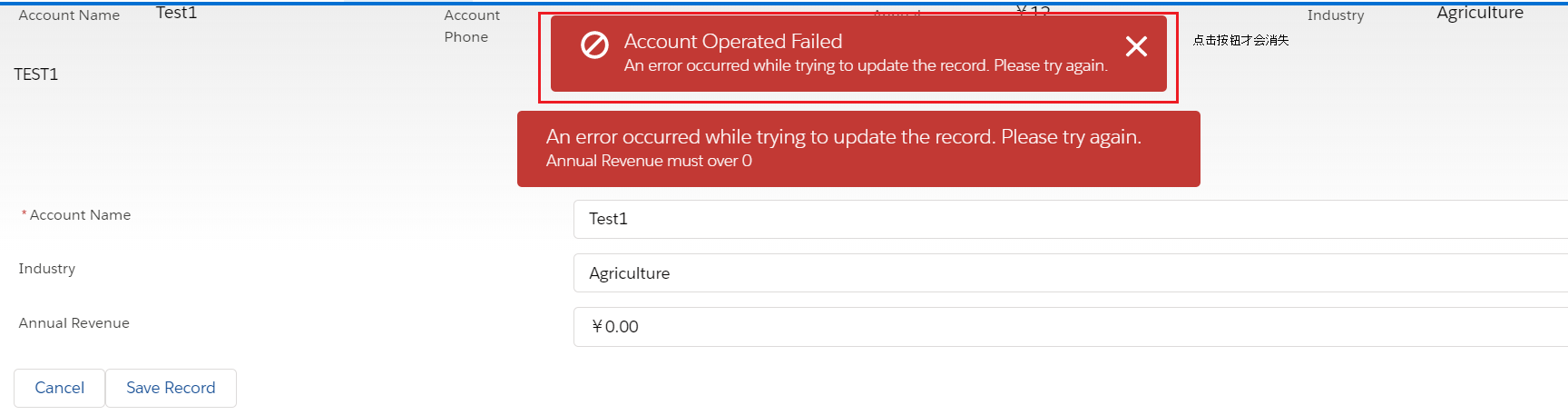
總結:此篇主要說的是Navigation以及Toast相關的知識,其中Navigation可以根據不同的type以及attribute去做不同功能的跳轉以及下載等操作,篇中例舉的比較少,感興趣的可以深入學習。篇中有錯誤地方歡迎指出,有不懂的歡迎留言。