在業務高峰期拔掉伺服器電源是一種怎樣的體驗?
寫在前面
當時的我在外面玩的正起勁,突然一個電話打來:「冰河,你在哪?伺服器突然不能訪問了!」。我:「又有什麼情況啊?」。「我不小心踩到伺服器電源連接的插線板了,伺服器斷電了,重啟時提示無法啟動」。我心裡一萬個無語,問:」是哪台伺服器斷電了「。「我不小心踩到那個小插線板的開關了,連接到這個插線板的伺服器都斷電了」。我:尼瑪,那是資料庫啊,我去。。。
於是我趕緊飛奔回公司,開始了苦逼的數據恢復過程。。。
文章已收錄到:
//github.com/sunshinelyz/technology-binghe
//gitee.com/binghe001/technology-binghe
解決主庫問題
主庫問題重現
回到公司一看,斷電的是公司的消息服務子系統資料庫,資料庫共3台,一種兩從,並採用了分庫分表的方式存儲數據。我首先把三台伺服器啟動好,發現主資料庫的進程無法啟動,兩台從資料庫同步主庫數據的狀態異常。按照順序,我先看主資料庫的日誌資訊,發現MySQL的錯誤日誌中輸出了如下資訊。
-----------------------------------------161108 23:36:45 mysqld_safe Starting mysqld daemon with
databases from /usr/local/mysql/var2021-02-28 23:36:46 0 [Warning] TIMESTAMP with implicit DEFAULT
value is deprecated. Please use --explicit_defaults_for_timestamp server option (see documentation
for more details).2021-02-28 23:36:46 5497 [Note] Plugin 'FEDERATED' is disabled.2021-02-28 23:36:46

7f11c48e1720 InnoDB: Warning: Using innodb_additional_mem_pool_size is DEPRECATED. This option may be
removed in future releases, together with the option innodb_use_sys_malloc and with the InnoDB's
internal memory allocator.2021-02-28 23:36:46 5497 [Note] InnoDB: Using atomics to ref count buffer
pool pages2021-02-28 23:36:46 5497 [Note] InnoDB: The InnoDB memory heap is disabled2021-02-28
23:36:46 5497 [Note] InnoDB: Mutexes and rw_locks use GCC atomic builtins2021-02-28 23:36:46 5497
[Note] InnoDB: Memory barrier is not used2021-02-28 23:36:46 5497 [Note] InnoDB: Compressed tables

use zlib 1.2.32021-02-28 23:36:46 5497 [Note] InnoDB: Using CPU crc32 instructions2021-02-28 23:36:46 5497 [Note] InnoDB: Initializing buffer pool, size = 16.0M2021-02-28 23:36:46 5497 [Note] InnoDB:
Completed initialization of buffer poolInnoDB: Database page corruption on disk or a failedInnoDB:
file read of page 5.InnoDB: You may have to recover from a backup.2021-02-28 23:36:46 7f11c48e1720
InnoDB: Page dump in ascii and hex (16384 bytes): len 16384; hex
7478d078000000050000000000000000000000000f271f4d000700000000000000000000000000000000001b4000000000000
000000200f20000000000000006000000000000002d000000000000002e000000000000002f0000000000000030000000000(
省略很多類似程式碼)InnoDB: End of page dump2021-02-28 23:36:46 7f11c48e1720 InnoDB: uncompressed page,
stored checksum in field1 1954074744, calculated checksums for field1: crc32 993334256, innodb
2046145943, none 3735928559, stored checksum in field2 1139795846, calculated checksums for field2:

crc32 993334256, innodb 1606613742, none 3735928559, page LSN 0 254222157, low 4 bytes of LSN at page end 254221236, page number (if stored to page already) 5, space id (if created with >= MySQL-4.1.1
and stored already) 0InnoDB: Page may be a transaction system pageInnoDB: Database page corruption on disk or a failedInnoDB: file read of page 5.InnoDB: You may have to recover from a backup.InnoDB: It
is also possible that your operatingInnoDB: system has corrupted its own file cacheInnoDB: and
rebooting your computer removes theInnoDB: error.InnoDB: If the corrupt page is an index pageInnoDB:
you can also try to fix the corruptionInnoDB: by dumping, dropping, and reimportingInnoDB: the
corrupt table. You can use CHECKInnoDB: TABLE to scan your table for corruption.InnoDB: See also
//dev.mysql.com/doc/refman/5.6/en/forcing-innodb-recovery.htmlInnoDB: about forcing
recovery.InnoDB: Ending processing because of a corrupt database page.2021-02-28 23:36:46
7f11c48e1720  InnoDB: Assertion failure in thread 139714288817952 in file buf0buf.cc line 4201InnoDB: We intentionally generate a memory trap.InnoDB: Submit a detailed bug report to
//bugs.mysql.com.InnoDB: If you get repeated assertion failures or crashes, evenInnoDB:

immediately after the mysqld startup, there may beInnoDB: corruption in the InnoDB tablespace. Please refer toInnoDB: //dev.mysql.com/doc/refman/5.6/en/forcing-innodb-recovery.htmlInnoDB: about
forcing recovery.03:36:46 UTC - mysqld got signal 6 ;This could be because you hit a bug. It is also possible that this binaryor one of the libraries it was linked against is corrupt, improperly
built,or misconfigured. This error can also be caused by malfunctioning hardware.We will try our best
to scrape up some info that will hopefully helpdiagnose the problem, but since we have already
crashed,something is definitely wrong and this may
fail.key_buffer_size=16777216read_buffer_size=262144max_used_connections=0max_threads=1000thread_coun
t=0connection_count=0It is possible that mysqld could use up tokey_buffer_size + (read_buffer_size +
sort_buffer_size)*max_threads = 798063 K  bytes of memoryHope that's ok; if not, decrease some
variables in the equation.Thread pointer: 0x0Attempting backtrace. You can use the following
information to find outwhere mysqld died. If you see no messages after this, something wentterribly
wrong...stack_bottom = 0 thread_stack 0x40000/usr/local/mysql/bin/mysqld(my_print_stacktrace+0x35)
[0x8e64b5]/usr/local/mysql/bin/mysqld(handle_fatal_signal+0x41b)
[0x652fbb]/lib64/libpthread.so.0(+0xf7e0)[0x7f11c44c77e0]/lib64/libc.so.6(gsignal+0x35)
[0x7f11c315d625]/lib64/libc.so.6(abort+0x175)

[0x7f11c315ee05]/usr/local/mysql/bin/mysqld[0xa585c5]/usr/local/mysql/bin/mysqld[0xa6c7b4]/usr/local/
mysql/bin/mysqld[0xa6cbc7]/usr/local/mysql/bin/mysqld[0xa5bce2]/usr/local/mysql/bin/mysqld[0xa1e2ba]/usr/local/mysql/bin/mysqld[0xa0bf60]/usr/local/mysql/bin/mysqld[0x95a427]/usr/local/mysql/bin/mysqld(_Z24ha_initialize_handlertonP13st_plugin_int+0x48)
[0x58f788]/usr/local/mysql/bin/mysqld[0x6e4a36]/usr/local/mysql/bin/mysqld(_Z11plugin_initPiPPci+0xb3e)
[0x6e826e]/usr/local/mysql/bin/mysqld[0x582d85]/usr/local/mysql/bin/mysqld(_Z11mysqld_mainiPPc+0x4d8)
[0x587d18]/lib64/libc.so.6(__libc_start_main+0xfd)
[0x7f11c3149d5d]/usr/local/mysql/bin/mysqld[0x57a019]The manual page at
//dev.mysql.com/doc/mysql/en/crashing.html containsinformation that should help you find out
what is causing the crash.161108 23:36:46 mysqld_safe mysqld from pid file
/usr/local/mysql/var/VM_241_49_centos.pid
ended------------------------------------------------------------------------------
主庫問題分析
從日誌中可以看出是innodb引擎出了問題。日誌里提示到 //dev.mysql.com/doc/refman/5.6/en/forcing-innodb-recovery.html查看強制恢復的方法。在mysql的配置文件my.cnf里找到 [mysqld]欄位下,添加 innodb_force_recovery=1:
[mysqld]innodb_force_recovery = 1
如果innodb_force_recovery = 1不生效,則可嘗試2——6幾個數字
然後重啟mysql,重啟成功。然後使用mysqldump或 pma 導出數據,執行修復操作等。修復完成後,把該參數注釋掉,還原默認值0。
配置文件的參數:innodb_force_recovery
innodb_force_recovery影響整個InnoDB存儲引擎的恢復狀況。默認為0,表示當需要恢復時執行所有的恢復操作(即校驗數據頁/purge undo/insert buffer merge/rolling back&forward),當不能進行有效的恢復操作時,mysql有可能無法啟動,並記錄錯誤日誌;
innodb_force_recovery可以設置為1-6,大的數字包含前面所有數字的影響。當設置參數值大於0後,可以對錶進行select,create,drop操作,但insert,update或者delete這類操作是不允許的。
- (SRV_FORCE_IGNORE_CORRUPT):忽略檢查到的corrupt頁。
- (SRV_FORCE_NO_BACKGROUND):阻止主執行緒的運行,如主執行緒需要執行full purge操作,會導致crash。
- (SRV_FORCE_NO_TRX_UNDO):不執行事務回滾操作。
- (SRV_FORCE_NO_IBUF_MERGE):不執行插入緩衝的合併操作。
- (SRV_FORCE_NO_UNDO_LOG_SCAN):不查看重做日誌,InnoDB存儲引擎會將未提交的事務視為已提交。
- (SRV_FORCE_NO_LOG_REDO):不執行前滾的操作。
主庫解決方案
一般修復方法參考:
第一種方法
建立一張新表:
create table demo_bak #和原表結構一樣,只是把INNODB改成了MYISAM。
把數據導進去
insert into demo_bak select * from demo;
刪除掉原表:
drop table demo;
注釋掉 innodb_force_recovery 之後,重啟。
重命名:
rename table demo_bak to demo;
最後改回存儲引擎:
alter table demo engine = innodb
第二種方法
另一個方法是使用mysqldump將表格導出,然後再導回到InnoDB表中。這兩種方法的結果是相同的。
備份導出(包括結構和數據):
mysqldump -uroot -p123 test > test.sql
還原方法1:
use test;source test.sql
還原方法2(系統命令行):
mysql -uroot -p123 test < test.sql;
注意,CHECK TABLE命令在InnoDB資料庫中基本上是沒有用的。
第三種方法
(1)配置my.cnf
配置innodb_force_recovery = 1或2——6幾個數字,重啟MySQL
(2)導出數據腳本
mysqldump -uroot -p123 test > test.sql
導出SQL腳本。或者用Navicat將所有資料庫/表導入到其他伺服器的資料庫中。
注意:這裡的數據一定要備份成功。然後刪除原資料庫中的數據。
(3)刪除ib_logfile0、ib_logfile1、ibdata1
備份MySQL數據目錄下的ib_logfile0、ib_logfile1、ibdata1三個文件,然後將這三個文件刪除
(4)配置my.cnf
將my.cnf中innodb_force_recovery = 1或2——6幾個數字這行配置刪除或者配置為innodb_force_recovery = 0,重啟MySQL服務
(5)將數據導入MySQL資料庫
mysql -uroot -p123 test < test.sql; 或者用Navicat將備份的數據導入到資料庫中。
此種方法下要注意的問題:
- ib_logfile0、ib_logfile1、ibdata1這三個文件一定要先備份後刪除;
- 一定要確認原數據導出成功了
- 當數據導出成功後,刪除原資料庫中的數據時,如果提示不能刪除,可在命令行進入MySQL的數據目錄,手動刪除相關資料庫的文件夾或者資料庫文件夾下的數據表文件,前提是數據一定導出或備份成功。
這裡,我使用的是第三種方法恢復了主資料庫的數據。
接下來,我們再來看看從資料庫數據的恢復。
解決從庫問題
主從複製原理
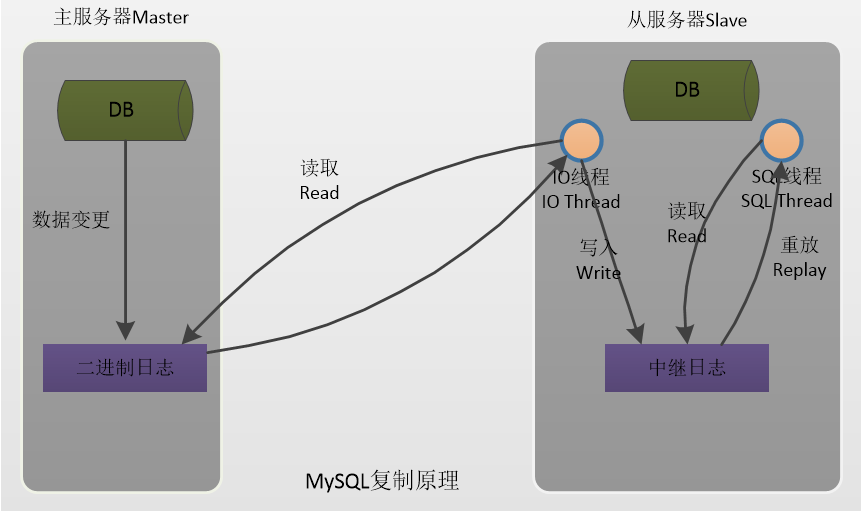
這裡,我就簡單的說下MySQL資料庫的主從複製原理。
MySQL主從複製原理,也稱為A/B原理。
(1) Master 將數據改變記錄到二進位日誌(binary log)中,也就是配置文件 log-bin 指定的文件, 這些記錄叫做二進位日誌事件(binary log events);
(2) Slave 通過 I/O 執行緒讀取 Master 中的 binary log events 並寫入到它的中繼日誌(relay log);
(3) Slave 重做中繼日誌中的事件,把中繼日誌中的事件資訊一條一條的在本地執行一次,完 成數據在本地的存儲,從而實現將改變反映到它自己的數據(數據重放)。
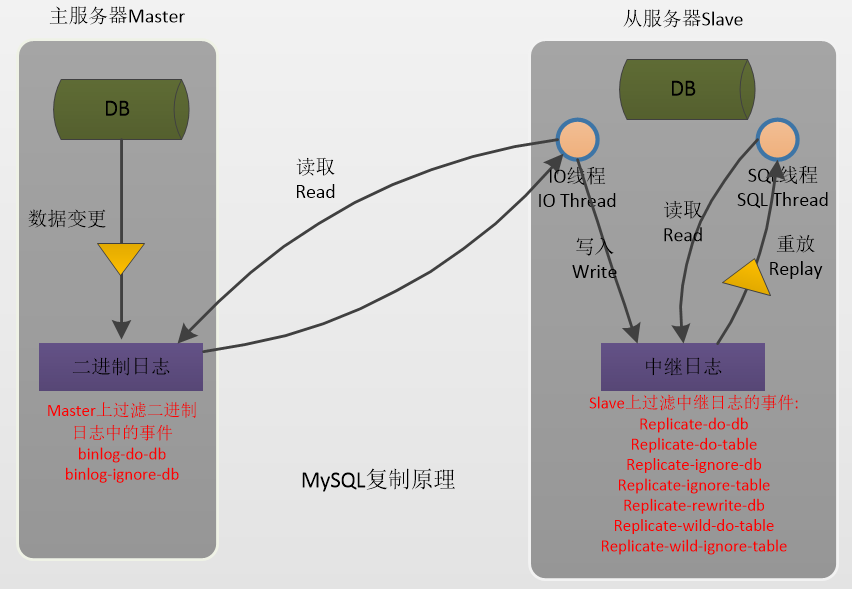
複製過濾可以讓你只複製伺服器中的一部分數據,有兩種複製過濾:
(1) 在 Master 上過濾二進位日誌中的事件;
(2) 在 Slave 上過濾中繼日誌中的事件。如下:
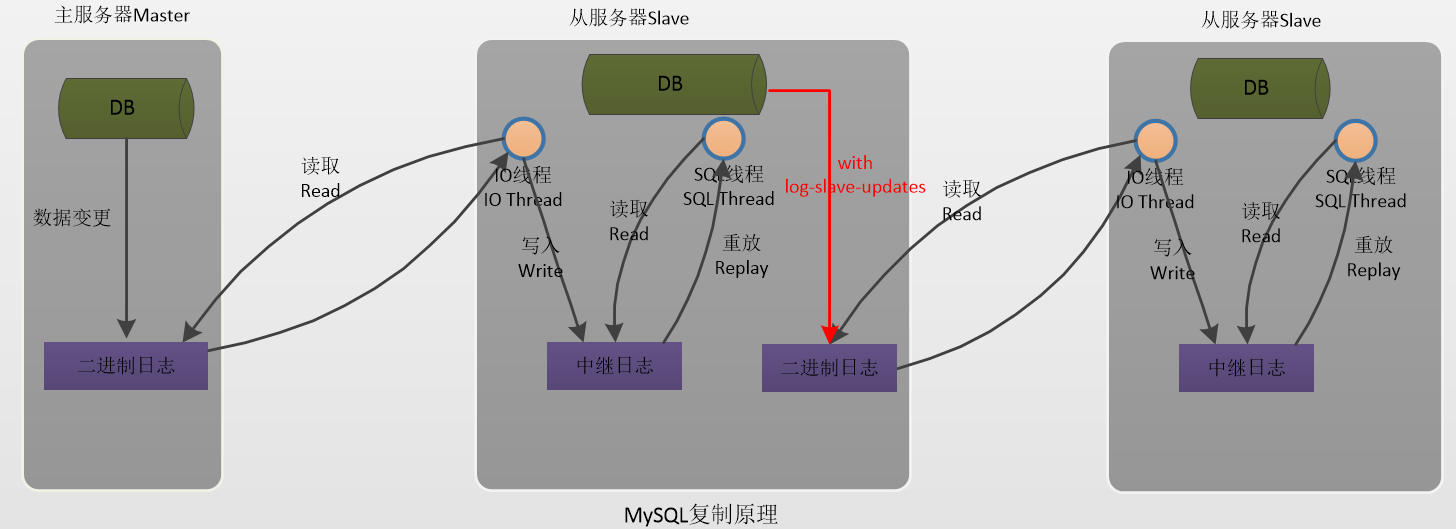
relay_log配置中繼日誌,log_slave_updates表示slave將複製事件 寫進自己的二進位日誌.當設置log_slave_updates時,你可以讓slave扮演其它slave的master.此時,slave把sql執行緒執行的事件寫進自己的二進位日誌(binary log)然後,它的slave可以獲取這些事件並執行它。如下圖所示(發送複製事件到其它的Slave):
從庫問題重現
恢復主庫的數據後,向主庫中插入了一批測試數據,大概有1000條,但是插入數據後,從庫遲遲沒有將數據同步過來。於是我先登錄主庫,執行如下命令。
mysql>show processlist;
查看下進程是否Sleep太多。發現很正常。
再查看下主庫的狀態。
show master status;
也正常。
mysql> show master status;
+-------------------+----------+--------------+-------------------------------+
| File              | Position | Binlog_Do_DB | Binlog_Ignore_DB              |
+-------------------+----------+--------------+-------------------------------+
| mysqld-bin.000001 |     3260 |              | mysql,test,information_schema |
+-------------------+----------+--------------+-------------------------------+
1 row in set (0.00 sec)
再到從庫上查看從庫的狀態。
mysql> show slave status\G

Slave_IO_Running: Yes
Slave_SQL_Running: No
發現是Slave不同步了。這裡,如果主從資料庫版本一致或不一致又會存在兩種解決方案。
主從版本一致解決方案
下面介紹兩種解決方法
方法一:忽略錯誤後,繼續同步
該方法適用於主從庫數據相差不大,或者要求數據可以不完全統一的情況,數據要求不嚴格的情況
解決:
stop slave;

#表示跳過一步錯誤,後面的數字可變
set global sql_slave_skip_counter =1;
start slave;
之後再用mysql> show slave status\G 查看
mysql> show slave status\G
Slave_IO_Running: Yes
Slave_SQL_Running: Yes
ok,現在主從同步狀態正常了。。。
方式二:重新做主從,完全同步
該方法適用於主從庫數據相差較大,或者要求數據完全統一的情況
解決步驟如下:
(1)先進入主庫,進行鎖表,防止數據寫入
使用命令:
mysql> flush tables with read lock;
注意:該處是鎖定為只讀狀態,語句不區分大小寫
(2)進行數據備份
#把數據備份到mysql.bak.sql文件
mysqldump -uroot -p -hlocalhost > mysql.bak.sql
這裡注意一點:資料庫備份一定要定期進行,可以用shell腳本或者python腳本,都比較方便,確保數據萬無一失。
(3)查看master 狀態
mysql> show master status;
+-------------------+----------+--------------+-------------------------------+
| File              | Position | Binlog_Do_DB | Binlog_Ignore_DB              |
+-------------------+----------+--------------+-------------------------------+
| mysqld-bin.000001 |     3260 |              | mysql,test,information_schema |
+-------------------+----------+--------------+-------------------------------+
1 row in set (0.00 sec)
(4)把mysql備份文件傳到從庫機器,進行數據恢復
scp mysql.bak.sql [email protected]:/tmp/
(5)停止從庫的狀態
mysql> stop slave;
(6)然後到從庫執行mysql命令,導入數據備份
mysql> source /tmp/mysql.bak.sql
(7)設置從庫同步,注意該處的同步點,就是主庫show master status資訊里的| File| Position兩項
change master to master_host = '192.168.128.100', master_user = 'rsync', master_port=3306, master_password='', master_log_file = 'mysqld-bin.000001', master_log_pos=3260;
(8)重新開啟從同步
mysql> start slave;
(9)查看同步狀態
mysql> show slave status\G

Slave_IO_Running: Yes
Slave_SQL_Running: Yes
(10)回到主庫並執行如下命令解除表鎖定。
UNLOCK TABLES;
如果主從資料庫的版本是一致的,以上述方式回復從資料庫是沒啥問題的,如果主從資料庫版本不一致的話,以上述方式回復主從資料庫可能還會存在問題。
主從版本不一致解決方案
如果MySQL主庫和從庫的版本不一致時,使用 show slave status \G命令查看從庫狀態時可能會看到如下所示的資訊。
Slave_IO_Running: Yes
Slave_SQL_Running: No
……
Last_Errno: 1755
Last_Error: Cannot execute the current event group in the parallel mode. Encountered event Gtid, relay-log name ./mysql-relay.000002, position 123321 which prevents execution of this event group in parallel mode. Reason: The master event is logically timestamped incorrectly...
注意如下的輸出資訊。
Last_Errno: 1755
Last_Error: Cannot execute the current event group in the parallel mode. Encountered event Gtid, relay-log name ./mysql-relay.000002, position 123321 which prevents execution of this event group in parallel mode. Reason: The master event is logically timestamped incorrectly...
這是由於主庫使用的是MySQL5.6,從庫使用的是MySQL5.7,資料庫版本不一致引起的。
從MySQL官網搜索1755的報錯看到是並行複製bug導致的報錯。想要解決的辦法也很簡單,直接關掉並行複製即可。
stop slave;
set global slave_parallel_workers=0;
start slave;
如果從庫還是存在問題,則可按照主從版本一致的方案來恢復從庫的數據。
這裡,附加一個MySQL官方文檔對於1755錯誤碼的描述。
好了,今天就到這兒吧,我是冰河,大家有啥問題可以在下方留言,也可以加我微信:sun_shine_lyz,我拉你進群,一起交流技術,一起進階,一起牛逼~~

