Java8新特性--Stream API
- Stream
- 寫在前面
- Stream是什麼
- Stream操作的三個步驟
- 1. 創建Stream
- 2. 中間操作
- 3. 終止操作(終端操作)
- 3.1 查找與匹配
- 3.2 歸約
- 3.3 收集
- 3.3.1 toList() 將流轉換成List
- 3.3.2 toSet() 將流轉換成Set
- 3.3.3 toCollection() 將流轉換成其他類型的集合
- 3.3.4 counting()計算流中元素個數
- 3.3.5 averagingDouble(...)計算流中元素Double類型的平均值
- 3.3.6 summingDouble(...)計算流中元素Double類型的總和
- 3.3.7 minBy(...)根據比較器選擇最小值
- 3.3.8 maxBy(...)根據比較器選擇最小值
- 3.3.9 groupingBy(...)根據某屬性的值對流分組,屬性為K,結果為V
- 3.3.10 partitioningBy(...)根據True或false進行分區
- 3.3.12 joining(...)連接流中每個字元串
Stream
寫在前面
Java8中有兩大最為重要的改變:
- Lambda表達式
- Stream API(java.util.stream.*)
Stream是Java8中處理集合的關鍵抽象概念,它可以指定你希望對集合進行的操作,可以執行非常複雜的查找、過濾、映射數據等操作。使用Stream API對集合數據進行操作,就類似於使用SQL執行資料庫查詢。也可以使用Stream API來並行執行操作。簡而言之,Stream API提供了一種高效且易於使用的處理數據的方式。
Stream是什麼
流是數據渠道,用於操作數據源(集合、數組等)所生成的元素序列。
即流這個數據渠道,在數據傳輸過程中,對數據源做一系列流水線式的中間操作,然後產生一個新的流,這個流不會改變原來的流
集合講的是數據,流講的是計算
注意
- Stream 自己不會存儲元素。
- Stream 不會改變源對象。相反,他們會返回一個持有結果的新Stream。
- Stream 操作是延遲執行的。這意味著他們會等需要結果的時候才執行。
Stream操作的三個步驟
1. 創建Stream
1.1 通過Collection集合
通過Collection系列集合提供的Stream()串列流或parallelStream()並行流。
其中,Java8中的Collection介面擴展了,提供了兩個獲取流的方法:
- 返回一個順序流
    /*
    * @since 1.8
    */
    default Stream<E> stream() {
        return StreamSupport.stream(spliterator(), false);
    }
- 返回一個並行流
    /*
     * @since 1.8
     */
    default Stream<E> parallelStream() {
        return StreamSupport.stream(spliterator(), true);
    }
下面我們寫個通過Collection系列集合流創建流的例子。
    @Test
    public void test01(){
        //通過Collection系列集合提供的Stream()或parallelStream()
        List<String> list = new ArrayList<>();
        Stream<String> stream = list.stream();
        Stream<String> stringStream = list.parallelStream();
    }
1.2 通過數組Arrays
        //通過數組Arrays 中的靜態方法stream()獲取數組
        Employee[] employees = new Employee[10];
        Stream<Employee> stream2 = Arrays.stream(employees);
通過Stream流中的of()方法來創建
        //通過Stream類中的靜態方法of()
        Stream<String> stream3 = Stream.of("aa", "bb", "cc", "dd");
1.3 創建無限流
創建無限流的兩種方法:迭代、生成
我們先來看一下迭代Stream.iterate()方法的定義
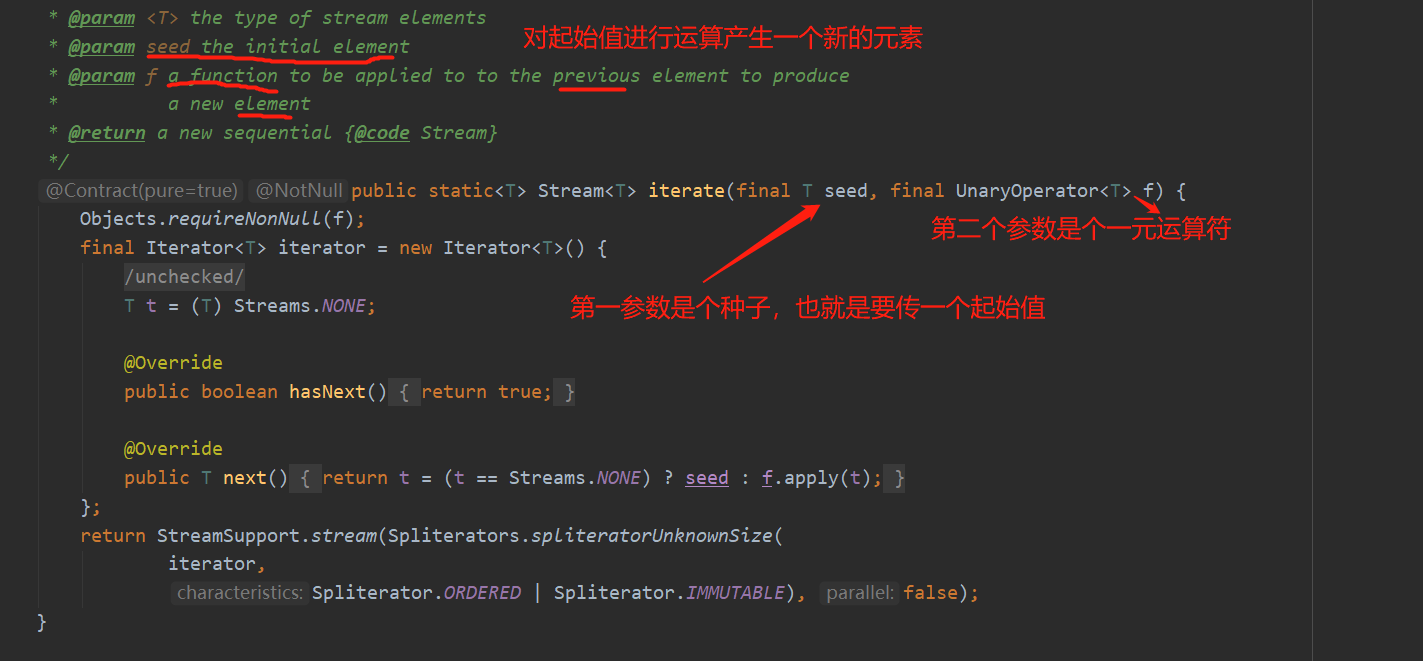
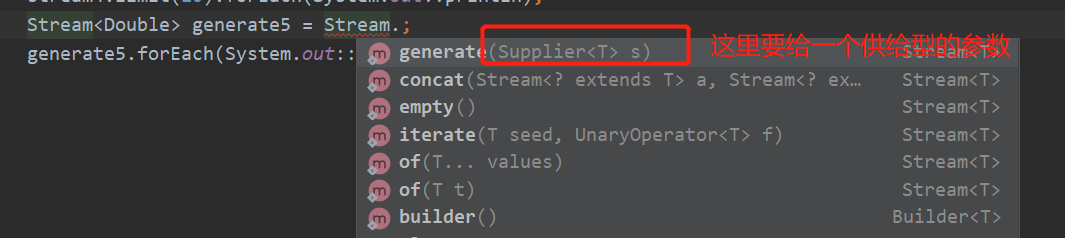
我們再來看一下生成的方式, Stream.generate()這裡需要一個供給型的參數
再來寫下創建無限流的例子
        //創建無限流
        //迭代   Stream.iterate()傳倆參數,第一個是種子即起始值,第二個參數是Lambda表達式即對起始值進行的操作,
        //這裡是生成偶數
        Stream<Integer> stream4 = Stream.iterate(0, (x) -> x + 2);
        //無限流就是沒有限制,需要一個終止操作限制
        stream4.limit(4).forEach(System.out::println);
        //生成的方式
        Stream<Double> generate5 = Stream.generate(() -> Math.random());
        generate5.limit(5).forEach(System.out::println);
運行結果
0
2
4
6
0.3204608858702849
0.495403965457605
0.9188968488509007
0.18726624455121932
0.3791774193868236
2. 中間操作
一個中間操作鏈,對數據源的數據進行處理。
多個中間操作可以連接起來形成一個流水線,除非流水線上觸發了終止操作,否則中間操作不會執行任何的處理,而在終止操作時一次性處理,稱為「惰性求值」或者「延遲載入」。
2.1 篩選與切片
| 方法 | 描述 |
|---|---|
| filter(Predicate p) | 接收Lambda,從流中排除某些元素 |
| distinct() | 篩選,通過流所生成元素的hashCode()和equal()去除重複元素 |
| limit(long maxSize) | 截斷流,使其元素不超過給定數量 |
| skip(long n) | 跳過元素,返回一個扔掉了前n個元素的流。若流中元素不足n個,則返回一個空流。與limit(n)互補 |
下面我們一個個來分析:
2.1.1 filter(Predicate p)
接收Lambda,從流中排除某些元素
    @Test
    public void test02(){
        List<Employee> employees = Arrays.asList(
                new Employee("張三",68,9000),
                new Employee("李四",38,8000),
                new Employee("王五",50,4000),
                new Employee("趙六",18,3000),
                new Employee("田七",8,1000));
        //中間操作,不會執行任何操作
        //filter(Predicate p) 接收Lambda,從流中排除某些元素
        Stream<Employee> employeeStream = employees.stream().filter((e) -> {
            System.out.println("StreamAPI的中間操作");
            return e.getAge() > 35;
        });

        //終止操作  當只有中間操作時執行是沒有結果的,因為只有執行終止操作以後所有的中間操作才一次性全部處理,即惰性求值
        employeeStream.forEach(System.out::println);

    }
運行結果
StreamAPI的中間操作
Employee{name='張三', age=68, salary=9000.0}
StreamAPI的中間操作
Employee{name='李四', age=38, salary=8000.0}
StreamAPI的中間操作
Employee{name='王五', age=50, salary=4000.0}
StreamAPI的中間操作
StreamAPI的中間操作
從運行結果可以看出,迭代操作不是我們做的,是由Stream API 幫我們完成的,再也不需要我們自己完成這個迭代操作了,這也叫內部迭代。與內部迭代相對應的是外部迭代,也就是我們自己寫的迭代。
    //外部迭代,我們自己寫的迭代
    @Test
    public void test03(){
        Iterator<Employee> iterator = employees.iterator();
        if(iterator.hasNext()){
            System.out.println(iterator.next());
        }
    }
2.1.2 limit(long maxSize)
limit(),下面我們過濾公司中薪資大於5000的僱員之後,獲取其中前2個
    //limit()過濾公司中薪資大於5000的僱員之後,獲取其中前2個僱員的資訊
    @Test
    public void test04(){
         employees.stream()
                .filter((e) -> {
                    System.out.println("===短路===");
                    return e.getSalary()>5000;
                })
                .limit(2)
                .forEach(System.out::println);
    }
運行結果
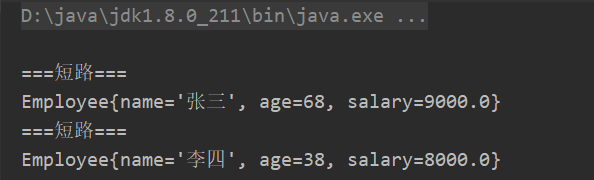
從運行結果我們看出,迭代操作只執行了兩次,也就是說只要找到滿足條件的結果之後,就不再進行迭代了,這個過程就叫「短路」。所以說它也可以提高效率,跟我們之前學的短路&&和||有點類似。
2.1.3 skip(long n)
扔掉也即跳過前幾個元素
    List<Employee> employees = Arrays.asList(
            new Employee("張三",68,9000),
            new Employee("李四",38,8000),
            new Employee("王五",50,4000),
            new Employee("趙六",18,3000),
            new Employee("田七",8,1000));
    //skip()過濾公司中薪資大於5000的僱員之後,跳過前2個僱員的資訊
    @Test
    public void test05(){
        employees.stream()
                .filter((e) -> e.getSalary()>2000)
                .skip(2)
                .forEach(System.out::println);
    }
運行結果,跳過了8000和9000的工資
Employee{name='王五', age=50, salary=4000.0}
Employee{name='趙六', age=18, salary=3000.0}
2.1.4 distinct()
我們首先給employees集合中添加幾個重複的元素趙六
    @Test
    public void test06(){
        List<Employee> employees1 = Arrays.asList(
                new Employee("張三",68,9000),
                new Employee("李四",38,8000),
                new Employee("王五",50,4000),
                new Employee("趙六",18,3000),
                new Employee("趙六",18,3000),
                new Employee("趙六",18,3000),
                new Employee("趙六",18,3000),
                new Employee("田七",8,1000));
        employees1.stream()
                .filter((e) -> e.getSalary()>2000)
                .distinct()
                .forEach(System.out::println);
    }
運行結果
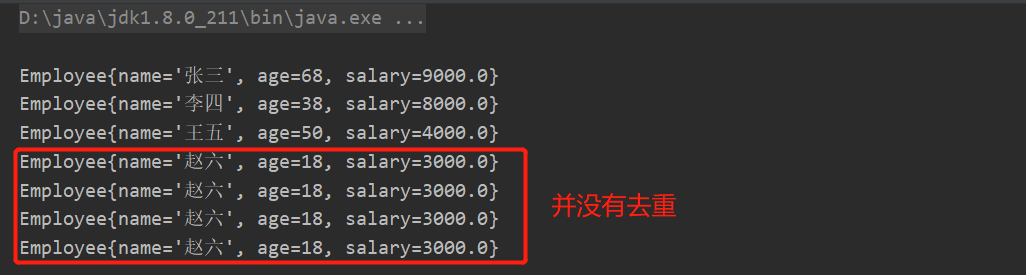
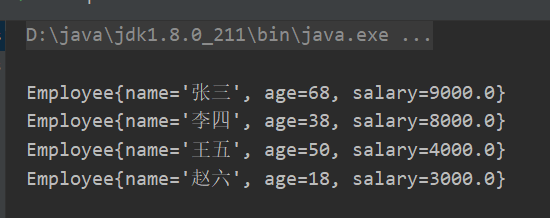
我們發現結果並沒有去重,因為,他是通過流所生成元素的hashCode()和equals()來去除重複元素的。所以,要想去除重複元素,必須得重寫Employee實體類中的hashCode()和equals()這兩個方法。
重寫後的Employee如下
package com.cqq.java8.lambda;

import java.util.Objects;

/**
 * @author caoqianqian
 * @Description:
 * @date 2021/3/6 9:24
 */
public class Employee {
    private String name;
    private int age;
    private double salary;

    public Employee(String name, int age, double salary) {
        this.name = name;
        this.age = age;
        this.salary = salary;
    }

    public Employee() {
    }

    public Employee(int age) {
        this.age = age;
    }

    public String getName() {
        return name;
    }

    @Override
    public String toString() {
        return "Employee{" +
                "name='" + name + '\'' +
                ", age=" + age +
                ", salary=" + salary +
                '}';
    }

    @Override
    public boolean equals(Object o) {
        if (this == o) return true;
        if (o == null || getClass() != o.getClass()) return false;
        Employee employee = (Employee) o;
        return age == employee.age &&
                Double.compare(employee.salary, salary) == 0 &&
                Objects.equals(name, employee.name);
    }

    @Override
    public int hashCode() {
        return Objects.hash(name, age, salary);
    }

    public void setName(String name) {
        this.name = name;
    }

    public int getAge() {
        return age;
    }

    public void setAge(int age) {
        this.age = age;
    }

    public double getSalary() {
        return salary;
    }

    public void setSalary(double salary) {
        this.salary = salary;
    }
}
我們再運行一下結果,已經是去重了的。
2.2 映射
| 方法 | 描述 |
|---|---|
| map(Function f) | 接收一個函數作為參數,該函數會被應用到每個元素上,並將其映射成一個新的元素 |
| mapToDouble(ToDoubleFunction f) | 接收一個函數作為參數,該函數會被應用到每個元素上,並將其映射成一個新的DoubleStream |
| mapToInt(ToIntFunction f) | 接收一個函數作為參數,該函數會被應用到每個元素上,並將其映射成一個新的IntStream |
| mapToLong(ToLongFunction f) | 接收一個函數作為參數,該函數會被應用到每個元素上,並將其映射成一個新的LongStream |
| flatMap(Function f) | 接收一個函數作為參數,將流中的每個值都換成另一個流,然後把左右流連成一個流 |
2.2.1 map(Function f)
接收Lambda,將元素轉換成其他形式或提取資訊。接收一個函數作為參數,該函數會被應用到每個元素上,並將其映射成一個新的元素
    @Test
    public void test07(){
        //將字母轉大寫
        List<String> list = Arrays.asList("aa","bb","cc");
        list.stream()
                .map(str -> str.toUpperCase())
                .forEach(System.out::println);
        //提取員工名字
        employees.stream()
                .map((e) -> e.getName())
                .forEach(System.out::println);
    }
運行結果
AA
BB
CC
張三
李四
王五
趙六
田七
2.2.2 flatMap(Function f)
接收一個函數作為參數,將流中的每個值都換成另一個流,然後把所有流連成另一個流。
我們先來寫一個方法來解析字元串,並把字元串中的一個一個的字元給單獨提取出來,放到集合中。
    public static Stream<Character> filterCharacter(String str){
        List<Character> list  = new ArrayList<>();
        for (Character c:str.toCharArray()) {
            list.add(c);
        }

        return list.stream();
    }
再來看這個測試例子
    //faltMap
    @Test
    public void test08(){
        //提取list里的一個個字元串的每一個字元
        List<String> list = Arrays.asList("aa","bb","cc");

        //通過map提取到的是一個stream流里還是stream流
        Stream<Stream<Character>> streamStream = list.stream()
                .map(TestStreamAPI::filterCharacter);
        //這裡得嵌套遍歷才可以循環出每個字元串的結果
        streamStream.forEach(
                s -> s.forEach(System.out::println)
        );

        //通過flatMap提取到的是一個stream流
        Stream<Character> streamStream2 = list.stream()
                .flatMap(TestStreamAPI::filterCharacter);
        //這樣就不用了嵌套遍歷了
        streamStream2.forEach(System.out::println);

    }
其實map方法就相當於Collaction的add方法,如果add的是個集合的話就會變成二維數組,而flatMap 的話就相當於Collaction的addAll方法,參數如果是集合的話,只是將2個集合合併,而不是變成二維數組。
2.3 排序
| 方法 | 描述 |
|---|---|
| sorted() | 產生一個新流,其中按自然順序排序 |
| sorted(Comparator comp) | 產生一個新流,其中按比較器順序排序 |
下面我們編寫測試例子,首先我們先創建一個員工的集合:
 List<Employee> employees = Arrays.asList(
            new Employee("張三",68,9000),
            new Employee("李四",38,8000),
            new Employee("王五",50,4000),
            new Employee("趙六",18,3000),
            new Employee("田七",8,1000));
用sort() 自然排序實現一串字元list的自然排序。用sorted(Comparator comp) 比較器排序,實現員工按年齡排序,如果年齡相等按姓名排。
    //排序
    //sort() 自然排序
    //sorted(Comparator comp) 比較器排序
    @Test
    public void test09(){
        //sort() 將字母按自然醒順序排序
        List<String> list = Arrays.asList("bb","aa","cc");
        list.stream()
                .sorted()
                .forEach(System.out::println);

        //sorted(Comparator comp) 比較器排序 按年齡排序,如果年齡相等按姓名排
        employees.stream()
                .sorted((e1,e2) -> {
                    if(e1.getAge()== e2.getAge()){
                        return e1.getName().compareTo(e2.getName());
                    }else {
                        return Integer.compare(e1.getAge(),e2.getAge());
                    }
                })
                .forEach(System.out::println);
    }
運行結果
aa
bb
cc
Employee{name='田七', age=8, salary=1000.0}
Employee{name='趙六', age=18, salary=3000.0}
Employee{name='李四', age=38, salary=8000.0}
Employee{name='王五', age=50, salary=4000.0}
Employee{name='張三', age=68, salary=9000.0}
3. 終止操作(終端操作)
一個終止操作,執行中間操作鏈,併產生結果。
即終止操作會從流的流水線生成結果,其結果可以是任何不是流的值,例如List、Integer、甚至是void。
3.1 查找與匹配
| 方法 | 描述 |
|---|---|
| allMatch(Predicate p) | 檢查是否匹配所有元素 |
| anyMatch(Predicate p) | 檢查是否至少匹配一個元素 |
| noneMatch(Predicate p) | 檢查是否沒有匹配所有元素 |
| findFirst() | 返回第一個元素 |
| findAny() | 返回當前流中的任意元素 |
| count() | 返迴流中元素的總個數 |
| max(Comparator c) | 返迴流中最大值 |
| min(Comparator c) | 返迴流中最小值 |
| forEach(Consumer c) | 內部迭代(使用Collection介面需要用戶去做迭代,成為外部迭代。相反,Stream API使用內部迭代--它幫你把迭代做好了) |
3.1.1 allMatch(Predicate p)檢查是否匹配所有元素
下面寫一個例子,檢查公司中所有員工是否處於空閑狀態。
    @Test
    public void test10(){
        List<Employee> employees1 = Arrays.asList(
                new Employee("張三",68,9000, Employee.Status.FREE),
                new Employee("李四",38,8000,Employee.Status.BUSY),
                new Employee("王五",50,4000,Employee.Status.VOCATION),
                new Employee("趙六",18,3000,Employee.Status.BUSY),
                new Employee("田七",8,1000,Employee.Status.FREE));
        boolean b = employees1.stream()
                .allMatch(e -> e.getStatus().equals(Employee.Status.FREE));
        System.out.println("===allMatch===="+b);

    }
Employee 的實體類中加個狀態和對應添加這個參數的構造方法
package com.cqq.java8.lambda;

import java.util.Objects;

public class Employee {
    private String name;
    private int age;
    private double salary;
    private Status status;

    public Employee(String name, int age, double salary) {
        this.name = name;
        this.age = age;
        this.salary = salary;
    }

    public Employee(String name, int age, double salary,Status status) {
        this.name = name;
        this.age = age;
        this.salary = salary;
        this.status = status;
    }

    public Employee() {
    }

    public Employee(int age) {
        this.age = age;
    }

    public String getName() {
        return name;
    }

    @Override
    public String toString() {
        return "Employee{" +
                "name='" + name + '\'' +
                ", age=" + age +
                ", salary=" + salary +
                '}';
    }

    @Override
    public boolean equals(Object o) {
        if (this == o) return true;
        if (o == null || getClass() != o.getClass()) return false;
        Employee employee = (Employee) o;
        return age == employee.age &&
                Double.compare(employee.salary, salary) == 0 &&
                Objects.equals(name, employee.name);
    }

    @Override
    public int hashCode() {
        return Objects.hash(name, age, salary);
    }

    public void setName(String name) {
        this.name = name;
    }

    public int getAge() {
        return age;
    }

    public Status getStatus() {
        return status;
    }

    public void setStatus(Status status) {
        this.status = status;
    }

    public void setAge(int age) {
        this.age = age;
    }

    public double getSalary() {
        return salary;
    }

    public void setSalary(double salary) {
        this.salary = salary;
    }

    public enum Status{
        FREE,
        BUSY,
        VOCATION;
    }
}
3.1.2 anyMatch(Predicate p)檢查是否至少匹配一個元素
    //anyMatch
    @Test
    public void test11(){
        boolean c = employees1.stream()
                .anyMatch(e -> e.getStatus().equals(Employee.Status.FREE));
        System.out.println("===anyMatch===="+c);
    }
3.1.3 noneMatch(Predicate p)檢查是否沒有匹配所有元素
    //noneMatch
    @Test
    public void test12(){
        boolean d = employees1.stream()
                .noneMatch(e -> e.getStatus().equals(Employee.Status.FREE));
        System.out.println("===anyMatch===="+d);

    }
3.1.4 findFirst()返回第一個元素
    //findFirst
    @Test
    public void test13(){
        Optional<Employee> first = employees1.stream()
                .sorted((e1, e2) -> Double.compare(e1.getSalary(), e2.getSalary()))
                .findFirst();
        System.out.println(first.get());
    }
注意:上面findFirst返回的是一個Optional對象,它將我們的Employee封裝了一層,這是為了避免了空指針。而且這個對象為我們提供了orElse方法,也就是當我們拿到的這個對象為空的時候,我們可以傳入一個新的對象去代替它。
3.1.5 findAny()返回當前流中任意元素
    //findAny
    @Test
    public void test14(){
        Optional<Employee> first = employees1.stream()
                .sorted((e1, e2) -> Double.compare(e1.getSalary(), e2.getSalary()))
                .findAny();
        System.out.println(first.get());
    }
3.1.6 count()返迴流中的總個數
    //count
    @Test
    public void test15(){
         long count = employees1.stream()
                .count();
        System.out.println(count);
    }
3.1.7 max()返迴流中最大的元素
    //max
    @Test
    public void test16(){
        //兩種方法
        Optional<Employee> max1 = employees1.stream()
                .max((e1,e2) -> Integer.compare(e1.getAge(),e2.getAge()));
        Optional<Employee> max2 = employees1.stream()
                .max(Comparator.comparingInt(Employee::getAge));
        System.out.println(max1);
    }
3.1.8 min()返迴流中最小的元素
    //min
    @Test
    public void test17(){
        //兩種方法
        Optional<Employee> max1 = employees1.stream()
                .min((e1,e2) -> Integer.compare(e1.getAge(),e2.getAge()));
        Optional<Employee> max2 = employees1.stream()
                .min(Comparator.comparingInt(Employee::getAge));
        System.out.println(max1);
    }
3.1.9 forEach(Consumer c)
這個我們很熟悉了,每個測試例子都循環列印輸出
3.2 歸約
| 方法 | 描述 |
|---|---|
| reduce(T identity,Binaryoperator b) | 可以將流中元素反覆結合在一起,得到一個值。返回T |
| reduce(Binaryoperator b) | 可以將流中元素反覆結合在一起,得到一個值。返回Oprator |
3.2.1 reduce(T identity,Binaryoperator b)
    //reduce()
    @Test
    public void test18(){
        List<Integer> list = Arrays.asList(1,2,3,4,5,6,7,8,9,10);
        //首先,需要傳一個起始值,然後,傳入的是一個二元運算。
        Integer count = list.stream().reduce(0, (x, y) -> x + y);
        System.out.println(count);
    }
reduce 歸約,把流中的元素按照(x, y) -> x + y的形式進行累加操作。首先0是一個起始值,然後從流中取出第一個元素1作為y進行累加即結果為1,再將這個結果1作為x,再從流中取出一個元素2作為y進行累加,結果為3,一次類推,反覆結合,最終得到一個新值。
3.2.2 reduce(Binaryoperator b)
    //reduce()
    @Test
    public void test19(){
        List<Integer> list = Arrays.asList(1,2,3,4,5,6,7,8,9,10);
        //沒有起始值,則有可能結果為空,所以返回的值會被封裝到Optional中。
        Optional<Integer> reduce = list.stream().reduce((x, y) -> x + y);
        //另一種寫法
        Optional<Integer> reduce1 = list.stream().reduce(Integer::sum);

        System.out.println(reduce);
        System.out.println(reduce1);

    }
沒有起始值,則有可能結果為空,所以返回的值會被封裝到Optional中。
備註:map和reduce的連接通常稱為map-reduce模式,因Google用它來進行網路搜索而出名。
3.3 收集
| 方法 | 描述 |
|---|---|
| collect(Collect c) | 將流轉化為其他形式,接收一個Collector介面的實現,用於給Stream中元素做匯總的方法 |
Collector介面中方法的實現,決定了如何對流執行收集操作(如收集到List、Set及Map中),而且Collectors實用類中提供了許多靜態方法,可以方便的創建常見的收集器實例。Collectors實用類中常用的靜態方法如下表所示:
| 方法 | 返回類型 | 作用 |
|---|---|---|
| toList() | List |
把流中的元素收集到List集合中 |
| toSet() | Set |
把流中的元素收集到Set集合中 |
| toCollection(...) | Collection |
把流中的元素收集到創建好的集合中 |
| counting() | Long | 計算流中元素個數 |
| averagingDouble(...) | Double | 計算流中元素Double類型的平均值 |
| summingDouble(...) | Double | 計算流中元素Double類型的總和 |
| maxBy(...) | Optional |
根據比較器選擇最大值 |
| minBy(...) | Optional |
根據比較器選擇最小值 |
| groupingBy(...) | Map<K,List |
根據某屬性的值對流分組,屬性為K,結果為V |
| partitioningBy(...) | Map<Boolean,List |
根據True或false進行分區 |
| summarizingBy(...) | DoubleSummaryStatistics | 收集流(流中元素為Double類型)的統計值。如:平均值 |
| joining(...) | String | 連接流中每個字元串 |
3.3.1 toList() 將流轉換成List
    //toList()
    @Test
    public void test20(){
        List<Integer> list = employees.stream().map(Employee::getAge).collect(Collectors.toList());
        list.forEach(System.out::println);
    }
3.3.2 toSet() 將流轉換成Set
    //toSet()
    @Test
    public void test21(){
        Set<Integer> collect = employees.stream().map(Employee::getAge).collect(Collectors.toSet());
        collect.forEach(System.out::println);
    }
3.3.3 toCollection() 將流轉換成其他類型的集合
將流轉換成HashSet
    //toCollection()
    @Test
    public void test22(){
        //換成HashSet
        HashSet<Integer> collect = employees.stream().map(Employee::getAge).collect(Collectors.toCollection(HashSet::new));
        collect.forEach(System.out::println);
    }
3.3.4 counting()計算流中元素個數
    //counting()
    @Test
    public void test23(){
        //總數
        Long collect = employees.stream().collect(Collectors.counting());
        System.out.println(collect);
    }
3.3.5 averagingDouble(...)計算流中元素Double類型的平均值
    //averagingDouble()
    @Test
    public void test24(){
        //平均值
        Double collect1 = employees.stream().collect(Collectors.averagingDouble(Employee::getAge));
        System.out.println(collect1);
    }
3.3.6 summingDouble(...)計算流中元素Double類型的總和
IntSummaryStatistics里包含{count=, sum=, min=, average=, max=}這幾項需要哪個值,通過get獲取就行
summarizingInt
    //summingDouble()
    @Test
    public void test25(){
        //平均值
        DoubleSummaryStatistics collect1 = employees.stream().collect(Collectors.summarizingDouble(Employee::getSalary));
        IntSummaryStatistics collect = employees.stream().collect(Collectors.summarizingInt(Employee::getAge));
        System.out.println(collect);
        System.out.println(collect.getSum());
    }
再來看下summarizingInt()
    //summarizingInt()
    @Test
    public void test26(){
        //平均值  IntSummaryStatistics里包含{count=5, sum=182, min=8, average=36.400000, max=68}這幾項需要哪個獲取就行
        IntSummaryStatistics collect = employees.stream().collect(Collectors.summarizingInt(Employee::getAge));
        System.out.println(collect);
        //從IntSummaryStatistics里取sum
        System.out.println(collect.getSum());
    }
執行結果
IntSummaryStatistics{count=5, sum=182, min=8, average=36.400000, max=68}
182
Collectors.summingLong()同上一樣,傳輸傳入Long型即可。
3.3.7 minBy(...)根據比較器選擇最小值
    //minBy()
    @Test
    public void test28(){
        Optional<Employee> min = employees.stream().collect(Collectors.minBy((x, y) -> Integer.compare(x.getAge(), y.getAge())));
        System.out.println(min.get());
    }
3.3.8 maxBy(...)根據比較器選擇最小值
    //maxBy()
    @Test
    public void test27(){
        Optional<Employee> max = employees.stream().collect(Collectors.maxBy((x, y) -> Integer.compare(x.getAge(), y.getAge())));
        System.out.println(max.get());
        //等價於這種形式
        Optional<Employee> max1 = employees.stream().max((x, y) -> Integer.compare(x.getAge(), y.getAge()));
        System.out.println(max1.get());

    }
3.3.9 groupingBy(...)根據某屬性的值對流分組,屬性為K,結果為V
分組分為一級分組和多級分組,下面例子分別進行了演示:
一級分組的例子
 //groupingBy()一級分組
    @Test
    public void test29(){
        Map<Employee.Status, List<Employee>> collect = employees.stream()
                .collect(Collectors.groupingBy(Employee::getStatus));
        System.out.println(collect);
    }
運行結果
{
BUSY=[Employee{name='張三', age=68, salary=9000.0}, Employee{name='李四', age=38, salary=8000.0}, Employee{name='趙六', age=18, salary=3000.0}],
VOCATION=[Employee{name='王五', age=50, salary=4000.0}],
FREE=[Employee{name='田七', age=8, salary=1000.0}]
}
多級分組的例子
    //多級分組
    @Test
    public void test30(){
       Map<Employee.Status,Map<String,List<Employee>>> map =  employees.stream()
                .collect(Collectors.groupingBy(Employee::getStatus,Collectors.groupingBy(e -> {
                    if(e.getAge()<35){
                        return "青年";
                    }else if(e.getAge()<50){
                        return "中年";
                    }else {
                        return "老年";
                    }
                })));
        System.out.println(map);
    }
運行結果
{
FREE={青年=[Employee{name='田七', age=8, salary=1000.0}]},
BUSY={青年=[Employee{name='趙六', age=18, salary=3000.0}], 老年=[Employee{name='張三', age=68, salary=9000.0}], 中年=[Employee{name='李四', age=38, salary=8000.0}]},
VOCATION={老年=[Employee{name='王五', age=50, salary=4000.0}]}
}
3.3.10 partitioningBy(...)根據True或false進行分區
    //partitioningBy()
    @Test
    public void test31(){
        Map<Boolean, List<Employee>> map = employees.stream()
                .collect(Collectors.partitioningBy(e -> e.getSalary() > 5000));
        System.out.println(map);
    }
運行結果
{
false=[Employee{name='王五', age=50, salary=4000.0}, Employee{name='趙六', age=18, salary=3000.0}, Employee{name='田七', age=8, salary=1000.0}],
true=[Employee{name='張三', age=68, salary=9000.0}, Employee{name='李四', age=38, salary=8000.0}]
}
3.3.12 joining(...)連接流中每個字元串
    //joining()
    @Test
    public void test32(){
        String collect = employees.stream().map(Employee::getName)
                .collect(Collectors.joining(","));
        System.out.println(collect);
    }
運行結果
張三,李四,王五,趙六,田七
至此,我們Stream的基本操作差不多就結束了,我們只需要多加練習,熟練使用就能提高效率啦。

