Databricks 第8篇:把Azure Data Lake Storage Gen2 (ADLS Gen 2)掛載到DBFS
- 2021 年 1 月 21 日
- 筆記
- Databricks
DBFS使用dbutils實現存儲服務的裝載(mount、掛載),用戶可以把Azure Data Lake Storage Gen2和Azure Blob Storage 賬戶裝載到DBFS中。mount是data lake storage和 blob storage的指針,因此數據不會同步到本地。
一,創建Azure Data Lake Storage Gen2
從Azure Portal中搜索Storage Account,開始創建Data Lake V2
1,創建Data Lake V2的詳細步驟
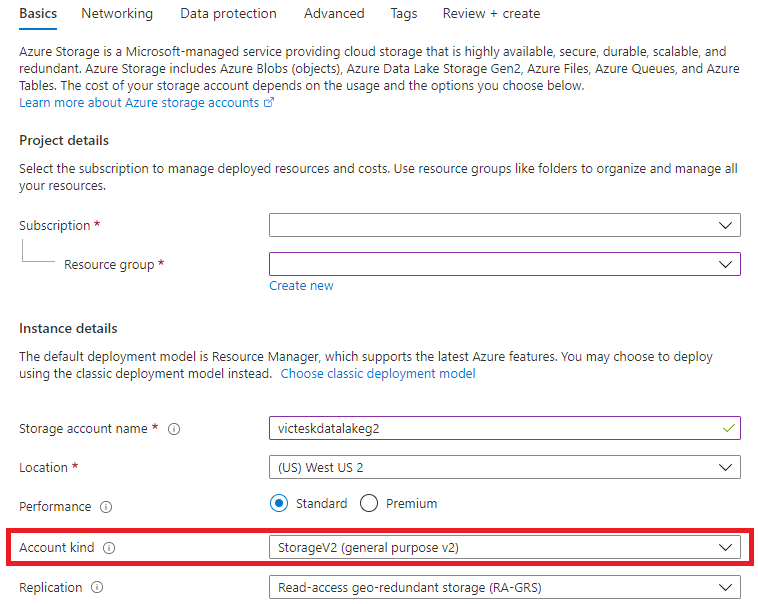
Step1:從Basics選項卡中,選擇Account Kind為:StorageV2(General purpose v2)
Step2:Networking 使用默認值
Step3:Data Protection 使用默認值
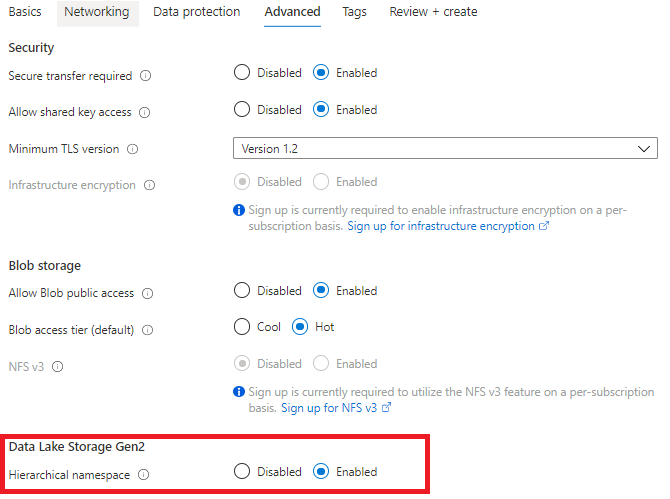
Step4:Advanced選項卡,啟用"Hierarchical namespace"
2,為Data Lake V2創建文件系統
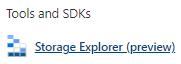
進入到Data Lake V2的資源頁面中,從「Tools and SDKs」中選擇「Storage Explorer」,
進入到Storage Explorer中,右擊CONTAINERS,選擇「Create file system」:

二,創建App registraation
為了在ADLS Gen 2和Azure Databricks之間建立連接,需要應用程式連接,如果在Azure Active Directory中將應用程式註冊配置為「是」,則非管理員用戶可以註冊自定義開發的應用程式以在此目錄中使用。
1,創建App
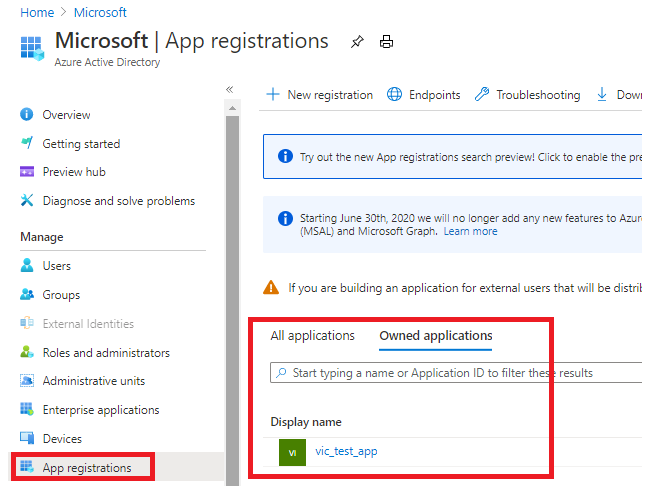
從Azure Portal中搜索「Azure Active Directory」,選擇「App registration」,創建vic_test_app

創建完成之後,點擊「App registrations」,從「Owned applications」中點擊vic_test_app。
2,為該app添加app secret(驗證密鑰),以訪問該app

複製Client Secret 的Value欄位,因為執行其他操作之後,這個值將無法再查看到。
3,得到的數據

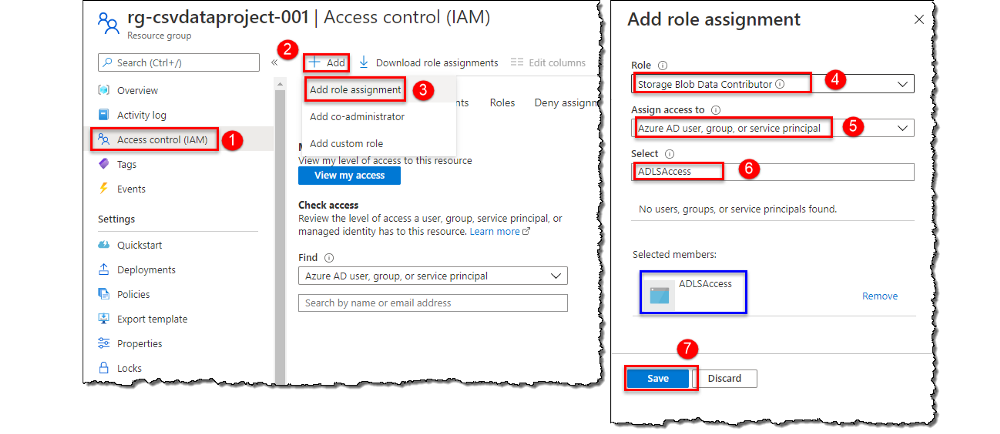
三,把Service Principal的許可權授予Data Lake V2賬戶
我們需要為Service Principal分配訪問角色,該Service Principal是在註冊App時自動創建,以訪問存儲賬戶中的數據。
四,創建Key Vault
Key Vault服務用於安全地存儲key、密碼、證書等secret,需要把從已註冊的app中獲取到的密鑰存儲到Key Vault中。
1:創建Key Vault
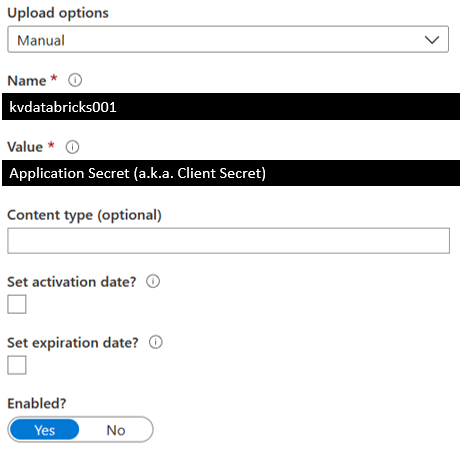
在Key Vault創建完成之後,向Key Vault中添加一個Secret,
2:保存Secret
定義Secret的Name,把從已註冊的app中獲取到的Client Secret存儲到Secret的Value中。
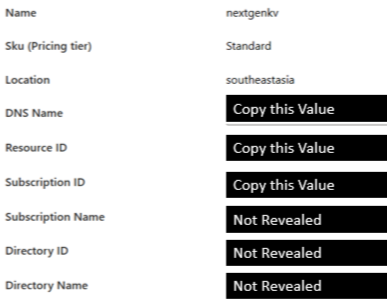
3,從Key Vault得到的數據
從Key Vault的Settings中點擊「Properties」
五,創建Azure Key Vault-backed的Secret Scope
使用Secret Scope來管理Secret,Secret Scope是Secret構成的,該Secret是由name來唯一標識的。
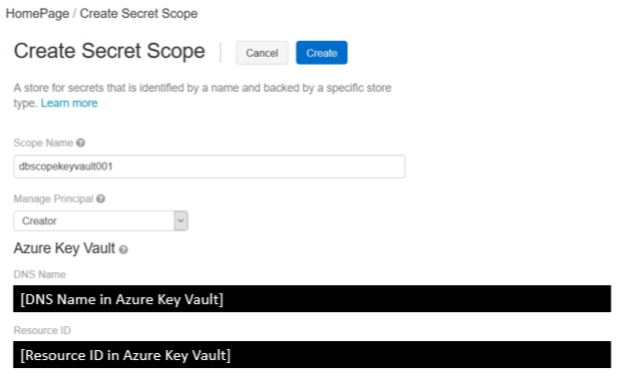
Step1,導航到創建Secret Scope的頁面
根據Databricks實例,導航到創建Secret Scope的頁面,注意該URI是區分大小寫的。
//<databricks-instance>#secrets/createScope
Step2,輸入Secret Scope的屬性
ScopeName是區分大小寫的,並且DNS Name和Resource ID都必須從Key Vault中複製。
六 ,掛載Data Lake Storage Gen2
通過創建 Azure Data Lake Storage Gen2的文件系統,註冊App、創建Key Vault、創建Secret Scope,我們完成了把Data Lake Gen2掛載到DBFS的所有準備工作,並獲得了以下數據:
- Client ID (a.k.a. Application ID)
- Client Secret (a.k.a. Application Secret)
- Directory ID (a.k.a Tenant ID)
- Databricks Secret Scope Name
- Key Name for Service Credentials (from Azure Key Vault, it is the secret's name)
- File System Name
- Storage Account Name
- Mount Name
Databricks提供了掛載命令:dbutils.mount(),通過該命令,我們可以把Azure Data Lake Storage Gen2掛載到DBFS中。掛載操作是一次性的操作,一旦掛載操作完成,就可以把遠程的Data Lake Gen2的file system當作本地文件來使用。
1,掛載Azure Data Lake Storage Gen2
使用服務主體(Service Principal)和OAuth 2.0進行身份驗證,把Azure Data Lake Storage Gen2帳戶裝載到DBFS,該裝載點(mount pointer)是數據湖存儲的指針,數據不需要同步到本地,但是只要遠程文件系統中的數據有更新,我們就能獲得數據的更新。
掛載Data Lake Storage Gen2文件系統,目前只支援OAuth 2.0 Credential:
######################################################################################
# Set the configurations. Here's what you need:
## 1.) Client ID (a.k.a Application ID)
## 2.) Client Secret (a.k.a. Application Secret)
## 3.) Directory ID
## 4.) File System Name
## 5.) Storage Account Name
## 6.) Mount Name
######################################################################################
configs = {"fs.azure.account.auth.type": "OAuth",
           "fs.azure.account.oauth.provider.type": "org.apache.hadoop.fs.azurebfs.oauth2.ClientCredsTokenProvider",
           "fs.azure.account.oauth2.client.id": "<client-id>",
           "fs.azure.account.oauth2.client.secret": dbutils.secrets.get(scope = "<scope-name>", key = "<key-name-for-service-credential>"),
           "fs.azure.account.oauth2.client.endpoint": "//login.microsoftonline.com/<directory-id>/oauth2/token"}

######################################################################################
# Optionally, you can add <directory-name> to the source URI of your mount point.
######################################################################################
dbutils.fs.mount(
  source = "abfss://<file-system-name>@<storage-account-name>.dfs.core.windows.net/",
  mount_point = "/mnt/<mount-name>",
  extra_configs = configs)
參數注釋:
- <Client-id>:App ID
- <scope-name>:Secret Scope的名稱
- <key-name-for-service-credential>:Azure Key Vault
- <directory-id>:tenant Id
<mount-name>:是DBFS path,表示Data Lake Store或其中的一個Folder在DBFS中裝載的位置dbutils.secrets.get(scope="<scope-name>",key="<service-credential-key-name>"):從Secret Scope中的Secret中獲取服務憑證- <file-system-name>:文件系統的名稱
- <storage-account-name>:存儲賬戶的名稱
2,訪問掛載點
訪問掛載點中的文件,可以通過pyspark.sql來訪問:
df = spark.read.text("/mnt/%s/...." % <mount-name>)
df = spark.read.text("dbfs:/mnt/<mount-name>/....")
或者通過SQL命令來訪問:
%sql
select *
from csv.`/mnt/mount_datalakeg2/stword.csv`
3,刷新掛載點
dbutils.fs.refreshMounts()
4,卸載掛載點:
dbutils.fs.unmount("/mnt/<mount-name>")
參考文檔:
Mounting & accessing ADLS Gen2 in Azure Databricks using Service Principal and Secret Scopes
Mount an ADLS Gen 2 to Databricks File System Using a Service Principal and OAuth 2.0 (Ep. 5)

