橫板闖關遊戲中的角色移動
- 2021 年 1 月 8 日
- 筆記
前言
在很多2D遊戲中,都會涉及到角色移動,跳躍等操作,最典型的就是橫板闖關遊戲。例如經典的魂斗羅、三國戰紀等。這兩款遊戲在地圖移動和角色行走的方式中唯一的不同就是魂斗羅是沒有縱深的那種。
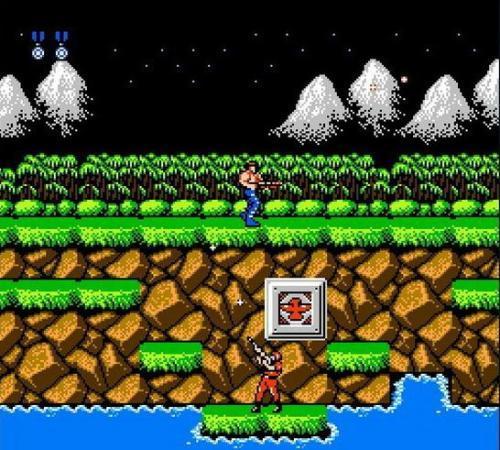
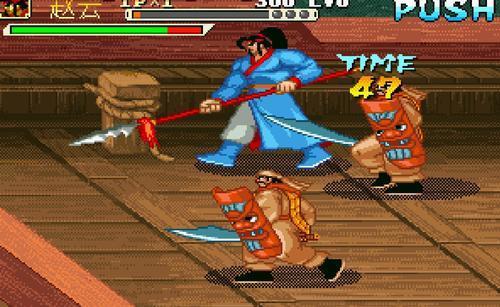
看似簡單,其實涉及了地圖,攝像機移動,數學和物理的一些內容。
本片內容先介紹一下移動組件的定義,稍後的文章會一點點講解地圖、自定義攝像機等,最終應用到遊戲中,做成一個完整的demo。
坐標系
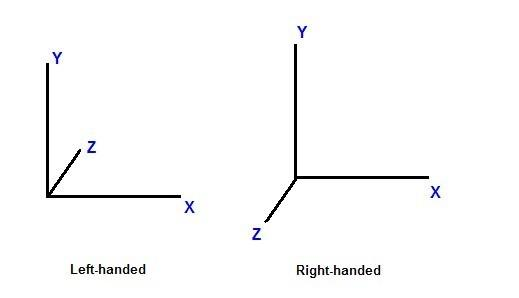
首先不得不說的一點,所有的移動都是依託坐標系的。我們這裡的坐標系是以左下角為原點,橫向向右為x正方向,縱向向上為y正方向,朝向螢幕的方向為z正方向,也就是unity使用的左手坐標系。而cocoscreator使用的是右手坐標系,但是這個轉換是比較簡單的。
移動組件的定義
首先列舉一下移動中都需要支援哪些功能
- 上下移動: 對於不可以上下移動的遊戲來說,z方向的速度始終為0即可。
- 左右移動:x坐標的變化。
- 支援兩個方向同時移動:當同時按下前上鍵時應該可以向左前方移動。
- 移動速度定義:當某個方向有速度時,才會向某個方向移動,站立狀態下,所有方向速度均為0.
- 彈力:這個是為了模擬球的落地彈起,實現並不要求那麼嚴格的。
- 摩擦力: 這個是為了模擬逐漸停止的效果。實現並不要求那麼嚴格。
- 是否受重力影響: 對於一些不受重力影響的物理,可以不做重力計算
- 是否啟用: 只有啟用以後才會進行移動計算。
- 在遊戲地圖中的坐標:記錄角色當前在地圖中的位置。
import { DIR } from "../../cfw/tools/Define";
import PhysicalManager from "./PhysicalManager";
const { ccclass, property } = cc._decorator;

@ccclass
export default class MoveSystem extends cc.Component {

    @property({ displayName: '是否受重力' })
    g: Boolean = true;

    @property({ displayName: '是否啟用' })
    enable: Boolean = true;

    @property({ displayName: '速度' })
    speed: cc.Vec3 = cc.v3(0, 0, 0)
    // 彈力
    @property({ type: cc.Float, displayName: '彈力' })
    elasticity: number = 0;

    //摩擦力
    @property({ type: cc.Float, displayName: '摩擦力' })
    frictional: number = 1;

    @property({ type: cc.Float, displayName: '跳躍高度' })
    jumpHigh: number = 350;

    //左右移動方向
    protected moveXDir: DIR = DIR.RIGHT;
    //上下移動方向
    protected moveZDir: DIR = DIR.UP;
    //角色在地圖中的位置
    protected position: cc.Vec3 = cc.v3(0, 0, 0)

    start() {
        if (this.enable) {
            this.setEnable(true)
        }

    }
    onDestroy() {
        if (this.enable) {
            this.setEnable(false)
        }
    }

    setEnable(f: boolean) {
        this.enable = f;
        cc.log('MoveSystem setEnable f ', f)
        if (this.enable) {
            PhysicalManager.instance().add(this)
        } else {
            PhysicalManager.instance().remove(this)
        }
    }

    isEnable() {
        return this.enable;
    }
    setMoveXDir(d: DIR) {
        this.moveXDir = d;
    }

    getMoveXDir() {
        return this.moveXDir;
    }

    setMoveZDir(d: DIR) {
        this.moveZDir = d;
    }

    getMoveZDir() {
        return this.moveZDir;
    }


    getFrictional() {
        return this.frictional;
    }

    setGrictional(n: number) {
        this.frictional = n;
    }

    setElasticity(n: number) {
        this.elasticity = n;
    }

    getElasticity() {
        return this.elasticity;
    }

    isG() {
        return this.g
    }

    setG(f: boolean) {
        this.g = f;
    }
    getJumpHigh() {
        return this.jumpHigh;
    }
    setJumpHight(h: number) {
        this.jumpHigh = h;
    }
    addJumpHigh(h: number) {
        this.jumpHigh += h;
    }

    isJumping() {
        return this.speed.y != 0;
    }
    setX(x: number) {
        this.position.x = x;
    }

    setY(y: number) {
        this.position.y = y;
    }

    getZ() {
        return this.position.z;
    }

    setZ(z: number) {
        this.position.z = z;
        this.node.zIndex = -z
    }

    getX() {
        return this.position.x;
    }

    getY() {
        return this.position.y;
    }


    getSpeedX() {
        return this.speed.x;
    }

    setSpeedX(s: number) {
        this.speed.x = s;
    }

    setSpeedY(spy: number) {
        this.speed.y = spy;
    }

    getSpeedY() {
        return this.speed.y
    }

    setSpeedZ(z: number) {
        this.speed.z = z;
    }

    getSpeedZ() {
        return this.speed.z;
    }
}
結語
對於移動的需求可能不止如此,但是在我以往的開發過程中,有這些已經可以應付大多數遊戲的需求了。程式碼僅供參考,歡迎留言探討。
歡迎關注我的個人GZH<微笑遊戲>
歡迎掃碼關注公眾號《微笑遊戲》,瀏覽更多內容。