JavaScript Array對象
- 2020 年 7 月 28 日
- 筆記
- javascript
數組聲明
數組是多個變數值的結合,是Array對象的實例,所以可以像對象一樣調用方法。
創建數組
使用對象方式創建數組。
<script> "use strict"; let array = new Array(1, 2, 3, 4, 5); console.table(array); console.log(typeof array); // object </script>
使用字面量方式簡單創建數組。
<script> "use strict"; let array = [1,2,3,4,5]; console.table(array); console.log(typeof array); // object </script>
Array.of
當使用對象創建數組時,如果只想要一個值可用Array.of進行創建,否則創建的是一個長度為填入值的空數組。
<script> "use strict"; // let array = new Array(3) 代表創建長度為3的空數組 let array = new Array.of(3); // 代表創建了一個數組 [3] </script>
多維數組
數組中可以包含多個數組,這被稱為多維數組。
如下示例,創建出一個二維數組。
<script> "use strict"; let array = [[1,2,3],["4","5","6"]]; </script>
const聲明
由於數組是引用類型,以使用const聲明並修改其中的值不會拋出異常。
但是並不推薦這樣做。
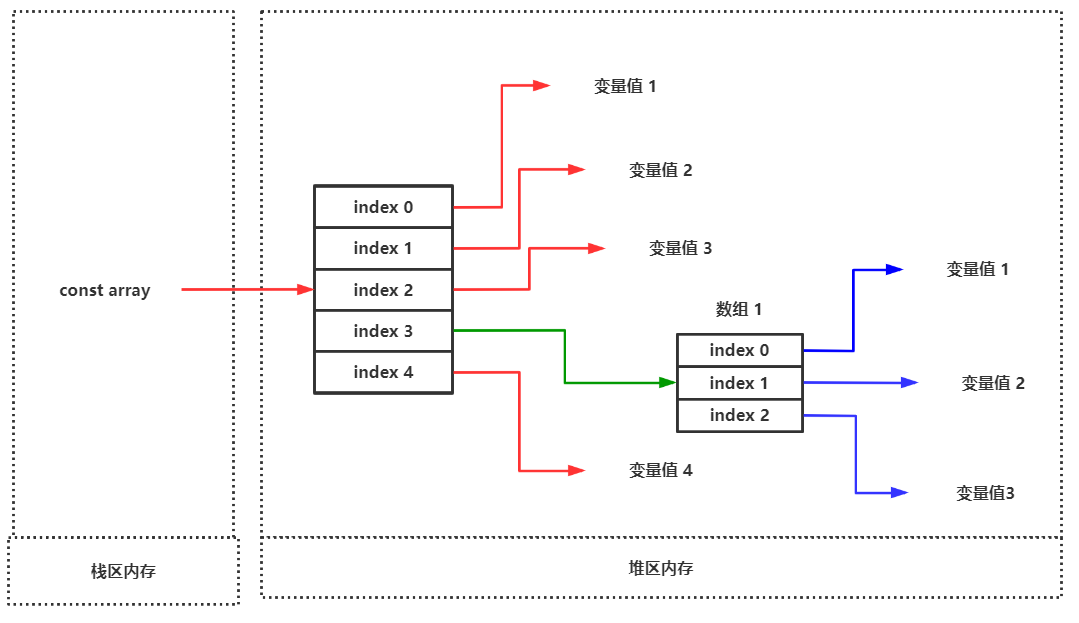
<script> "use strict"; const array = [[1,2,3],["4","5","6"]]; array[0] = "Array"; console.log(array); // ["Array", Array(3)] </script>
基本操作
長度獲取
使用length可獲取數組長度。
<script> "use strict"; const array = [[1,2,3],["4","5","6"],"7","8","9"]; console.log(array.length); // 5 </script>
類型檢測
使用Array對象提供的isArray()方法來判斷一個對象是否為數組類型。
<script> "use strict"; console.log(Array.isArray({})); // false console.log(Array.isArray([])); // true </script>
類型轉換
數組轉字元串
大部分數據類型都可以使用toString() 函數轉換為字元串。
<script> "use strict"; let array = [1,2,3,4]; console.log(array.toString()); // 1,2,3,4 </script>
、
還可以使用String()將數組對象進行包裹實現轉換。
<script>

        "use strict";
        let array = [1,2,3,4];
        console.log(String(array));  // 1,2,3,4

</script>
使用join()方法拼接合併出字元串。
<script>

        "use strict";
        let array = [1, 2, 3, 4];
        console.log(array.join("---"));  // 1---2---3---4

</script>
類數組轉數組
可通過Array.from()將類數組轉為數組,類數組是指具有length屬性或為可迭代對象。
參數1:要轉換的類數組
參數2:類似於
map()的回調函數,對元素挨個挨個做操作
以下示例將展示把DOM對象的NodeList轉換為數組進行操作的過程。
<!DOCTYPE html>
<html lang="en">

<head>
        <meta charset="UTF-8">
        <meta name="viewport" content="width=device-width, initial-scale=1.0">
        <title>Document</title>
</head>

<body>

        <div>d1</div>
        <div>d2</div>
        <div>d3</div>
        <div>d4</div>

</body>

<script>

        "use strict";
        let ele_list = document.querySelectorAll("div");

        Array.from(ele_list, function (ele) {
                console.log(ele.innerHTML);  // d1 d2 d3 d4
        })

</script>

</html>
... 展開語法與類數組轉換
...語法是非常強大的一種語法,類似於Python中的*柴博語法,可將元素單一拆出。
我們使用[...對象]即可將類數組的元素全部添加進數組中,且可以調用數組的方法對其中元素進行操作。
以下示例將演示使用[...NodeList]將 DOM的NodeList類數組轉換為數組再使用map()方法對其中元素進行操作。
<!DOCTYPE html>
<html lang="en">

<head>
        <meta charset="UTF-8">
        <meta name="viewport" content="width=device-width, initial-scale=1.0">
        <title>Document</title>
</head>

<body>

        <div>d1</div>
        <div>d2</div>
        <div>d3</div>
        <div>d4</div>

</body>

<script>

        "use strict";
        let ele_list = document.querySelectorAll("div");

        [...ele_list].map(function (ele) {
                console.log(ele.innerHTML);  // d1 d2 d3 d4
        })

</script>

</html>
展開語法
數組合併
為一個數組添加另一個數組中的元素,可使用...展開語法,但是我個人並不推薦這麼做,在運行效率上來說會有略微的降低。
<script>

        "use strict";
        let a1 = [1,2,3];
        let a2 = ["3","4","5"];

        a1 = [...a1,...a2];
        console.log(a1);  //  (6) [1, 2, 3, "3", "4", "5"]

</script>
函數傳參
...語法代替了arguments來接收任意數量的位置傳參。
arguments可接收任意數量的位置傳參,但是形參名只能是arguments,但...語法可以跟上任意形參名
<script>

        "use strict";

        function show(...args) {
                console.log(args);  // (5) [1, 2, 3, 4, 5]
                console.log(Array.isArray(args));  // true
        };

        show(1,2,3,4,5);

</script>
節點轉換
上面已經介紹過...語法與類數組轉換,這裡不再詳細舉例。
解構賦值
解構是一種更簡潔的賦值特性,可以理解為分解一個數據的結構
建議使用
var/let/const聲明,如果在嚴格模式下不使用聲明會拋出異常
基本使用
嚴格按照語法,解構接收變數必須由[]包裹,並且一定不要忘記前面的聲明。
<script>

        "use strict";

        let array = new Array("雲崖",18,"男");

        let [name,age,gender] = array;

        console.log(name);  // 雲崖
        console.log(age);   // 18
        console.log(gender);  // 男

</script>
... 接收全部
可以使用...語法來接收餘下的全部變數。
<script>

        "use strict";

        let array = new Array("雲崖",18,"男");

        let [name,...other] = array;

        console.log(name);  // 雲崖
        console.log(other);  // (2) [18, "男"]

</script>
佔位使用
某些變數不想獲取,可使用_作為變數名進行佔用,這在很多程式語言中都是通用的,或者直接使用,將它捨棄掉。
<script>

        "use strict";

        let array = new Array("雲崖", 18, "男");

        let [name, _, gender] = array;

        console.log(name);  // 雲崖
        console.log(gender);  // 男

</script>
函數參數
可以使用結構賦值的特性,讓函數的形參接收到數組實參傳遞進的元素。
當然我們也可以為形參的接收變數設定默認值。
<script>

        "use strict";

        function show([name, age, gender = "男"]) {

                console.log(name);  // 小芳
                console.log(age);  // 18
                console.log(gender);  // 女

        }

        show(["小芳", 18, "女"]);

</script>
索引使用
索引index總是從0開始,數組中最後一位元素的索引為length-1
語法介紹:數組對象[index]
盡量不要使用索引進行數組對象的操作,因為被操作的元素可能會出現undefined的情況造成誤判。
獲取單元素
使用索引index來獲取單一元素。
<script>

        "use strict";

        let array = ["一", "二", "三", "四", "五"];
        console.log(array[2]);  // "三"

</script>
獲取最後一位元素。
<script>

        "use strict";

        let array = ["一", "二", "三", "四", "五"];
        console.log(array[array.length - 1]);  // "五"

</script>
獲取倒數第二位元素。
<script>

        "use strict";

        let array = ["一", "二", "三", "四", "五"];
        console.log(array[array.length - 2]);  // "四"

</script>
增加單元素
如果增加的元素索引大於數組索引,那麼之前的未定義索引位置上的元素都會用undefined進行佔位。
<script>

        "use strict";

        let array = ["一", "二", "三", "四", "五"];
        array[8] = "九"
        console.log(array);  // (9) ["一", "二", "三", "四", "五", empty × 3, "九"]
        console.log(array[6]);  // undefined

</script>
修改單元素
直接使用index進行操作即可,如果操作的index元素為undefined或者不存在,則相當於增減單元素。
<script>

        "use strict";

        let array = ["一", "二", "三", "四", "五"];
        array[0] = "壹"
        console.log(array); // (5) ["壹", "二", "三", "四", "五"]

</script>
刪除單元素
使用delete配合索引來刪除單個元素,被刪除的元素在數組中依舊會用undefined進行佔位。
<script>

        "use strict";

        let array = ["一", "二", "三", "四", "五"];
        delete array[0];
        console.log(array); // (5) [empty, "二", "三", "四", "五"]
        console.log(array[0]); // undefined

</script>
管理元素
push
屬於棧方法,將元素壓入數組尾部。
可以理解為追加元素至數組尾部。
<script>

        "use strict";

        let array = ["一", "二", "三", "四", "五"];
        array.push("六", "七", "八");
        console.log(array); // (8) ["一", "二", "三", "四", "五", "六", "七", "八"]

</script>
unshift
屬於棧方法,將元素壓入數組頭部。
可以理解為添加元素至數組頭部。
<script>

        "use strict";

        let array = ["一", "二", "三", "四", "五"];
        array.unshift("one", "two", "three");
        console.log(array); // (8) ["one", "two", "three", "一", "二", "三", "四", "五"]

</script>
shift
屬於棧方法,將數組第一個元素彈出。
返回值為彈出的元素。
<script>

        "use strict";

        let array = ["一", "二", "三", "四", "五"];
        const first = array.shift()

        console.log(first);  // 一
        console.log(array); // (4) ["二", "三", "四", "五"]

</script>
pop
屬於棧方法,將數組末尾元素彈出。
返回值為彈出的元素。
<script>

        "use strict";

        let array = ["一", "二", "三", "四", "五"];
        const last = array.pop()

        console.log(last);  // 五
        console.log(array); // (4) ["一", "二", "三", "四"]

</script>
fill
使用fill() 填充數組元素
<script>

        "use strict";

        let array = new Array(5).fill("填充一樣的");

        console.log(array);  // (5) ["填充一樣的", "填充一樣的", "填充一樣的", "填充一樣的", "填充一樣的"]

</script>
指定填充位置
<script>

        "use strict";
        let array = ["一", "二", "三", "四", "五"];

        array.fill("小問號",2,4);  // 改變了幾個元素,可以使用後面的數值-前面的數值計算 4-2=2 改變2個元素

        console.log(array); // (5) ["一", "二", "小問號", "四", "五"]

</script>
slice
使用 slice() 方法從數組中截取部分元素組合成新數組(並不會改變原數組),不傳第二個參數時截取到數組的最後元素。
<script>

        "use strict";
        let array = ["一", "二", "三", "四", "五"];

        let new_array = array.slice(1,3); // 取頭不去尾
        console.log(new_array);  //  ["二", "三"]

</script>
splice
使用 splice 方法可以添加、刪除、替換數組中的元素,會對原數組進行改變。
刪除元素
刪除數組元素第一個參數為從哪開始刪除,第二個參數為刪除的數量,返回值為刪除的元素。
<script>

        "use strict";
        let array = ["一", "二", "三", "四", "五"];

        let del_value = array.splice(1,3); // 代表從索引1開始向後刪除2個元素  3-1=2,共刪除3個元素。

        console.log(del_value);  // 被刪除的元素  ["二", "三", "四"]

        console.log(array);  // 原數組   ["一", "五"]

</script>
先刪除元素再添加元素
通過指定新參數來設置在刪除位置添加的元素
<script>

        "use strict";
        let array = ["一", "二", "三", "四", "五"];

        let del_value = array.splice(1,3,"add-2","add-3","add-4"); // 代表從索引1開始向後刪除2個元素  3-1=2,共刪除3個元素。然後再添加元素

        console.log(del_value);  // 被刪除的元素  ["二", "三", "四"]

        console.log(array);  // 原數組   ["一", "add-2", "add-3", "add-4", "五"]

</script>
向末尾添加元素
配合length進行操作。
<script>

        "use strict";
        let array = ["一", "二", "三", "四", "五"];

        array.splice(array.length, 0, "add-1", "add-2");

        console.log(array);  // 原數組  (7) ["一", "二", "三", "四", "五", "add-1", "add-2"]

</script>
向頭部添加元素
<script>

        "use strict";
        let array = ["一", "二", "三", "四", "五"];

        array.splice(0, 0, "add-1", "add-2");

        console.log(array);  // 原數組  (7) ["add-1", "add-2", "一", "二", "三", "四", "五"]

</script>
元素位置調整函數
<script>

        "use strict";
        function move(array, before, to) {
                if (before < 0 || to >= array.length) {
                        console.error("指定位置錯誤");
                        return;
                }
                const newArray = [...array];
                const elem = newArray.splice(before, 1);
                newArray.splice(to, 0, ...elem);
                return newArray;
        }
        const array = [1, 2, 3, 4];
        console.log(move(array, 0, 3));

</script>
清空數組
將數組值修改為[]可以清空數組,如果有多個引用時數組在記憶體中存在被其他變數引用。
<script>

        "use strict";
        let array1 = ["一", "二", "三", "四", "五"];
        let array2 = array1;

        array1 = []  // 改變array1的記憶體指向


        console.log(array1);  // []
        console.log(array2);  // (5) ["一", "二", "三", "四", "五"]

</script>
將數組length設置為0也可以清空數組
<script>

        "use strict";
        let array1 = ["一", "二", "三", "四", "五"];
        let array2 = array1;

        array1.length = 0; // 清除記憶體指向中的數組中所有元素


        console.log(array1);  // []
        console.log(array2);  // []

</script>
使用splice方法刪除所有數組元素
<script>

        "use strict";
        let array1 = ["一", "二", "三", "四", "五"];
        let array2 = array1;

        array1.splice(0,array1.length); // 清除記憶體指向中的數組中所有元素


        console.log(array1);  // []
        console.log(array2);  // []

</script>
使用pop/shift刪除所有元素,來清空數組
<script>

        "use strict";
        let array1 = ["一", "二", "三", "四", "五"];
        let array2 = array1;

        while (array1.pop()) {}  // 只要彈出元素就代表true,繼續執行

        console.log(array1);  // []
        console.log(array2);  // []

</script>
合併拆分
join
使用join()連接成字元串
<script>

        "use strict";
        let array = ["www","google","com"];
        let new_str = array.join(".");
        console.log(new_str); // www.google.com

</script>
split
split() 方法用於將字元串分割成數組,類似join方法的反函數。
<script>

        "use strict";
        let str = "www.google.com";
        let array = str.split(".");

        console.log(array);  // (3) ["www", "google", "com"]

</script>
concat
concat()方法用於連接兩個或多個數組,元素是值類型的是複製操作,如果是引用類型還是指向同一對象
<script>

        "use strict";
        let array1 = new Array("一","二","三");
        let array2 = new Array("4","5","6");

        console.log(array1.concat(array2)); // (6) ["一", "二", "三", "4", "5", "6"]

</script>
copyWithin
使用 copyWithin() 從數組中複製一部分到同數組中的另外位置。
語法說明
array.copyWithin(target, start, end)
| 參數 | 描述 |
|---|---|
| target | 必需。複製到指定目標索引位置。 |
| start | 可選。元素複製的起始位置。 |
| end | 可選。停止複製的索引位置 (默認為 array.length)。如果為負值,表示倒數。 |
<script>

        "use strict";

        const arr = [1, 2, 3, 4];

        console.log(arr.copyWithin(2, 0, 2)); // [1, 2, 1, 2]

</script>
查找元素
indexOf
使用 indexOf() 從前向後查找元素出現的位置,如果找不到返回 -1,找到的話返回索引位置本身。
第二個參數為從指定位置開始向後查找。
<script>

        "use strict";
        let array = new Array(0, 1, 2, 3, 4, 5, 6, 7, 8, 9);
        console.log(array.indexOf("6"));  // 找不到,返回  -1  因為indexOf是嚴格查找
        console.log(array.indexOf(6)); // 6
        console.log(array.indexOf(6, 3)); // 從索引3位置向後查找

</script>
lastIndexOf
使用 lastindexOf() 從後向前查找元素出現的位置,如果找不到返回 -1,找到的話返回索引位置本身。
第二個參數為從指定位置開始向前查找。
<script>

        "use strict";
        let array = new Array(0, 1, 2, 3, 4, 5, 6, 7, 8, 9);
        console.log(array.lastIndexOf("6"));  // 找不到,返回  -1  因為indexOf是嚴格查找
        console.log(array.lastIndexOf(6)); // 6
        console.log(array.lastIndexOf(6, 3)); // 從索引3位置向前查找,找不到 返回 -1

</script>
includes
判斷數組中某一個元素是否存在,返回布爾值。
<script>

        "use strict";
        let array = new Array(0, 1, 2, 3, 4, 5, 6, 7, 8, 9);
        console.log(array.includes("6")); // 嚴格模式查找,找不到  false
        console.log(array.includes(6)); // true

</script>
find
find()方法找到後會把值返回出來,你可以為它指定一個匿名函數,參數是 : 當前值,索引,操作數組。
如果找不到返回值為undefined
<script>

        "use strict";
        let array = new Array(0, 1, 2, 3, 4, 5, 6, 7, 8, 9);

        let res = array.find(function (value) {

                return value == 6;
        })

        console.log(res);

</script>
使用includes()等不能查找引用類型,因為它們的記憶體地址是不相等的。
<script>

        "use strict";
        let array = new Array(0, 1, 2, 3, 4, 5, 6, 7, 8, { "k1": "v1", "k2": 'v2' });

        console.log(array.includes({ "k1": "v1", "k2": 'v2' })); // false 嚴格模式,找不到

</script>
這個時候find()就派上用場了。
<script>

        "use strict";
        let array = new Array(0, 1, 2, 3, 4, 5, 6, 7, 8, { "k1": "v1", "k2": 'v2' });

        let res = array.find(function (value) {
                return value["k1"] == "v1";
        });

        console.log(res); // {k1: "v1", k2: "v2"}

</script>
findIndex
findIndex() 與 find() 的區別是返回索引值,參數也是 : 當前值,索引,操作數組。
<script>

        "use strict";
        let array = new Array(0, 1, 2, 3, 4, 5, 6, 7, 8, { "k1": "v1", "k2": 'v2' });

        let res = array.findIndex(function (value) {
                return value["k1"] == "v1";
        });

        console.log(res); // 9

</script>
find原理
下面是find()的原理。
<script>

        "use strict";

        let arr = [1, 2, 3, 4, 5];

        function find(array, callback) {
                for (const value of array) {
                        if (callback(value) === true) return value;
                }
                return undefined;
        }

        let res = find(arr, function (item) {
                return item == 23;
        });
        console.log(res);

</script>
下面是為Array對象添加原型方法實現。
<script>

        "use strict";

        let arr = [1, 2, 3, 4, 5];

        Array.prototype.findValue = function (callback) {
                for (const value of this) {
                        if (callback(value) === true) return value;
                }
                return undefined;
        };

        let re = arr.findValue(function (item) {
                return item == 2;
        });
        console.log(re);

</script>
反轉排序
reverse
反轉數組順序。
<script>

        "use strict";

        let array = new Array("一","二","三","四","五");

        console.log(array.reverse()); // (5) ["五", "四", "三", "二", "一"]

</script>
sort
sort每次使用兩個值進行比較 Array.sort((a,b)=>a-b
返回負數 a 排在 b前面,從小到大
返回正數 b 排在a 前面
返回 0 時不動
默認從小到大排序數組元素。
<script>

        "use strict";

        let array = [1, 32, 34, 2, 31, 3, 89]

        console.log(array.sort()); // (7) [1, 2, 3, 31, 32, 34, 89]

</script>
使用排序函數從大到小排序,參數一與參數二比較,返回正數為降序負數為升序。
<script>

        "use strict";

        let array = [1, 32, 34, 2, 31, 3, 89]

        let res = array.sort(function (v1, v2) {
                 // v2-v1 從大到小
                // v1-v2 從小到大

                return v2 - v1
        });

        console.log(res); // (7) [89, 34, 32, 31, 3, 2, 1]

</script>
也可以配合reverse()進行從大到小的排序。
<script>

        "use strict";

        let array = [1, 32, 34, 2, 31, 3, 89]

        let res = array.sort().reverse();

        console.log(res); // (7) [89, 34, 32, 31, 3, 2, 1]

</script>
應用場景
按照工資從大到小進行排序。
<script>

        "use strict";

        let people = [

                { "name": "二狗", "wage": 12000 },
                { "name": "小紅", "wage": 4300 },
                { "name": "三癩子", "wage": 8800 },
                { "name": "二瘸子", "wage": 3300 },

        ];


        let res = people.sort(function (v1, v2){
                // v2-v1 從大到小
                // v1-v2 從小到大

                return v2["wage"] - v1["wage"];
        })

        console.log(res);


</script>
排序原理
<script>

        "use strict";

        let arr = [1, 5, 3, 9, 7];

        function sort(array, callback) {
                for (const n in array) {
                        for (const m in array) {
                                if (callback(array[n], array[m]) < 0) {
                                        let temp = array[n];
                                        array[n] = array[m];
                                        array[m] = temp;
                                }
                        }
                }
                return array;
        }

        arr = sort(arr, function (a, b) {
                return a - b;
        });

        console.table(arr);

</script>
循環遍歷
for
根據數組長度結合for 循環來遍曆數組
<script>

        "use strict";

        let array = ["一", "二", "三", "四", "五"];

        for (let i=0; i < array.length; i++) {
                console.log(array[i]);
        }

</script>
forEach
forEach()使函數作用在每個數組元素上,但是沒有返回值。注意與map()的區別,map()是具有返回值的。
如下實例,將原列表中的每個元素的值加上100。
<script>

        "use strict";

        let array = [1, 2, 3, 4, 5, 6, 7, 8, 9];

        array.forEach(function (value, index, array) {
                array[index] += 100;
        });

        console.log(array);  // (9) [101, 102, 103, 104, 105, 106, 107, 108, 109]

</script>
for/in
遍歷時的迭代變數為索引值。
<script>

        "use strict";

        let array = [1, 2, 3, 4, 5, 6, 7, 8, 9];

        for(let i in array){
                console.log(i);  // 0 1 2 3 4 5 6 7 8
        }

</script>
for/of
遍歷時的迭代變數為值本身。
<script>

        "use strict";

        let array = [1, 2, 3, 4, 5, 6, 7, 8, 9];

        for(let i of array){
                console.log(i);  //  1 2 3 4 5 6 7 8 9
        }

</script>
迭代器方法
數組本身就是屬於一個迭代對象,因此可以調用其下的迭代方法。
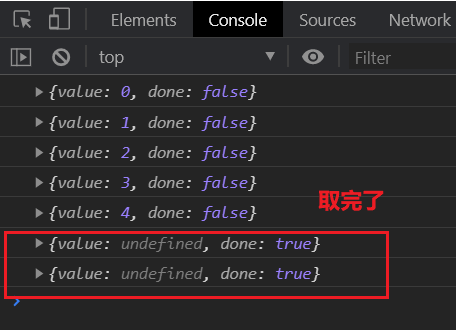
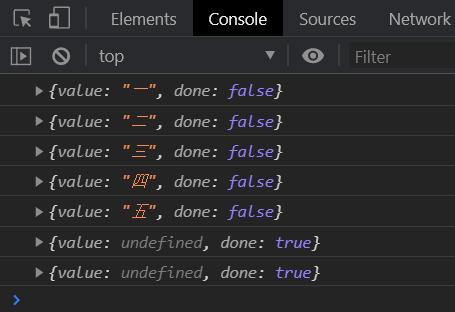
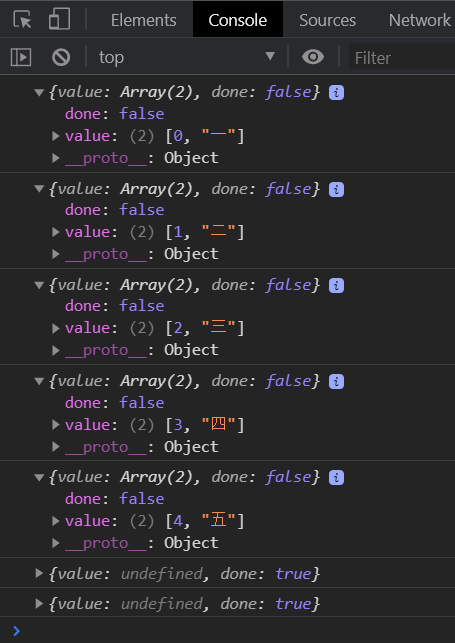
迭代器有一個特點,只能向後不能向前,迭代器中的值取一個少一個,關於迭代器的知識在後面會有。
迭代器取值方法next()。
keys
獲取所有的索引值。
<script>

        "use strict";

        let array = ["一", "二", "三", "四", "五"];

        let array_keys = array.keys();

        console.log(array_keys.next());
        console.log(array_keys.next());
        console.log(array_keys.next());
        console.log(array_keys.next());
        console.log(array_keys.next());
        // 下面兩個已經取不到值了
        console.log(array_keys.next());
        console.log(array_keys.next());

</script>
values
獲取所有的值本身。
<script>

        "use strict";

        let array = ["一", "二", "三", "四", "五"];

        let array_values = array.values();

        console.log(array_values.next());
        console.log(array_values.next());
        console.log(array_values.next());
        console.log(array_values.next());
        console.log(array_values.next());
        // 下面兩個已經取不到值了
        console.log(array_values.next());
        console.log(array_values.next());

</script>
entries
以數組形式返回所有的索引值與值本身
<script>

        "use strict";

        let array = ["一", "二", "三", "四", "五"];

        let array_entries = array.entries();

        console.log(array_entries.next());
        console.log(array_entries.next());
        console.log(array_entries.next());
        console.log(array_entries.next());
        console.log(array_entries.next());
        // 下面兩個已經取不到值了
        console.log(array_entries.next());
        console.log(array_entries.next());

</script>
擴展方法
every
every() 用於遞歸的檢測元素,要所有元素操作都要返回真結果才為真。
指定函數中第一個參數為元素,第二個參數為索引,第三個參數為原數組。
查看班級中同學的Js成績是否都及格
<script>

        "use strict";

        const user = [
                { name: "李四", js: 89 },
                { name: "馬六", js: 55 },
                { name: "張三", js: 78 }
        ];

        const res = user.every(function (value,index,array) {
                return value.js >= 60;
         });

        console.log(res);

</script>
some
使用 some 函數可以遞歸的檢測元素,如果有一個返回true,表達式結果就是真。
指定函數中第一個參數為元素,第二個參數為索引,第三個參數為原數組。
敏感辭彙檢測示例如下。
<!DOCTYPE html>
<html lang="en">

<head>
        <meta charset="UTF-8">
        <meta name="viewport" content="width=device-width, initial-scale=1.0">
        <title>Document</title>
</head>

<body>

        <input type="text" placeholder="前請輸入昵稱">
        <button type="button">提交</button>

</body>
<script>

        "use strict";

        const detect = ["蛤蟆", "維尼熊", "跳跳虎"];

        document.querySelector("button").addEventListener("click", function () {

                let user_input = document.querySelector("input").value;

                let res = detect.some(function (value, index, array) {
                        // 如果列表中的辭彙出現在用戶輸入的字元串中
                        return user_input.indexOf(value) >= 0;
                });

                if (res) alert("請不要輸入敏感辭彙!");
        });


</script>

</html>
filter
對數組中的元素挨個進行判定,為真的留下,為假的拋棄。
指定函數中第一個參數為元素,第二個參數為索引,第三個參數為原數組。
篩選出大於60的元素。
<script>

        "use strict";

        const array = [54, 52, 60, 78, 44, 92];

        let res =array.filter(function (value, index, array) {
                return value >= 60;
        });

        console.log(res);  // (3) [60, 78, 92]

</script>
map
對數組中的元素挨個進行操作,並返回一個新數組。
指定函數中第一個參數為元素,第二個參數為索引,第三個參數為原數組。
注意與forEach()函數的區別,它是沒有返回值的,而map()是具有返回值的。
如下實例,將每個元素的值加上100並返回一個新列表。
<script>

        "use strict";

        let array = [1, 2, 3, 4, 5, 6, 7, 8, 9];

        let new_array = array.map(function (value, index, array) {
                return value += 100;
        });

        console.log(array);  // 原數組  (9) [1, 2, 3, 4, 5, 6, 7, 8, 9]
        console.log(new_array); // 新數組  (9) [101, 102, 103, 104, 105, 106, 107, 108, 109]

</script>
reduce
使用 reduce 與 reduceRight 函數可以迭代數組的所有元素,reduce 從前開始 reduceRight 從後面開始。下面通過函數計算課程點擊數的和。
第一個參數是執行函數,第二個參數為初始值
傳入第二個參數時將所有元素循環一遍
不傳第二個參數時從第二個元素開始循環
執行函數參數說明如下
| 參數 | 說明 |
|---|---|
| prev | 上次調用回調函數返回的結果 |
| cur | 當前的元素值 |
| index | 當前的索引 |
| array | 原數組 |
統計元素在數組中出現的次數。
<script>

        "use strict";

        let array = [1, 2, 3, 4, 5, 6, 7, 8, 9,9,9,9,9];

        function countArrayELem(array, elem) {
                return array.reduce((total, cur) => (total += cur == elem ? 1 : 0), 0);
        }

        console.log(countArrayELem(array, 9)); // 5

</script>
返回數組中最大元素。
<script>

        "use strict";

        let array = [1, 2, 3, 4, 5, 6, 7, 8, 9];

        let res = array.reduce(function (prev, cur, index, array) {
                return prev > cur ? prev : cur;
        });

        console.log(res);  // 9

</script>
元素累加。
<script>

        "use strict";

        let array = [1, 2, 3, 4, 5, 6, 7, 8, 9];

        let res = array.reduce(function (prev, cur, index, array) {
                return prev+cur;
        });

        console.log(res);  // 45

</script>
元素累加,並在之前基礎上加100。
<script>

        "use strict";

        let array = [1, 2, 3, 4, 5, 6, 7, 8, 9];

        let res = array.reduce(function (prev, cur, index, array) {
                return prev + cur;
        }, 100); // 添加第二個參數

        console.log(res);  // 145

</script>

