玩轉SpringBoot之搗鼓 Redis
- 2020 年 6 月 29 日
- 筆記
- springboot
我們都知道,把首頁數據放到Redis里,能夠加快首頁數據的訪問速度。但是我們要如何準確又快速的將 Redis 整合到自己的 SpringBoot2.x 項目中呢?今天阿淼就帶大家爬一爬其中的門門道道。
序、Redis 介紹
Redis 使用了浪費流量的文本協議,但因為它數據存儲在記憶體中的,相對而言,依然可以取得極高的訪問性能。並且 Redis 是執行緒安全的。
RESP 就是 Redis 序列化協議的簡稱。它是一種直觀的文本協議,優勢在於實現異常簡單,解析性能極好。
Redis 協議裡面雖然有大量冗餘的回車換行符,但是這不影響它成為技術領域非常受歡迎的一個文本協議。在技術領域,性能並不總是一切,還有簡單性、易理解性和易實現性,這些都需要進行適當權衡。
一、Redis 基礎數據結構
1、字元串:(快取)
- key:value
value 可以是對象轉換成的 JSON 字元串,也可以是對象序列化後的二進位字元串
2、列表:(非同步隊列)
類似linkedlist
- 右邊進左邊出:隊列
- 右邊進右邊出:棧
3、字典(哈希)
類似hashmap:數組+鏈表
不過rehash是漸進式hash策略
4、集合:(去重)
- 無序 set: 類似hashset
- 有序 zset:類似SortedSet和HashMap的結合體,內部是現實現是跳躍列表
二、Lettuce
隨著 Spring Boot2.x 的到來,支援的組件越來越豐富,也越來越成熟,其中對 Redis 的支援不僅僅是豐富了它的API,更是替換掉底層 Jedis 的依賴,取而代之換成了 Lettuce。
雖然 Lettuce 和 Jedis 的都是連接 Redis Server 的客戶端程式,但是 Jedis 在實現上是直連 redis server,多執行緒環境下非執行緒安全,除非使用連接池,為每個Jedis實例增加物理連接。而 Lettuce 基於 Netty 的連接實例(StatefulRedisConnection),可以在多個執行緒間並發訪問,且執行緒安全,滿足多執行緒環境下的並發訪問,同時它是可伸縮的設計,一個連接實例不夠的情況也可以按需增加連接實例。
Lettuce是可擴展的Redis客戶端,用於構建無阻塞的Reactive應用程式.
Luttuce官網://lettuce.io/

Google翻譯後的頁面是:
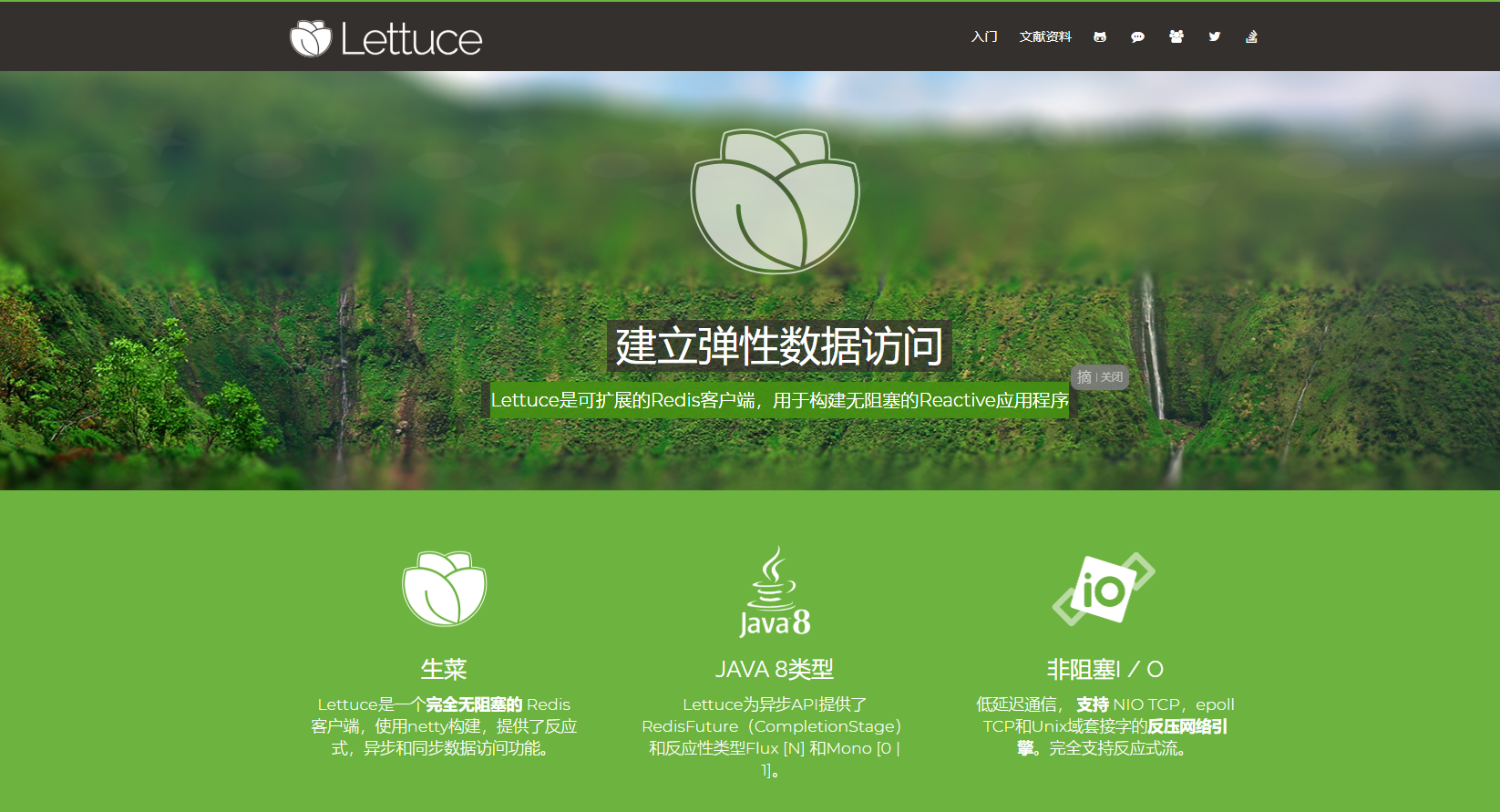
原來這玩意兒叫生菜,你別說,看著圖標還真有點像。

三、實操
項目中使用的 SpringBoot2.x 實現,如果之前是 SpringBoot1.x 則需要注意,底層已經由 Jedis 升級成了 Lettuce 。
3.1、引入依賴
除去 SpringBoot 項目需要的 jar 包外,另外還需要引入 redis 相關的依賴:
<dependency>
    <groupId>org.springframework.boot</groupId>
    <artifactId>spring-boot-starter-data-redis</artifactId>
</dependency>
<dependency>
    <groupId>org.apache.commons</groupId>
    <artifactId>commons-pool2</artifactId>
</dependency>
3.2、application.yml 配置文件
此處用到的 application.yml 文件,配置如下:
spring:
  redis:
    # Redis默認情況下有16個分片,這裡配置具體使用的分片。默認是索引為0的分片
    database: 1
    # Redis伺服器地址
    host: 127.0.0.1
    # Redis伺服器連接埠
    port: 6379
    # Redis伺服器連接密碼(默認為空)
    password: mmzsblog
    # 連接超時時間(毫秒)
    timeout: 2000s

    # 配置文件中添加 lettuce.pool 相關配置,則會使用到lettuce連接池
    lettuce:
      pool:
        # 連接池最大阻塞等待時間(使用負值表示沒有限制) 默認 -1
        max-wait: 60s
        # 連接池中的最大空閑連接 默認 8
        max-idle: 10
        # 連接池中的最小空閑連接 默認 0
        min-idle: 10
        # 連接池最大連接數(使用負值表示沒有限制) 默認 8
        max-activ: 8
如果項目是由 SpringBoot1.x 升級到 SpringBoot2.x 的,要沿用 jedis 連接池配置時會用到配置 jedis 相關的屬性:
    # 配置文件中添加 jedis.pool 相關配置,則會使用到 jedis 連接池
    jedis:
      pool:
        max-active: 10
        max-idle: 8
        min-idle: 0
        max-wait: 60s
並且引用的 jar 包也需要調整:
<dependency>
    <groupId>org.springframework.boot</groupId>
    <artifactId>spring-boot-starter-data-redis</artifactId>
    <exclusions>
        <exclusion>
            <groupId>io.lettuce</groupId>
            <artifactId>lettuce-core</artifactId>
        </exclusion>
    </exclusions>
</dependency>
<dependency>
    <groupId>redis.clients</groupId>
    <artifactId>jedis</artifactId>
</dependency>
另外,這裡再貼一下 Spring Boot 關於 RedisProperties 的所有配置項
# REDIS RedisProperties
spring.redis.cluster.max-redirects= # Maximum number of redirects to follow when executing commands across the cluster.
spring.redis.cluster.nodes= # Comma-separated list of "host:port" pairs to bootstrap from.
spring.redis.database=0 # Database index used by the connection factory.
spring.redis.url= # Connection URL. Overrides host, port, and password. User is ignored. Example: redis://user:[email protected]:6379
spring.redis.host=localhost # Redis server host.
spring.redis.jedis.pool.max-active=8 # Maximum number of connections that can be allocated by the pool at a given time. Use a negative value for no limit.
spring.redis.jedis.pool.max-idle=8 # Maximum number of "idle" connections in the pool. Use a negative value to indicate an unlimited number of idle connections.
spring.redis.jedis.pool.max-wait=-1ms # Maximum amount of time a connection allocation should block before throwing an exception when the pool is exhausted. Use a negative value to block indefinitely.
spring.redis.jedis.pool.min-idle=0 # Target for the minimum number of idle connections to maintain in the pool. This setting only has an effect if it is positive.
spring.redis.lettuce.pool.max-active=8 # Maximum number of connections that can be allocated by the pool at a given time. Use a negative value for no limit.
spring.redis.lettuce.pool.max-idle=8 # Maximum number of "idle" connections in the pool. Use a negative value to indicate an unlimited number of idle connections.
spring.redis.lettuce.pool.max-wait=-1ms # Maximum amount of time a connection allocation should block before throwing an exception when the pool is exhausted. Use a negative value to block indefinitely.
spring.redis.lettuce.pool.min-idle=0 # Target for the minimum number of idle connections to maintain in the pool. This setting only has an effect if it is positive.
spring.redis.lettuce.shutdown-timeout=100ms # Shutdown timeout.
spring.redis.password= # Login password of the redis server.
spring.redis.port=6379 # Redis server port.
spring.redis.sentinel.master= # Name of the Redis server.
spring.redis.sentinel.nodes= # Comma-separated list of "host:port" pairs.
spring.redis.ssl=false # Whether to enable SSL support.
spring.redis.timeout= # Connection timeout.
3.3、自定義一個 RedisTemplate
這個看你自己,不自定義也不影響使用,只是說可能不那麼順手,所以阿淼習慣自定義一個。因為 Spring Boot 在 RedisAutoConfiguration 中默認配置了 RedisTemplate<Object, Object>、StringRedisTemplate兩個模板類,然而RedisTemplate<Object, Object>並未指定key、value的序列化器。
@Configuration
public class RestTemplateConfig {
    @Bean
    public RedisTemplate<String, Serializable> redisCacheTemplate(LettuceConnectionFactory redisConnectionFactory) {
        RedisTemplate<String, Serializable> template = new RedisTemplate<>();
        template.setKeySerializer(new StringRedisSerializer());
        template.setValueSerializer(new GenericJackson2JsonRedisSerializer());
        template.setConnectionFactory(redisConnectionFactory);
        return template;
    }
}
3.4、Person 實體類
聲明一個 Person 實體類:
/**
 * @author :created by mmzsblog
 * @date :created at 2020/06/23 16:41
 */
@Data
@NoArgsConstructor
@AllArgsConstructor
public class Person implements Serializable {

    private static final long serialVersionUID = -8183942491930372236L;
    private Long userId;
    private String username;
    private String password;
}
3.5、測試
通過編寫一個 UserController 來進行測試:
@RestController
public class UserController {
    @Resource
    private RedisTemplate redisTemplate;

    @Resource
    private StringRedisTemplate stringRedisTemplate;

    @GetMapping("/set")
    public String set() {
        stringRedisTemplate.opsForValue().set("one", "1");

        // redisTemplate 保存的是位元組序列,因為 RestTemplateConfig 自定義的時候指定了 key 和 value 的序列化器。
        redisTemplate.opsForValue().set("two", "2");
        redisTemplate.opsForValue().set("person", new Person(1L, "luffy", "123456789"));

        // 測試執行緒安全
        ExecutorService executorService = Executors.newFixedThreadPool(1000);
        IntStream.range(0, 1000).forEach(i -> {
            executorService.execute(() -> stringRedisTemplate.opsForValue().increment("num", 1));
        });
        return "Ok!";
    }

    @GetMapping("/get")
    public String get() {
        String one = stringRedisTemplate.opsForValue().get("one");
        if ("1".equals(one)) {
            System.out.println("key: one" + " || value: " + one);
        }

        Object two = redisTemplate.opsForValue().get("two");
        if ("2".equals(two.toString())) {
            System.out.println("key: two" + " || value: " + two);
        }

        Person user = (Person) redisTemplate.opsForValue().get("person");
        if ("luffy".equals(user.getUsername())) {
            System.out.println("key: person" + " || value: " + user);
        }
        return "Ok!";
    }
}
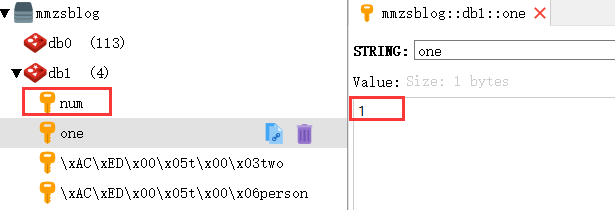
用RedisDesktopManager工具查看,數據如下:
用 StringRedisTemplate 設置的鍵值是String類型的:
用 RedisTemplate 設置的鍵值是二進位的位元組流形式存儲的,從截圖中的 [Binary] 標識符也能看出:
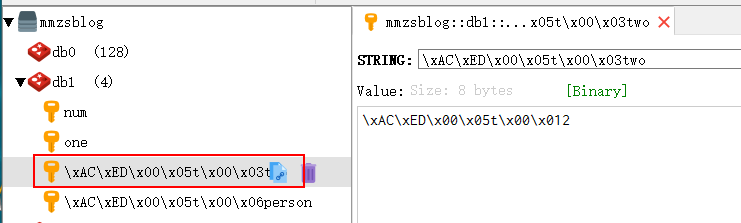
自定義的 RedisTemplate 和 StringRedisTemplate 並不會有什麼衝突,想用 String 存儲還是二進位的位元組流形式存儲完全取決於你自己。
參考
- //lettuce.io/
- Spring Boot官方文檔 91.4
- 《Redis深度歷險:核心原理和應用實踐》
- //blog.battcn.com/2018/05/11/springboot/v2-nosql-redis/
- //www.jianshu.com/p/f7d11e7109b7