Kafka 非同步消息也會阻塞?記一次 Dubbo 頻繁超時排查過程
- 2019 年 10 月 8 日
- 筆記

線上某服務 A 調用服務 B 介面完成一次交易,一次晚上的生產變更之後,系統監控發現服務 B 介面頻繁超時,後續甚至返回執行緒池耗盡錯誤 Thread pool is EXHAUSTED。因為服務 B 依賴外部介面,剛開始誤以為外部介面延時導致,所以臨時增加服務 B dubbo 執行緒池執行緒數量。配置變更之後,重啟服務,服務恢復正常。一段時間之後,服務 B 再次返回執行緒池耗盡錯誤。這次深入排查問題之後,才發現 Kafka 非同步發送消息阻塞了 dubbo 執行緒,從而導致調用超時。
一、問題分析
Dubbo 2.6.5,Kafak maven 0.8.0-beta1
服務 A 調用服務 B,收到如下錯誤:
2019-08-30 09:14:52,311 WARN method [%f [DUBBO] Thread pool is EXHAUSTED! Thread Name: DubboServerHandler-xxxx, Pool Size: 1000 (active: 1000, core: 1000, max: 1000, largest: 1000), Task: 6491 (completed: 5491), Executor status:(isShutdown:false, isTerminated:false, isTerminating:false), in dubbo://xxxx!, dubbo version: 2.6.0, current host: 127.0.0.1可以看到當前 dubbo 執行緒池已經滿載運行,不能再接受新的調用。正常情況下 dubbo 執行緒可以很快完成任務,然後歸還到執行緒池中。由於執行緒執行的任務發生阻塞,消費者端調用超時。而服務提供者端由於已有執行緒被阻塞,執行緒池必須不斷創建新執行緒處理任務,直到執行緒數量達到最大數量,系統返回 Thread pool is EXHAUSTED。
執行緒任務長時間被阻塞可能原因有:
- 頻繁的 fullgc,導致系統暫停。
- 調用某些阻塞 API,如 socket 連接未設置超時時間導致阻塞。
- 系統內部死鎖
通過分析系統堆棧 dump 情況,果然發現所有 dubbo 執行緒都處於 WATTING 狀態。
下圖為應用堆棧 dump 日誌:
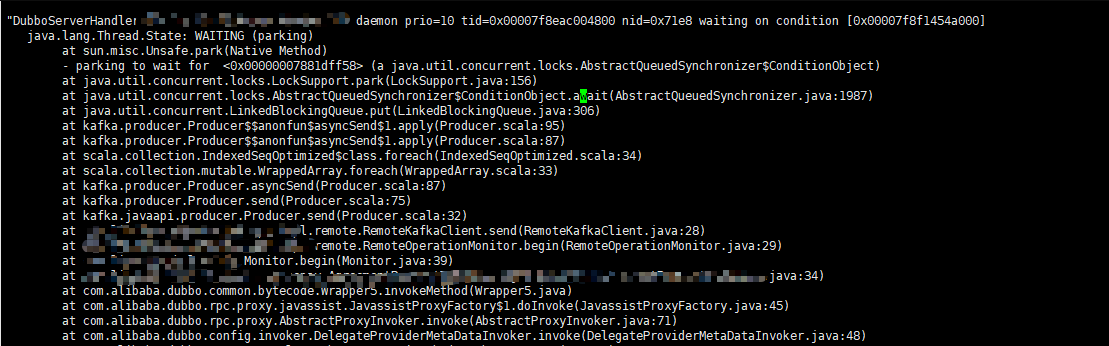
從堆棧日誌可以看到 dubbo 執行緒最後阻塞在 LinkedBlockingQueue#put ,而該阻塞發生在 Kafka 發送消息方法內。
這裡服務 B 需要使用 Kafka 發送監控消息,為了消息發送不影響主業務,這裡使用 Kafka 非同步發送消息。由於 Kafka 服務端最近更換了對外的埠,而服務 B Kafka 配置未及時變更。最後服務 B 修改配置,服務重新啟動,該問題得以解決。
二、Kafka 非同步模式
下面分析 Kafka 非同步發送消息阻塞的實際原因。
0.8.0 Kafka 默認使用同步模式發送消息,非同步發送消息需要設置producer.type=async屬性。同步模式需要等待 Kafka 將消息發送到消息隊列,這個過程當然會阻塞主執行緒。而非同步模式最大的優點在於無需要等待 Kafka 這個發送過程。
原本認為這裡的非同步是使用子執行緒去運行任務,但是 Kafka 非同步模式並非這樣。查看 Kafka 官方文檔producer,可以看到對非同步模式描述。
Batching is one of the big drivers of efficiency, and to enable batching the Kafka producer has an asynchronous mode that accumulates data in memory and sends out larger batches in a single request. The batching can be configured to accumulate no more than a fixed number of messages and to wait no longer than some fixed latency bound (say 100 messages or 5 seconds). This allows the accumulation of more bytes to send, and few larger I/O operations on the servers. Since this buffering happens in the client it obviously reduces the durability as any data buffered in memory and not yet sent will be lost in the event of a producer crash.
從上我們可以看到,Kafka 非同步模式將會把多條消息打包一塊批量發送到服務端。這種模式將會先把消息放到記憶體隊列中,直到消息到達一定數量(默認為 200)或者等待時間超限(默認為 5000ms)。
這麼做最大好處在於提高消息發送的吞吐量,減少網路 I/O。當然這麼做也存在明顯劣勢,如果生產者宕機,在記憶體中還未發送消息可能就會丟失。
下面從 kafka 源碼分析這個阻塞過程。
三、Kafka 源碼解析
Kafka 消息發送端採用如下配置:
Properties props = new Properties(); props.put("metadata.broker.list", "localhost:9092"); // 選擇非同步發送 props.put("producer.type", "async"); props.put("serializer.class", "kafka.serializer.StringEncoder"); props.put("queue.buffering.max.messages","1"); props.put("batch.num.messages","1"); Producer<Integer, String> producer= new Producer(new ProducerConfig(props)); producer.send(new KeyedMessage("test", "hello world"));這裡設置 producer.type=async,從而使 Kafka 非同步發送消息。
send 方法源碼如下:
ps: 這個版本 Kafka 源碼採用 Scala 編寫,不過源碼還是比較簡單,比較容易閱讀。
def send(messages: KeyedMessage[K,V]*) { if (hasShutdown.get) throw new ProducerClosedException recordStats(messages) sync match { case true => eventHandler.handle(messages) // 由於 producer.type=async 非同步發送 case false => asyncSend(messages) } }由於我們上面設置 producer.type=async,這裡將會使用 asyncSend 非同步發送模式。
asyncSend 源碼如下:
private def asyncSend(messages: Seq[KeyedMessage[K,V]]) { for (message <- messages) { val added = config.queueEnqueueTimeoutMs match { case 0 => queue.offer(message) case _ => try { config.queueEnqueueTimeoutMs < 0 match { case true => queue.put(message) true case _ => queue.offer(message, config.queueEnqueueTimeoutMs, TimeUnit.MILLISECONDS) } } catch { case e: InterruptedException => false } } if(!added) { producerTopicStats.getProducerTopicStats(message.topic).droppedMessageRate.mark() producerTopicStats.getProducerAllTopicsStats.droppedMessageRate.mark() throw new QueueFullException("Event queue is full of unsent messages, could not send event: " + message.toString) }else { trace("Added to send queue an event: " + message.toString) trace("Remaining queue size: " + queue.remainingCapacity) } } }asyncSend 將會把消息加入到 LinkedBlockingQueue 阻塞隊列中。這裡根據 config.queueEnqueueTimeoutMs參數使用不同方法。
當 config.queueEnqueueTimeoutMs=0,將會調用 LinkedBlockingQueue#offer,如果該隊列未滿,將會把元素插入隊列隊尾。如果隊列未滿,直接返回 false。所以如果此時隊列已滿,消息不再會加入隊列中,然後 asyncSend 將會拋出 QueueFullException 異常。
當 config.queueEnqueueTimeoutMs < 0,將會調用 LinkedBlockingQueue#put 加入元素,如果該隊列已滿,該方法將會一直被阻塞直到隊列存在可用空間。
當 config.queueEnqueueTimeoutMs > 0,將會調用 LinkedBlockingQueue#offer,這裡與上面不同之處在於設置超時時間,如果隊列已滿將會阻塞知道超時。
config.queueEnqueueTimeoutMs參數通過 queue.enqueue.timeout.ms 配置生效,默認為 -1。默認情況下 LinkedBlockingQueue 最大數量為 10000,可以通過設置 queue.buffering.max.messages 改變隊列最大值。
消息放到隊列中後,Kafka 將會使用一個非同步執行緒不斷從隊列中獲取消息,批量發送消息。
非同步處理消息程式碼如下:
private def processEvents() { var lastSend = SystemTime.milliseconds var events = new ArrayBuffer[KeyedMessage[K,V]] var full: Boolean = false // drain the queue until you get a shutdown command Stream.continually(queue.poll(scala.math.max(0, (lastSend + queueTime) - SystemTime.milliseconds), TimeUnit.MILLISECONDS)) .takeWhile(item => if(item != null) item ne shutdownCommand else true).foreach { currentQueueItem => val elapsed = (SystemTime.milliseconds - lastSend) // check if the queue time is reached. This happens when the poll method above returns after a timeout and // returns a null object val expired = currentQueueItem == null if(currentQueueItem != null) { trace("Dequeued item for topic %s, partition key: %s, data: %s" .format(currentQueueItem.topic, currentQueueItem.key, currentQueueItem.message)) events += currentQueueItem } // check if the batch size is reached full = events.size >= batchSize if(full || expired) { if(expired) debug(elapsed + " ms elapsed. Queue time reached. Sending..") if(full) debug("Batch full. Sending..") // if either queue time has reached or batch size has reached, dispatch to event handler tryToHandle(events) lastSend = SystemTime.milliseconds events = new ArrayBuffer[KeyedMessage[K,V]] } } // send the last batch of events tryToHandle(events) if(queue.size > 0) throw new IllegalQueueStateException("Invalid queue state! After queue shutdown, %d remaining items in the queue" .format(queue.size)) } 這裡非同步執行緒將會不斷從隊列中獲取任務,一旦條件滿足,就會批量發送任務。該條件為:
- 批量消息數量達到 200,可以設置
batch.num.messages參數改變配置。 - 等待時間到達最大的超時時間,默認為 5000ms,可以設置
queue.buffering.max.ms改變改配置。
四、問題解決辦法
上面問題雖然通過更換 Kafka 正確地址解決,但是為了預防下次該問題再發生,可以採用如下方案:
- 改變
config.queueEnqueueTimeoutMs默認配置,像這種系統監控日誌允許丟失,所以可以設置config.queueEnqueueTimeoutMs=0。 - 升級 Kafka 版本,最新版本 Kafka 使用 Java 重寫發送端邏輯,不再使用阻塞隊列存儲消息。
本文首發於:studyidea.cn/kafka…
歡迎關注我的公眾號:程式通事,獲得日常乾貨推送。如果您對我的專題內容感興趣,也可以關注我的部落格:studyidea.cn