新特性解讀 | InnoDB ReplicaSet:MySQL 副本集初體驗
- 2020 年 3 月 13 日
- 筆記
一、InnoDB ReplicaSet 介紹
- MySQL 副本集(官方名稱:MySQL InnoDB ReplicaSet)在 MySQL 8.0.19 版本(2020-01-13 Released)之後開始支援,本質還是是基於 GTID 的非同步複製
- 角色分為 Primary 和 Secondary 1)Primary 即傳統意義上的 Master,一個副本集只允許一個 2)Secondary 即 Slave,允許一個或多個
- 通過 MySQL Shell 自帶的 AdminAPI 創建、配置、刪除等管理副本集
- 通過 MySQL Router 使用副本集,引導與連接方式與 InnoDB Cluster 和 MGR 有點類似,不同之處在於新增了 cluster_type = rs 集群類型。
二、通過 MySQL Shell 部署 Sandbox 實例
- MySQL Shell 除了集成 AdminAPI 外還提供了 MySQL Sandbox 功能,可輕鬆部署用以測試的 MySQL 資料庫實例
- 通過 Sandbox 一鍵部署三個 MySQL 實例
# mysqlsh MySQL JS > dba.deploySandboxInstance(3306) MySQL JS > dba.deploySandboxInstance(3307) MySQL JS > dba.deploySandboxInstance(3308)
指定 root 密碼後自動創建 MySQL 實例,默認數據目錄在 $HOME/mysql-sandboxes/port

三、通過 MySQL Shell 配置 InnoDB 副本集
3.1 創建集群管理賬戶
- 創建集群管理員賬戶 repl 作為具有管理 InnoDB ReplicaSet 所需的許可權集合
MySQL JS > dba.configureReplicaSetInstance('root@localhost:3306', {clusterAdmin: "'repl'@'%'", clusterAdminPassword: 'repl'});

3.2 創建 InnoDB 副本集
- 連接到第一個 MySQL 實例 3306,創建命名為 renzy 的副本集
MySQL JS > connect root@localhost:3306 MySQL localhost:3306 ssl JS > var rs = dba.createReplicaSet("renzy")

- 查看副本集狀態,默認第一個實例 3306 選舉為 Primary 節點
MySQL localhost:3306 ssl JS > rs.status() { "replicaSet": { "name": "renzy", "primary": "127.0.0.1:3306", "status": "AVAILABLE", "statusText": "All instances available.", "topology": { "127.0.0.1:3306": { "address": "127.0.0.1:3306", "instanceRole": "PRIMARY", "mode": "R/W", "status": "ONLINE" } }, "type": "ASYNC" } }
3.3 添加節點到副本集
MySQL localhost:3306 ssl JS > rs.addInstance('localhost:3307') MySQL localhost:3306 ssl JS > rs.addInstance('localhost:3308')
- 添加節點 3307 和 3308 到副本集涉及到數據拷貝有兩種方式:Clone 全量同步和 Inremental recovery 增量同步,本文使用 Clone 全量同步方式從 Primary 節點全量同步數據

- 查看副本集狀態,已添加到副本集的實例 3307 和 3308 的角色為 Secondary ,並自動與 Primary 節點 3306 建立複製關係
MySQL localhost:3306 ssl JS > rs.status() { "replicaSet": { "name": "renzy", "primary": "127.0.0.1:3306", "status": "AVAILABLE", "statusText": "All instances available.", "topology": { "127.0.0.1:3306": { "address": "127.0.0.1:3306", "instanceRole": "PRIMARY", "mode": "R/W", "status": "ONLINE" }, "127.0.0.1:3307": { "address": "127.0.0.1:3307", "instanceRole": "SECONDARY", "mode": "R/O", "replication": { "applierStatus": "APPLIED_ALL", "applierThreadState": "Slave has read all relay log; waiting for more updates", "receiverStatus": "ON", "receiverThreadState": "Waiting for master to send event", "replicationLag": null }, "status": "ONLINE" }, "127.0.0.1:3308": { "address": "127.0.0.1:3308", "instanceRole": "SECONDARY", "mode": "R/O", "replication": { "applierStatus": "APPLIED_ALL", "applierThreadState": "Slave has read all relay log; waiting for more updates", "receiverStatus": "ON", "receiverThreadState": "Waiting for master to send event", "replicationLag": null }, "status": "ONLINE" } }, "type": "ASYNC" } }
3.4 副本集在線主從切換
- 手工在線將實例 3308 切換為 Primary 節點
MySQL localhost:3306 ssl JS > rs.setPrimaryInstance('127.0.0.1:3308')
- 實例 3308 被提升為 Primary 後,副本集將自動將 實例 3306 降級為 Secondary 並與 3308 建立複製關係,副本集中其它實例 3307 也將自動與 3308 建立複製與同步
MySQL localhost:3306 ssl JS > rs.status() { "replicaSet": { "name": "renzy", "primary": "127.0.0.1:3308", "status": "AVAILABLE", "statusText": "All instances available.", "topology": { "127.0.0.1:3306": { "address": "127.0.0.1:3306", "instanceRole": "SECONDARY", "mode": "R/O", "replication": { "applierStatus": "APPLIED_ALL", "applierThreadState": "Slave has read all relay log; waiting for more updates", "receiverStatus": "ON", "receiverThreadState": "Waiting for master to send event", "replicationLag": null }, "status": "ONLINE" }, "127.0.0.1:3307": { "address": "127.0.0.1:3307", "instanceRole": "SECONDARY", "mode": "R/O", "replication": { "applierStatus": "APPLIED_ALL", "applierThreadState": "Slave has read all relay log; waiting for more updates", "receiverStatus": "ON", "receiverThreadState": "Waiting for master to send event", "replicationLag": null }, "status": "ONLINE" }, "127.0.0.1:3308": { "address": "127.0.0.1:3308", "instanceRole": "PRIMARY", "mode": "R/W", "status": "ONLINE" } }, "type": "ASYNC" } }
3.5 副本集 Primary 節點故障
- 手工殺掉 Primary 節點進程
# ps -ef | grep 3308 root 18975 1 0 16:52 ? 00:01:23 /root/mysql-sandboxes/3308/bin/mysqld --defaults-file=/root/mysql-sandboxes/3308/my.cnf --user=root # kill -9 18975
- 副本集 無法自動進行故障轉移 ,需要人工介入修復

- 手工將 Secondary 節點 3306 強制提升為 Primary
MySQL localhost:3306 ssl JS > rs.forcePrimaryInstance("127.0.0.1:3306")
- 副本集恢復後,因 3308 不可用副本集狀態顯示為 AVAIABLE_PARITAL (部分可用)

四、通過 MySQL Router 使用副本集
- 與使用 MySQL Router 連接 MGR 或 InnoDB Cluster 一樣,副本集也可以通過 MySQL Router 訪問,首先通過 –bootstrap 選項引導副本集
mysqlrouter --user=root --bootstrap root@localhost:3308

五、MySQL Router 通過 R/W 自動連接到 Primary
- 啟動 MySQL Router
mysqlrouter -c /usr/local/mysql-router-8.0.19-linux-glibc2.12-x86_64/mysqlrouter.conf & // 通過 MySQL Router R/W 埠可以自動識別並連接到 Primary # mysql -h10.186.63.158 -P6446 -uroot -proot -e 'select @@port;' mysql: [Warning] Using a password on the command line interface can be insecure. +--------+ | @@port | +--------+ | 3308 | +--------+ # mysql -h10.186.63.158 -P6446 -uroot -proot -e 'show slave hosts;' mysql: [Warning] Using a password on the command line interface can be insecure. +------------+-----------+------+------------+--------------------------------------+ | Server_id | Host | Port | Master_id | Slave_UUID | +------------+-----------+------+------------+--------------------------------------+ | 1587786506 | 127.0.0.1 | 3307 | 2457151498 | cb569215-3b29-11ea-80f4-02000aba3f9e | | 3616586416 | 127.0.0.1 | 3306 | 2457151498 | c23ee4be-3b29-11ea-815a-02000aba3f9e | +------------+-----------+------+------------+--------------------------------------+
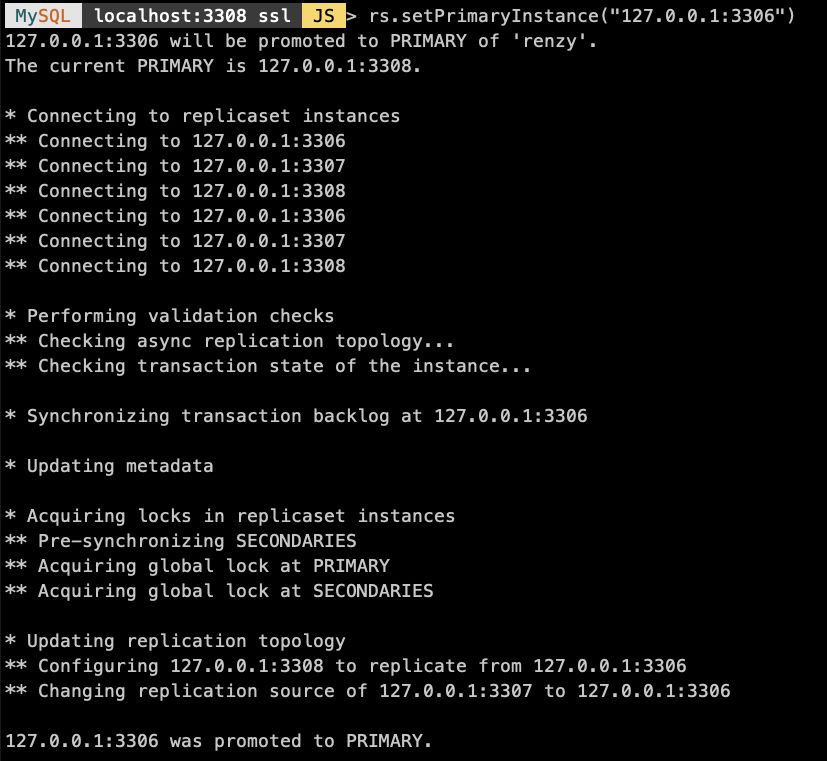
- 副本集主從切換後,MySQL Router R/W 自動指向被選舉出來的新的 Primary

六、結論
1. MySQL Router 可以很好的兼容 InnoDB ReplicaSet,可自動識別到副本集主從切換,將新的 R/W 連接指向 Primary。
2. InnoDB ReplicaSet 當前還不完善,可作為新特性在測試環境試用,但因為不支援自動故障轉移,Primary 宕機整個副本集將不可用。
3. InnoDB ReplicaSet 目前僅支援基於 GTID 的非同步複製,哪怕支援自動切換,數據也有丟失風險,所以離真正部署到生產環境還有一段路要走。
4. InnoDB ReplicaSet 暫時還沒有類似芒果 DB 完善的投票選舉機制,故障切換時也會存在腦裂風險。
總之,InnoDB 副本集雖存在諸多不足之處,但作為 2020 年 Oracle 的開餐甜點其帶來的效果也讓眾多 MySQL DBA 眼前一亮,既然有了副本集,相信 Sharding 也是未來可期,你覺得呢?

