分散式存儲系統之Ceph集群CephFS基礎使用
- 2022 年 10 月 9 日
- 筆記
- ceph, CephFS, CephFS基礎使用, CephFS架構, FUSE掛載CephFS, mount掛載CephFS
前文我們了解了ceph之上的RBD介面使用相關話題,回顧請參考//www.cnblogs.com/qiuhom-1874/p/16753098.html;今天我們來聊一聊ceph之上的另一個客戶端介面cephfs使用相關話題;
CephFS概述
文件系統是至今在電腦領域中用到的存儲訪問中最通用也是最普遍的介面;即便是我們前面聊到的RDB塊設備,絕大多數都是格式化分區掛載至文件系統之上使用;使用純裸設備的場景其實不多;為此,ceph在向外提供客戶端介面中也提供了文件系統介面cephfs;不同於rbd的架構,cephfs需要在rados存儲集群上啟動一個mds的進程來幫忙管理文件系統的元數據資訊;我們知道對於rados存儲系統來說,不管什麼方式的客戶端,存儲到rados之上的數據都會經由存儲池,然後存儲到對應的osd之上;對於mds(metadata server )來說,它需要工作為一個守護進程,為其客戶端提供文件系統服務;客戶端的每一次存取操作,都會先聯繫mds,找對應的元數據資訊;但是mds它自身不存儲任何元數據資訊,文件系統的元數據資訊都會存儲到rados的一個存儲池當中,而文件本身的數據存儲到另一個存儲池當中;這也意味著msd是一個無狀態服務,有點類似k8s里的apiserver,自身不存儲數據,而是將數據存儲至etcd中,使得apiserver 成為一個無狀態服務;mds為一個無狀態服務,也就意味著可以有多個mds同時提供服務,相比傳統文件存儲系統來講metadata server成為瓶頸的可能也就不復存在;
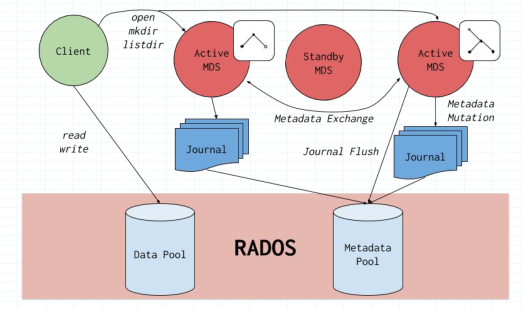
提示:CephFS依賴於專用的MDS(MetaData Server)組件管理元數據資訊並向客戶端輸出一個倒置的樹狀層級結構;將元數據快取於MDS的記憶體中, 把元數據的更新日誌於流式化後存儲在RADOS集群上, 將層級結構中的的每個名稱空間對應地實例化成一個目錄且存儲為一個專有的RADOS對象;
CephFS架構
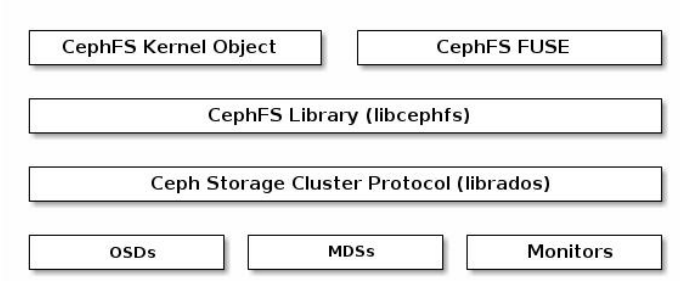
提示:cephfs是建構在libcephfs之上,libcephfs建構在librados之上,即cephfs工作在librados的頂端,向外提供文件系統服務;它支援兩種方式的使用,一種是基於內核空間模組(ceph)掛載使用,一種是基於用戶空間FUSE來掛載使用;
創建CephFS
通過上述描述,cephfs的工作邏輯首先需要兩個存儲池來分別存放元數據和數據;這個我們在前邊的ceph訪問介面啟用一文中有聊到過,回顧請參考//www.cnblogs.com/qiuhom-1874/p/16727620.html;我這裡不做過多說明;
查看CephFS狀態
[root@ceph-admin ~]# ceph fs status cephfs
cephfs - 0 clients
======
+------+--------+------------+---------------+-------+-------+
| Rank | State  |    MDS     |    Activity   |  dns  |  inos |
+------+--------+------------+---------------+-------+-------+
|  0   | active | ceph-mon02 | Reqs:    0 /s |   10  |   13  |
+------+--------+------------+---------------+-------+-------+
+---------------------+----------+-------+-------+
|         Pool        |   type   |  used | avail |
+---------------------+----------+-------+-------+
| cephfs-metadatapool | metadata | 2286  |  280G |
|   cephfs-datapool   |   data   |    0  |  280G |
+---------------------+----------+-------+-------+
+-------------+
| Standby MDS |
+-------------+
+-------------+
MDS version: ceph version 13.2.10 (564bdc4ae87418a232fc901524470e1a0f76d641) mimic (stable)
[root@ceph-admin ~]#
CephFS客戶端帳號
啟用CephX認證的集群上,CephFS的客戶端完成認證後方可掛載訪問文件系統;
[root@ceph-admin ~]# ceph auth get-or-create client.fsclient mon 'allow r' mds 'allow rw' osd 'allow rw pool=cephfs-datapool'
[client.fsclient]
        key = AQDx2z5jgeqiIRAAIxQFz09BF99kcAYxiFwOWg==
[root@ceph-admin ~]# ceph auth get client.fsclient
exported keyring for client.fsclient
[client.fsclient]
        key = AQDx2z5jgeqiIRAAIxQFz09BF99kcAYxiFwOWg==
        caps mds = "allow rw"
        caps mon = "allow r"
        caps osd = "allow rw pool=cephfs-datapool"
[root@ceph-admin ~]#
提示:這裡需要注意,對於元數據存儲池來說,它的客戶端是mds,對應數據的讀寫都是有mds來完成操作,對於cephfs的客戶端來說,他不需要任何操作元數據存儲池的許可權,我們這裡只需要授權用戶對數據存儲池有讀寫許可權即可;對於mon節點來說,用戶只需要有讀的許可權就好,對mds有讀寫許可權就好;
保存用戶帳號的密鑰資訊於secret文件,用於客戶端掛載操作認證之用
[root@ceph-admin ~]# ceph auth print-key client.fsclient
AQDx2z5jgeqiIRAAIxQFz09BF99kcAYxiFwOWg==[root@ceph-admin ~]# ceph auth print-key client.fsclient -o fsclient.key
[root@ceph-admin ~]# cat fsclient.key
AQDx2z5jgeqiIRAAIxQFz09BF99kcAYxiFwOWg==[root@ceph-admin ~]#
提示:這裡只需要導出key的資訊就好,對於許可權資訊,客戶端用不到,客戶端拿著key去ceph上認證,對應許可權ceph是知道的;
將密鑰文件需要保存於掛載CephFS的客戶端主機上,我們可以使用scp的方式推到客戶端主機之上;客戶端主機除了要有這個key文件之外,還需要有ceph集群的配置文件

提示:我這裡以admin host作為客戶端使用,將對應key文件複製到/etc/ceph/目錄下,對應使用內核模組掛載,指定mount到該目錄讀取對應key的資訊即可;
內核客戶端安裝必要工具和模組
1、內核模組ceph.ko
2、安裝ceph-common程式包
3、提供ceph.conf配置文件和用於認證的密鑰文件
[root@ceph-admin ~]# ls /lib/modules/3.10.0-1160.76.1.el7.x86_64/kernel/fs/ceph/
ceph.ko.xz
[root@ceph-admin ~]# modinfo ceph
filename:       /lib/modules/3.10.0-1160.76.1.el7.x86_64/kernel/fs/ceph/ceph.ko.xz
license:        GPL
description:    Ceph filesystem for Linux
author:         Patience Warnick <[email protected]>
author:         Yehuda Sadeh <[email protected]>
author:         Sage Weil <[email protected]>
alias:          fs-ceph
retpoline:      Y
rhelversion:    7.9
srcversion:     B1FF0EC5E9EF413CE8D9D1C
depends:        libceph
intree:         Y
vermagic:       3.10.0-1160.76.1.el7.x86_64 SMP mod_unload modversions
signer:         CentOS Linux kernel signing key
sig_key:        C6:93:65:52:C5:A1:E9:97:0B:A2:4C:98:1A:C4:51:A6:BC:11:09:B9
sig_hashalgo:   sha256
[root@ceph-admin ~]# yum info ceph-common
Loaded plugins: fastestmirror
Repository epel is listed more than once in the configuration
Repository epel-debuginfo is listed more than once in the configuration
Repository epel-source is listed more than once in the configuration
Loading mirror speeds from cached hostfile
 * base: mirrors.aliyun.com
 * extras: mirrors.aliyun.com
 * updates: mirrors.aliyun.com
Installed Packages
Name        : ceph-common
Arch        : x86_64
Epoch       : 2
Version     : 13.2.10
Release     : 0.el7
Size        : 44 M
Repo        : installed
From repo   : Ceph
Summary     : Ceph Common
URL         : //ceph.com/
License     : LGPL-2.1 and CC-BY-SA-3.0 and GPL-2.0 and BSL-1.0 and BSD-3-Clause and MIT
Description : Common utilities to mount and interact with a ceph storage cluster.
            : Comprised of files that are common to Ceph clients and servers.

[root@ceph-admin ~]# ls /etc/ceph/
ceph.client.admin.keyring  ceph.client.test.keyring  ceph.conf  fsclient.key  rbdmap  tmpJ434zL
[root@ceph-admin ~]#
mount掛載CephFS
[root@ceph-admin ~]# df -h
Filesystem               Size  Used Avail Use% Mounted on
devtmpfs                 899M     0  899M   0% /dev
tmpfs                    910M     0  910M   0% /dev/shm
tmpfs                    910M  9.6M  901M   2% /run
tmpfs                    910M     0  910M   0% /sys/fs/cgroup
/dev/mapper/centos-root   49G  3.6G   45G   8% /
/dev/sda1                509M  176M  334M  35% /boot
tmpfs                    182M     0  182M   0% /run/user/0
[root@ceph-admin ~]# mount -t ceph ceph-mon01:6789,ceph-mon02:6789,ceph-mon03:6789:/ /mnt -o name=fsclient,secretfile=/etc/ceph/fsclient.key
[root@ceph-admin ~]# df -h
Filesystem                                                                                                     Size  Used Avail Use% Mounted on
devtmpfs                                                                                                       899M     0  899M   0% /dev
tmpfs                                                                                                          910M     0  910M   0% /dev/shm
tmpfs                                                                                                          910M  9.6M  901M   2% /run
tmpfs                                                                                                          910M     0  910M   0% /sys/fs/cgroup
/dev/mapper/centos-root                                                                                         49G  3.6G   45G   8% /
/dev/sda1                                                                                                      509M  176M  334M  35% /boot
tmpfs                                                                                                          182M     0  182M   0% /run/user/0
192.168.0.71:6789,172.16.30.71:6789,192.168.0.72:6789,172.16.30.72:6789,192.168.0.73:6789,172.16.30.73:6789:/  281G     0  281G   0% /mnt
[root@ceph-admin ~]# mount |tail -1
192.168.0.71:6789,172.16.30.71:6789,192.168.0.72:6789,172.16.30.72:6789,192.168.0.73:6789,172.16.30.73:6789:/ on /mnt type ceph (rw,relatime,name=fsclient,secret=<hidden>,acl,wsize=16777216)
[root@ceph-admin ~]#
查看掛載狀態
[root@ceph-admin ~]# stat -f /mnt
  File: "/mnt"
    ID: a0de3ae372c48f48 Namelen: 255     Type: ceph
Block size: 4194304    Fundamental block size: 4194304
Blocks: Total: 71706      Free: 71706      Available: 71706
Inodes: Total: 0          Free: -1
[root@ceph-admin ~]#
在/mnt上存儲數據,看看對應是否可以正常存儲?
[root@ceph-admin ~]# find /usr/share/ -type f -name '*.jpg' -exec cp {} /mnt \;
[root@ceph-admin ~]# ll /mnt
total 3392
-rw-r--r-- 1 root root 961243 Oct  6 22:17 day.jpg
-rw-r--r-- 1 root root 961243 Oct  6 22:17 default.jpg
-rw-r--r-- 1 root root 980265 Oct  6 22:17 morning.jpg
-rw-r--r-- 1 root root 569714 Oct  6 22:17 night.jpg
[root@ceph-admin ~]#
提示:可以看到我們可以正常向/mnt存儲文件;
將掛載資訊寫入/etc/fstab配置文件
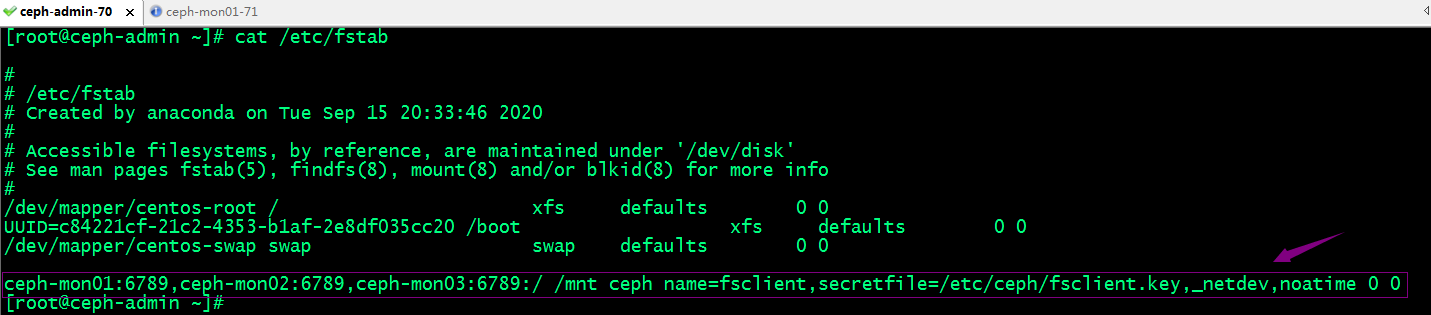
提示:這裡需要注意,寫入fstab文件中,如果是網路文件系統建議加上_netdev選項來指定該文件系統為網路文件系統,如果當系統啟動,如果掛載不上,超時後自動放棄掛載,否則系統會一直嘗試掛載,導致系統可能啟動不起來;
測試,取消/mnt的掛載,然後使用fstab配置文件掛載,看看是否可以正常掛載?
[root@ceph-admin ~]# umount /mnt
[root@ceph-admin ~]# ls /mnt
[root@ceph-admin ~]# df -h
Filesystem               Size  Used Avail Use% Mounted on
devtmpfs                 899M     0  899M   0% /dev
tmpfs                    910M     0  910M   0% /dev/shm
tmpfs                    910M  9.6M  901M   2% /run
tmpfs                    910M     0  910M   0% /sys/fs/cgroup
/dev/mapper/centos-root   49G  3.6G   45G   8% /
/dev/sda1                509M  176M  334M  35% /boot
tmpfs                    182M     0  182M   0% /run/user/0
[root@ceph-admin ~]# mount -a
[root@ceph-admin ~]# ls /mnt
day.jpg  default.jpg  morning.jpg  night.jpg
[root@ceph-admin ~]# df -h
Filesystem                                                                                                     Size  Used Avail Use% Mounted on
devtmpfs                                                                                                       899M     0  899M   0% /dev
tmpfs                                                                                                          910M     0  910M   0% /dev/shm
tmpfs                                                                                                          910M  9.6M  901M   2% /run
tmpfs                                                                                                          910M     0  910M   0% /sys/fs/cgroup
/dev/mapper/centos-root                                                                                         49G  3.6G   45G   8% /
/dev/sda1                                                                                                      509M  176M  334M  35% /boot
tmpfs                                                                                                          182M     0  182M   0% /run/user/0
192.168.0.71:6789,172.16.30.71:6789,192.168.0.72:6789,172.16.30.72:6789,192.168.0.73:6789,172.16.30.73:6789:/  281G     0  281G   0% /mnt
[root@ceph-admin ~]#
提示:可以看到我們使用mount -a是可以直接將cephfs掛載至/mnt之上,說明我們配置文件內容沒有問題;ok,到此基於內核空間模組(ceph.ko)掛載cephfs文件系統的測試就完成了,接下來我們來說說使用用戶空間fuse掛載cephfs;
FUSE掛載CephFS
FUSE,全稱Filesystem in Userspace,用於非特權用戶能夠無需操作內核而創建文件系統;客戶端主機環境準備,安裝ceph-fuse程式包,獲取到客戶端帳號的keyring文件和ceph.conf配置文件即可;這裡就不需要ceph-common;
[root@ceph-admin ~]# yum install -y ceph-fuse
Loaded plugins: fastestmirror
Repository epel is listed more than once in the configuration
Repository epel-debuginfo is listed more than once in the configuration
Repository epel-source is listed more than once in the configuration
Loading mirror speeds from cached hostfile
 * base: mirrors.aliyun.com
 * extras: mirrors.aliyun.com
 * updates: mirrors.aliyun.com
Ceph                                                                                                       | 1.5 kB  00:00:00
Ceph-noarch                                                                                                | 1.5 kB  00:00:00
base                                                                                                       | 3.6 kB  00:00:00
ceph-source                                                                                                | 1.5 kB  00:00:00
epel                                                                                                       | 4.7 kB  00:00:00
extras                                                                                                     | 2.9 kB  00:00:00
updates                                                                                                    | 2.9 kB  00:00:00
(1/4): extras/7/x86_64/primary_db                                                                          | 249 kB  00:00:00
(2/4): epel/x86_64/updateinfo                                                                              | 1.1 MB  00:00:00
(3/4): epel/x86_64/primary_db                                                                              | 7.0 MB  00:00:01
(4/4): updates/7/x86_64/primary_db                                                                         |  17 MB  00:00:02
Resolving Dependencies
--> Running transaction check
---> Package ceph-fuse.x86_64 2:13.2.10-0.el7 will be installed
--> Processing Dependency: fuse for package: 2:ceph-fuse-13.2.10-0.el7.x86_64
--> Running transaction check
---> Package fuse.x86_64 0:2.9.2-11.el7 will be installed
--> Finished Dependency Resolution

Dependencies Resolved

==================================================================================================================================
 Package                        Arch                        Version                               Repository                 Size
==================================================================================================================================
Installing:
 ceph-fuse                      x86_64                      2:13.2.10-0.el7                       Ceph                      490 k
Installing for dependencies:
 fuse                           x86_64                      2.9.2-11.el7                          base                       86 k

Transaction Summary
==================================================================================================================================
Install  1 Package (+1 Dependent package)

Total download size: 576 k
Installed size: 1.6 M
Downloading packages:
(1/2): fuse-2.9.2-11.el7.x86_64.rpm                                                                        |  86 kB  00:00:00
(2/2): ceph-fuse-13.2.10-0.el7.x86_64.rpm                                                                  | 490 kB  00:00:15
----------------------------------------------------------------------------------------------------------------------------------
Total                                                                                              37 kB/s | 576 kB  00:00:15
Running transaction check
Running transaction test
Transaction test succeeded
Running transaction
  Installing : fuse-2.9.2-11.el7.x86_64                                                                                       1/2
  Installing : 2:ceph-fuse-13.2.10-0.el7.x86_64                                                                               2/2
  Verifying  : 2:ceph-fuse-13.2.10-0.el7.x86_64                                                                               1/2
  Verifying  : fuse-2.9.2-11.el7.x86_64                                                                                       2/2

Installed:
  ceph-fuse.x86_64 2:13.2.10-0.el7

Dependency Installed:
  fuse.x86_64 0:2.9.2-11.el7

Complete!
[root@ceph-admin ~]#
掛載CephFS
[root@ceph-admin ~]# ceph-fuse -n client.fsclient -m ceph-mon01:6789,ceph-mon02:6789,ceph-mon03:6789 /mnt
2022-10-06 23:13:17.185 7fae97fbec00 -1 auth: unable to find a keyring on /etc/ceph/ceph.client.fsclient.keyring,/etc/ceph/ceph.keyring,/etc/ceph/keyring,/etc/ceph/keyring.bin,: (2) No such file or directory
2022-10-06 23:13:17.185 7fae97fbec00 -1 monclient: ERROR: missing keyring, cannot use cephx for authentication
failed to fetch mon config (--no-mon-config to skip)
[root@ceph-admin ~]#
提示:這裡提示我們在/etc/ceph/目錄下沒有找到對應用戶的keyring文件;
導出client.fsclient用戶密鑰資訊,並存放在/etc/ceph下取名為ceph.client.fsclient.keyring;
[root@ceph-admin ~]# ceph auth get client.fsclient -o /etc/ceph/ceph.client.fsclient.keyring
exported keyring for client.fsclient
[root@ceph-admin ~]# cat /etc/ceph/ceph.client.fsclient.keyring
[client.fsclient]
        key = AQDx2z5jgeqiIRAAIxQFz09BF99kcAYxiFwOWg==
        caps mds = "allow rw"
        caps mon = "allow r"
        caps osd = "allow rw pool=cephfs-datapool"
[root@ceph-admin ~]#
再次使用ceph-fuse掛載cephfs
[root@ceph-admin ~]# ceph-fuse -n client.fsclient -m ceph-mon01:6789,ceph-mon02:6789,ceph-mon03:6789 /mnt
2022-10-06 23:16:43.066 7fd51d9c0c00 -1 init, newargv = 0x55f0016ebd40 newargc=7
ceph-fuse[8096]: starting ceph client
ceph-fuse[8096]: starting fuse
[root@ceph-admin ~]# df -h
Filesystem               Size  Used Avail Use% Mounted on
devtmpfs                 899M     0  899M   0% /dev
tmpfs                    910M     0  910M   0% /dev/shm
tmpfs                    910M  9.6M  901M   2% /run
tmpfs                    910M     0  910M   0% /sys/fs/cgroup
/dev/mapper/centos-root   49G  3.6G   45G   8% /
/dev/sda1                509M  176M  334M  35% /boot
tmpfs                    182M     0  182M   0% /run/user/0
ceph-fuse                281G  4.0M  281G   1% /mnt
[root@ceph-admin ~]# ll /mnt
total 3392
-rw-r--r-- 1 root root 961243 Oct  6 22:17 day.jpg
-rw-r--r-- 1 root root 961243 Oct  6 22:17 default.jpg
-rw-r--r-- 1 root root 980265 Oct  6 22:17 morning.jpg
-rw-r--r-- 1 root root 569714 Oct  6 22:17 night.jpg
[root@ceph-admin ~]#
將掛載資訊寫入/etc/fstab文件中
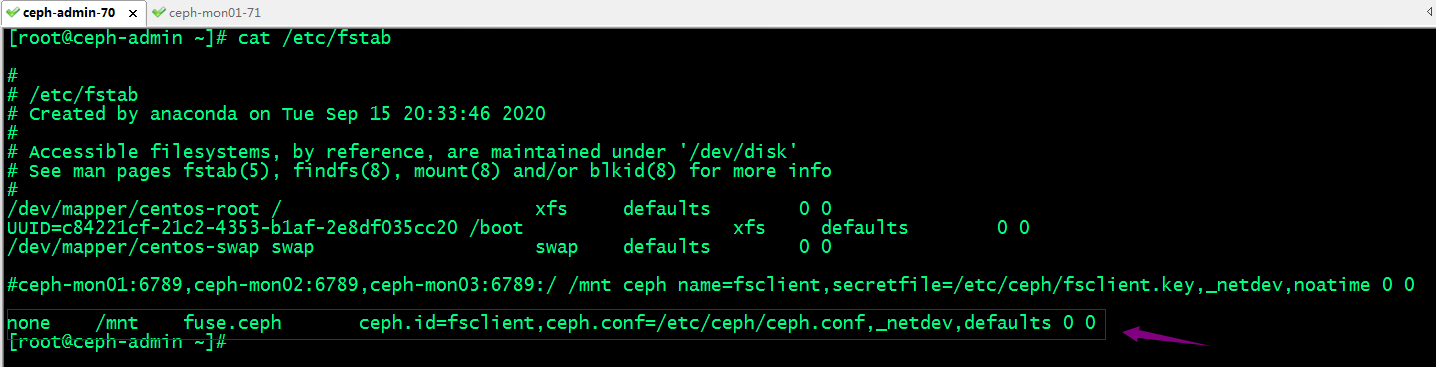
提示:使用fuse方式掛載cephfs,對應文件系統設備為none,類型為fuse.ceph;掛載選項里只需要指定用ceph.id(ceph授權的用戶名,不要前綴client),ceph配置文件路徑;這裡不需要指定密鑰文件,因為ceph.id指定的用戶名,ceph-fuse會自動到/etc/ceph/目錄下找對應文件名的keyring文件來當作對應用戶名的密鑰文件;
測試,使用fstab配置文件,看看是否可正常掛載?
[root@ceph-admin ~]# df
Filesystem              1K-blocks    Used Available Use% Mounted on
devtmpfs                   919632       0    919632   0% /dev
tmpfs                      931496       0    931496   0% /dev/shm
tmpfs                      931496    9744    921752   2% /run
tmpfs                      931496       0    931496   0% /sys/fs/cgroup
/dev/mapper/centos-root  50827012 3718492  47108520   8% /
/dev/sda1                  520868  179572    341296  35% /boot
tmpfs                      186300       0    186300   0% /run/user/0
[root@ceph-admin ~]# ll /mnt
total 0
[root@ceph-admin ~]# mount -a
ceph-fuse[8770]: starting ceph client
2022-10-06 23:25:57.230 7ff21e3f7c00 -1 init, newargv = 0x5614f1bad9d0 newargc=9
ceph-fuse[8770]: starting fuse
[root@ceph-admin ~]# mount |tail -2
fusectl on /sys/fs/fuse/connections type fusectl (rw,relatime)
ceph-fuse on /mnt type fuse.ceph-fuse (rw,relatime,user_id=0,group_id=0,allow_other)
[root@ceph-admin ~]# ll /mnt
total 3392
-rw-r--r-- 1 root root 961243 Oct  6 22:17 day.jpg
-rw-r--r-- 1 root root 961243 Oct  6 22:17 default.jpg
-rw-r--r-- 1 root root 980265 Oct  6 22:17 morning.jpg
-rw-r--r-- 1 root root 569714 Oct  6 22:17 night.jpg
[root@ceph-admin ~]# df -h
Filesystem               Size  Used Avail Use% Mounted on
devtmpfs                 899M     0  899M   0% /dev
tmpfs                    910M     0  910M   0% /dev/shm
tmpfs                    910M  9.6M  901M   2% /run
tmpfs                    910M     0  910M   0% /sys/fs/cgroup
/dev/mapper/centos-root   49G  3.6G   45G   8% /
/dev/sda1                509M  176M  334M  35% /boot
tmpfs                    182M     0  182M   0% /run/user/0
ceph-fuse                281G  4.0M  281G   1% /mnt
[root@ceph-admin ~]#
提示:可以看到使用mount -a 讀取配置文件也是可以正常掛載,說明我們配置文件中的內容沒有問題;
卸載文件系統的方式
第一種我們可以使用umount 掛載點來實現卸載;
[root@ceph-admin ~]# mount |tail -1
ceph-fuse on /mnt type fuse.ceph-fuse (rw,relatime,user_id=0,group_id=0,allow_other)
[root@ceph-admin ~]# ll /mnt
total 3392
-rw-r--r-- 1 root root 961243 Oct  6 22:17 day.jpg
-rw-r--r-- 1 root root 961243 Oct  6 22:17 default.jpg
-rw-r--r-- 1 root root 980265 Oct  6 22:17 morning.jpg
-rw-r--r-- 1 root root 569714 Oct  6 22:17 night.jpg
[root@ceph-admin ~]# umount /mnt
[root@ceph-admin ~]# ll /mnt
total 0
[root@ceph-admin ~]#
第二種我們使用fusermount -u 掛載點來卸載
[root@ceph-admin ~]# mount -a
ceph-fuse[9717]: starting ceph client
2022-10-06 23:40:55.540 7f169dbc4c00 -1 init, newargv = 0x55859177fa40 newargc=9
ceph-fuse[9717]: starting fuse
[root@ceph-admin ~]# ll /mnt
total 3392
-rw-r--r-- 1 root root 961243 Oct  6 22:17 day.jpg
-rw-r--r-- 1 root root 961243 Oct  6 22:17 default.jpg
-rw-r--r-- 1 root root 980265 Oct  6 22:17 morning.jpg
-rw-r--r-- 1 root root 569714 Oct  6 22:17 night.jpg
[root@ceph-admin ~]# fusermount -u /mnt
[root@ceph-admin ~]# ll /mnt
total 0
[root@ceph-admin ~]#
ok,到此基於用戶空間fuse方式掛載cephfs的測試就完成了;