基於Debian搭建Hyperledger Fabric 2.4開發環境及運行簡單案例
- 2022 年 4 月 6 日
- 筆記
- blockchain, fabric, 區塊鏈
相關實驗源碼已上傳://github.com/wefantasy/FabricLearn
前言
在基於truffle框架實現以太坊公開拍賣智慧合約中我們已經實現了以太坊智慧合約的編寫及部署,但其工作方式註定其只能應用於有限的業務場景中。相比之下,基於超級賬本的Fabric具有高可擴展性和高可訂製性,能夠應用在更為複雜的商業場景中,但Fabric技術涉及很多新的概念,源程式碼跟新速度快且各版本間兼容性差,對初學者很不友好。為了使能夠快速掌握Fabric,本文基於其目前最新的2.4版本搭建了一套區塊鏈運行環境,並在此之上部署了官方示例chaincode並對其進行交互調試,最終整個環境及示例程式碼能夠正常運行且得出預期結果。
環境搭建
網上幾乎所有的Fabric教程都是基於Ubuntu環境而不是Windows,其原因主要是Fabric的運行需要的Docker環境在Windows下表現不佳,此外Fabric許多官方文檔也是基於Ubuntu纂寫,在windows下運行可能會遇到難以預估的bug。原本為了方便後期部署至公網伺服器想在CentOS上搭建環境,但由於CentOS8停止維護,且CentOS Stream使用體驗頗差,於是最終選擇了Debian系統。
本環境各系統、軟體版本如下:
| 系統、軟體 | 版本 |
|---|---|
| VMware Pro | 16.0.0 |
| Debian | debian-11.2.0-amd64-DVD-1.iso |
| git | 2.30.2 |
| curl | 7.74.0 |
| docker | 20.10 |
| golang | go1.17.8 |
| jq | jq-1.6 |
| fabric | 2.4.0 |
| fabric-ca | 1.5.2 |
| fabric-samples | v2.3.0 |
本環境各Docker鏡像版本如下:
| 鏡像 | 版本 |
|---|---|
| hyperledger/fabric-tools | 2.4 |
| hyperledger/fabric-peer | 2.4 |
| hyperledger/fabric-orderer | 2.4 |
| hyperledger/fabric-ccenv | 2.4 |
| hyperledger/fabric-baseos | 2.4 |
| hyperledger/fabric-ca | 1.5 |
警告:建議Fabric所有實驗過程皆在root許可權下進行,否則在sudo許可權切換的過程中會出現很多環境變數的問題。
雜項安裝
- 安裝最新版本
Gitapt install git - 安裝最新版本
cURLapt install curl - 安裝
Golang - 安裝jq
apt install jq
安裝Fabric
官方腳本安裝
為了幫助開發者快速搭建Fabric環境,官方創建了一個Fabric環境搭建的批處理工具bootstrap.sh,可以通過該工具直接安裝環境:
wget //raw.githubusercontent.com/hyperledger/fabric/master/scripts/bootstrap.sh
chmod +x bootstrap.sh
./bootstrap.sh
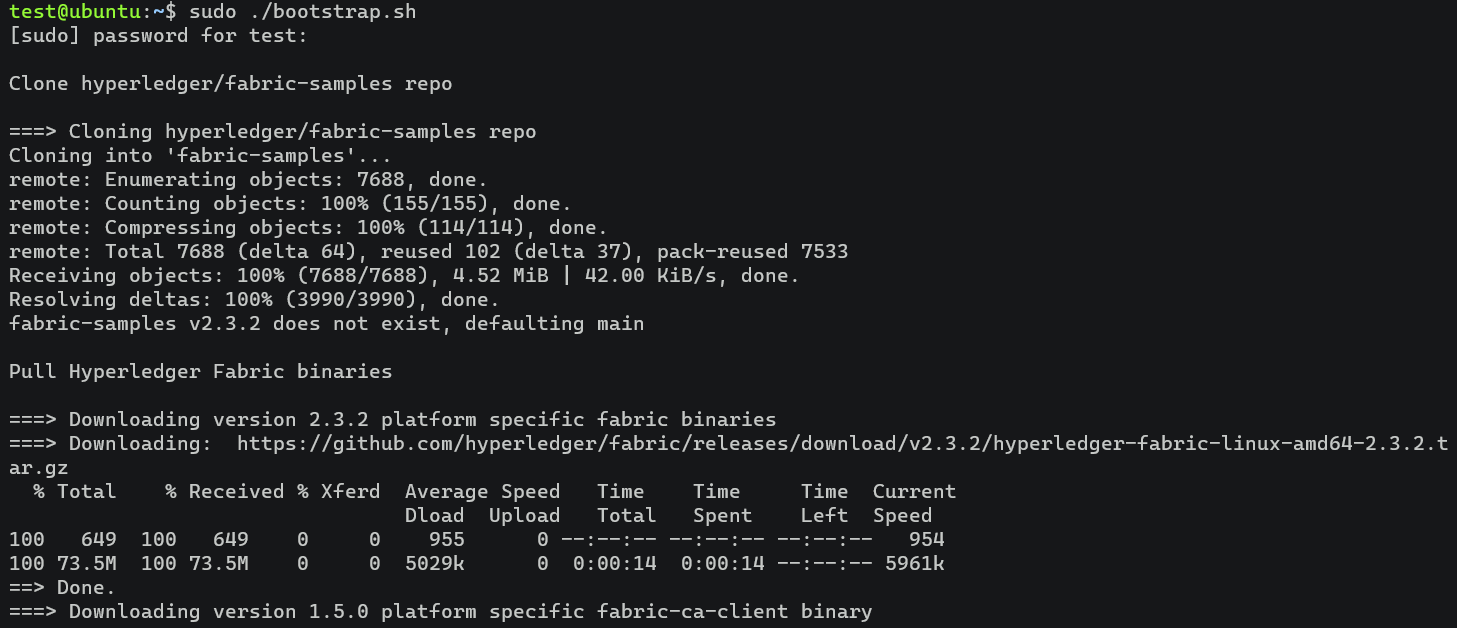
不出意外的話會看見腳本順利的環境安裝過程:
手動安裝
當然,直接使用官方腳本不出意外的話肯定會出意外(網路原因),在此我們可以通過手動安裝需要的各項環境。
- 安裝fabric-samples
fabric-samples是Fabric的官方Demo集合,其內部包含多個示例,每個示例有Golang、JavaScript、typescript、Java的鏈碼實現,並且這些鏈碼可以直接部署到對應的Fabric上,對初學者很有幫助。fabric-samples安裝非常簡單,使用git clone [email protected]:hyperledger/fabric-samples.git將項目源碼克隆到本地即可,若一直失敗也可以直接在release中下載對應版本的壓縮包。 - 安裝Fabric
Fabric是聯盟鏈的核心開發工具,包含了我們開發、編譯、部署過程中的所有命令。 - 下載fabric 2.4.0並解壓
wget //github.com/hyperledger/fabric/releases/download/v2.4.0/hyperledger-fabric-linux-amd64-2.4.0.tar.gz
mkdir /usr/local/fabric
tar -xzvf hyperledger-fabric-linux-amd64-2.3.2.tar.gz -C /usr/local/fabric
- 下載fabric-ca 1.5.2並解壓
wget //github.com/hyperledger/fabric-ca/releases/download/v1.5.2/hyperledger-fabric-ca-linux-amd64-1.5.2.tar.gz
tar -xzvf hyperledger-fabric-ca-linux-amd64-1.5.2.tar.gz
mv bin/* /usr/local/fabric/bin
- 設置環境變數,在
/etc/profile末尾添加
#Fabric
export FABRIC=/usr/local/fabric
export PATH=$PATH:$FABRIC/bin
- 更新環境變數
source /etc/profile
安裝Docker
- 如果存在則移除舊的版本
apt remove docker docker-engine docker.io containerd runc
- 更新
apt索引包並允許其使用HTTPS安裝
apt update
apt install \
    apt-transport-https \
    ca-certificates \
    curl \
    gnupg \
    lsb-release
- 添加
Docker官方GPG密鑰
curl -fsSL //download.docker.com/linux/ubuntu/gpg | gpg --dearmor -o /usr/share/keyrings/docker-archive-keyring.gpg
- 添加
Docker倉庫
echo \
"deb [arch=amd64 signed-by=/usr/share/keyrings/docker-archive-keyring.gpg] //download.docker.com/linux/ubuntu \
$(lsb_release -cs) stable" | tee /etc/apt/sources.list.d/docker.list > /dev/null
- 安裝
Docker引擎
apt update
apt install docker-ce docker-ce-cli containerd.io
- 安裝
docker-compose
apt install docker-compose
安裝Docker鏡像依賴
Fabric相關鏡像均可以在DockerHub官方鏡像網站進行下載,搜索需要的鏡像則可獲取安裝方法,本試驗用到的所有鏡像為:
docker pull hyperledger/fabric-tools:2.4
docker pull hyperledger/fabric-peer:2.4
docker pull hyperledger/fabric-orderer:2.4
docker pull hyperledger/fabric-ccenv:2.4
docker pull hyperledger/fabric-baseos:2.4
docker pull hyperledger/fabric-ca:1.5
使用docker images命令查看安裝完成後鏡像:
hyperledger/fabric-tools     2.4       625237d887db   4 weeks ago    473MB
hyperledger/fabric-peer      2.4       ee643d889779   4 weeks ago    62.3MB
hyperledger/fabric-orderer   2.4       df64446ac2df   4 weeks ago    37.3MB
hyperledger/fabric-ccenv     2.4       da4f00cb576a   4 weeks ago    517MB
hyperledger/fabric-baseos    2.4       0287ebf8aaf3   4 weeks ago    6.94MB
hyperledger/fabric-ca        1.5       4ea287b75c63   6 months ago   69.8MB
示例程式碼中使用的鏡像標籤都為latest,但如果在pull時直接選擇latest可能會報錯,因此我們在上面鏡像拉取完成後手動使用以下命令為鏡像打上latest標籤:
# docker tag IMAGEID(鏡像id) REPOSITORY:TAG(倉庫:標籤)
docker tag 625237d887db hyperledger/fabric-tools:latest
docker tag ee643d889779 hyperledger/fabric-peer:latest
docker tag df64446ac2df hyperledger/fabric-orderer:latest
docker tag da4f00cb576a hyperledger/fabric-ccenv:latest
docker tag 0287ebf8aaf3 hyperledger/fabric-baseos:latest
docker tag 4ea287b75c63 hyperledger/fabric-ca:latest
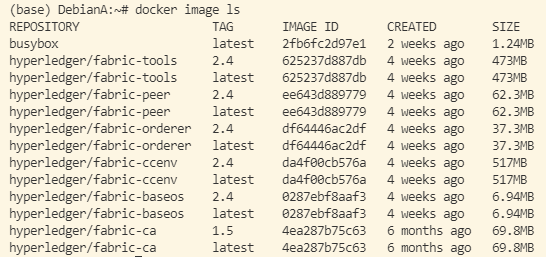
最終的鏡像為:
運行測試
啟動fabric網路
- 進入fabric-sample的test-network目錄
cd fabric-samples/test-network
- 運行
./network.sh up啟動網路
Creating network "fabric_test" with the default driver
Creating volume "docker_orderer.example.com" with default driver
Creating volume "docker_peer0.org1.example.com" with default driver
Creating volume "docker_peer0.org2.example.com" with default driver
Creating peer0.org1.example.com ... done
Creating orderer.example.com    ... done
Creating peer0.org2.example.com ... done
Creating cli                    ... done
CONTAINER ID   IMAGE                               COMMAND             CREATED                  STATUS
PORTS
            NAMES
7738c1e84751   hyperledger/fabric-tools:latest     "/bin/bash"         Less than a second ago   Up Less than a second                   cli
1f24de2c6cd5   hyperledger/fabric-peer:latest      "peer node start"   2 seconds ago            Up Less than a second   0.0.0.0:9051->9051/tcp, :::9051->9051/tcp, 0.0.0.0:19051->19051/tcp, :::19051->19051/tcp                peer0.org2.example.com
bfc48b20360c   hyperledger/fabric-orderer:latest   "orderer"           2 seconds ago            Up Less than a second   0.0.0.0:7050->7050/tcp, :::7050->7050/tcp, 0.0.0.0:7053->7053/tcp, :::7053->7053/tcp, 0.0.0.0:17050->17050/tcp, :::17050->17050/tcp   orderer.example.com
b9a61fdaf47a   hyperledger/fabric-peer:latest      "peer node start"   2 seconds ago            Up Less than a second   0.0.0.0:7051->7051/tcp, :::7051->7051/tcp, 0.0.0.0:17051->17051/tcp, :::17051->17051/tcp                peer0.org1.example.com
最終出現以上輸出日誌則表示網路啟動成功,每個加入Fabric網路的Node和User都需要隸屬於某個組織,以上網路中包含了兩個平行組織————peer0.org1.example.com和peer0.org2.example.com,它還包括一個作為ordering service維護網路的orderer.example.com。
創建channel
上節已經在機器上運行了peer節點和orderer節點,現在可以使用network.sh為Org1和Org2之間創建channel。channel是特定網路成員之間的私有通道,只能被屬於該通道的組織使用,並且對網路的其他成員是不可見的。每個channel都有一個單獨的區塊鏈賬本,屬於該通道的組織可以讓其下peer加入該通道,以讓peer能夠存儲channel上的帳本並驗證賬本上的交易。
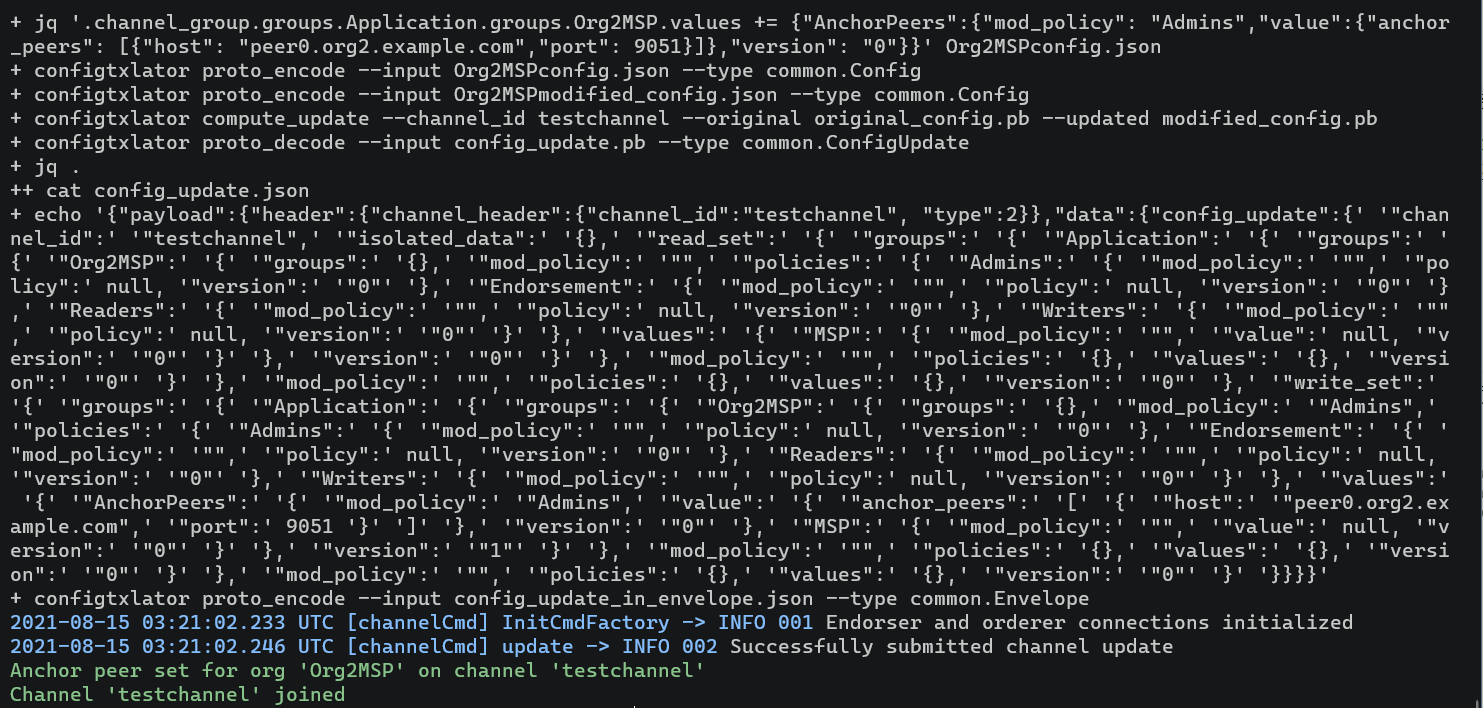
使用以下命令創建自定義通道testchannel:
./network.sh createChannel -c testchannel
部署chaincode
建議部署操作全部在
root賬戶下進行,否則可能發生未知錯誤,以下流程為筆者在非root用戶下所遇問題,最終重建虛擬機全部指令在root賬戶下才完成部署。
創建通道後,您可以開始使用智慧合約與通道賬本交互。智慧合約包含管理區塊鏈賬本上資產的業務邏輯,由成員運行的應用程式網路可以在賬本上調用智慧合約創建,更改和轉讓這些資產。可以通過./network.sh deployCC命令部署智慧合約,但本過程可能會出現很多問題。
使用以下命令部署chaincode:
./network.sh deployCC -c testchannel -ccn basic -ccp ../asset-transfer-basic/chaincode-go -ccl go
此命令執行後可能會出現錯誤:scripts/deployCC.sh: line 114: log.txt: Permission denied,很明顯這是許可權不足所致,加上sudo試試:
./network.sh deployCC -c testchannel -ccn basic -ccp ../asset-transfer-basic/chaincode-go -ccl go
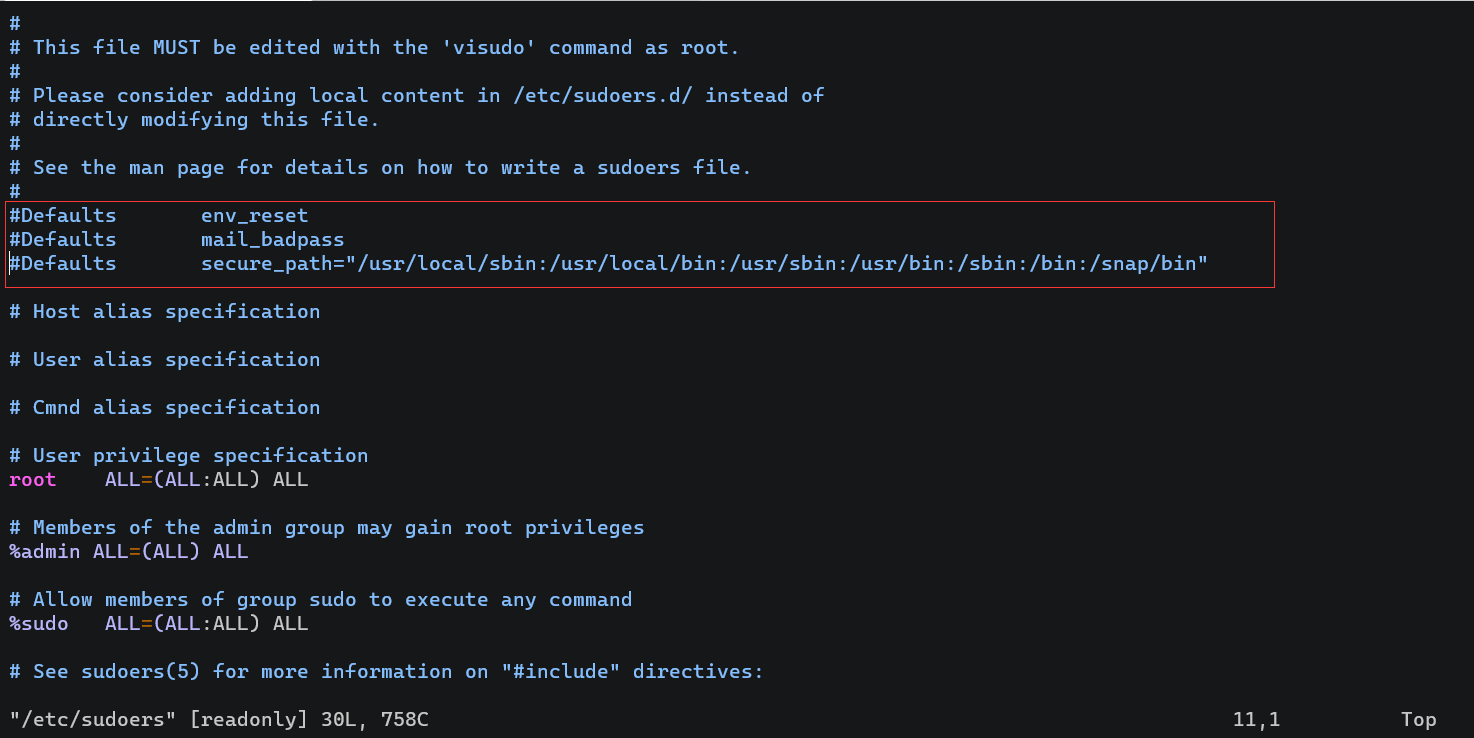
加上sudo後出現新的錯誤:deployCC.sh: line 59: go: command not found。檢查本用戶go命令可用,檢查root用戶go命令可用,單單sudo後不能用。查閱資料後發現這是因為linux系統為了安全,限制在使用sudo時會清空自定義的環境變數,最簡單的解決方法是在/etc/sudoers文件中直接將該限制注釋[1]:
加上注釋後重新執行上條命令,又出現了新的錯誤:
go: github.com/golang/[email protected]: Get "//proxy.golang.org/github.com/golang/protobuf/@v/v1.3.2.mod": dial tcp 172.217.160.81:443: i/o timeout
很明顯這是因為本地網路無法訪問proxy.golang.org所致,在命令行輸入go env -w GO111MODULE=on && go env -w GOPROXY=//goproxy.cn,direct命令配置中國代理[2]後再次執行。令人意外的是錯誤不變,設置的代理沒有生效?手動使用go get github.com/golang/protobuf手動下載安裝後再次運行錯誤還是不變,此時檢查本地GOPATH目錄下已有github.com/golang/protobuf包,為什麼沒有識別到?此時靈機一動,使用go env查看GOPATH環境變數,發現與本地用戶不一致,原來sudo命令會使用root的go環境變數,而之前設置的代理、下載的包都只能在本地用戶下生效,因此這個問題最終的解決方案是直接切換到root用戶下重新配置go代理並運行。成功運行後可看見如下結果:
2021-08-15 00:45:54.064 PDT [chaincodeCmd] ClientWait -> INFO 001 txid [ebeb8df6904f45b81fb30714f7eecb30b4bbfd32f4acc809f34f7c660e396eb8] committed with status (VALID) at localhost:7051
2021-08-15 00:45:54.144 PDT [chaincodeCmd] ClientWait -> INFO 002 txid [ebeb8df6904f45b81fb30714f7eecb30b4bbfd32f4acc809f34f7c660e396eb8] committed with status (VALID) at localhost:9051
Chaincode definition committed on channel 'testchannel'
Using organization 1
Querying chaincode definition on peer0.org1 on channel 'testchannel'...
Attempting to Query committed status on peer0.org1, Retry after 3 seconds.
+ peer lifecycle chaincode querycommitted --channelID testchannel --name basic
+ res=0
Committed chaincode definition for chaincode 'basic' on channel 'testchannel':
Version: 1.0, Sequence: 1, Endorsement Plugin: escc, Validation Plugin: vscc, Approvals: [Org1MSP: true, Org2MSP: true]
Query chaincode definition successful on peer0.org1 on channel 'testchannel'
Using organization 2
Querying chaincode definition on peer0.org2 on channel 'testchannel'...
Attempting to Query committed status on peer0.org2, Retry after 3 seconds.
+ peer lifecycle chaincode querycommitted --channelID testchannel --name basic
+ res=0
Committed chaincode definition for chaincode 'basic' on channel 'testchannel':
Version: 1.0, Sequence: 1, Endorsement Plugin: escc, Validation Plugin: vscc, Approvals: [Org1MSP: true, Org2MSP: true]
Query chaincode definition successful on peer0.org2 on channel 'testchannel'
Chaincode initialization is not required
合約交互
在安裝fabric中我們已經設置了fabric可執行文件的環境變數,需保證可以成功在test-network目錄下使用peer命令。
- 設置FABRIC_CFG_PATH變數,其下需包含core.yaml文件
export FABRIC_CFG_PATH=$PWD/../config/
# export FABRIC_CFG_PATH=/usr/local/fabric/config/
- 設置其它
Org1組織的變數依賴
# Environment variables for Org1
# CORE_PEER_TLS_ROOTCERT_FILE和CORE_PEER_MSPCONFIGPATH環境變數指向Org1的organizations文件夾中的身份證書。
export CORE_PEER_TLS_ENABLED=true
export CORE_PEER_LOCALMSPID="Org1MSP"
export CORE_PEER_TLS_ROOTCERT_FILE=${PWD}/organizations/peerOrganizations/org1.example.com/peers/peer0.org1.example.com/tls/ca.crt
export CORE_PEER_MSPCONFIGPATH=${PWD}/organizations/peerOrganizations/org1.example.com/users/[email protected]/msp
export CORE_PEER_ADDRESS=localhost:7051
- 初始化chaincode
peer chaincode invoke -o localhost:7050 --ordererTLSHostnameOverride orderer.example.com --tls --cafile ${PWD}/organizations/ordererOrganizations/example.com/orderers/orderer.example.com/msp/tlscacerts/tlsca.example.com-cert.pem -C testchannel -n basic --peerAddresses localhost:7051 --tlsRootCertFiles ${PWD}/organizations/peerOrganizations/org1.example.com/peers/peer0.org1.example.com/tls/ca.crt --peerAddresses localhost:9051 --tlsRootCertFiles ${PWD}/organizations/peerOrganizations/org2.example.com/peers/peer0.org2.example.com/tls/ca.crt -c '{"function":"InitLedger","Args":[]}'

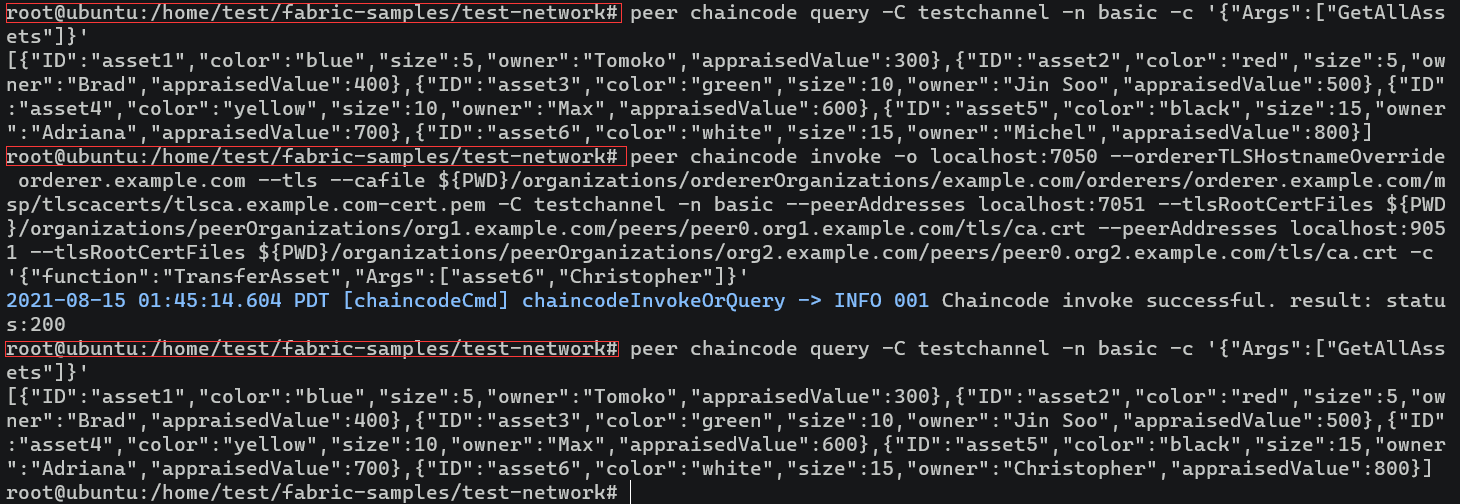
4. 查詢賬本資產列表
peer chaincode query -C testchannel -n basic -c '{"Args":["GetAllAssets"]}'

5. 修改賬本資產
peer chaincode invoke -o localhost:7050 --ordererTLSHostnameOverride orderer.example.com --tls --cafile ${PWD}/organizations/ordererOrganizations/example.com/orderers/orderer.example.com/msp/tlscacerts/tlsca.example.com-cert.pem -C testchannel -n basic --peerAddresses localhost:7051 --tlsRootCertFiles ${PWD}/organizations/peerOrganizations/org1.example.com/peers/peer0.org1.example.com/tls/ca.crt --peerAddresses localhost:9051 --tlsRootCertFiles ${PWD}/organizations/peerOrganizations/org2.example.com/peers/peer0.org2.example.com/tls/ca.crt -c '{"function":"TransferAsset","Args":["asset6","Christopher"]}'
6. 關閉網路
./network.sh down
該命令將停止並刪除節點和鏈碼容器、組織加密材料、刪除之前運行的通道項目和docker卷,並從Docker Registry移除鏈碼鏡像。
因為
asset-transfer (basic)鏈碼的背書策略需要交易同時被Org1和Org2簽名,所以鏈碼調用指令需要使用--peerAddresses標籤來指向peer0.org1.example.com和peer0.org2.example.com;因為網路的TLS被開啟,指令也需要用--tlsRootCertFiles標籤指向每個peer節點的TLS證書。
參考
-
qq_JWang_03215367. 解決command not found 報錯. 慕課. [2018-07-31] ↩︎
-
沐沐子楓. failed to normalize chaincode path: ‘go list’ failed with: go. 部落格園. [2020-11-27] ↩︎