CSS中上下margin的傳遞和摺疊
CSS中上下margin的傳遞和摺疊
1.上下margin傳遞
1.1.margin-top傳遞
為什麼會產生上邊距傳遞?
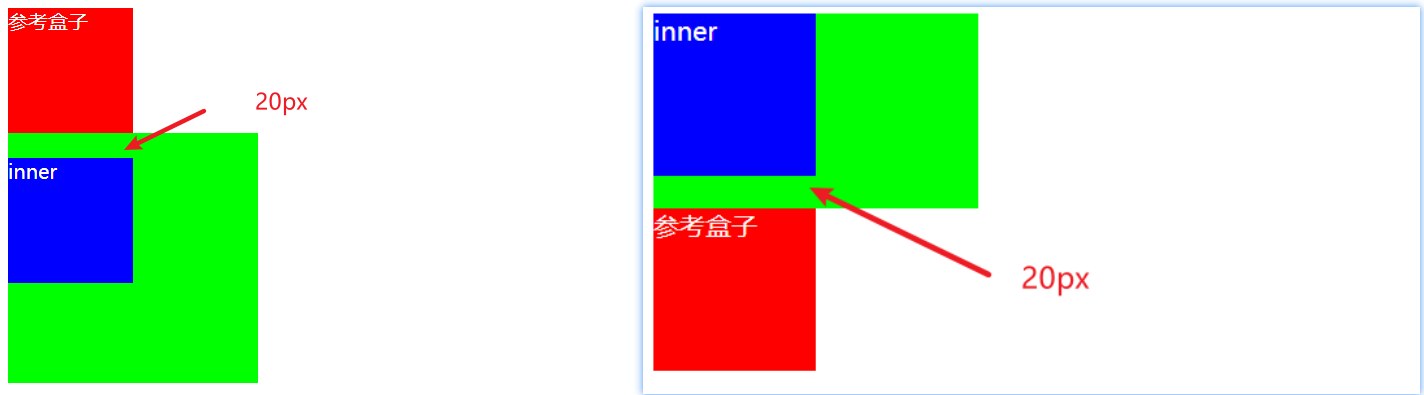
塊級元素的頂部線和父元素的頂部線重疊,那麼這個塊級元素的margin-top值會傳遞給父元素。
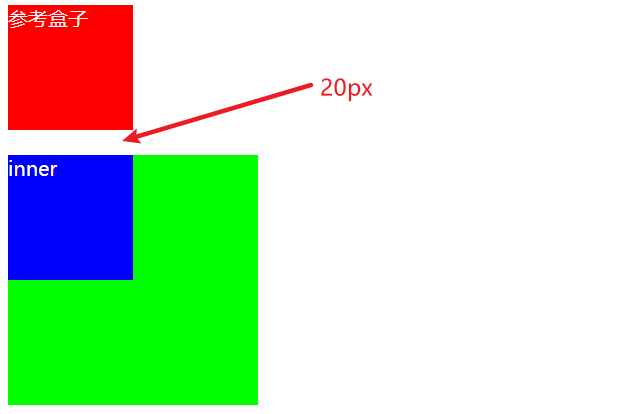
示例程式碼:給inner盒子設置margin-top: 20px;。
.reference {
  width: 100px;
  height: 100px;
  background-color: #f00;
  color: #fff;
}

.box {
  width: 200px;
  height: 200px;
  background-color: #0f0;
}

 .inner {
   width: 100px;
   height: 100px;
   background-color: #00f;
   margin-top: 20px;
 }
<div class="reference">參考盒子</div>
<div class="box">
  <div class="inner"></div>
</div>
運行結果:inner的margin-top的值傳遞給了box。
1.2.margin-bottom傳遞
為什麼會產生下邊距傳遞?
塊級元素的底部線和父元素的底部線重疊,並且父元素的高度是auto,那麼這個塊級元素的margin-bottom值會傳遞給父元素。
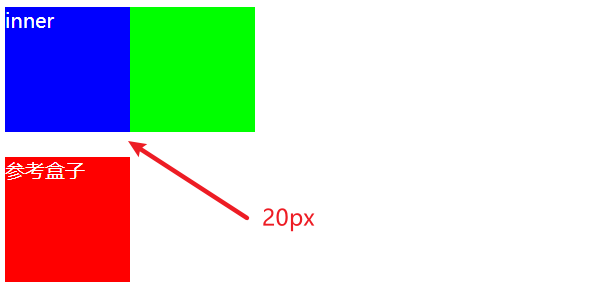
示例程式碼:給inner盒子設置margin-bottom: 20px;,並且給父元素設置height: auto;。
.box {
  width: 200px;
  height: auto; /* 給父元素高度設置auto,或者不設置高度,默認為auto */
  background-color: #0f0;
}

.inner {
  width: 100px;
  height: 100px;
  background-color: #00f;
  margin-bottom: 20px;
  color: #fff;
}

.reference {
  width: 100px;
  height: 100px;
  background-color: #f00;
  color: #fff;
}
<div class="box">
  <div class="inner">inner</div>
</div>
<div class="reference">參考盒子</div>
運行結果:inner的margin-bottom的值傳遞給了box。
1.3.如何防止出現傳遞問題?
-
給父元素設置
padding-top或padding-bottom,防止頂部線或底部線重疊即可;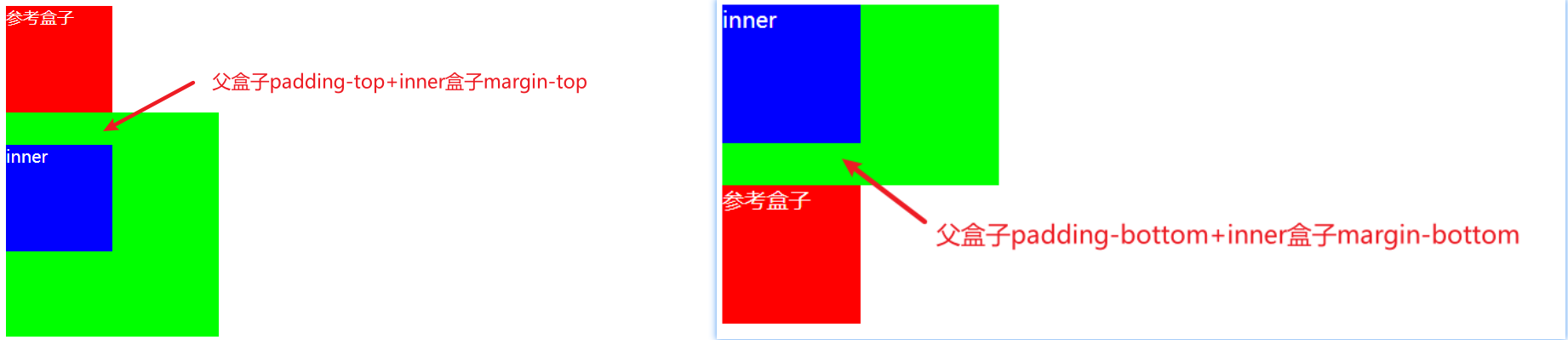
-
給父元素設置
border,可以解決邊距傳遞的問題;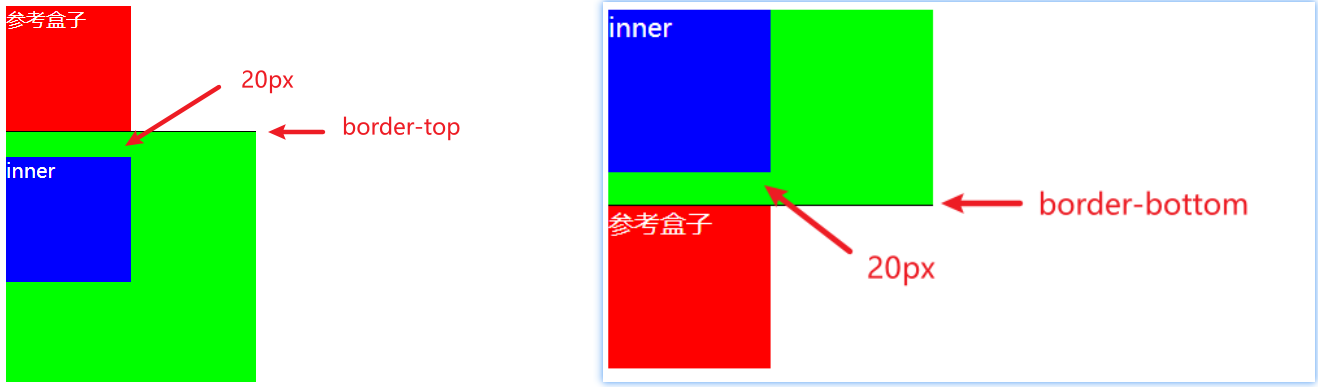
-
觸發BFC(Block Format Context,塊級格式化上下文),簡單理解就是給父元素設置一個結界,防止上下邊距傳遞出去(最優解決方案)。觸發BFC有以下方式:
- 添加浮動
float(float的值不能是none); - 設置一個非
visible的overflow屬性(除了visible,其他屬性值都可以,像hidden、auto、scroll等); - 設置定位
position(position的值不能是static或relative); - 設置
display的值為inline-block、table-cell、flex、table-caption或inline-flex;
- 添加浮動
2.上下margin摺疊
上下margin摺疊(collapse),也稱作外邊距塌陷。垂直方向上相鄰的2個margin(margin-top、margin-bottom)有可能會合併為一個margin。但是水平方向上的margin(margin-left、margin-right)永遠不會摺疊。
2.1.兄弟塊級元素之間上下margin摺疊
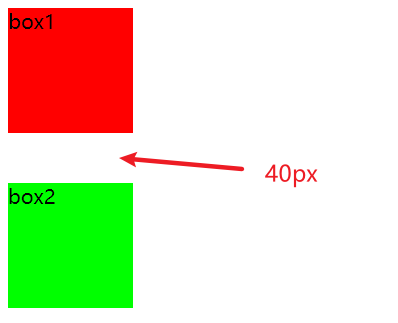
示例程式碼:給box1設置下邊距40px,給box2設置上邊距20px。
.box1 {
  width: 100px;
  height: 100px;
  background-color: #f00;
  margin-bottom: 40px;
}

.box2 {
  width: 100px;
  height: 100px;
  background-color: #0f0;
  margin-top: 20px;
}
<div class="box1">box1</div>
<div class="box2">box2</div>
運行結果:兩個盒子間距為40px。
2.2.父子塊級元素之間上下margin摺疊
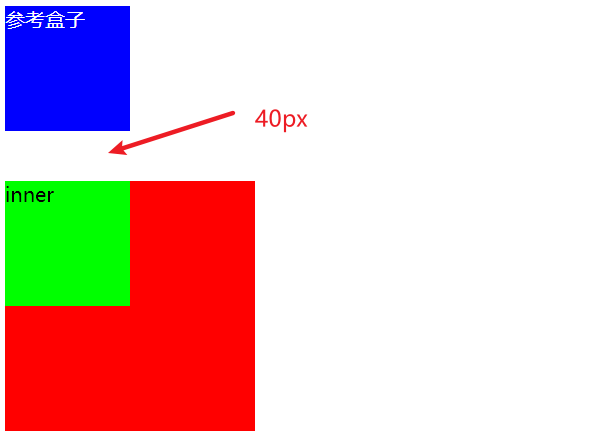
示例程式碼:inner設置上邊距為40px,父元素box設置上邊距為20px。
.reference {
  width: 100px;
  height: 100px;
  background-color: #00f;
  color: #fff;
}

.box {
  width: 200px;
  height: 200px;
  background-color: #f00;
  margin-top: 20px;
}

.inner {
  width: 100px;
  height: 100px;
  background-color: #0f0;
  margin-top: 40px;
}
<div class="reference">參考盒子</div>
<div class="box">
  <div class="inner">inner</div>
</div>
運行結果:上邊距為40px。
2.3.總結
- 父子塊級元素之間上下margin摺疊的原因是inner將上邊距傳遞給了父元素box,然後父元素box再與自己的上邊距進行比較;
- 摺疊後最終計算規則:兩個值進行比較,取較大值;
- 如果想防止上下邊距摺疊,只設置其中一個即可;


