Log4Net + Log4Mongo 將日誌記錄到MongoDb中
實現:
- 將日誌保存在MongoDb中;
- 自定義日誌欄位;
- 日誌按照日期拆分集合;
第一部分:將日誌保存在MongoDb中
-
新建控制台程式Log4MongoDemo
-
通過NuGet安裝Log4Net (v2.0.8)、log4mongo-net(v2.2.0)
-
項目根目錄下添加log4net.config配置文件
<?xml version="1.0"?> <configuration> <!--聲明一個名為「log4net」的自定義配置節--> <configSections> <section name="log4net" type="log4net.Config.Log4NetConfigurationSectionHandler,log4net"/> </configSections> <!--log4net配置資訊--> <log4net> <logger name="MongoDBLogger"> <level value="ALL"/> <appender-ref ref="MongoDBAppender" /> </logger> <appender name="MongoDBAppender" type="Log4Mongo.MongoDBAppender, Log4Mongo"> <connectionString value="mongodb://(登錄名):(密碼)@(伺服器地址)/app" /> <CollectionName value="logs"/> </appender> </log4net> </configuration> -
日誌記錄方法
public class LogHelper { private static readonly ILog log = LogManager.GetLogger("MongoDBLogger"); /// <summary> /// 記錄一般日誌 /// </summary> public static void LogInfo(AppOpLog opLog) { if (log.IsInfoEnabled) { log.Info(opLog); } } } -
記錄日誌
static void Main(string[] args) { log4net.Config.XmlConfigurator.Configure( new System.IO.FileInfo(AppDomain.CurrentDomain.BaseDirectory + "\\log4net.config") ); LogHelper.LogInfo(null); Console.ReadKey(); } -
查看結果
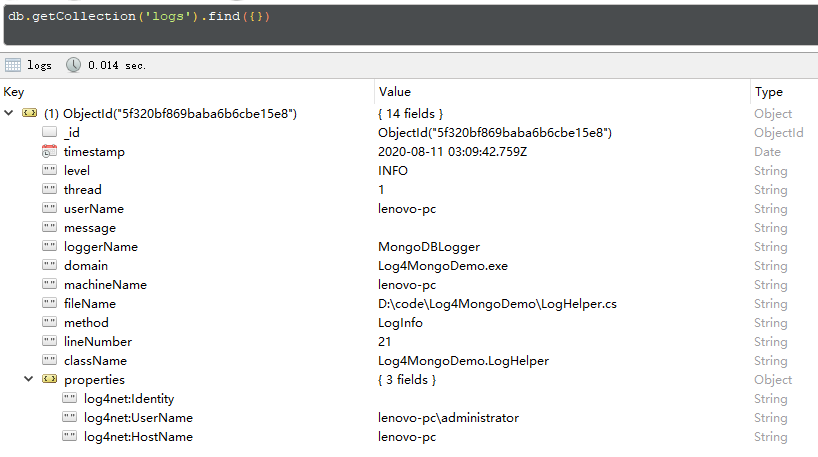
第二部分:自定義日誌欄位
從github上下載【log4mongo-net】源碼進行修改,日誌中記錄的欄位定義在BackwardCompatibility.cs下BuildBsonDocument方法和BuildExceptionBsonDocument方法中,只需要修改這兩個方法就可以按照根據自己的需求記錄日誌內容
-
將自定義的日誌內容通過 log.Info(object) 傳遞
-
在BuildBsonDocument方法中通過LoggingEvent的MessageObject屬性來獲取自定義的日誌內容
public class BackwardCompatibility { public static BsonDocument BuildBsonDocument(LoggingEvent loggingEvent) { if(loggingEvent == null) { return null; } BsonDocument bs = loggingEvent.MessageObject.ToBsonDocument(); var toReturn = bs; toReturn.Add("TimeStamp", loggingEvent.TimeStamp); toReturn.Add("ThreadId", loggingEvent.ThreadName); if(loggingEvent.ExceptionObject != null) { toReturn.Add("Exception", BuildExceptionBsonDocument(loggingEvent.ExceptionObject)); } PropertiesDictionary compositeProperties = loggingEvent.GetProperties(); if(compositeProperties != null && compositeProperties.Count > 0) { var properties = new BsonDocument(); foreach(DictionaryEntry entry in compositeProperties) { properties.Add(entry.Key.ToString(), entry.Value.ToString()); } toReturn.Add("Properties", properties); } return toReturn; } private static BsonDocument BuildExceptionBsonDocument(Exception ex) { var toReturn = new BsonDocument { {"Message", ex.Message}, {"Source", ex.Source}, {"StackTrace", ex.StackTrace} }; if(ex.InnerException != null) { toReturn.Add("InnerException", BuildExceptionBsonDocument(ex.InnerException)); } return toReturn; } } -
日誌記錄:LogHelper.LogInfo(object),object為自定義類型
第三部分:日誌按照日期拆分集合
因為MongoDb不需要預先定義集合結構,所以我們只需要根據自己的需求修改集合的生成規則就可以拆分日誌到不同的集合中,這裡實現將日誌按天拆分。
- 在log4net.config配置文件中將CollectionName的value修改為「yyyyMMdd」
- 修改MongoDBAppender.cs下的GetCollection()方法:
private IMongoCollection<BsonDocument> GetCollection()
		{
			var db = GetDatabase();
			var collectionName = CollectionName ?? "logs";

            if (collectionName == "yyyyMMdd")
            {
                collectionName = $"Log{DateTime.Now.ToString("yyyyMMdd")}" ;
            }

            EnsureCollectionExists(db, collectionName);

            var collection = db.GetCollection<BsonDocument>(collectionName);
			return collection;
		}
完整程式碼地址://github.com/zhrong92/Log4NetDemo
參考文章://www.cnblogs.com/zeallag/p/5205571.html


