Vue3.x+element-plus+ts踩坑筆記
- 2022 年 10 月 20 日
- 筆記
- element-plus, typescript, vue3.x
閑聊
前段時間小穎在B站找了個學習vue3+TS的視頻,自己嘗試着搭建了一些基礎代碼,在實現功能的過程中遇到了一些問題,為了防止自己遺忘,寫個隨筆記錄一下嘻嘻
項目代碼
git地址:vue3.x-ts-element-plus–demo
踩坑集合:
1.根據 element-plus 官網提示 按需引入 組件後,遇到:ElLoading、ElMessage、ElNotification、ElMessageBox 樣式丟失
起因是小穎在封裝 axios 時,發現引入的 ElNotification 組件沒有樣式,表單提交時加載 ElLoading 組件有沒有樣式,後來通過面向百度解決了該問題,嘻嘻
解決方案一:
第一步:執行下面代碼
npm i unplugin-element-plus -D
第二步:在 vue.config.js 改為
解決方案二:
直接全局引入 element-plus
第一步:修改 main.ts
參考:記錄-解決element-plus自動引入後ElLoading、ElMessage、ElNotification、ElMessageBox樣式丟失的問題
2.動態使用圖標組件時,圖標組件不能正確渲染
起因是小穎在封裝菜單組件時,要動態遍歷菜單數據根據數據中的 icon 值,通過:
<component :is="menuInfo.icon" class="menu-icon" />
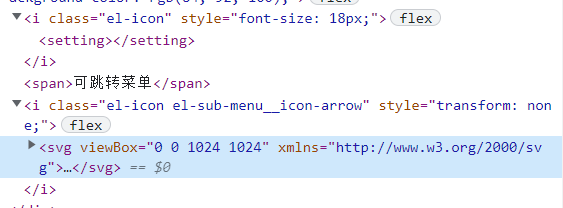
動態渲染各自的菜單圖標,但是沒有渲染出來,通過F12發現渲染出來的dom就不是圖標組件的dom,而是這樣的:
當前 menuInfo.icon 值為:setting
左側菜單組件
因考慮到菜單可能不止兩級可能會是多級的所以小穎將其封裝成以下組件:


<template>
  <div class="logo-box">XXXX管理系統</div>
  <div class="menu-box">
    <el-menu
      active-text-color="#ffd04b"
      background-color="#545c64"
      class="el-menu-vertical"
      :default-active="menuActive"
      :unique-opened="true"
      text-color="#fff"
      @open="handleOpen"
      @close="handleClose"
    >
      <template v-for="menu in menuList" :key="menu.id">
        <subMenu :menuInfo="menu" />
      </template>
    </el-menu>
  </div>
</template>

<script lang="ts" setup>
import { defineProps, computed } from "vue";
import { useStore } from "vuex";
import SubMenu from "./subMenu.vue";

const store = useStore();
const props = defineProps({
  menuList: {
    type: Array,
    default: () => [],
  },
});
const menuActive = computed(() => {
  return store.state.setting.menuActive;
});
const handleOpen = (key: string, keyPath: string[]) => {
  console.log(key, keyPath);
};
const handleClose = (key: string, keyPath: string[]) => {
  console.log(key, keyPath);
};
</script>

<style lang="scss" scoped>
.logo-box {
  height: 80px;
  display: flex;
  justify-content: center;
  align-items: center;
  font-size: 20px;
  cursor: pointer;
  background-color: #545c64;
  color: #fff;
  // background: v-bind(themeBackground);
}
.menu-box {
  height: calc(100vh - 80px);
  background-color: #545c64;
}
.el-menu-vertical {
  border-right: none;
}
.el-menu-vertical:not(.menu--collapse) {
  min-height: 400px;
}
</style>
leftMenu.vue
<template>
  <el-sub-menu v-if="menuInfo.childs.length > 0" :index="menuInfo.id">
    <template #title>
      <el-icon :size="18">
          <component :is="menuInfo.icon" />
      </el-icon>
      <span>{{ menuInfo.m_name }}</span>
    </template>
    <template v-for="item in menuInfo.childs" :key="item.id">
      <sub-menu :menu-info="item" />
    </template>
  </el-sub-menu>
  <el-menu-item v-else :index="menuInfo.id"  @click="menuFun(menuInfo, menuInfo.id)" >
    <el-icon :size="18">
      <component :is="menuInfo.icon" class="menu-icon" />
    </el-icon>
    <span>{{ menuInfo.m_name }}</span>
  </el-menu-item>
</template>
<script lang="ts" name="SubMenu" setup>
import {
  Document,
  Menu as IconMenu,
  Location,
  Setting,
  Menu,
  Grid,
} from "@element-plus/icons-vue";
import { defineProps } from "vue";
import { useRouter } from "vue-router";
import { useStore } from "vuex";

//路由
const router = useRouter();
//vuex
const store = useStore();
const props = defineProps({
  menuInfo: {
    type: Object,
    default: () => {
      return {
        id: "",
        parent_id: "",
        m_name: "",
        icon: "",
        childs: [],
      };
    },
  },
});

const menuFun = (event: any, index: string) => {
  setNav(event);
  store.dispatch("setMenuActive", { menuActive: index });
  if (event.url && event.url.length > 0) {
    router.push({
      path: event.url,
      query: {},
    });
  }
};
const setNav = (item: any) => {
  store.dispatch("setNav", { nav: item });
};
</script>
subMenu.vue
解決方案一:
修改 main.ts
import { createApp } from 'vue'
import App from './App.vue'
import router from './router'
import store from './store'
import ElementPlus from 'element-plus'
import 'element-plus/es/components/button/style/css'
import * as Icons from '@element-plus/icons-vue'
const app = createApp(App)

Object.keys(Icons).forEach(key => {
    app.component(key, Icons[key as keyof typeof Icons])
})
app.use(store)
app.use(router)
app.use(ElementPlus)
app.mount('#app')
解決方案二:
將 main.ts 改回原來的
import { createApp } from 'vue'
import App from './App.vue'
import router from './router'
import store from './store'
createApp(App).use(store).use(router).mount('#app')
//公共css
import './assets/css/index.scss'
將subMenu.vue組件的 js 代碼改為
import { defineComponent } from "vue";
  import {
    Document,
    Menu as IconMenu,
    Location,
    Setting,
    Menu,
    Grid,
  } from "@element-plus/icons-vue";
  import { useRouter } from "vue-router";
  import { useStore } from "vuex";
  export default defineComponent({
    components: {
      Document,
      Menu,
      Location,
      Setting,
      Grid,
    },
    props: {
      menuInfo: {
        type: Object,
        default: () => {
          return {
            id: "",
            parent_id: "",
            m_name: "",
            icon: "",
            childs: [],
          };
        },
      },
    },
    setup() {
      //路由
      const router = useRouter();
      //vuex
      const store = useStore();
      const menuFun = (event: any, index: string) => {
        setNav(event);
        store.dispatch("setMenuActive", { menuActive: index });
        if (event.url && event.url.length > 0) {
          router.push({
            path: event.url,
            query: {},
          });
        }
      };
      const setNav = (item: any) => {
        store.dispatch("setNav", { nav: item });
      };
      return {
        menuFun,
      };
    },
  });
</script>
參考哪裡忘記了,第一種是面向百度的,第二種是小穎自己試出來的
來來來找到了,參考這裡;vue3 動態加載el-icon圖標
3.vuex頁面刷新數據丟失問題的四種解決方式
解決方案:
第一步:執行以下代碼
npm install --save vuex-persist
第二步:在 store 下的 index.ts 中引入並使用
import VuexPersistence from "vuex-persist";//解決頁面刷新vuex數據丟失

const vuexLocal = new VuexPersistence({
  storage: window.localStorage
})
export default createStore({
  state: {
  },
  getters: {
  },
  mutations: {
  },
  actions: {
  },
  modules: modules,
  plugins: [vuexLocal.plugin]
})
更多方法參考:vuex頁面刷新數據丟失問題的四種解決方式
4.如何自動引入 store 下指定目錄下的所有文件,此方法也適用於引入組件
比如小穎要實現在 store 下的 index.ts 中自動引入 store 下的 modules 中的所有 ts
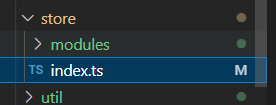
解決方案:
將 index.ts 改為:
import { createStore } from 'vuex'
import VuexPersistence from "vuex-persist";//解決頁面刷新vuex數據丟失
const modulesFiles = require.context('./modules', false, /\.ts$/)

// you do not need `import app from './modules/app'`
// it will auto require all vuex module from modules file
const modules = modulesFiles.keys().reduce((modules: any, modulePath) => {
  // set './app.js' => 'app'
  const moduleName = modulePath.replace(/^\.\/(.*)\.\w+$/, '$1')
  const value = modulesFiles(modulePath)
  modules[moduleName] = value.default
  return modules
}, {})
const vuexLocal = new VuexPersistence({
  storage: window.localStorage
})
export default createStore({
  state: {
  },
  getters: {
  },
  mutations: {
  },
  actions: {
  },
  modules: modules,
  plugins: [vuexLocal.plugin]
})
後面的坑等後面寫了再繼續補充,最近小穎在忙着弄接的私活所以也沒繼續看vue3了,等這段時間忙完繼續搞,💪打工人···················