Spring Cloud實戰 | 第六篇:Spring Cloud Gateway+Spring Security OAuth2+JWT實現微服務統一認證授權
- 2020 年 9 月 23 日
- 筆記
- SpringCloud, SpringCloud實戰
一. 前言
本篇實戰案例基於 youlai-mall 項目。項目使用的是當前主流和最新版本的技術和解決方案,自己不會太多華麗的言辭去描述,只希望能勾起大家對編程的一點喜歡。所以有興趣的朋友可以進入 github | 碼雲了解下項目明細 ,有興趣也可以一起研發。
微服務通過整合 Spirng Cloud Gateway、Spring Security OAuth2、JWT 實現微服務的統一認證授權。其中Spring Cloud Gateway作為OAuth2客戶端,其他微服務提供資源服務給網關,交由網關來做統一鑒權,所以這裡網關同樣也作為資源服務器。
溫馨提示:微服務認證授權在整個系列算是比較有難度的,本篇同時從理論和實戰兩個角度出發,所以篇幅有些長,還需要往期文章搭建的環境基礎,所以沒有太多時間的小夥伴可以等有時間在研究。
往期系列文章
- Spring Cloud實戰 | 第一篇:Windows搭建Nacos服務
- Spring Cloud實戰 | 第二篇:Spring Cloud整合Nacos實現註冊中心
- Spring Cloud實戰 | 第三篇:Spring Cloud整合Nacos實現配置中心
- Spring Cloud實戰 | 第四篇:Spring Cloud整合Gateway實現API網關
- Spring Cloud實戰 | 第五篇:Spring Cloud整合OpenFeign實現微服務之間的調用
二. OAuth2和JWT概念及關係?
1. 什麼是OAuth2?
OAuth 2.0 是目前最流行的授權機制,用來授權第三方應用,獲取用戶數據。
— 【阮一峰】OAuth 2.0 的一個簡單解釋
QQ登錄OAuth2.0:對於用戶相關的OpenAPI(例如獲取用戶信息,動態同步,照片,日誌,分享等),為了保護用戶數據的安全和隱私,第三方網站訪問用戶數據前都需要顯式的向用戶徵求授權。 — 【QQ登錄】OAuth2.0開發文檔
從上面定義可以理解OAuth2是一個授權協議,並且廣泛流行的應用。
下面通過「有道雲筆記」通過「QQ授權登錄」的案例來分析QQ的OAuth2平台的具體實現。
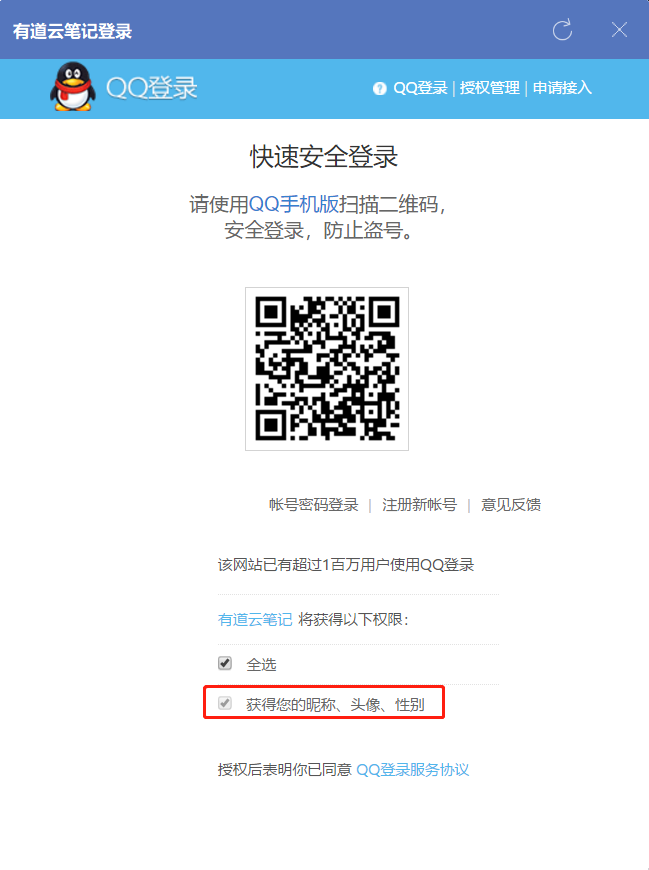
流程分析:
有道雲筆記客戶端 -> 選擇QQ授權登錄 -> QQ認證授權成功返回access_token -> 有道雲筆記客戶端接收到access_token後進入有道雲筆記應用
流程關聯OAuth2的角色關聯如下:
(1)第三方應用程序(Third-party Application):案例中的"有道雲筆記"客戶端。

(2)HTTP服務提供商(HTTP Service):QQ

(3)資源所有者(Resource Owner):用戶

(4)用戶代理(User Agent): 比如瀏覽器,代替用戶去訪問這些資源。

(5)認證服務器(Authorization Server):服務提供商專門用來處理認證的服務器。案例中QQ提供的認證授權。

(6)資源服務器(Resource server):即服務提供商存放用戶生成的資源的服務器。它與認證服務器,可以是同一台服務器,也可以是不同的服務器。
     這裡指客戶端拿到access_token要去訪問資源對象的服務器,比如我們在有道雲里的筆記。
2. 什麼是JWT?
JWT(JSON Web Token)是令牌token的一個子集,首先在服務器端身份認證通過後生成一個字符串憑證並返回給客戶端,客戶端請求服務器端時攜帶該token字符串進行鑒權認證。
JWT是無狀態的。 除了包含簽名算法、憑據過期時間之外,還可擴展添加額外信息,比如用戶信息等,所以無需將JWT存儲在服務器端。相較於cookie/session機制中需要將用戶信息保存在服務器端的session里節省了內存開銷,用戶量越多越明顯。
JWT的結構如下:
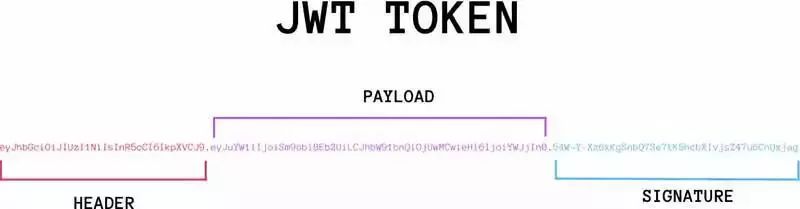
看不明白沒關係,我先把youlai-mall認證通過後生成的access token(標準的JWT格式)放到JWT官網進行解析成能看的定的格式。
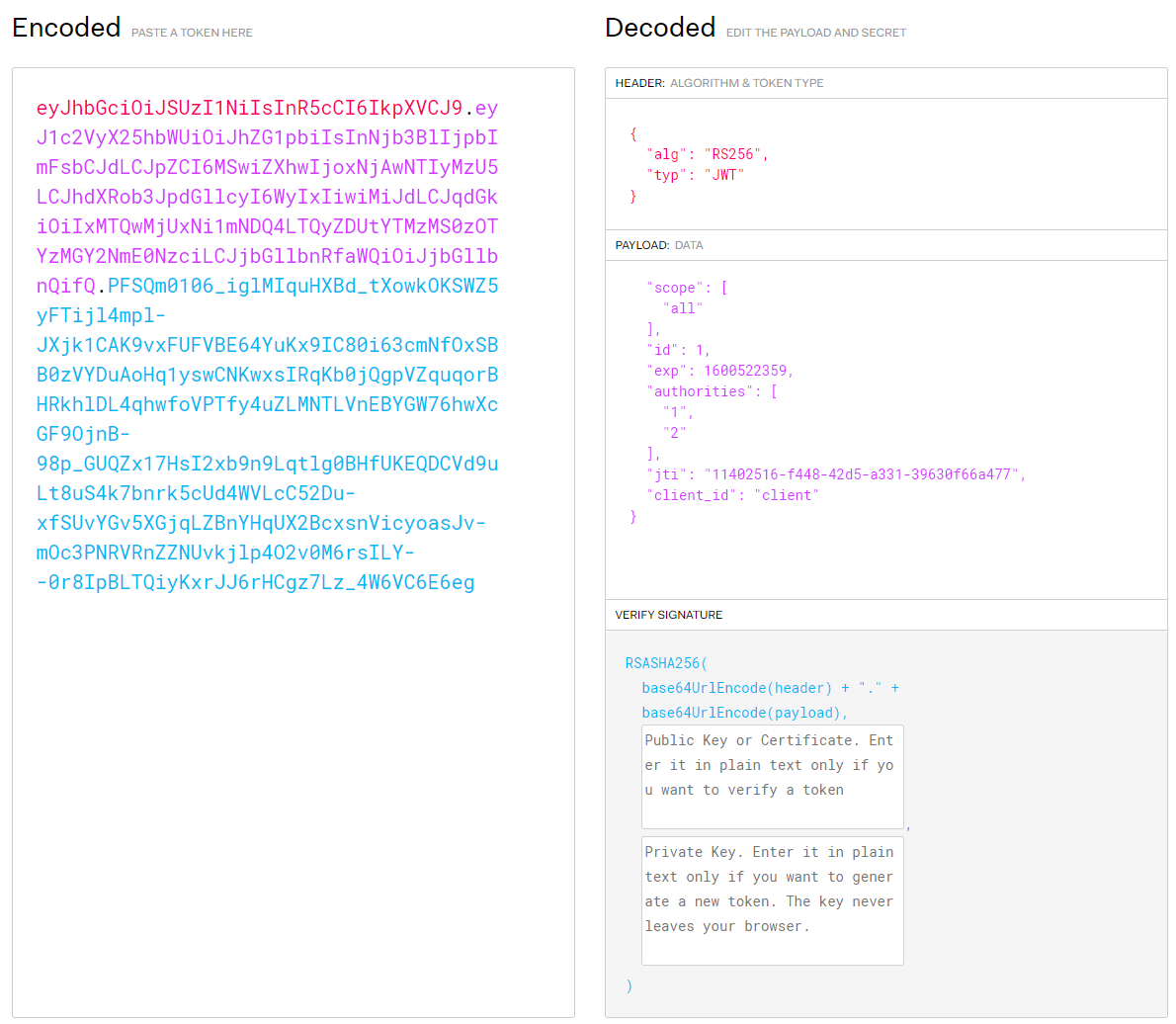
JWT字符串由Header(頭部)、Payload(負載)、Signature(簽名)三部分組成。
Header: JSON對象,用來描述JWT的元數據,alg屬性表示簽名的算法,typ標識token的類型

Payload: JSON對象,用來存放實際需要傳遞的數據, 除了默認字段,還可以在此自定義私有字段

Signature: 對Header、Payload這兩部分進行簽名,簽名需要私鑰,為了防止數據被篡改
3. OAuth2和JWT關係?
- OAuth2是一種認證授權的協議規範。
- JWT是基於token的安全認證協議的實現。
至於一定要給這二者沾點親帶點故的話。可以說OAuth2在認證成功生成的令牌access_token可以由JWT實現。
三. 認證服務器
認證服務器落地 youlai-mall 的youlai-auth認證中心模塊,完整代碼地址: github | 碼雲
1. pom依賴
    <dependency>
        <groupId>org.springframework.cloud</groupId>
        <artifactId>spring-cloud-starter-oauth2</artifactId>
    </dependency>

    <dependency>
        <groupId>org.springframework.security</groupId>
        <artifactId>spring-security-oauth2-jose</artifactId>
    </dependency>
2. 認證服務配置(AuthorizationServerConfig)
/**
 * 認證服務配置
 */
@Configuration
@EnableAuthorizationServer
@AllArgsConstructor
public class AuthorizationServerConfig extends AuthorizationServerConfigurerAdapter {

    private DataSource dataSource;
    private AuthenticationManager authenticationManager;
    private UserDetailsServiceImpl userDetailsService;

    /**
     * 客戶端信息配置
     */
    @Override
    @SneakyThrows
    public void configure(ClientDetailsServiceConfigurer clients) {
        JdbcClientDetailsServiceImpl jdbcClientDetailsService = new JdbcClientDetailsServiceImpl(dataSource);
        jdbcClientDetailsService.setFindClientDetailsSql(AuthConstants.FIND_CLIENT_DETAILS_SQL);
        jdbcClientDetailsService.setSelectClientDetailsSql(AuthConstants.SELECT_CLIENT_DETAILS_SQL);
        clients.withClientDetails(jdbcClientDetailsService);
    }

    /**
     * 配置授權(authorization)以及令牌(token)的訪問端點和令牌服務(token services)
     */
    @Override
    public void configure(AuthorizationServerEndpointsConfigurer endpoints) {
        TokenEnhancerChain tokenEnhancerChain = new TokenEnhancerChain();
        List<TokenEnhancer> tokenEnhancers = new ArrayList<>();
        tokenEnhancers.add(tokenEnhancer());
        tokenEnhancers.add(jwtAccessTokenConverter());
        tokenEnhancerChain.setTokenEnhancers(tokenEnhancers);

        endpoints.authenticationManager(authenticationManager)
                .accessTokenConverter(jwtAccessTokenConverter())
                .tokenEnhancer(tokenEnhancerChain)
                .userDetailsService(userDetailsService)
                // refresh_token有兩種使用方式:重複使用(true)、非重複使用(false),默認為true
                //      1.重複使用:access_token過期刷新時, refresh token過期時間未改變,仍以初次生成的時間為準
                //      2.非重複使用:access_token過期刷新時, refresh_token過期時間延續,在refresh_token有效期內刷新而無需失效再次登錄
                .reuseRefreshTokens(false);
    }

    /**
     * 允許表單認證
     */
    @Override
    public void configure(AuthorizationServerSecurityConfigurer security) {
        security.allowFormAuthenticationForClients();
    }

    /**
     * 使用非對稱加密算法對token簽名
     */
    @Bean
    public JwtAccessTokenConverter jwtAccessTokenConverter() {
        JwtAccessTokenConverter converter = new JwtAccessTokenConverter();
        converter.setKeyPair(keyPair());
        return converter;
    }

    /**
     * 從classpath下的密鑰庫中獲取密鑰對(公鑰+私鑰)
     */
    @Bean
    public KeyPair keyPair() {
        KeyStoreKeyFactory factory = new KeyStoreKeyFactory(
                new ClassPathResource("youlai.jks"), "123456".toCharArray());
        KeyPair keyPair = factory.getKeyPair(
                "youlai", "123456".toCharArray());
        return keyPair;
    }

    /**
     * JWT內容增強
     */
    @Bean
    public TokenEnhancer tokenEnhancer() {
        return (accessToken, authentication) -> {
            Map<String, Object> map = new HashMap<>(2);
            User user = (User) authentication.getUserAuthentication().getPrincipal();
            map.put(AuthConstants.JWT_USER_ID_KEY, user.getId());
            map.put(AuthConstants.JWT_CLIENT_ID_KEY, user.getClientId());
            ((DefaultOAuth2AccessToken) accessToken).setAdditionalInformation(map);
            return accessToken;
        };
    }
}
AuthorizationServerConfig這個配置類是整個認證服務實現的核心。總結下來就是兩個關鍵點,客戶端信息配置和access_token生成配置。
2.1 客戶端信息配置
配置OAuth2認證允許接入的客戶端的信息,因為接入OAuth2認證服務器首先人家得認可你這個客戶端吧,就比如上面案例中的QQ的OAuth2認證服務器認可「有道雲筆記」客戶端。
同理,我們需要把客戶端信息配置在認證服務器上來表示認證服務器所認可的客戶端。一般可配置在認證服務器的內存中,但是這樣很不方便管理擴展。所以實際最好配置在數據庫中的,提供可視化界面對其進行管理,方便以後像PC端、APP端、小程序端等多端靈活接入。
Spring Security OAuth2官方提供的客戶端信息表oauth_client_details
CREATE TABLE `oauth_client_details`  (
  `client_id` varchar(256) CHARACTER SET utf8 COLLATE utf8_general_ci NOT NULL,
  `resource_ids` varchar(256) CHARACTER SET utf8 COLLATE utf8_general_ci NULL DEFAULT NULL,
  `client_secret` varchar(256) CHARACTER SET utf8 COLLATE utf8_general_ci NULL DEFAULT NULL,
  `scope` varchar(256) CHARACTER SET utf8 COLLATE utf8_general_ci NULL DEFAULT NULL,
  `authorized_grant_types` varchar(256) CHARACTER SET utf8 COLLATE utf8_general_ci NULL DEFAULT NULL,
  `web_server_redirect_uri` varchar(256) CHARACTER SET utf8 COLLATE utf8_general_ci NULL DEFAULT NULL,
  `authorities` varchar(256) CHARACTER SET utf8 COLLATE utf8_general_ci NULL DEFAULT NULL,
  `access_token_validity` int(11) NULL DEFAULT NULL,
  `refresh_token_validity` int(11) NULL DEFAULT NULL,
  `additional_information` varchar(4096) CHARACTER SET utf8 COLLATE utf8_general_ci NULL DEFAULT NULL,
  `autoapprove` varchar(256) CHARACTER SET utf8 COLLATE utf8_general_ci NULL DEFAULT NULL,
  PRIMARY KEY (`client_id`) USING BTREE
) ENGINE = InnoDB CHARACTER SET = utf8 COLLATE = utf8_general_ci ROW_FORMAT = Dynamic;
添加一條客戶端信息
INSERT INTO `oauth_client_details` VALUES ('client', NULL, '123456', 'all', 'password,refresh_token', '', NULL, NULL, NULL, NULL, NULL);

2.2 token生成配置
項目使用JWT實現access_token,關於access_token生成步驟的配置如下:
1. 生成密鑰庫
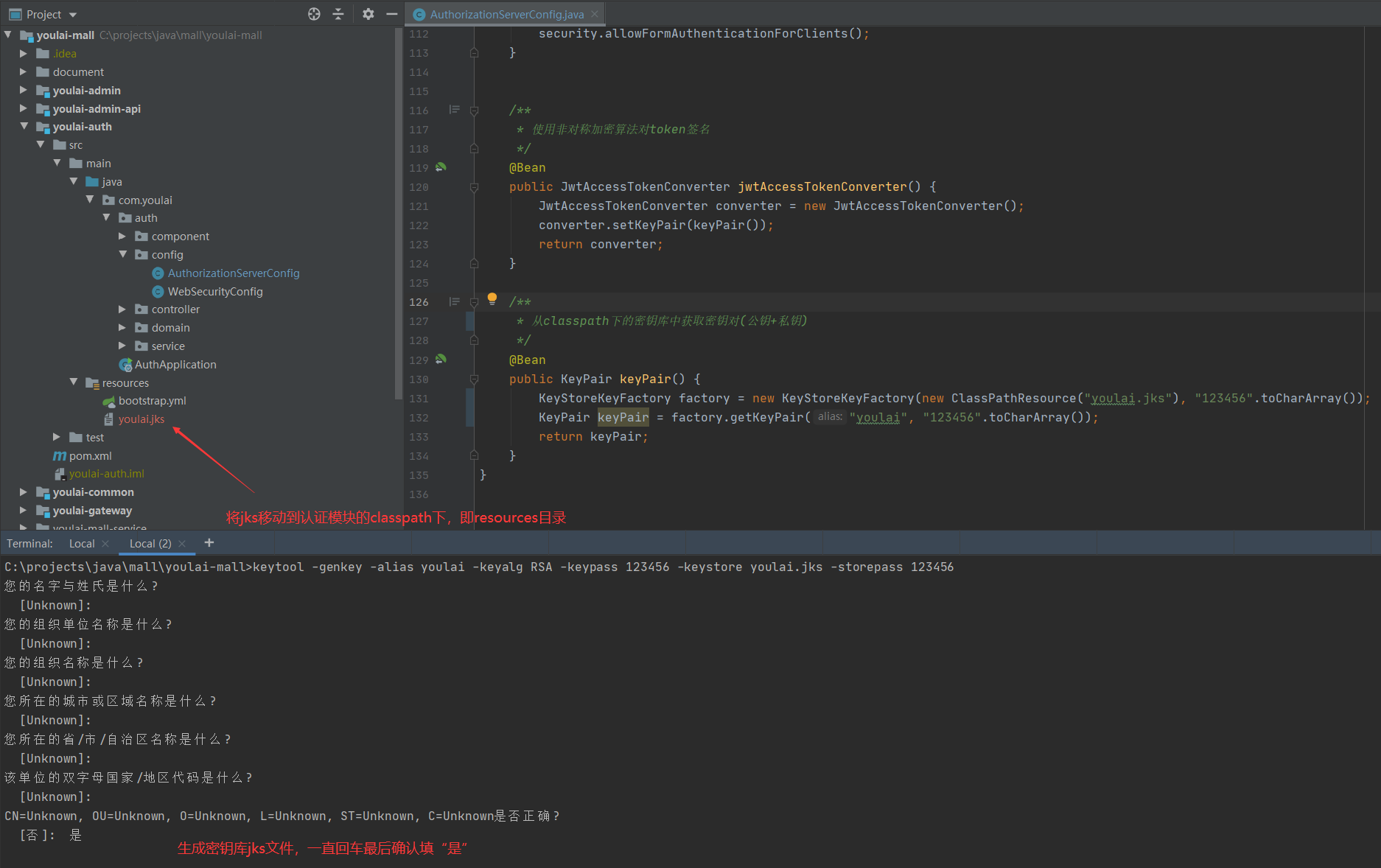
使用JDK工具的keytool生成JKS密鑰庫(Java Key Store),並將youlai.jks放到resources目錄
keytool -genkey -alias youlai -keyalg RSA -keypass 123456 -keystore youlai.jks -storepass 123456
-genkey 生成密鑰

-alias 別名

-keyalg 密鑰算法

-keypass 密鑰口令

-keystore 生成密鑰庫的存儲路徑和名稱

-storepass 密鑰庫口令
2. JWT內容增強
JWT負載信息默認是固定的,如果想自定義添加一些額外信息,需要實現TokenEnhancer的enhance方法將附加信息添加到access_token中。
3. JWT簽名
JwtAccessTokenConverter是生成token的轉換器,可以實現指定token的生成方式(JWT)和對JWT進行簽名。
簽名實際上是生成一段標識(JWT的Signature部分)作為接收方驗證信息是否被篡改的依據。原理部分請參考這篇的文章:RSA加密、解密、簽名、驗簽的原理及方法
其中對JWT簽名有對稱和非對稱兩種方式:
對稱方式:認證服務器和資源服務器使用同一個密鑰進行加簽和驗簽 ,默認算法HMAC
非對稱方式:認證服務器使用私鑰加簽,資源服務器使用公鑰驗簽,默認算法RSA
非對稱方式相較於對稱方式更為安全,因為私鑰只有認證服務器知道。
項目中使用RSA非對稱簽名方式,具體實現步驟如下:
(1). 從密鑰庫獲取密鑰對(密鑰+私鑰)
(2). 認證服務器私鑰對token簽名
(3). 提供公鑰獲取接口供資源服務器驗簽使用
公鑰獲取接口
/**
 * RSA公鑰開放接口
 */
@RestController
@AllArgsConstructor
public class PublicKeyController {

    private KeyPair keyPair;

    @GetMapping("/rsa/publicKey")
    public Map<String, Object> getKey() {
        RSAPublicKey publicKey = (RSAPublicKey) keyPair.getPublic();
        RSAKey key = new RSAKey.Builder(publicKey).build();
        return new JWKSet(key).toJSONObject();
    }

}
3. 安全配置(WebSecurityConfig)
@Configuration
@EnableWebSecurity
public class WebSecurityConfig extends WebSecurityConfigurerAdapter {

    @Override
    protected void configure(HttpSecurity http) throws Exception {
         http
            .authorizeRequests().requestMatchers(EndpointRequest.toAnyEndpoint()).permitAll()
        .and()
            .authorizeRequests().antMatchers("/rsa/publicKey").permitAll().anyRequest().authenticated()
        .and()
            .csrf().disable();
    }

    /**
     *  如果不配置SpringBoot會自動配置一個AuthenticationManager,覆蓋掉內存中的用戶
     */
    @Bean
    public AuthenticationManager authenticationManagerBean() throws Exception {
        return super.authenticationManagerBean();
    }

    @Bean
    public PasswordEncoder passwordEncoder()  {
        return PasswordEncoderFactories.createDelegatingPasswordEncoder();
    }
}
安全配置主要是配置請求訪問權限、定義認證管理器、密碼加密配置。
四. 資源服務器
資源服務器落地 youlai-mall 的youlai-gateway微服務網關模塊,完整代碼地址: github | 碼雲
上文有提到過網關這裡是擔任資源服務器的角色,因為網關是微服務資源訪問的統一入口,所以在這裡做資源訪問的統一鑒權是再合適不過。
1. pom依賴
    <dependency>
        <groupId>org.springframework.security</groupId>
        <artifactId>spring-security-oauth2-resource-server</artifactId>
    </dependency>
    <dependency>
        <groupId>org.springframework.security</groupId>
        <artifactId>spring-security-oauth2-jose</artifactId>
    </dependency>
2. 配置文件(youlai-gateway.yaml)
spring:
  security:
    oauth2:
      resourceserver:
        jwt:
          # 獲取JWT驗簽公鑰請求路徑
          jwk-set-uri: '//localhost:9999/youlai-auth/rsa/publicKey'
  redis:
    database: 0
    host: localhost
    port: 6379
    password:
  cloud:
    gateway:
      discovery:
        locator:
          enabled: true # 啟用服務發現
          lower-case-service-id: true
      routes:
        - id: youlai-auth
          uri: lb://youlai-auth
          predicates:
            - Path=/youlai-auth/**
          filters:
            - StripPrefix=1
        - id: youlai-admin
          uri: lb://youlai-admin
          predicates:
            - Path=/youlai-admin/**
          filters:
            - StripPrefix=1

# 配置白名單路徑
white-list:
    urls:
      - "/youlai-auth/oauth/token"
      - "/youlai-auth/rsa/publicKey"
3. 鑒權管理器
鑒權管理器是作為資源服務器驗證是否有權訪問資源的裁決者,核心部分的功能先已通過注釋形式進行說明,後面再對具體形式補充。
/**
 * 鑒權管理器
 */
@Component
@AllArgsConstructor
@Slf4j
public class AuthorizationManager implements ReactiveAuthorizationManager<AuthorizationContext> {

    private RedisTemplate redisTemplate;
    private WhiteListConfig whiteListConfig;

    @Override
    public Mono<AuthorizationDecision> check(Mono<Authentication> mono, AuthorizationContext authorizationContext) {
        ServerHttpRequest request = authorizationContext.getExchange().getRequest();
        String path = request.getURI().getPath();
        PathMatcher pathMatcher = new AntPathMatcher();

        // 白名單路徑直接放行
        List<String> whiteList = whiteListConfig.getUrls();
        for (String ignoreUrl : whiteList) {
            if (pathMatcher.match(ignoreUrl, path)) {
                return Mono.just(new AuthorizationDecision(true));
            }
        }

        // 對應跨域的預檢請求直接放行
        if (request.getMethod() == HttpMethod.OPTIONS) {
            return Mono.just(new AuthorizationDecision(true));
        }

        // token為空拒絕訪問
        String token = request.getHeaders().getFirst(AuthConstants.JWT_TOKEN_HEADER);
        if (StrUtil.isBlank(token)) {
            return Mono.just(new AuthorizationDecision(false));
        }

        // 緩存取資源權限角色關係列表
        Map<Object, Object> resourceRolesMap = redisTemplate.opsForHash().entries(AuthConstants.RESOURCE_ROLES_KEY);
        Iterator<Object> iterator = resourceRolesMap.keySet().iterator();

        // 請求路徑匹配到的資源需要的角色權限集合authorities統計
        List<String> authorities = new ArrayList<>();
        while (iterator.hasNext()) {
            String pattern = (String) iterator.next();
            if (pathMatcher.match(pattern, path)) {
                authorities.addAll(Convert.toList(String.class, resourceRolesMap.get(pattern)));
            }
        }
        Mono<AuthorizationDecision> authorizationDecisionMono = mono
                .filter(Authentication::isAuthenticated)
                .flatMapIterable(Authentication::getAuthorities)
                .map(GrantedAuthority::getAuthority)
                .any(roleId -> {
                    // roleId是請求用戶的角色(格式:ROLE_{roleId}),authorities是請求資源所需要角色的集合
                    log.info("訪問路徑:{}", path);
                    log.info("用戶角色roleId:{}", roleId);
                    log.info("資源需要權限authorities:{}", authorities);
                    return authorities.contains(roleId);
                })
                .map(AuthorizationDecision::new)
                .defaultIfEmpty(new AuthorizationDecision(false));
        return authorizationDecisionMono;
    }
}
第1、2、3處只是做些基礎訪問判斷,不做過多的說明
第4處從Redis緩存獲取資源權限數據。首先我們會關注兩個問題:
(1). 資源權限數據是什麼樣格式數據?
(2). 數據什麼時候初始化到緩存中?
以下就帶着這兩個問題來分析要完成第4步從緩存獲取資源權限數據需要提前做哪些工作吧。
(1). 資源權限數據格式
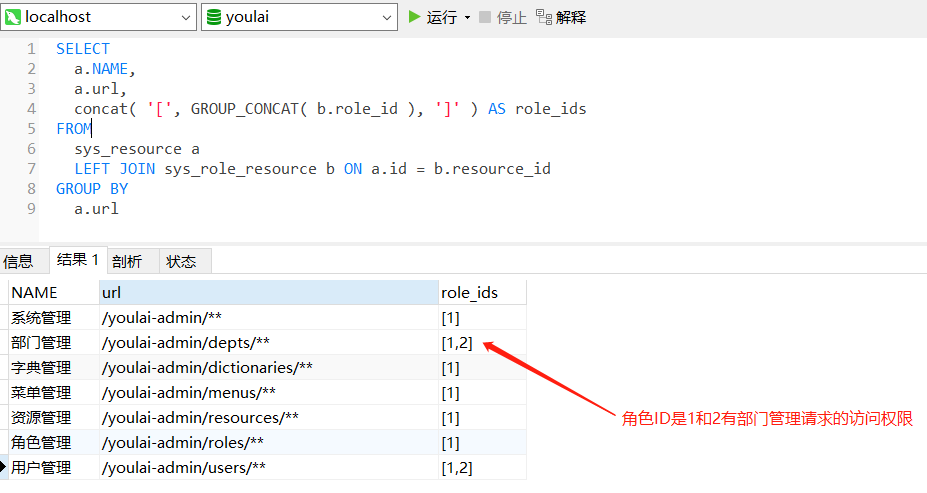
需要把url和role_ids的映射關係緩存到redis,大致意思的意思可以理解擁有url訪問權限的角色ID有哪些。
(2). 初始化緩存時機
SpringBoot提供兩個接口CommandLineRunner和ApplicationRunner用於容器啟動後執行一些業務邏輯,比如數據初始化和預加載、MQ監聽啟動等。兩個接口執行時機無差,唯一區別在於接口的參數不同。有興趣的朋友可以了解一下這兩位朋友,以後會經常再見的哈~
那麼這裡的業務邏輯是在容器初始化完成之後將從MySQL讀取到資源權限數據加載到Redis緩存中,正中下懷,來看下具體實現吧。

Redis緩存中的資源權限數據
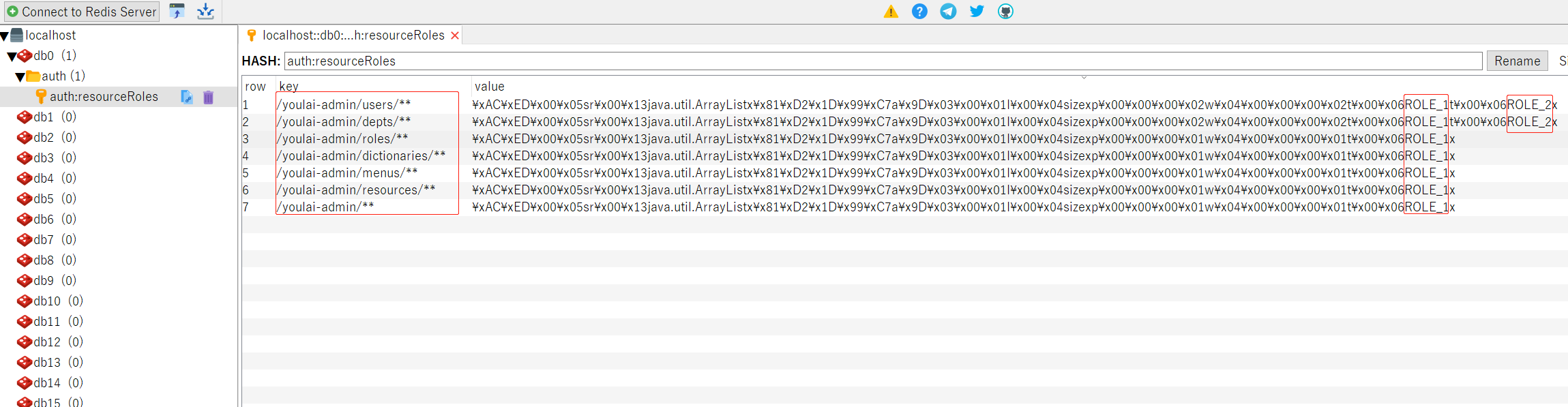
至此從緩存數據可以看到擁有資源url訪問權限的角色信息,從緩存獲取賦值給resourceRolesMap。
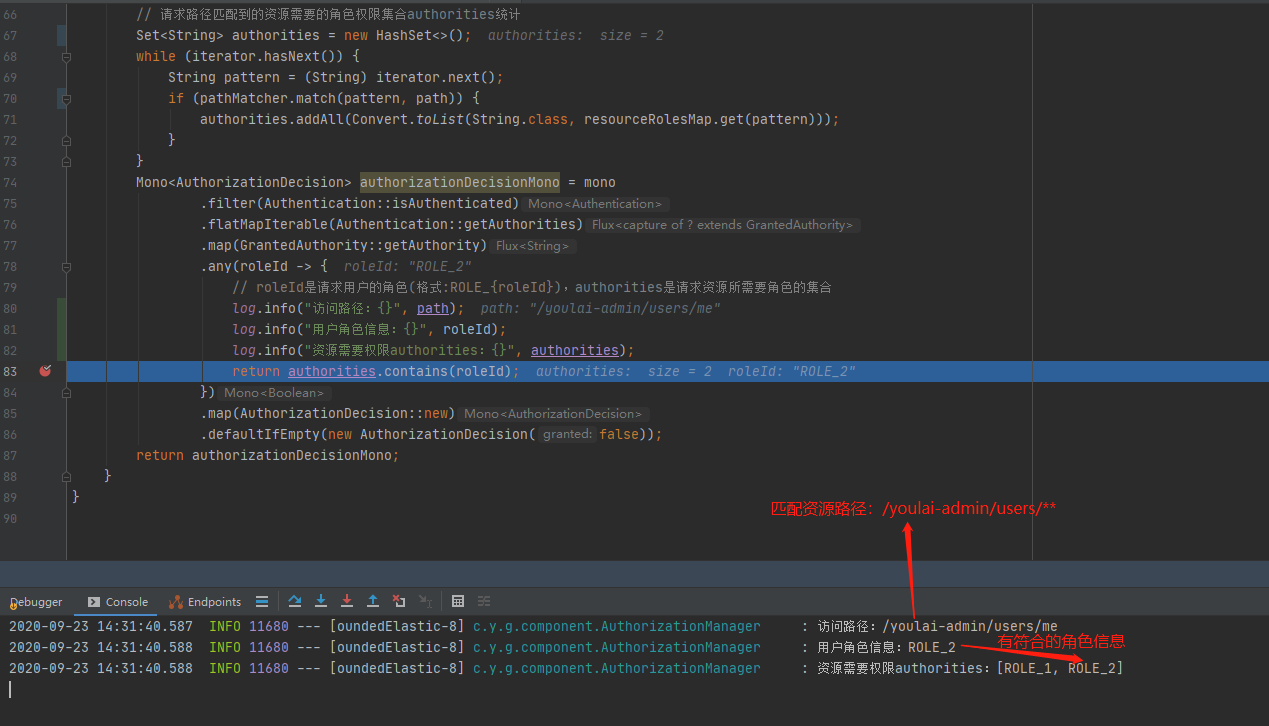
第5處根據請求路徑去匹配resourceRolesMap的資url(Ant Path匹配規則),得到對應資源所需角色信息添加到authorities。
第6處就是判斷用戶是否有權訪問資源的最終一步了,只要用戶的角色中匹配到authorities中的任何一個,就說明該用戶擁有訪問權限,允許通過。
4. 資源服務器配置
這裡做的工作是將鑒權管理器AuthorizationManager配置到資源服務器、請求白名單放行、無權訪問和無效token的自定義異常響應。配置類基本上都是約定俗成那一套,核心功能和注意的細節點通過注釋說明。
/**
 * 資源服務器配置
 */
@AllArgsConstructor
@Configuration
// 註解需要使用@EnableWebFluxSecurity而非@EnableWebSecurity,因為SpringCloud Gateway基於WebFlux
@EnableWebFluxSecurity
public class ResourceServerConfig {

    private AuthorizationManager authorizationManager;
    private CustomServerAccessDeniedHandler customServerAccessDeniedHandler;
    private CustomServerAuthenticationEntryPoint customServerAuthenticationEntryPoint;
    private WhiteListConfig whiteListConfig;

    @Bean
    public SecurityWebFilterChain securityWebFilterChain(ServerHttpSecurity http) {
        http.oauth2ResourceServer().jwt()
                .jwtAuthenticationConverter(jwtAuthenticationConverter());
        // 自定義處理JWT請求頭過期或簽名錯誤的結果
        http.oauth2ResourceServer().authenticationEntryPoint(customServerAuthenticationEntryPoint);
        http.authorizeExchange()
                .pathMatchers(ArrayUtil.toArray(whiteListConfig.getUrls(),String.class)).permitAll()
                .anyExchange().access(authorizationManager)
                .and()
                .exceptionHandling()
                .accessDeniedHandler(customServerAccessDeniedHandler) // 處理未授權
                .authenticationEntryPoint(customServerAuthenticationEntryPoint) //處理未認證
                .and().csrf().disable();

        return http.build();
    }

    /**
     * @link//blog.csdn.net/qq_24230139/article/details/105091273
     * ServerHttpSecurity沒有將jwt中authorities的負載部分當做Authentication
     * 需要把jwt的Claim中的authorities加入
     * 方案:重新定義ReactiveAuthenticationManager權限管理器,默認轉換器JwtGrantedAuthoritiesConverter
     */
    @Bean
    public Converter<Jwt, ? extends Mono<? extends AbstractAuthenticationToken>> jwtAuthenticationConverter() {
        JwtGrantedAuthoritiesConverter jwtGrantedAuthoritiesConverter = new JwtGrantedAuthoritiesConverter();
        jwtGrantedAuthoritiesConverter.setAuthorityPrefix(AuthConstants.AUTHORITY_PREFIX);
        jwtGrantedAuthoritiesConverter.setAuthoritiesClaimName(AuthConstants.AUTHORITY_CLAIM_NAME);

        JwtAuthenticationConverter jwtAuthenticationConverter = new JwtAuthenticationConverter();
        jwtAuthenticationConverter.setJwtGrantedAuthoritiesConverter(jwtGrantedAuthoritiesConverter);
        return new ReactiveJwtAuthenticationConverterAdapter(jwtAuthenticationConverter);
    }

}
/**
 * 無權訪問自定義響應
 */
@Component
public class CustomServerAccessDeniedHandler implements ServerAccessDeniedHandler {

    @Override
    public Mono<Void> handle(ServerWebExchange exchange, AccessDeniedException e) {
        ServerHttpResponse response=exchange.getResponse();
        response.setStatusCode(HttpStatus.OK);
        response.getHeaders().set(HttpHeaders.CONTENT_TYPE, MediaType.APPLICATION_JSON_VALUE);
        response.getHeaders().set("Access-Control-Allow-Origin","*");
        response.getHeaders().set("Cache-Control","no-cache");
        String body= JSONUtil.toJsonStr(Result.custom(ResultCodeEnum.USER_ACCESS_UNAUTHORIZED));
        DataBuffer buffer =  response.bufferFactory().wrap(body.getBytes(Charset.forName("UTF-8")));
        return response.writeWith(Mono.just(buffer));
    }
}
/**
 * 無效token/token過期 自定義響應
 */
@Component
public class CustomServerAuthenticationEntryPoint implements ServerAuthenticationEntryPoint {

    @Override
    public Mono<Void> commence(ServerWebExchange exchange, AuthenticationException e) {
        ServerHttpResponse response = exchange.getResponse();
        response.setStatusCode(HttpStatus.OK);
        response.getHeaders().set(HttpHeaders.CONTENT_TYPE, MediaType.APPLICATION_JSON_VALUE);
        response.getHeaders().set("Access-Control-Allow-Origin", "*");
        response.getHeaders().set("Cache-Control", "no-cache");
        String body = JSONUtil.toJsonStr(Result.custom(ResultCodeEnum.USER_ACCOUNT_UNAUTHENTICATED));
        DataBuffer buffer = response.bufferFactory().wrap(body.getBytes(Charset.forName("UTF-8")));
        return response.writeWith(Mono.just(buffer));
    }

}
5. 網關鑒權測試
| 用戶 | 角色ID | 角色名稱 |
|---|---|---|
| admin | 2 | 系統管理員 |
| 資源名稱 | 資源路徑 | 要求角色權限 |
|---|---|---|
| 系統管理 | /youlai-admin/** | [1] |
| 菜單管理 | /youlai-admin/menus/** | [1,2] |
| 用戶管理 | /youlai-admin/users/** | [1,2] |
| 部門管理 | /youlai-admin/depts/** | [1,2] |
| 字典管理 | /youlai-admin/dictionaries/** | [1] |
| 角色管理 | /youlai-admin/roles/** | [1] |
| 資源管理 | /youlai-admin/resources/** | [1] |
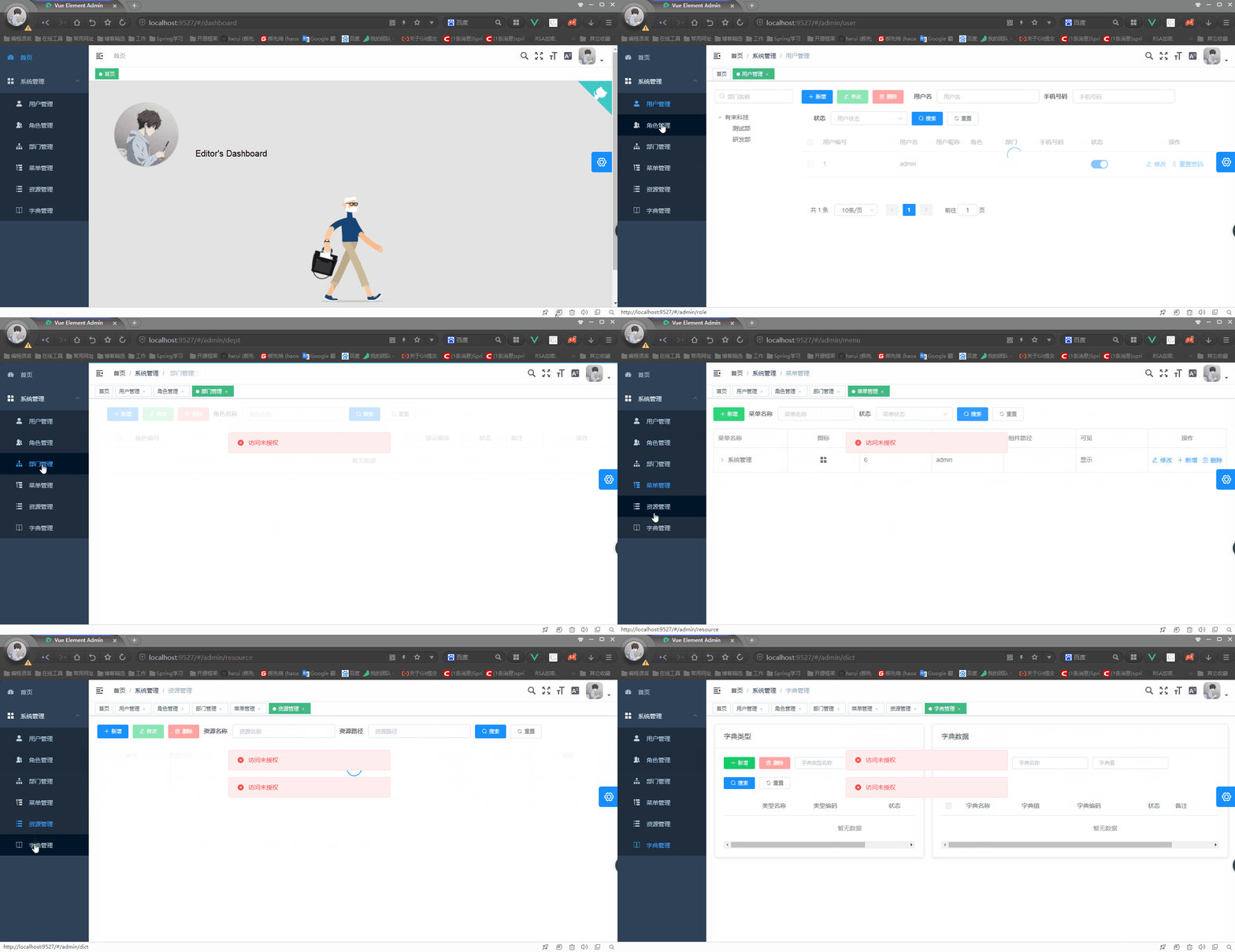
從模擬的數據可以看到admin擁有系統管理員的角色,而系統管理員只有菜單管理、用戶管理、部門管理三個請求資源的訪問權限,無其他資源的訪問權限。
啟動管理平台前端工程 youlai-mall-admin-web 完整代碼地址: github | 碼雲
訪問除了菜單管理、用戶管理、部門管理這三個系統管理員擁有訪問權限的資源之外,頁面都會提示「訪問未授權」,直接的說明了網關服務器實現了請求鑒權的目的。
五. 結語
至此,Spring Cloud的統一認證授權就實現了。其實還有很多可以擴展的點,文章中把客戶端信息存儲在數據庫中,那麼可以添加一個管理界面來維護這些客戶端信息,這樣便可靈活配置客戶端接入認證平台、認證有效期等等。同時也還有未完成的事項,我們知道JWT是無狀態的,那用戶在登出、修改密碼、註銷的時候怎麼能把JWT置為無效呢?因為不可能像cookie/session機制把用戶信息從服務器刪除。所以這些都是值得思考的東西,我會在下篇文章提供對應的解決方案。
今天博客園的園齡達到6年了,6年的時間自己依然沒有折騰啥出來,工作還有生活的壓力都挺大的,但也不想就這樣放棄了,所以。。。加油吧!!!
完整源碼地址
youlai-mall-admin-web github | 碼雲


