Netty源码分析 (八)—– write过程 源码分析
- 2019 年 10 月 3 日
- 筆記
上一篇文章主要讲了netty的read过程,本文主要分析一下write和writeAndFlush。
主要内容
本文分以下几个部分阐述一个java对象最后是如何转变成字节流,写到socket缓冲区中去的
- pipeline中的标准链表结构
- java对象编码过程
- write:写队列
- flush:刷新写队列
- writeAndFlush: 写队列并刷新
pipeline中的标准链表结构
一个标准的pipeline链式结构如下
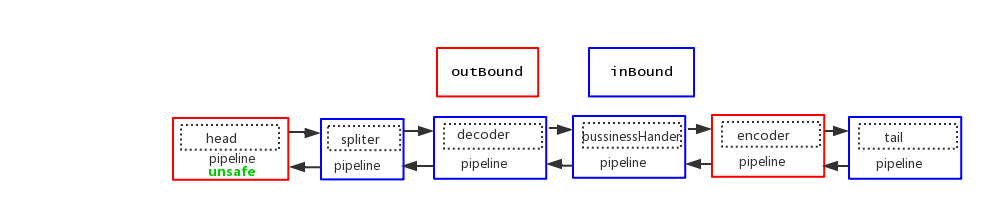
java对象编码过程
为什么我们在pipeline中添加了encoder节点,java对象就转换成netty可以处理的ByteBuf,写到管道里?
我们先看下调用write的code
BusinessHandler
protected void channelRead0(ChannelHandlerContext ctx, Request request) throws Exception { Response response = doBusiness(request); if (response != null) { ctx.channel().write(response); } }
业务处理器接受到请求之后,做一些业务处理,返回一个Response,然后,response在pipeline中传递,落到 Encoder节点,我们来跟踪一下 ctx.channel().write(response);
public ChannelFuture write(Object msg) { return this.pipeline.write(msg); }
调用了Channel中的pipeline中的write方法,我们接着看
public final ChannelFuture write(Object msg) { return this.tail.write(msg); }
pipeline中有属性tail,调用tail中的write,由此我们知道write消息的时候,从tail开始,接着往下看
private void write(Object msg, boolean flush, ChannelPromise promise) { AbstractChannelHandlerContext next = this.findContextOutbound(); Object m = this.pipeline.touch(msg, next); EventExecutor executor = next.executor(); if (executor.inEventLoop()) { if (flush) { next.invokeWriteAndFlush(m, promise); } else { next.invokeWrite(m, promise); } } else { Object task; if (flush) { task = AbstractChannelHandlerContext.WriteAndFlushTask.newInstance(next, m, promise); } else { task = AbstractChannelHandlerContext.WriteTask.newInstance(next, m, promise); } safeExecute(executor, (Runnable)task, promise, m); } }
中间我省略了几个重载的方法,我们来看看第一行代码,next = this.findContextOutbound();
private AbstractChannelHandlerContext findContextOutbound() { AbstractChannelHandlerContext ctx = this; do { ctx = ctx.prev; } while(!ctx.outbound); return ctx; }
通过 ctx = ctx.prev; 我们知道从tail开始找到pipeline中的第一个outbound的handler,然后调用 invokeWrite(m, promise),此时找到的第一个outbound的handler就是我们自定义的编码器Encoder
我们接着看 next.invokeWrite(m, promise);
private void invokeWrite(Object msg, ChannelPromise promise) { if (this.invokeHandler()) { this.invokeWrite0(msg, promise); } else { this.write(msg, promise); } } private void invokeWrite0(Object msg, ChannelPromise promise) { try { ((ChannelOutboundHandler)this.handler()).write(this, msg, promise); } catch (Throwable var4) { notifyOutboundHandlerException(var4, promise); } }
一路代码跟下来,我们可以知道是调用了第一个outBound类型的handler中的write方法,也就是第一个调用的是我们自定义编码器Encoder的write方法
我们来看看自定义Encoder
public class Encoder extends MessageToByteEncoder<Response> { @Override protected void encode(ChannelHandlerContext ctx, Response response, ByteBuf out) throws Exception { out.writeByte(response.getVersion()); out.writeInt(4 + response.getData().length); out.writeBytes(response.getData()); } }
自定义Encoder继承 MessageToByteEncoder ,并且重写了 encode方法,这就是编码器的核心,我们先来看 MessageToByteEncoder
public abstract class MessageToByteEncoder<I> extends ChannelOutboundHandlerAdapter {
我们看到 MessageToByteEncoder 继承了 ChannelOutboundHandlerAdapter,说明了 Encoder 是一个 Outbound的handler
我们来看看 Encoder 的父类 MessageToByteEncoder中的write方法
MessageToByteEncoder
@Override public void write(ChannelHandlerContext ctx, Object msg, ChannelPromise promise) throws Exception { ByteBuf buf = null; try { // 判断当前Handelr是否能处理写入的消息 if (acceptOutboundMessage(msg)) { @SuppressWarnings("unchecked") // 强制换换 I cast = (I) msg; // 分配一段ButeBuf buf = allocateBuffer(ctx, cast, preferDirect); try { // 调用encode,这里就调回到 `Encoder` 这个Handelr中 encode(ctx, cast, buf); } finally { // 既然自定义java对象转换成ByteBuf了,那么这个对象就已经无用了,释放掉 // (当传入的msg类型是ByteBuf的时候,就不需要自己手动释放了) ReferenceCountUtil.release(cast); } // 如果buf中写入了数据,就把buf传到下一个节点 if (buf.isReadable()) { ctx.write(buf, promise); } else { // 否则,释放buf,将空数据传到下一个节点 buf.release(); ctx.write(Unpooled.EMPTY_BUFFER, promise); } buf = null; } else { // 如果当前节点不能处理传入的对象,直接扔给下一个节点处理 ctx.write(msg, promise); } } catch (EncoderException e) { throw e; } catch (Throwable e) { throw new EncoderException(e); } finally { // 当buf在pipeline中处理完之后,释放 if (buf != null) { buf.release(); } } }
这里,我们详细阐述一下Encoder是如何处理传入的java对象的
1.判断当前Handler是否能处理写入的消息,如果能处理,进入下面的流程,否则,直接扔给下一个节点处理
2.将对象强制转换成Encoder可以处理的 Response对象
3.分配一个ByteBuf
4.调用encoder,即进入到 Encoder 的 encode方法,该方法是用户代码,用户将数据写入ByteBuf
5.既然自定义java对象转换成ByteBuf了,那么这个对象就已经无用了,释放掉,(当传入的msg类型是ByteBuf的时候,就不需要自己手动释放了)
6.如果buf中写入了数据,就把buf传到下一个节点,否则,释放buf,将空数据传到下一个节点
7.最后,当buf在pipeline中处理完之后,释放节点
总结一点就是,Encoder节点分配一个ByteBuf,调用encode方法,将java对象根据自定义协议写入到ByteBuf,然后再把ByteBuf传入到下一个节点,在我们的例子中,最终会传入到head节点,因为head节点是一个OutBount类型的handler
HeadContext
public void write(ChannelHandlerContext ctx, Object msg, ChannelPromise promise) throws Exception { unsafe.write(msg, promise); }
这里的msg就是前面在Encoder节点中,载有java对象数据的自定义ByteBuf对象,进入下一节
write:写队列
我们来看看channel中unsafe的write方法,先来看看其中的一个属性
AbstractUnsafe
protected abstract class AbstractUnsafe implements Unsafe { private volatile ChannelOutboundBuffer outboundBuffer = new ChannelOutboundBuffer(AbstractChannel.this);
我们来看看 ChannelOutboundBuffer 这个类
public final class ChannelOutboundBuffer { private final Channel channel; private ChannelOutboundBuffer.Entry flushedEntry; private ChannelOutboundBuffer.Entry unflushedEntry; private ChannelOutboundBuffer.Entry tailEntry;
ChannelOutboundBuffer内部维护了一个Entry链表,并使用Entry封装msg。其中的属性我们下面会详细讲
我们回到正题,接着看 unsafe.write(msg, promise);
AbstractUnsafe
@Override public final void write(Object msg, ChannelPromise promise) { assertEventLoop(); ChannelOutboundBuffer outboundBuffer = this.outboundBuffer; int size; try { msg = filterOutboundMessage(msg); size = pipeline.estimatorHandle().size(msg); if (size < 0) { size = 0; } } catch (Throwable t) { safeSetFailure(promise, t); ReferenceCountUtil.release(msg); return; } outboundBuffer.addMessage(msg, size, promise); }
1.调用 filterOutboundMessage() 方法,将待写入的对象过滤,把非ByteBuf对象和FileRegion过滤,把所有的非直接内存转换成直接内存DirectBuffer
@Override protected final Object filterOutboundMessage(Object msg) { if (msg instanceof ByteBuf) { ByteBuf buf = (ByteBuf) msg; if (buf.isDirect()) { return msg; } return newDirectBuffer(buf); } if (msg instanceof FileRegion) { return msg; } throw new UnsupportedOperationException( "unsupported message type: " + StringUtil.simpleClassName(msg) + EXPECTED_TYPES); }
2.接下来,估算出需要写入的ByteBuf的size
3.最后,调用 ChannelOutboundBuffer 的addMessage(msg, size, promise) 方法,所以,接下来,我们需要重点看一下这个方法干了什么事情
ChannelOutboundBuffer
public void addMessage(Object msg, int size, ChannelPromise promise) { // 创建一个待写出的消息节点 Entry entry = Entry.newInstance(msg, size, total(msg), promise); if (tailEntry == null) { flushedEntry = null; tailEntry = entry; } else { Entry tail = tailEntry; tail.next = entry; tailEntry = entry; } if (unflushedEntry == null) { unflushedEntry = entry; } incrementPendingOutboundBytes(size, false); }
想要理解上面这段代码,必须得掌握写缓存中的几个消息指针,如下图
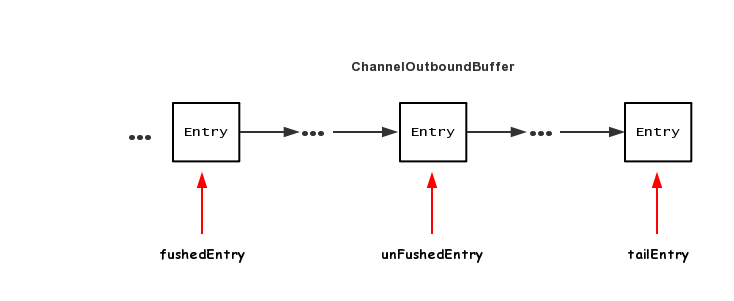
ChannelOutboundBuffer 里面的数据结构是一个单链表结构,每个节点是一个 Entry,Entry 里面包含了待写出ByteBuf 以及消息回调 promise,下面分别是三个指针的作用
1.flushedEntry 指针表示第一个被写到操作系统Socket缓冲区中的节点
2.unFlushedEntry 指针表示第一个未被写入到操作系统Socket缓冲区中的节点
3.tailEntry指针表示ChannelOutboundBuffer缓冲区的最后一个节点
初次调用 addMessage 之后,各个指针的情况为

fushedEntry指向空,unFushedEntry和 tailEntry 都指向新加入的节点
第二次调用 addMessage之后,各个指针的情况为

第n次调用 addMessage之后,各个指针的情况为

可以看到,调用n次addMessage,flushedEntry指针一直指向NULL,表示现在还未有节点需要写出到Socket缓冲区,而unFushedEntry之后有n个节点,表示当前还有n个节点尚未写出到Socket缓冲区中去
flush:刷新写队列
不管调用channel.flush(),还是ctx.flush(),最终都会落地到pipeline中的head节点
HeadContext
@Override public void flush(ChannelHandlerContext ctx) throws Exception { unsafe.flush(); }
之后进入到AbstractUnsafe
AbstractUnsafe
public final void flush() { assertEventLoop(); ChannelOutboundBuffer outboundBuffer = this.outboundBuffer; if (outboundBuffer == null) { return; } outboundBuffer.addFlush(); flush0(); }
flush方法中,先调用 outboundBuffer.addFlush();
ChannelOutboundBuffer
public void addFlush() { Entry entry = unflushedEntry; if (entry != null) { if (flushedEntry == null) { flushedEntry = entry; } do { flushed ++; if (!entry.promise.setUncancellable()) { int pending = entry.cancel(); decrementPendingOutboundBytes(pending, false, true); } entry = entry.next; } while (entry != null); unflushedEntry = null; } }
可以结合前面的图来看,首先拿到 unflushedEntry 指针,然后将 flushedEntry 指向unflushedEntry所指向的节点,调用完毕之后,三个指针的情况如下所示
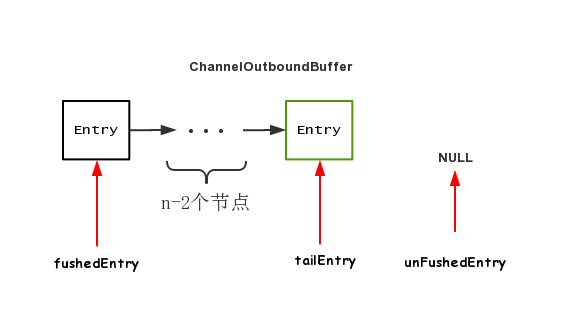
相当于所有的节点都即将开始推送出去
接下来,调用 flush0();
AbstractUnsafe
protected void flush0() { doWrite(outboundBuffer); }
发现这里的核心代码就一个 doWrite,继续跟
AbstractNioByteChannel
protected void doWrite(ChannelOutboundBuffer in) throws Exception { int writeSpinCount = -1; boolean setOpWrite = false; for (;;) { // 拿到第一个需要flush的节点的数据 Object msg = in.current(); if (msg instanceof ByteBuf) { // 强转为ByteBuf,若发现没有数据可读,直接删除该节点 ByteBuf buf = (ByteBuf) msg; boolean done = false; long flushedAmount = 0; // 拿到自旋锁迭代次数 if (writeSpinCount == -1) { writeSpinCount = config().getWriteSpinCount(); } // 自旋,将当前节点写出 for (int i = writeSpinCount - 1; i >= 0; i --) { int localFlushedAmount = doWriteBytes(buf); if (localFlushedAmount == 0) { setOpWrite = true; break; } flushedAmount += localFlushedAmount; if (!buf.isReadable()) { done = true; break; } } in.progress(flushedAmount); // 写完之后,将当前节点删除 if (done) { in.remove(); } else { break; } } } }
这里略微有点复杂,我们分析一下
1.第一步,调用current()先拿到第一个需要flush的节点的数据
ChannelOutBoundBuffer
public Object current() { Entry entry = flushedEntry; if (entry == null) { return null; } return entry.msg; }
2.第二步,拿到自旋锁的迭代次数
if (writeSpinCount == -1) { writeSpinCount = config().getWriteSpinCount(); }
3.自旋的方式将ByteBuf写出到jdk nio的Channel
for (int i = writeSpinCount - 1; i >= 0; i --) { int localFlushedAmount = doWriteBytes(buf); if (localFlushedAmount == 0) { setOpWrite = true; break; } flushedAmount += localFlushedAmount; if (!buf.isReadable()) { done = true; break; } }
doWriteBytes 方法跟进去
protected int doWriteBytes(ByteBuf buf) throws Exception { final int expectedWrittenBytes = buf.readableBytes(); return buf.readBytes(javaChannel(), expectedWrittenBytes); }
我们发现,出现了 javaChannel(),表明已经进入到了jdk nio Channel的领域,我们来看看 buf.readBytes(javaChannel(), expectedWrittenBytes);
public int readBytes(GatheringByteChannel out, int length) throws IOException { this.checkReadableBytes(length); int readBytes = this.getBytes(this.readerIndex, out, length); this.readerIndex += readBytes; return readBytes; }
我们来看关键代码 this.getBytes(this.readerIndex, out, length)
private int getBytes(int index, GatheringByteChannel out, int length, boolean internal) throws IOException { this.checkIndex(index, length); if (length == 0) { return 0; } else { ByteBuffer tmpBuf; if (internal) { tmpBuf = this.internalNioBuffer(); } else { tmpBuf = ((ByteBuffer)this.memory).duplicate(); } index = this.idx(index); tmpBuf.clear().position(index).limit(index + length); //将tmpBuf中的数据写到out中 return out.write(tmpBuf); } }
我们来看看out.write(tmpBuf)
public int write(ByteBuffer src) throws IOException { ensureOpen(); if (!writable) throw new NonWritableChannelException(); synchronized (positionLock) { int n = 0; int ti = -1; try { begin(); ti = threads.add(); if (!isOpen()) return 0; do { n = IOUtil.write(fd, src, -1, nd); } while ((n == IOStatus.INTERRUPTED) && isOpen()); return IOStatus.normalize(n); } finally { threads.remove(ti); end(n > 0); assert IOStatus.check(n); } } }
和read实现一样,SocketChannelImpl的write方法通过IOUtil的write实现:关键代码 n = IOUtil.write(fd, src, -1, nd);
static int write(FileDescriptor var0, ByteBuffer var1, long var2, NativeDispatcher var4) throws IOException { //如果是DirectBuffer,直接写,将堆外缓存中的数据拷贝到内核缓存中进行发送 if (var1 instanceof DirectBuffer) { return writeFromNativeBuffer(var0, var1, var2, var4); } else { //非DirectBuffer //获取已经读取到的位置 int var5 = var1.position(); //获取可以读到的位置 int var6 = var1.limit(); assert var5 <= var6; //申请一个原buffer可读大小的DirectByteBuffer int var7 = var5 <= var6 ? var6 - var5 : 0; ByteBuffer var8 = Util.getTemporaryDirectBuffer(var7); int var10; try { var8.put(var1); var8.flip(); var1.position(var5); //通过DirectBuffer写,将堆外缓存的数据拷贝到内核缓存中进行发送 int var9 = writeFromNativeBuffer(var0, var8, var2, var4); if (var9 > 0) { var1.position(var5 + var9); } var10 = var9; } finally { //回收分配的DirectByteBuffer Util.offerFirstTemporaryDirectBuffer(var8); } return var10; } }
代码逻辑我们就不再讲了,代码注释已经很清楚了,这里我们关注一点,我们可以看看我们前面的一个方法 filterOutboundMessage(),将待写入的对象过滤,把非ByteBuf对象和FileRegion过滤,把所有的非直接内存转换成直接内存DirectBuffer
说明到了这一步所有的 var1 意境是直接内存DirectBuffer,就不需要走到else,就不需要write两次了
4.删除该节点
节点的数据已经写入完毕,接下来就需要删除该节点
ChannelOutBoundBuffer
public boolean remove() { Entry e = flushedEntry; Object msg = e.msg; ChannelPromise promise = e.promise; int size = e.pendingSize; removeEntry(e); if (!e.cancelled) { ReferenceCountUtil.safeRelease(msg); safeSuccess(promise); } // recycle the entry e.recycle(); return true; }
首先拿到当前被flush掉的节点(flushedEntry所指),然后拿到该节点的回调对象 ChannelPromise, 调用 removeEntry()方法移除该节点
private void removeEntry(Entry e) { if (-- flushed == 0) { flushedEntry = null; if (e == tailEntry) { tailEntry = null; unflushedEntry = null; } } else { flushedEntry = e.next; } }
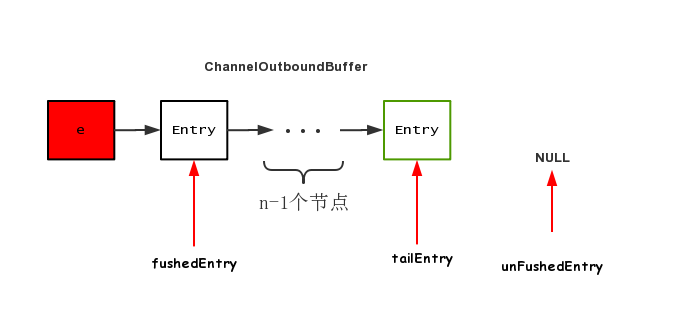
这里的remove是逻辑移除,只是将flushedEntry指针移到下个节点,调用完毕之后,节点图示如下
writeAndFlush: 写队列并刷新
理解了write和flush这两个过程,writeAndFlush 也就不难了
public final ChannelFuture writeAndFlush(Object msg) { return tail.writeAndFlush(msg); } public ChannelFuture writeAndFlush(Object msg) { return writeAndFlush(msg, newPromise()); } public ChannelFuture writeAndFlush(Object msg, ChannelPromise promise) { write(msg, true, promise); return promise; } private void write(Object msg, boolean flush, ChannelPromise promise) { AbstractChannelHandlerContext next = findContextOutbound(); EventExecutor executor = next.executor(); if (executor.inEventLoop()) { if (flush) { next.invokeWriteAndFlush(m, promise); } else { next.invokeWrite(m, promise); } } }
可以看到,最终,通过一个boolean变量,表示是调用 invokeWriteAndFlush,还是 invokeWrite,invokeWrite便是我们上文中的write过程
private void invokeWriteAndFlush(Object msg, ChannelPromise promise) { invokeWrite0(msg, promise); invokeFlush0(); }
可以看到,最终调用的底层方法和单独调用 write 和 flush 是一样的
private void invokeWrite(Object msg, ChannelPromise promise) { invokeWrite0(msg, promise); } private void invokeFlush(Object msg, ChannelPromise promise) { invokeFlush0(msg, promise); }
由此看来,invokeWriteAndFlush基本等价于write方法之后再来一次flush
总结
1.pipeline中的编码器原理是创建一个ByteBuf,将java对象转换为ByteBuf,然后再把ByteBuf继续向前传递
2.调用write方法并没有将数据写到Socket缓冲区中,而是写到了一个单向链表的数据结构中,flush才是真正的写出
3.writeAndFlush等价于先将数据写到netty的缓冲区,再将netty缓冲区中的数据写到Socket缓冲区中,写的过程与并发编程类似,用自旋锁保证写成功
4.netty中的缓冲区中的ByteBuf为DirectByteBuf
