odoo12之应用:一、双因子验证(Two-factor authentication, 2FA)(HOTP,TOTP)附源码
- 2019 年 10 月 3 日
- 筆記
前言
双因子认证:双因子认证(2FA)是指结合密码以及实物(信用卡、SMS手机、令牌或指纹等生物标志)两种条件对用户进行认证的方法。–百度百科
跟我一样”老”的网瘾少年想必一定见过买点卡后上面送的密保(类似但不完全一样),还有”将军令”,以及网银的网盾,是一种二次验证的机制;它通常是6位的数字,每次使用后(HOTP)或者一定时间后(TOTP)都将会刷新,大大加大了用户的安全性,OTP(One-Time Password)分为HOTP(HMAC-based One-Time Password)和TOTP(Time-based One-Time Password)。
HOTP是基于 HMAC 算法加密的一次性密码,以事件同步机制,把事件次序(counter)及相同的密钥(secret)作为输入,通过 HASH 算法运算出一致的密码。
TOTP是基于时间戳算法的一次性密码,基于客户端的时间和服务器的时间及相同的密钥(secret)作为输入,产生数字进行对比,这就需要客户端的时间和服务器的时间保持相对的一致性。
Odoo12集成双因子认证
为了让odoo12的登录也可以使用双因子认证以提高安全性,我们需要:
1、实现OTP验证逻辑 2、为ODOO用户界面展示二维码 3、为管理员用户提供OTP开关 4、在登录界面增加对OTP的验证
我们需要依赖的包:
pip install pyotp pip install pyqrcode pip install pypng
实现OTP验证逻辑
首先,我们需要对res.users用户进行重写,添加OTP验证逻辑
# -*- coding: utf-8 -*- import base64 import pyotp import pyqrcode import io from odoo import models, fields, api, _, tools from odoo.http import request from odoo.exceptions import AccessDenied import logging _logger = logging.getLogger(__name__) class ResUsers(models.Model): _inherit = 'res.users' otp_type = fields.Selection(selection=[('time', _('Time based')), ('count', _('Counter based'))], default='time', string="Type", help="Type of 2FA, time = new code for each period, counter = new code for each login") otp_secret = fields.Char(string="Secret", size=16, help='16 character base32 secret', default=lambda self: pyotp.random_base32()) otp_counter = fields.Integer(string="Counter", default=0) otp_digits = fields.Integer(string="Digits", default=6, help="Length of the code") otp_period = fields.Integer(string="Period", default=30, help="Seconds to update code") otp_qrcode = fields.Binary(compute="_compute_otp_qrcode") otp_uri = fields.Char(compute='_compute_otp_uri', string="URI") # 生成二维码 @api.model def create_qr_code(self, uri): buffer = io.BytesIO() qr = pyqrcode.create(uri) qr.png(buffer, scale=3) return base64.b64encode(buffer.getvalue()).decode() # 将二维码的值赋给otp_qrcode变量 @api.depends('otp_uri') def _compute_otp_qrcode(self): self.ensure_one() self.otp_qrcode = self.create_qr_code(self.otp_uri) # 计算otp_uri @api.depends('otp_type', 'otp_period', 'otp_digits', 'otp_secret', 'company_id', 'otp_counter') def _compute_otp_uri(self): self.ensure_one() if self.otp_type == 'time': self.otp_uri = pyotp.utils.build_uri(secret=self.otp_secret, name=self.login, issuer_name=self.company_id.name, period=self.otp_period) else: self.otp_uri = pyotp.utils.build_uri(secret=self.otp_secret, name=self.login, initial_count=self.otp_counter, issuer_name=self.company_id.name, digits=self.otp_digits) # 验证otp验证码是否正确 @api.model def check_otp(self, otp_code): res_user = self.env['res.users'].browse(self.env.uid) if res_user.otp_type == 'time': totp = pyotp.TOTP(res_user.otp_secret) return totp.verify(otp_code) elif res_user.otp_type == 'count': hotp = pyotp.HOTP(res_user.otp_secret) # 允许用户不小心多点20次,但是已经用过的码则无法再次使用 for count in range(res_user.otp_counter, res_user.otp_counter + 20): if count > 0 and hotp.verify(otp_code, count): res_user.otp_counter = count + 1 return True return False # 覆盖原生_check_credentials,增加双因子验证 def _check_credentials(self, password): super(ResUsers, self)._check_credentials(password) # 判断是否打开双因子验证并校验验证码 if self.company_id.is_open_2fa and not self.check_otp(request.params.get('tfa_code')): # pass raise AccessDenied(_('Validation Code Error!'))
在这里,我们继承了res.users,添加了如下方法:
_compute_otp_uri: 计算otp_uri create_qr_code: 通过计算的otp_uri生成二维码 _compute_otp_qrcode: 调用create_qr_code生成二维码,赋值给otp_qrcode变量 check_otp: 用于验证otp验证码是否正确 _check_credentials: 覆盖原生_check_credentials,判断双因子的开关,调用check_otp进行双因子验证
_check_credentials方法中,我们判断了双因子的开关,而双因子开关是以公司为单位的,因此我们还需要对res.company进行继承添加字段:
# -*- coding: utf-8 -*- from odoo import models, api, fields class ResCompany(models.Model): _inherit = "res.company" is_open_2fa = fields.Boolean(string="Open 2FA", default=False)
为ODOO用户界面展示二维码
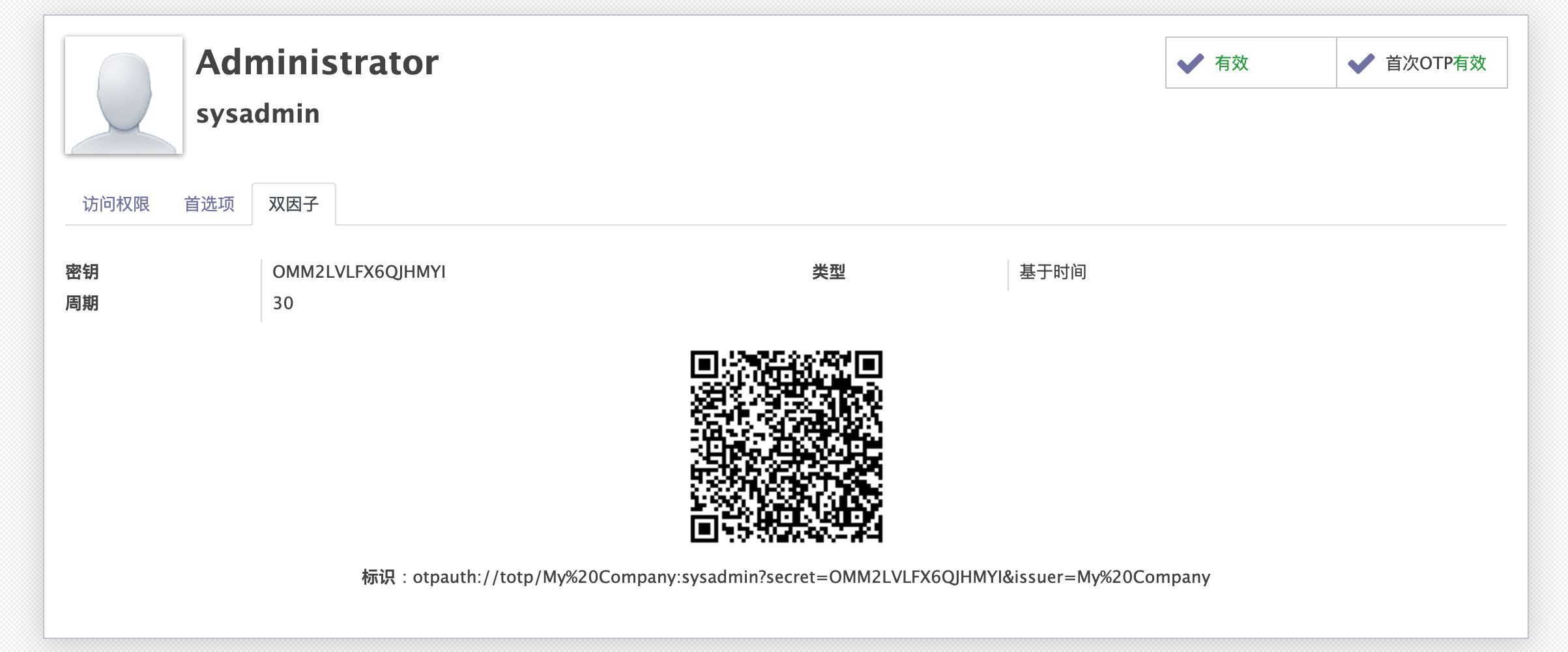
我们写好逻辑后,需要在用户界面中将二维码以及配置展示出来:
<?xml version="1.0" encoding="utf-8"?> <odoo> <data> <!-- 设置->用户&公司->用户界面--> <record id="view_users_form" model="ir.ui.view"> <field name="name">res.users.form</field> <field name="model">res.users</field> <field name="inherit_id" ref="base.view_users_form"/> <field name="arch" type="xml"> <notebook colspan="4" position="inside"> <page string="2FA"> <group col="4" colspan="4"> <field name="otp_secret"/> <field name="otp_type"/> <field name="otp_counter" attrs="{'invisible':[('otp_type', '==', 'time')], 'readonly': True}"/> <field name="otp_digits" attrs="{'invisible':[('otp_type', '==', 'time')]}"/> <field name="otp_period" attrs="{'invisible':[('otp_type', '==', 'count')]}"/> </group> <div class="row" style="display: block;text-align: center;"> <field name="otp_qrcode" widget="image" nolabel="1"/> </div> <div class="row" style="display: block;text-align: center;"> <label for="otp_uri"/>: <field name="otp_uri"/> </div> </page> </notebook> </field> </record> <!-- 右上角首选项界面--> <record id="view_users_form_simple_modif" model="ir.ui.view"> <field name="name">res.users.preferences.form.otp</field> <field name="model">res.users</field> <field name="inherit_id" ref="base.view_users_form_simple_modif"/> <field name="arch" type="xml"> <footer position="before"> <div class="o_horizontal_separator">OTP</div> <div class="row" style="display:block;text-align:center"> <field name="otp_qrcode" widget="image" nolabel="1"/> </div> <div class="row" style="display:block;text-align:center"> <field name="otp_uri" nolabel="1"/> </div> </footer> </field> </record> </data> </odoo>
效果如下:
为管理员用户提供OTP开关
我们需要让OTP可以为管理员配置,我们将它加入到res.config.settings的常规设置中:
首先,继承模型添加关联字段,is_open_2fa与company_id里的is_open_2fa关联:
# -*- coding: utf-8 -*- from odoo import fields, models class ResConfigSettings(models.TransientModel): _inherit = 'res.config.settings' is_open_2fa = fields.Boolean(related='company_id.is_open_2fa', string="Open 2FA", readonly=False)
然后,我们将它展示到常规设置->用户当中
<?xml version="1.0" encoding="utf-8"?> <odoo> <record id="res_config_settings_view_form" model="ir.ui.view"> <field name="name">res.config.settings.view.form.inherit.base.setup</field> <field name="model">res.config.settings</field> <field name="priority" eval="100"/> <field name="inherit_id" ref="base.res_config_settings_view_form"/> <field name="arch" type="xml"> <xpath expr="//div[@id='user_default_rights']" position="inside"> <div class="col-12 col-lg-6 o_setting_box"> <div class="o_setting_left_pane"> <field name="is_open_2fa"/> </div> <div class="o_setting_right_pane"> <label for="is_open_2fa"/> <div class="text-muted"> The Switch to open 2FA </div> </div> </div> </xpath> </field> </record> </odoo>
效果如下: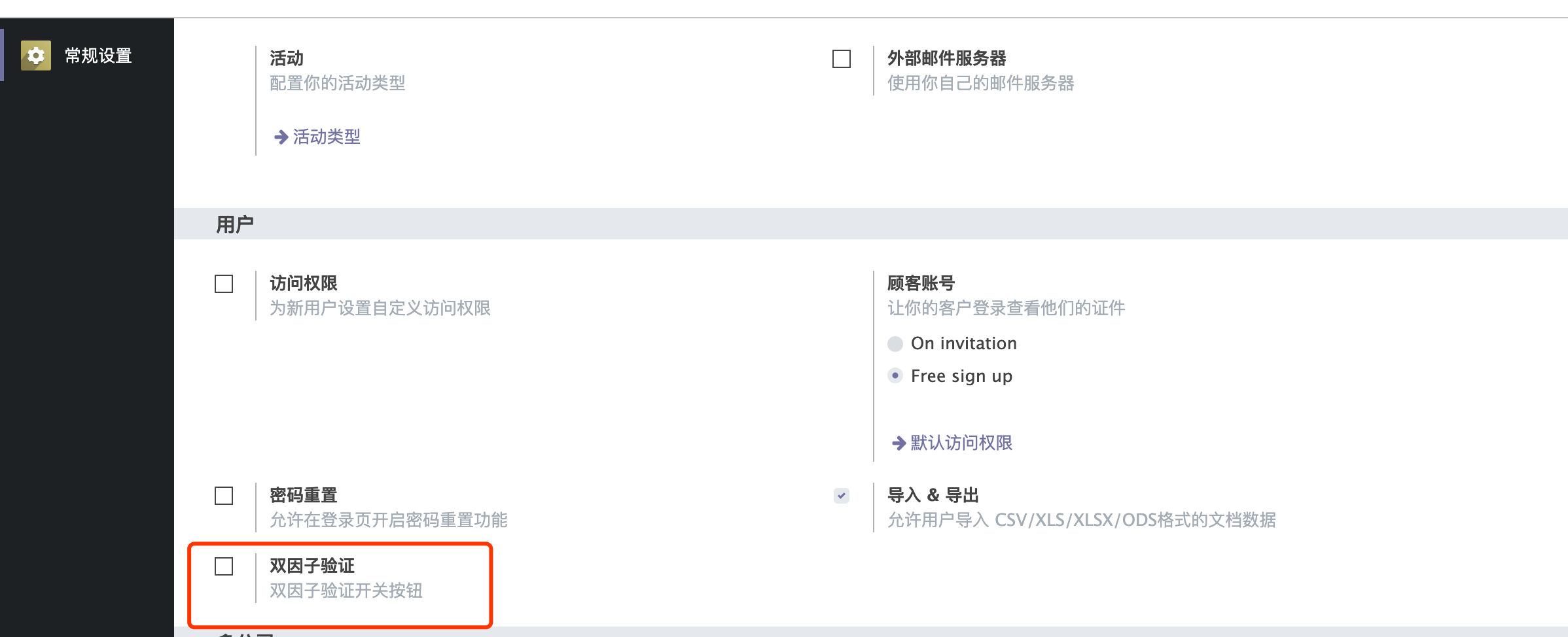
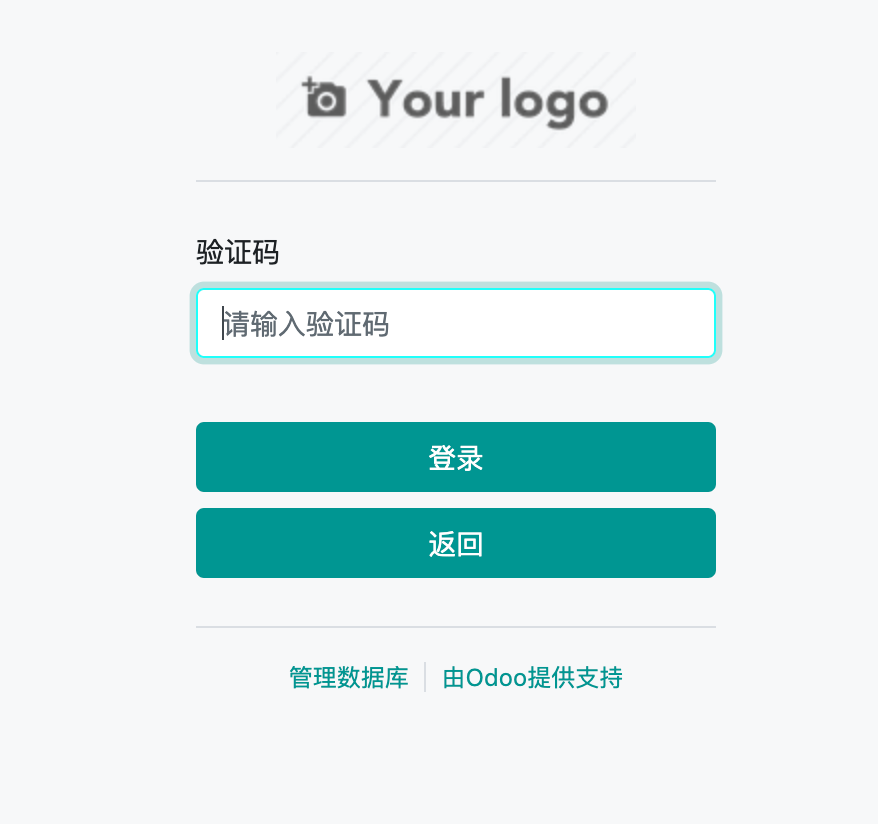
在登录界面增加对OTP的验证
最后,我们修改登录界面,在页面中增加对otp的验证。
首先,我们需要新增输入页面:
<?xml version="1.0" encoding="utf-8"?> <odoo> <template id="auth_2FA.2fa_auth" name="TFA_auth"> <t t-call="web.login_layout"> <form class="oe_login_form" role="form" t-attf-action="/web/login/2fa_auth{{ '?debug' if debug else '' }}" method="post" onsubmit="this.action = this.action + location.hash"> <input type="hidden" name="csrf_token" t-att-value="request.csrf_token()"/> <div class="form-group field-login"> <label for="tfa_code">Validation Code</label> <input type="text" placeholder="Please input 2FA digits number" name="tfa_code" t-att-value="tfa_code" id="tfa_code" t-attf-class="form-control #{'form-control-sm' if form_small else ''}" required="required" autofocus="autofocus" autocapitalize="off"/> </div> <p class="alert alert-danger" t-if="error" role="alert"> <t t-esc="error"/> </p> <p class="alert alert-success" t-if="message" role="status"> <t t-esc="message"/> </p> <div t-attf-class="clearfix oe_login_buttons text-center mb-1 {{'pt-2' if form_small else 'pt-3'}}"> <button type="submit" class="btn btn-primary btn-block">Log in</button> <button type="button" class="btn btn-primary btn-block" onclick="window.location.href='/web/login'">Return</button> <div class="o_login_auth"/> </div> <input type="hidden" name="login" t-att-value="login"/> <input type="hidden" name="password" t-att-value="password"/> <input type="hidden" name="redirect" t-att-value="redirect"/> </form> </t> </template> </odoo>
然后,我们需要对/web/login路由进行修改,更改它的跳转逻辑和验证逻辑,在controller中添加main.py:
# -*- coding: utf-8 -*- import odoo import logging from odoo import http, _ from odoo.addons.web.controllers.main import ensure_db, Home from passlib.context import CryptContext from odoo.http import request default_crypt_context = CryptContext( ['pbkdf2_sha512', 'md5_crypt'], deprecated=['md5_crypt'], ) _logger = logging.getLogger(__name__) class WebHome(odoo.addons.web.controllers.main.Home): # Override by misterling @http.route('/web/login', type='http', auth="none", sitemap=False) def web_login(self, redirect=None, **kw): ensure_db() request.params['login_success'] = False if request.httprequest.method == 'GET' and redirect and request.session.uid: return http.redirect_with_hash(redirect) if not request.uid: request.uid = odoo.SUPERUSER_ID values = request.params.copy() try: values['databases'] = http.db_list() except odoo.exceptions.AccessDenied: values['databases'] = None if request.httprequest.method == 'POST': old_uid = request.uid try: request.env.cr.execute( "SELECT COALESCE(company_id, NULL), COALESCE(password, '') FROM res_users WHERE login=%s", [request.params['login']] ) res = request.env.cr.fetchone() if not res: raise odoo.exceptions.AccessDenied(_('Wrong login account')) [company_id, hashed] = res if company_id and request.env['res.company'].browse(company_id).is_open_2fa: # 验证密码正确性 valid, replacement = default_crypt_context.verify_and_update(request.params['password'], hashed) if replacement is not None: self._set_encrypted_password(self.env.user.id, replacement) if valid: response = request.render('auth_2FA.2fa_auth', values) response.headers['X-Frame-Options'] = 'DENY' return response else: raise odoo.exceptions.AccessDenied() # 没有打开双因子验证 uid = request.session.authenticate(request.session.db, request.params['login'], request.params['password']) request.params['login_success'] = True return http.redirect_with_hash(self._login_redirect(uid, redirect=redirect)) except odoo.exceptions.AccessDenied as e: request.uid = old_uid if e.args == odoo.exceptions.AccessDenied().args: values['error'] = _("Wrong login/password") else: values['error'] = e.args[0] else: if 'error' in request.params and request.params.get('error') == 'access': values['error'] = _('Only employee can access this database. Please contact the administrator.') if 'login' not in values and request.session.get('auth_login'): values['login'] = request.session.get('auth_login') if not odoo.tools.config['list_db']: values['disable_database_manager'] = True # otherwise no real way to test debug mode in template as ?debug => # values['debug'] = '' but that's also the fallback value when # missing variables in qweb if 'debug' in values: values['debug'] = True response = request.render('web.login', values) response.headers['X-Frame-Options'] = 'DENY' return response @http.route('/web/login/2fa_auth', type='http', auth="none") def web_login_2fa_auth(self, redirect=None, **kw): ensure_db() request.params['login_success'] = False if not request.uid: request.uid = odoo.SUPERUSER_ID values = request.params.copy() try: values['databases'] = http.db_list() except odoo.exceptions.AccessDenied: values['databases'] = None old_uid = request.uid try: uid = request.session.authenticate(request.session.db, request.params['login'], request.params['password']) request.params['login_success'] = True return http.redirect_with_hash(self._login_redirect(uid, redirect=redirect)) except odoo.exceptions.AccessDenied as e: request.uid = old_uid if e.args == odoo.exceptions.AccessDenied().args: values['error'] = _("Wrong login/password") else: values['error'] = e.args[0] if not odoo.tools.config['list_db']: values['disable_database_manager'] = True if 'login' not in values and request.session.get('auth_login'): values['login'] = request.session.get('auth_login') if 'debug' in values: values['debug'] = True response = request.render('auth_2FA.2fa_auth', values) response.headers['X-Frame-Options'] = 'DENY' return response
我们新增了otp验证路由,将登录逻辑增加到otp验证路由中,然后更改login路由,增加以下逻辑:
request.env.cr.execute( "SELECT COALESCE(company_id, NULL), COALESCE(password, '') FROM res_users WHERE login=%s", [request.params['login']] ) res = request.env.cr.fetchone() if not res: raise odoo.exceptions.AccessDenied(_('Wrong login account')) [company_id, hashed] = res if company_id and request.env['res.company'].browse(company_id).is_open_2fa: # 验证密码正确性 valid, replacement = default_crypt_context.verify_and_update(request.params['password'], hashed) if replacement is not None: self._set_encrypted_password(self.env.user.id, replacement) if valid: response = request.render('auth_2FA.2fa_auth', values) response.headers['X-Frame-Options'] = 'DENY' return response else: raise odoo.exceptions.AccessDenied()
这段代码的作用是判断otp是否开启并进行密码验证(不登录,不生成session),通过密码验证跳转到otp验证页面。效果如下:
增加语言支持
由于使用的是英文,我们需要增加中文翻译支持。
Tip:需要中文翻译的语句在非字段描述中需要使用_进行包裹,如: _("Wrong login/password")
打开开发者模式,设置->翻译->导出翻译->选择简体中文,PO文件,要导出的应用为two factor authentication。新建auth_2FA/i18n目录,将导出的文件复制到i18n目录下,修改里面英文内容对应的中文内容后,重启服务器即可生效。
如果没有生效,请在设置->翻译->加载翻译中重新加载。
TODO
对于第一次使用的用户,在用户登录时,在登录界面中展示二维码。实现方案:为res.users增加”是否第一次使用”字段,在第一次登录后展示二维码,并为其赋值为True。具体的逻辑有兴趣的朋友可以先行尝试实现。
APP下载
功能需要配套app使用,请自己手机搜索”谷歌验证器”下载使用,或使用其他可用otp软件替代。
代码地址
从github中下载:
git clone https://github.com/lingjiawen/auth_2FA.git
从odoo官方app中下载:https://apps.odoo.com/apps/modules/12.0/auth_2FA/
声明
原文来自于博客园(https://www.cnblogs.com/ljwTiey/p/11505473.html)
转载请注明文章出处,文章如有任何版权问题,请联系作者删除。
代码仅供学习使用,未经作者允许,禁止使用于商业用途。
合作或问题反馈,联系邮箱:[email protected]
———————————以下为9月12号更新———————————-
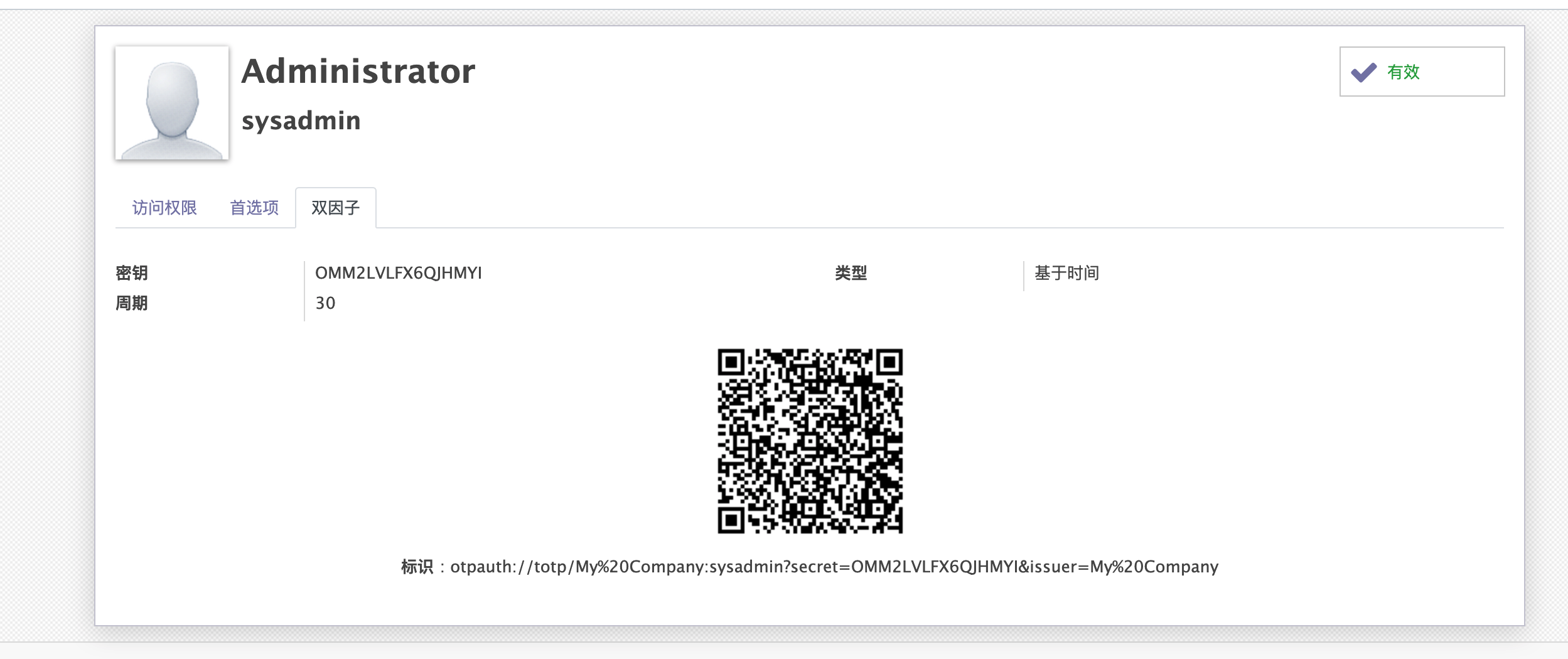
新增对于第一次使用的用户,在用户登录时,在登录界面中展示二维码。实现方案:为res.users增加”是否第一次使用”字段,在第一次登录后展示二维码,并为其赋值为True,已更新至github和app store,效果如下: